Internet Explorer won't open pop-ups in New Tab. (IE8 64-bit)

MacroPolo

New member
Local time
4:19 AM
Messages
4
Location
USA
So here's what happens:
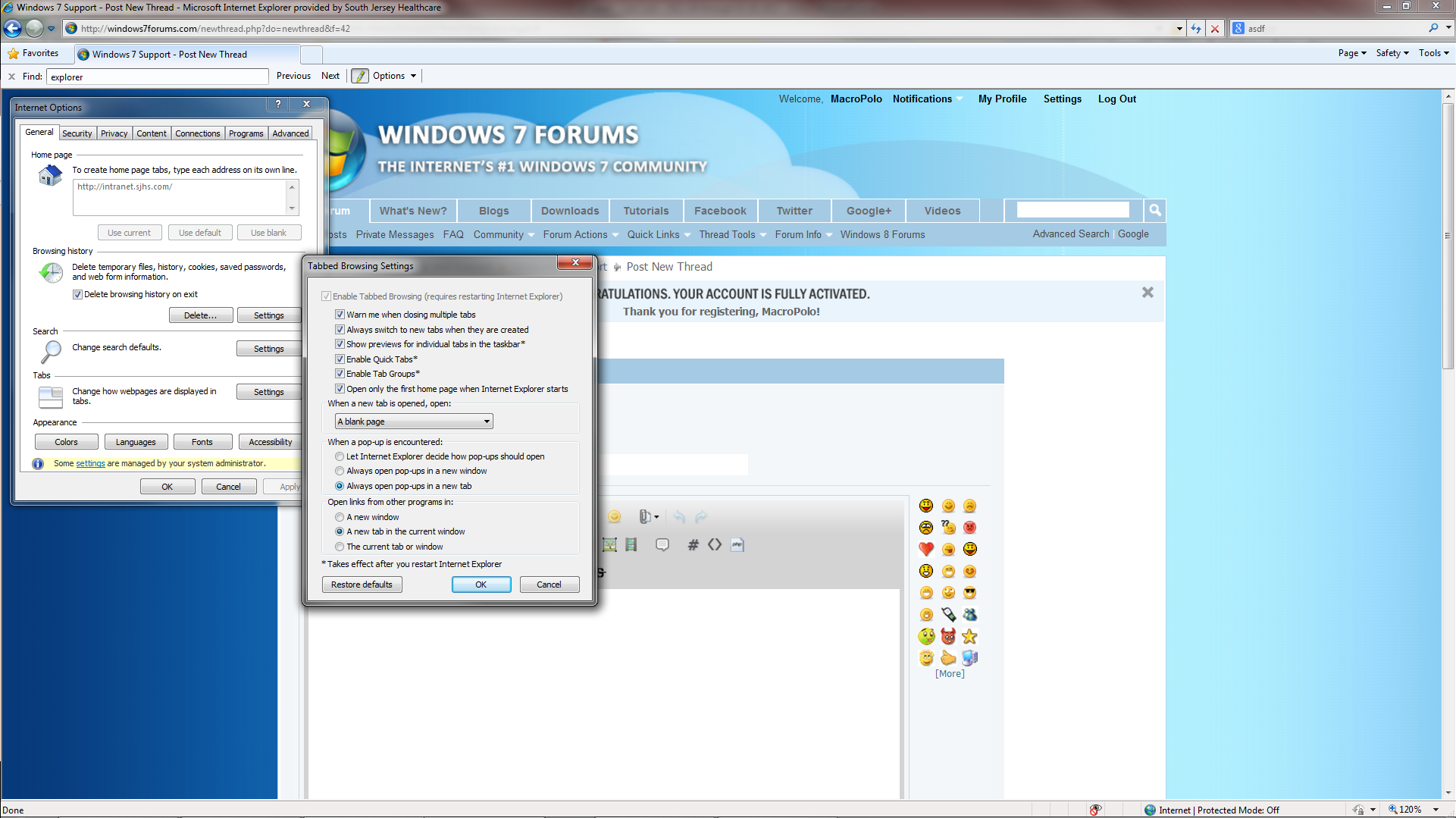
- Go to Tools > Internet Options > General > Tabs Settings
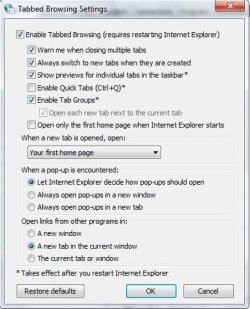
- Change "When a pop-up is encountered" from "Always open pop-ups in a new window" to "Always open pop-ups in a new tab"
- Click Ok
- Click Ok
- Restart Internet Explorer

When I restart IE and click a link that will cause a pop-up, the pop-up still opens in a new window. IE automatically changes the setting back to "Always open in a new window" from "Always open in a new tab".

PLEASE HELP!

For what it's worth:
- Windows 7 Enterprise 64-bit
- Internet Explorer 8 64-bit
cau2s2o.png
 

My Computer My Computer

At a glance

Windows 7 Enterprise 64-bit2.30GHz Intel i7-2820QM8.00 GB
Computer type
Laptop
Computer Manufacturer/Model Number
HP
OS
Windows 7 Enterprise 64-bit
CPU
2.30GHz Intel i7-2820QM
Memory
8.00 GB
Try setting it this way:
 

Attachments

  • tabbed browsing.jpg
    tabbed browsing.jpg
    35.3 KB · Views: 8

My Computer My Computer

At a glance

Windows 7 Ultimate 32bit SP1Intel(R) Core(TM)2 Quad CPU @ 2.40GHz, 2400 MHz4 GBATI Radeon HD 2600 Pro
Computer type
PC/Desktop
Computer Manufacturer/Model Number
Bruce ... somewhere in his 40's
OS
Windows 7 Ultimate 32bit SP1
CPU
Intel(R) Core(TM)2 Quad CPU @ 2.40GHz, 2400 MHz
Motherboard
INTEL/D975XBX2
Memory
4 GB
Graphics Card(s)
ATI Radeon HD 2600 Pro
Monitor(s) Displays
Samsung SyncMaster 914v
Screen Resolution
1280 x 1024
Hard Drives
2/500GB each ... ST3500630AS ATA Device.
One is not connected
PSU
Rocketfish 700 W
Case
G.Skill Gigabyte Chassis
Keyboard
Standard PS/2 Keyboard
Mouse
Microsoft PS/2 Mouse
Internet Speed
DSL
Antivirus
Avira Internet Security
Browser
IE 11
Other Info
ATI HDMI Audio
It still automaticalls resets "When a pop-up is encountered" back to "Always open pop-ups in a new window" :/

I don't understand why..


Edit: I am on my work computer, can I check if there is a restriction in place by admin for that specific setting? Even if that's the case, I try disconnecting from my work's network and connecting to the internet through my cellphone (thus bypassing any employer security settings) and the same thing happens.
 

My Computer My Computer

At a glance

Windows 7 Enterprise 64-bit2.30GHz Intel i7-2820QM8.00 GB
Computer type
Laptop
Computer Manufacturer/Model Number
HP
OS
Windows 7 Enterprise 64-bit
CPU
2.30GHz Intel i7-2820QM
Memory
8.00 GB
If you're not running as an Administrator, then that could be the problem.
 

My Computer My Computer

At a glance

Windows 7 Ultimate 32bit SP1Intel(R) Core(TM)2 Quad CPU @ 2.40GHz, 2400 MHz4 GBATI Radeon HD 2600 Pro
Computer type
PC/Desktop
Computer Manufacturer/Model Number
Bruce ... somewhere in his 40's
OS
Windows 7 Ultimate 32bit SP1
CPU
Intel(R) Core(TM)2 Quad CPU @ 2.40GHz, 2400 MHz
Motherboard
INTEL/D975XBX2
Memory
4 GB
Graphics Card(s)
ATI Radeon HD 2600 Pro
Monitor(s) Displays
Samsung SyncMaster 914v
Screen Resolution
1280 x 1024
Hard Drives
2/500GB each ... ST3500630AS ATA Device.
One is not connected
PSU
Rocketfish 700 W
Case
G.Skill Gigabyte Chassis
Keyboard
Standard PS/2 Keyboard
Mouse
Microsoft PS/2 Mouse
Internet Speed
DSL
Antivirus
Avira Internet Security
Browser
IE 11
Other Info
ATI HDMI Audio
If you're not running as an Administrator, then that could be the problem.

Well, it's definitely a possibility, but how would I know?

It just seems like such a weird/unlikely thing for them to restrict. I have access to about everything on the machine... down to the command prompt and registry editor.

When I run "cmd" the top of the window says "Administrator: C:\Windows\system32\cmd.exe"


Edit:

Actually, I'm fairly certain I have Admin access.

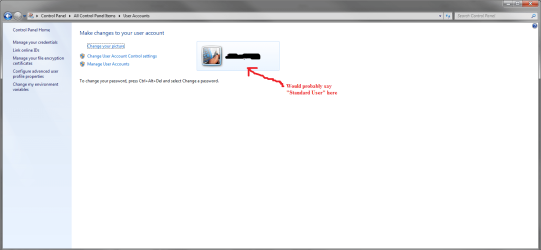
1) If I go to Control Panel > User Accounts, I am the only User listed, and it does not say "Standard User" which would indicate not having Admin access.

2) If I go to Control Panel > System, in the "Computer name, domain and workgroup settings" section there is a link "Change Settings", which usually indicates Admin User access
 

Attachments

  • User Accounts.png
    User Accounts.png
    40.2 KB · Views: 7
  • System.png
    System.png
    58.5 KB · Views: 8
Last edited:

My Computer My Computer

At a glance

Windows 7 Enterprise 64-bit2.30GHz Intel i7-2820QM8.00 GB
Computer type
Laptop
Computer Manufacturer/Model Number
HP
OS
Windows 7 Enterprise 64-bit
CPU
2.30GHz Intel i7-2820QM
Memory
8.00 GB
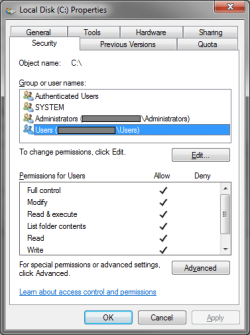
From start, right on computer to open, right click on local disc C:\ and choose properties. Now click on the security tab. Does the user account and Administrator account have the same name?
 

My Computer My Computer

At a glance

Windows 7 Ultimate 32bit SP1Intel(R) Core(TM)2 Quad CPU @ 2.40GHz, 2400 MHz4 GBATI Radeon HD 2600 Pro
Computer type
PC/Desktop
Computer Manufacturer/Model Number
Bruce ... somewhere in his 40's
OS
Windows 7 Ultimate 32bit SP1
CPU
Intel(R) Core(TM)2 Quad CPU @ 2.40GHz, 2400 MHz
Motherboard
INTEL/D975XBX2
Memory
4 GB
Graphics Card(s)
ATI Radeon HD 2600 Pro
Monitor(s) Displays
Samsung SyncMaster 914v
Screen Resolution
1280 x 1024
Hard Drives
2/500GB each ... ST3500630AS ATA Device.
One is not connected
PSU
Rocketfish 700 W
Case
G.Skill Gigabyte Chassis
Keyboard
Standard PS/2 Keyboard
Mouse
Microsoft PS/2 Mouse
Internet Speed
DSL
Antivirus
Avira Internet Security
Browser
IE 11
Other Info
ATI HDMI Audio
From start, right on computer to open, right click on local disc C:\ and choose properties. Now click on the security tab. Does the user account and Administrator account have the same name?

If you're referring to what's I have grayed out in the attached picture, then yes, the names are the same.
 

Attachments

  • Properties.png
    Properties.png
    13.8 KB · Views: 4

My Computer My Computer

At a glance

Windows 7 Enterprise 64-bit2.30GHz Intel i7-2820QM8.00 GB
Computer type
Laptop
Computer Manufacturer/Model Number
HP
OS
Windows 7 Enterprise 64-bit
CPU
2.30GHz Intel i7-2820QM
Memory
8.00 GB
Back
Top