Solved Internet keeps crashing while gaming

AlexP

Knowledge is power.
Local time
10:39 PM
Messages
53
Location
Romania,Timis
Ok,so,this happens while I'm playing online games,especialley counter strike 1.6.
While it's crashed,I can't load internet pages and re-enter the cs server,bun I CAN talk on yahoo messenger and my utorrent keeps downloading/uploading.
It crashes fairley often,for a little period of time(approx 30 secons to 1 min).
I am connected to a belkin router,through a wireless connection.
The lights are still on,even if the internet is down(I mean,semi-down,coz the Y!M and utorrent are still working o.O).
I tried disconnecting the router and re-connecting it,but with no success.
Closing the firewall is futile...
I'm open to suggestions.
I WILL NOT connect directley to the modem!
P.S. I think that I'll reinstall the router.
 

My Computer

OS
Win 7 Home Premium 64 bit
Hi AlexP,

Do you have the proper port forwarding of the Counter Strike game in your Belkin router?
Belkin : Support Configuring port forwarding

I don't know the exact Model of your Belkin, this link might also help.
http://portforward.com/english/routers/port_forwarding/Belkin/F5D9630-4/Counter_Strike.htm

Can you try a wired connection to the router? Are you able to replicate the issue?

Might be worth it to download the Belkin's router's firmware and you will need a wired connection to manually install the firmware, an FYI. Don't attempt to install it thru a wireless connection.
 

My Computer

Computer Manufacturer/Model Number
Lenovo Desktop/Samsung Laptop
OS
Win7 & Win8 64bit
CPU
Intel i5
Internet Speed
Charter-20 Mbps
Antivirus
Avast
Browser
FF, IE9 and Chrome
I'm not installing it through the wireless connection,I did it throug the computer that's connected to it.
I can not see if the problem persists with the cable plugged in directly and I don't rly think it's the router's problem.
The game went perfectly normal on my other laptop,that used wireless too,and it was windows 7 ultimate...
The only thing is that it was 32 bit...
I know it's a G type...
And,I'm not hosting a server,so I don't need to portforward...Isn't that right?>.>
 

My Computer

OS
Win 7 Home Premium 64 bit
I am having the same problem. Tried Both using MSI RG60SE wireless and Speed-touch modem. Firmwares updated,protocol v6 unchecked everything works fine while chatting browsing etc. When i log on BF3 after 10mins or so it disconnects. Always same time. The interesting part is even on my ps3 i play fifa and it always disconnects me from it after i finish of playing first match (ps3 is wireless connection with MSI router). Always same timing. Everything disconnects and it re-connects automatically.

I called providers everything fine from their side. No idea .. any help guys please? Thank you
 

My Computer

Computer Manufacturer/Model Number
ASUS
OS
Windows 7 Ultimate x64
CPU
i7 920
Motherboard
Asus Rampage 3 Extreme
Memory
6GB ddr3 1600
Graphics Card(s)
GTX470
Sound Card
7.1 XFI
Monitor(s) Displays
LG LED W24 FLATRON
Hard Drives
SSD 60GB x2
PSU
1000W PURE
Case
COSMOS-S
Cooling
HYBRID SYSTEM
AlexP - Your P2P Programs might be intervening. If your other laptop is not having an issue, you may try using a different Wi-Fi adapter if you think that the router is not at fault.

Ryan87 - I think it will be better if you create your own Thread. I'll find it or someone should be assisting you.
 

My Computer

Computer Manufacturer/Model Number
Lenovo Desktop/Samsung Laptop
OS
Win7 & Win8 64bit
CPU
Intel i5
Internet Speed
Charter-20 Mbps
Antivirus
Avast
Browser
FF, IE9 and Chrome
Ummm,I'm not using any wi-fi adapter....It's just the incorpored one...
And,what's a P2P program?XD
 

My Computer

OS
Win 7 Home Premium 64 bit
I meant to replace or buy a new Wireless Network Adapter. If you can borrow one from a friend and test it out, you may do so or just stop by at the local Electronic Store. Return it if it didn't help at all.

Re - P2P? :D Bittorrent, utorrent, etc...
 

My Computer

Computer Manufacturer/Model Number
Lenovo Desktop/Samsung Laptop
OS
Win7 & Win8 64bit
CPU
Intel i5
Internet Speed
Charter-20 Mbps
Antivirus
Avast
Browser
FF, IE9 and Chrome
I tried out another adapter,and no use.
Closed the utorrent,no use...
 

My Computer

OS
Win 7 Home Premium 64 bit
Have you done this?
Might be worth it to download the Belkin's router's firmware and you will need a wired connection to manually install the firmware, an FYI. Don't attempt to install it thru a wireless connection.
No issue if it's a wired connection to the router or modem?
I can not see if the problem persists with the cable plugged in directly
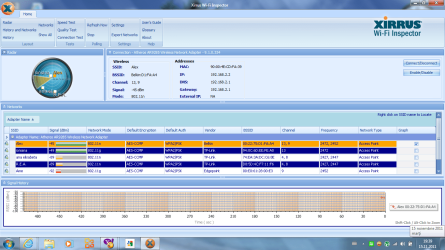
Install and run Xirrus Wi-Fi Inspector from your wireless computer.
Double click the Xirrus Icon on your desktop, Tap the Printscreen key on your keyboard, open up Paint then choose Edit from the Menu and select Paste, then SAVE it. Upload and attached it here,
 

My Computer

Computer Manufacturer/Model Number
Lenovo Desktop/Samsung Laptop
OS
Win7 & Win8 64bit
CPU
Intel i5
Internet Speed
Charter-20 Mbps
Antivirus
Avast
Browser
FF, IE9 and Chrome
there
This pic is made while the net fell.
Something else I just found!
It seems that my upload has more serious problems.
While I was talking to a friend on Y!M,he couldn't hear me,but I heard him perfectly(during a net shot)
 

Attachments

  • thereyagoes.png
    thereyagoes.png
    77.4 KB · Views: 41

My Computer

OS
Win 7 Home Premium 64 bit

My Computer

Computer Manufacturer/Model Number
Lenovo Desktop/Samsung Laptop
OS
Win7 & Win8 64bit
CPU
Intel i5
Internet Speed
Charter-20 Mbps
Antivirus
Avast
Browser
FF, IE9 and Chrome
*sigh*
Why should I upgrade the firmware,since the other laptop is speeding like a rocket?
P.S. Tried changing the channels before posting,no result.
 

My Computer

OS
Win 7 Home Premium 64 bit
Have you tried Port forwarding - Post #3?

You may also bypass it by enabling DMZ in your router, it's risky though, just make sure that your computer has Security Software installed.
 

My Computer

Computer Manufacturer/Model Number
Lenovo Desktop/Samsung Laptop
OS
Win7 & Win8 64bit
CPU
Intel i5
Internet Speed
Charter-20 Mbps
Antivirus
Avast
Browser
FF, IE9 and Chrome

My Computer

Computer Manufacturer/Model Number
Lenovo Desktop/Samsung Laptop
OS
Win7 & Win8 64bit
CPU
Intel i5
Internet Speed
Charter-20 Mbps
Antivirus
Avast
Browser
FF, IE9 and Chrome
K,I'll see how the DMZ thing works.
I'll report later.
EDIT:no luck.
Still the same old fail.
 

My Computer

OS
Win 7 Home Premium 64 bit
Hey,2xg,I'd like to install new drivers for my network addapter.
I have an Atheros AR9285 wireless network addapter.
Could you give me a verified link and a short description of what I have to do?
XD
 

My Computer

OS
Win 7 Home Premium 64 bit

My Computer

Computer Manufacturer/Model Number
Lenovo Desktop/Samsung Laptop
OS
Win7 & Win8 64bit
CPU
Intel i5
Internet Speed
Charter-20 Mbps
Antivirus
Avast
Browser
FF, IE9 and Chrome
I can't download it...
Whenever I hit the download button,it refreshes the page.
Ik that I seem realy dumb,lol,but this is just too annying...
 

My Computer

OS
Win 7 Home Premium 64 bit

Attachments

My Computer

Computer Manufacturer/Model Number
Lenovo Desktop/Samsung Laptop
OS
Win7 & Win8 64bit
CPU
Intel i5
Internet Speed
Charter-20 Mbps
Antivirus
Avast
Browser
FF, IE9 and Chrome
Back
Top