Internet stops working when downloading.

Internet stops working when downloading

Go to your device manager. Choose your wireless adapter. In the tab on the far right, called Power Management uncheck the box that allows your computer to shut down the Wi-Fi.
 

My Computer

Computer type
PC/Desktop
OS
Windows 10
Hi Cam,
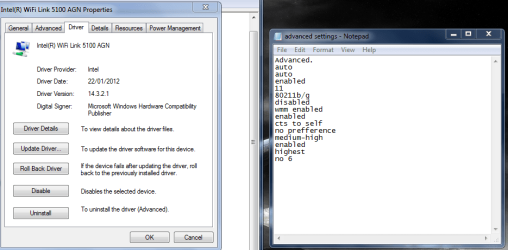
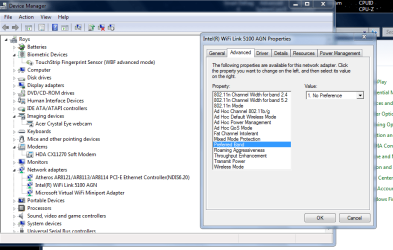
Compare/change the settings on the adapter Advanced settings to the closest you can get to like mine, might help

Roy
 

Attachments

  • wifi5100.PNG
    wifi5100.PNG
    119.5 KB · Views: 0
  • wifiband.PNG
    wifiband.PNG
    117.7 KB · Views: 0

My Computer

Computer type
PC/Desktop
Computer Manufacturer/Model Number
medionl/Aspire 6930G/acer x55a
OS
W7 home premium 32bit/W7HP 64bit/w10 tp insider ring
CPU
E5300 dual core
Motherboard
medion MS7366
Memory
3gb
Graphics Card(s)
Nvidia Geforce 7100 Nforce 630i
Monitor(s) Displays
avixc
Internet Speed
n (isp resticted to 72)
Antivirus
mse/pands
Browser
palemoon
Other Info
Belkin Fd7050 n USB using Railink RT2870 drivers, more upto date
Ok thanks i have done both things you guys said and i will get back to you if it happens again.
 

My Computer

Computer type
Laptop
Computer Manufacturer/Model Number
Dell
OS
windows 7 home premium 64bit
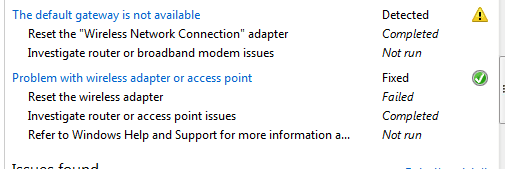
Ok it happened again when downloading a game on steam.I ran the troubleshooter again and it came up with this.(pic bellow)
 

Attachments

  • ....PNG
    ....PNG
    10.4 KB · Views: 5

My Computer

Computer type
Laptop
Computer Manufacturer/Model Number
Dell
OS
windows 7 home premium 64bit

My Computer

Computer type
PC/Desktop
Computer Manufacturer/Model Number
medionl/Aspire 6930G/acer x55a
OS
W7 home premium 32bit/W7HP 64bit/w10 tp insider ring
CPU
E5300 dual core
Motherboard
medion MS7366
Memory
3gb
Graphics Card(s)
Nvidia Geforce 7100 Nforce 630i
Monitor(s) Displays
avixc
Internet Speed
n (isp resticted to 72)
Antivirus
mse/pands
Browser
palemoon
Other Info
Belkin Fd7050 n USB using Railink RT2870 drivers, more upto date
Back
Top