Randoml12
New member
- Local time
- 8:48 AM
- Messages
- 13
For the past few weeks I've been having this problem, the internet works fine and suddenly stops opening pages and disconnects me from any game I'm playing but it still says that it's connected.
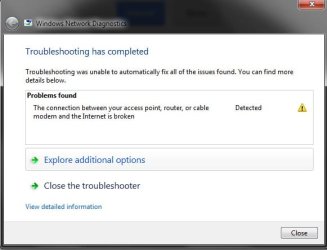
This happens maybe 10 times a day and when it does happen, I run the 'Diagnose' on LAN adapter and it always finds the problem in default gateway ''Default Gateway Not Available'' and it says 'Fixed' but it happens again all the time.
I tried setting up static IP address, updating network drivers, running the program called '6to4remover' and some other things that I found on this site and none of them helped, the problem still persists.
I also called my ISP and they said that everything is alright at their end and that the connection is working as intended.
Here's the ipconfig/all if it helps.
Microsoft Windows [Version 6.1.7601]
Copyright (c) 2009 Microsoft Corporation. All rights reserved.
C:\Users\H>ipconfig/all
Windows IP Configuration
Host Name . . . . . . . . . . . . : H-PC
Primary Dns Suffix . . . . . . . :
Node Type . . . . . . . . . . . . : Hybrid
IP Routing Enabled. . . . . . . . : No
WINS Proxy Enabled. . . . . . . . : No
DNS Suffix Search List. . . . . . : h1telekom.hr
Wireless LAN adapter Wireless Network Connection:
Connection-specific DNS Suffix . : h1telekom.hr
Description . . . . . . . . . . . : Qualcomm Atheros AR5007EG Wireless Network Adapter #2
Physical Address. . . . . . . . . : 00-15-AF-21-BB-FE
DHCP Enabled. . . . . . . . . . . : Yes
Autoconfiguration Enabled . . . . : Yes
IPv4 Address. . . . . . . . . . . : 192.168.1.41(Preferred)
Subnet Mask . . . . . . . . . . . : 255.255.255.0
Lease Obtained. . . . . . . . . . : 16. listopada 2013. 22:30:52
Lease Expires . . . . . . . . . . : 17. listopada 2013. 22:30:52
Default Gateway . . . . . . . . . : 192.168.1.1
DHCP Server . . . . . . . . . . . : 192.168.1.1
DNS Servers . . . . . . . . . . . : 192.168.1.1
NetBIOS over Tcpip. . . . . . . . : Enabled
Ethernet adapter Local Area Connection:
Connection-specific DNS Suffix . : h1telekom.hr
Description . . . . . . . . . . . : Atheros L1 Gigabit Ethernet 10/100/1000Ba
se-T Controller
Physical Address. . . . . . . . . : 00-1E-8C-BA-93-A0
DHCP Enabled. . . . . . . . . . . : Yes
Autoconfiguration Enabled . . . . : Yes
IPv4 Address. . . . . . . . . . . : 192.168.1.21(Preferred)
Subnet Mask . . . . . . . . . . . : 255.255.255.0
Lease Obtained. . . . . . . . . . : 17. listopada 2013. 5:36:31
Lease Expires . . . . . . . . . . : 18. listopada 2013. 5:36:31
Default Gateway . . . . . . . . . : 192.168.1.1
DHCP Server . . . . . . . . . . . : 192.168.1.1
DNS Servers . . . . . . . . . . . : 192.168.1.1
NetBIOS over Tcpip. . . . . . . . : Enabled
C:\Users\H>
This happens maybe 10 times a day and when it does happen, I run the 'Diagnose' on LAN adapter and it always finds the problem in default gateway ''Default Gateway Not Available'' and it says 'Fixed' but it happens again all the time.
I tried setting up static IP address, updating network drivers, running the program called '6to4remover' and some other things that I found on this site and none of them helped, the problem still persists.
I also called my ISP and they said that everything is alright at their end and that the connection is working as intended.
Here's the ipconfig/all if it helps.
Microsoft Windows [Version 6.1.7601]
Copyright (c) 2009 Microsoft Corporation. All rights reserved.
C:\Users\H>ipconfig/all
Windows IP Configuration
Host Name . . . . . . . . . . . . : H-PC
Primary Dns Suffix . . . . . . . :
Node Type . . . . . . . . . . . . : Hybrid
IP Routing Enabled. . . . . . . . : No
WINS Proxy Enabled. . . . . . . . : No
DNS Suffix Search List. . . . . . : h1telekom.hr
Wireless LAN adapter Wireless Network Connection:
Connection-specific DNS Suffix . : h1telekom.hr
Description . . . . . . . . . . . : Qualcomm Atheros AR5007EG Wireless Network Adapter #2
Physical Address. . . . . . . . . : 00-15-AF-21-BB-FE
DHCP Enabled. . . . . . . . . . . : Yes
Autoconfiguration Enabled . . . . : Yes
IPv4 Address. . . . . . . . . . . : 192.168.1.41(Preferred)
Subnet Mask . . . . . . . . . . . : 255.255.255.0
Lease Obtained. . . . . . . . . . : 16. listopada 2013. 22:30:52
Lease Expires . . . . . . . . . . : 17. listopada 2013. 22:30:52
Default Gateway . . . . . . . . . : 192.168.1.1
DHCP Server . . . . . . . . . . . : 192.168.1.1
DNS Servers . . . . . . . . . . . : 192.168.1.1
NetBIOS over Tcpip. . . . . . . . : Enabled
Ethernet adapter Local Area Connection:
Connection-specific DNS Suffix . : h1telekom.hr
Description . . . . . . . . . . . : Atheros L1 Gigabit Ethernet 10/100/1000Ba
se-T Controller
Physical Address. . . . . . . . . : 00-1E-8C-BA-93-A0
DHCP Enabled. . . . . . . . . . . : Yes
Autoconfiguration Enabled . . . . : Yes
IPv4 Address. . . . . . . . . . . : 192.168.1.21(Preferred)
Subnet Mask . . . . . . . . . . . : 255.255.255.0
Lease Obtained. . . . . . . . . . : 17. listopada 2013. 5:36:31
Lease Expires . . . . . . . . . . : 18. listopada 2013. 5:36:31
Default Gateway . . . . . . . . . : 192.168.1.1
DHCP Server . . . . . . . . . . . : 192.168.1.1
DNS Servers . . . . . . . . . . . : 192.168.1.1
NetBIOS over Tcpip. . . . . . . . : Enabled
C:\Users\H>
My Computer
- Computer type
- PC/Desktop
- Computer Manufacturer/Model Number
- Asus
- OS
- Windows 7 Ultimate 32-bit (6.1, Build 7601) Service Pack 1
- CPU
- Intel(R) Core(TM)2 Duo CPU E4600 @ 2.40GHz (2 CPUs), ~2
- Motherboard
- ASUS P5B Deluxe/WiFi-AP
- Memory
- 2048MB RAM DDR2
- Graphics Card(s)
- AMD Radeon HD 6670
- Sound Card
- ASUS P5B Deluxe/WiFi-AP
- Monitor(s) Displays
- Samsung SyncMaster P2370H
- Screen Resolution
- 1920x1080 32bit 60Hz
- Hard Drives
- Western Digital WD Blue WD10EZEX 1TB 7200 RPM 64MB Cache SATA 6.0Gb/s 3.5"
- PSU
- Antec 320W
- Case
- Antec
- Internet Speed
- 8mbit download/0.5mbit upload
- Antivirus
- Avira 2013
- Browser
- Google Chrome