Solved Internet suddenly stops working, problem with default gateway.

Randoml12

New member
Local time
9:40 AM
Messages
13
For the past few weeks I've been having this problem, the internet works fine and suddenly stops opening pages and disconnects me from any game I'm playing but it still says that it's connected.

This happens maybe 10 times a day and when it does happen, I run the 'Diagnose' on LAN adapter and it always finds the problem in default gateway ''Default Gateway Not Available'' and it says 'Fixed' but it happens again all the time.

I tried setting up static IP address, updating network drivers, running the program called '6to4remover' and some other things that I found on this site and none of them helped, the problem still persists.

I also called my ISP and they said that everything is alright at their end and that the connection is working as intended.

Here's the ipconfig/all if it helps.


Microsoft Windows [Version 6.1.7601]
Copyright (c) 2009 Microsoft Corporation. All rights reserved.

C:\Users\H>ipconfig/all

Windows IP Configuration

Host Name . . . . . . . . . . . . : H-PC
Primary Dns Suffix . . . . . . . :
Node Type . . . . . . . . . . . . : Hybrid
IP Routing Enabled. . . . . . . . : No
WINS Proxy Enabled. . . . . . . . : No
DNS Suffix Search List. . . . . . : h1telekom.hr

Wireless LAN adapter Wireless Network Connection:

Connection-specific DNS Suffix . : h1telekom.hr
Description . . . . . . . . . . . : Qualcomm Atheros AR5007EG Wireless Network Adapter #2
Physical Address. . . . . . . . . : 00-15-AF-21-BB-FE
DHCP Enabled. . . . . . . . . . . : Yes
Autoconfiguration Enabled . . . . : Yes
IPv4 Address. . . . . . . . . . . : 192.168.1.41(Preferred)
Subnet Mask . . . . . . . . . . . : 255.255.255.0
Lease Obtained. . . . . . . . . . : 16. listopada 2013. 22:30:52
Lease Expires . . . . . . . . . . : 17. listopada 2013. 22:30:52
Default Gateway . . . . . . . . . : 192.168.1.1
DHCP Server . . . . . . . . . . . : 192.168.1.1
DNS Servers . . . . . . . . . . . : 192.168.1.1
NetBIOS over Tcpip. . . . . . . . : Enabled

Ethernet adapter Local Area Connection:

Connection-specific DNS Suffix . : h1telekom.hr
Description . . . . . . . . . . . : Atheros L1 Gigabit Ethernet 10/100/1000Ba
se-T Controller
Physical Address. . . . . . . . . : 00-1E-8C-BA-93-A0
DHCP Enabled. . . . . . . . . . . : Yes
Autoconfiguration Enabled . . . . : Yes
IPv4 Address. . . . . . . . . . . : 192.168.1.21(Preferred)
Subnet Mask . . . . . . . . . . . : 255.255.255.0
Lease Obtained. . . . . . . . . . : 17. listopada 2013. 5:36:31
Lease Expires . . . . . . . . . . : 18. listopada 2013. 5:36:31
Default Gateway . . . . . . . . . : 192.168.1.1
DHCP Server . . . . . . . . . . . : 192.168.1.1
DNS Servers . . . . . . . . . . . : 192.168.1.1
NetBIOS over Tcpip. . . . . . . . : Enabled

C:\Users\H>
 

My Computer My Computer

Computer type
PC/Desktop
Computer Manufacturer/Model Number
Asus
OS
Windows 7 Ultimate 32-bit (6.1, Build 7601) Service Pack 1
CPU
Intel(R) Core(TM)2 Duo CPU E4600 @ 2.40GHz (2 CPUs), ~2
Motherboard
ASUS P5B Deluxe/WiFi-AP
Memory
2048MB RAM DDR2
Graphics Card(s)
AMD Radeon HD 6670
Sound Card
ASUS P5B Deluxe/WiFi-AP
Monitor(s) Displays
Samsung SyncMaster P2370H
Screen Resolution
1920x1080 32bit 60Hz
Hard Drives
Western Digital WD Blue WD10EZEX 1TB 7200 RPM 64MB Cache SATA 6.0Gb/s 3.5"
PSU
Antec 320W
Case
Antec
Internet Speed
8mbit download/0.5mbit upload
Antivirus
Avira 2013
Browser
Google Chrome
It appears that you are connected to your local network using a wired and a wireless connection.

Maybe you should disable the wireless connection and see how things work for you.
 

My Computer My Computer

Computer type
Laptop
Computer Manufacturer/Model Number
Employer provided Dell Latitude
OS
W7 Pro SP1 64bit
CPU
i7
Memory
8GB
Graphics Card(s)
Intel HD Graphics
Hard Drives
crappy SSD
Antivirus
Employer mandated Symantec Endpoint Protection
Browser
Pale Moon 64bit, IE11 64bit & Chrome 64bit
Don't you think it's a little strange how there is no tunnel adaptor or IPv6 information in the ipconfig?

I find it very strange, in fact this isn't right at all.

The 6 to 4 remover is my doing but since you don't have any tunnel adaptors it won't help.

Something has ripped the guts from this machine so we need to check for system file corruption, this assumes that you want the problem fixed.

I'd recommend doing an running the sfc /scannow command in an elevated command prompt.
 

My Computer My Computer

Computer type
PC/Desktop
Computer Manufacturer/Model Number
Home built
OS
Windows 7 Ult, Windows 8.1 Pro,
CPU
Q9650-4.275GHz, E8600 4.5GHz, E6750-3.8GHz
Motherboard
Evga 780i FTW
Memory
G.Skill PC2 9600 1200Mhz 5 5 5 15 2T
Graphics Card(s)
GTX480
Sound Card
Asus Xonar D2
Monitor(s) Displays
HannsG
Screen Resolution
1680X1050
Hard Drives
GSkill Phoenix Pro 120GB SSD
PSU
ThermalTake Toughpower 1000Watt modular
Case
ThermalTake XaserV
Cooling
Xigmatek S1283
Keyboard
Logitech G15
Mouse
Logitech G9
Internet Speed
T1
When you have the problem check ipconfig again
default gateway is still 192.168.1.1?
In command prompt:
Code:
ping 192.168.1.1
gives you 4 sent, 4 received, 0 errors?

Enabling both wireless and wired is no problem at all! It uses wired (higher priority) then
 

My Computer My Computer

Computer type
Laptop
Computer Manufacturer/Model Number
ACER ASPIRE 5742G
OS
Microsoft Windows 7 Home Premium 64-bits 7601 Multiprocessor Free Service Pack 1
CPU
Intel(R) Core(TM) i3 CPU M 370 @ 2.40GHz
Motherboard
Acer Aspire 5742G
Memory
4,00 GB
Graphics Card(s)
ATI Mobility Radeon HD 5400 Series
Sound Card
(1) AMD High Definition Audio Device (2) Realtek High Defi
Screen Resolution
1366 x 768 x 32 bits (4294967296 colors) @ 60 Hz
Hard Drives
WDC WD5000BEVT-22ZAT0

My Computer My Computer

Computer type
Laptop
Computer Manufacturer/Model Number
ACER ASPIRE 5742G
OS
Microsoft Windows 7 Home Premium 64-bits 7601 Multiprocessor Free Service Pack 1
CPU
Intel(R) Core(TM) i3 CPU M 370 @ 2.40GHz
Motherboard
Acer Aspire 5742G
Memory
4,00 GB
Graphics Card(s)
ATI Mobility Radeon HD 5400 Series
Sound Card
(1) AMD High Definition Audio Device (2) Realtek High Defi
Screen Resolution
1366 x 768 x 32 bits (4294967296 colors) @ 60 Hz
Hard Drives
WDC WD5000BEVT-22ZAT0
Did you do Automating "6to4" Adapter Removal in Windows - RyanVictory.com ?? Why? It's unrelated to the problem. You're using tcp/ip v4.


It doesn't matter what he did with the 6 to 4 remover, when Windows is working correctly is will create a new tunnel adaptor automatically, in this case Windows is not working correctly.

The problem here is that the 6 to 4 tunnel adaptor and the IPv6 functionality has been ripped out of this system. This should be obvious by looking at the ipconfig. This problem should not occur unless there are other problems with the system.

It's likely the machine is also missing system files or even registry keys so it's best to pursue this problem with a system file scan.
 

My Computer My Computer

Computer type
PC/Desktop
Computer Manufacturer/Model Number
Home built
OS
Windows 7 Ult, Windows 8.1 Pro,
CPU
Q9650-4.275GHz, E8600 4.5GHz, E6750-3.8GHz
Motherboard
Evga 780i FTW
Memory
G.Skill PC2 9600 1200Mhz 5 5 5 15 2T
Graphics Card(s)
GTX480
Sound Card
Asus Xonar D2
Monitor(s) Displays
HannsG
Screen Resolution
1680X1050
Hard Drives
GSkill Phoenix Pro 120GB SSD
PSU
ThermalTake Toughpower 1000Watt modular
Case
ThermalTake XaserV
Cooling
Xigmatek S1283
Keyboard
Logitech G15
Mouse
Logitech G9
Internet Speed
T1
Sorry for not answering, I forgot the password and had to remember what my email was.

'UsernameIssues' was correct, I was connected to both wireless and LAN so that must have caused issues, when I disconnected from wireless and disabled its adapter, the problem went away.

Thanks for answering everyone
 

My Computer My Computer

Computer type
PC/Desktop
Computer Manufacturer/Model Number
Asus
OS
Windows 7 Ultimate 32-bit (6.1, Build 7601) Service Pack 1
CPU
Intel(R) Core(TM)2 Duo CPU E4600 @ 2.40GHz (2 CPUs), ~2
Motherboard
ASUS P5B Deluxe/WiFi-AP
Memory
2048MB RAM DDR2
Graphics Card(s)
AMD Radeon HD 6670
Sound Card
ASUS P5B Deluxe/WiFi-AP
Monitor(s) Displays
Samsung SyncMaster P2370H
Screen Resolution
1920x1080 32bit 60Hz
Hard Drives
Western Digital WD Blue WD10EZEX 1TB 7200 RPM 64MB Cache SATA 6.0Gb/s 3.5"
PSU
Antec 320W
Case
Antec
Internet Speed
8mbit download/0.5mbit upload
Antivirus
Avira 2013
Browser
Google Chrome
Sorry for not answering, I forgot the password and had to remember what my email was.

'UsernameIssues' was correct, I was connected to both wireless and LAN so that must have caused issues, when I disconnected from wireless and disabled its adapter, the problem went away.

Thanks for answering everyone

The IP's were valid but when Windows is working correctly the wired connection should automatically take over when both connections are active.

I still see bigger problems in the network stack here with the tunnel adaptors missing and no IPv6 information what so ever but if you want to ignore that obvious problem then good luck to you. :geek:
 

My Computer My Computer

Computer type
PC/Desktop
Computer Manufacturer/Model Number
Home built
OS
Windows 7 Ult, Windows 8.1 Pro,
CPU
Q9650-4.275GHz, E8600 4.5GHz, E6750-3.8GHz
Motherboard
Evga 780i FTW
Memory
G.Skill PC2 9600 1200Mhz 5 5 5 15 2T
Graphics Card(s)
GTX480
Sound Card
Asus Xonar D2
Monitor(s) Displays
HannsG
Screen Resolution
1680X1050
Hard Drives
GSkill Phoenix Pro 120GB SSD
PSU
ThermalTake Toughpower 1000Watt modular
Case
ThermalTake XaserV
Cooling
Xigmatek S1283
Keyboard
Logitech G15
Mouse
Logitech G9
Internet Speed
T1
Sorry for not answering, I forgot the password and had to remember what my email was.

'UsernameIssues' was correct, I was connected to both wireless and LAN so that must have caused issues, when I disconnected from wireless and disabled its adapter, the problem went away.

Thanks for answering everyone

The IP's were valid but when Windows is working correctly the wired connection should automatically take over when both connections are active.

I still see bigger problems in the network stack here with the tunnel adaptors missing and no IPv6 information what so ever but if you want to ignore that obvious problem then good luck to you. :geek:

Yeah my bad, the problem is unfortunately back and I called my ISP today again and they suggested that I try with a new LAN cable and setting a static IP address but the problem still persists, sorry for not listening to you :P

Here's a new ipconfig/all so you can see the new settings, if you know how to fix this please help, it's driving me crazy

------------------------------
Microsoft Windows [Version 6.1.7601]
Copyright (c) 2009 Microsoft Corporation. All rights reserved.

C:\Users\H>ipconfig/all

Windows IP Configuration

Host Name . . . . . . . . . . . . : H-PC
Primary Dns Suffix . . . . . . . :
Node Type . . . . . . . . . . . . : Hybrid
IP Routing Enabled. . . . . . . . : No
WINS Proxy Enabled. . . . . . . . : No

Ethernet adapter Local Area Connection:

Connection-specific DNS Suffix . :
Description . . . . . . . . . . . : Atheros L1 Gigabit Ethernet 10/100/1000Ba
se-T Controller
Physical Address. . . . . . . . . : 00-1E-8C-BA-93-A0
DHCP Enabled. . . . . . . . . . . : No
Autoconfiguration Enabled . . . . : Yes
Link-local IPv6 Address . . . . . : fe80::14a4:6eaf:4f1a:9863%11(Preferred)
IPv4 Address. . . . . . . . . . . : 192.168.1.55(Preferred)
Subnet Mask . . . . . . . . . . . : 255.255.255.0
Default Gateway . . . . . . . . . : 192.168.1.1
DHCPv6 IAID . . . . . . . . . . . : 285220492
DHCPv6 Client DUID. . . . . . . . : 00-01-00-01-19-F1-80-BC-00-1E-8C-BA-93-A0

DNS Servers . . . . . . . . . . . : 80.80.50.3
80.80.50.43
NetBIOS over Tcpip. . . . . . . . : Enabled

Wireless LAN adapter Wireless Network Connection:

Media State . . . . . . . . . . . : Media disconnected
Connection-specific DNS Suffix . :
Description . . . . . . . . . . . : Qualcomm Atheros AR5007EG Wireless Networ
k Adapter
Physical Address. . . . . . . . . : 00-15-AF-21-BB-FE
DHCP Enabled. . . . . . . . . . . : Yes
Autoconfiguration Enabled . . . . : Yes

Tunnel adapter isatap.{DEFDF72B-74F6-4A60-A664-14B7EC54B3FA}:

Media State . . . . . . . . . . . : Media disconnected
Connection-specific DNS Suffix . :
Description . . . . . . . . . . . : Microsoft ISATAP Adapter
Physical Address. . . . . . . . . : 00-00-00-00-00-00-00-E0
DHCP Enabled. . . . . . . . . . . : No
Autoconfiguration Enabled . . . . : Yes

Tunnel adapter Local Area Connection* 11:

Connection-specific DNS Suffix . :
Description . . . . . . . . . . . : Teredo Tunneling Pseudo-Interface
Physical Address. . . . . . . . . : 00-00-00-00-00-00-00-E0
DHCP Enabled. . . . . . . . . . . : No
Autoconfiguration Enabled . . . . : Yes
IPv6 Address. . . . . . . . . . . : 2001:0:9d38:6abd:c7f:6a2:fad8:6254(Prefer
red)
Link-local IPv6 Address . . . . . : fe80::c7f:6a2:fad8:6254%12(Preferred)
Default Gateway . . . . . . . . . : ::
NetBIOS over Tcpip. . . . . . . . : Disabled

C:\Users\H>

----------------------------

I also did sfc /scannow:

Microsoft Windows [Version 6.1.7601]
Copyright (c) 2009 Microsoft Corporation. All rights reserved.

C:\Windows\system32>sfc /scannow

Beginning system scan. This process will take some time.

Beginning verification phase of system scan.
Verification 100% complete.

Windows Resource Protection did not find any integrity violations.

C:\Windows\system32>
 

My Computer My Computer

Computer type
PC/Desktop
Computer Manufacturer/Model Number
Asus
OS
Windows 7 Ultimate 32-bit (6.1, Build 7601) Service Pack 1
CPU
Intel(R) Core(TM)2 Duo CPU E4600 @ 2.40GHz (2 CPUs), ~2
Motherboard
ASUS P5B Deluxe/WiFi-AP
Memory
2048MB RAM DDR2
Graphics Card(s)
AMD Radeon HD 6670
Sound Card
ASUS P5B Deluxe/WiFi-AP
Monitor(s) Displays
Samsung SyncMaster P2370H
Screen Resolution
1920x1080 32bit 60Hz
Hard Drives
Western Digital WD Blue WD10EZEX 1TB 7200 RPM 64MB Cache SATA 6.0Gb/s 3.5"
PSU
Antec 320W
Case
Antec
Internet Speed
8mbit download/0.5mbit upload
Antivirus
Avira 2013
Browser
Google Chrome
You can still PING 192.168.1.1 when having problems?
Code:
ping 192.168.1.1
if so:
http://192.168.1.1 in browser shows router page?
ping 74.125.136.94
works as well?
 

My Computer My Computer

Computer type
Laptop
Computer Manufacturer/Model Number
ACER ASPIRE 5742G
OS
Microsoft Windows 7 Home Premium 64-bits 7601 Multiprocessor Free Service Pack 1
CPU
Intel(R) Core(TM) i3 CPU M 370 @ 2.40GHz
Motherboard
Acer Aspire 5742G
Memory
4,00 GB
Graphics Card(s)
ATI Mobility Radeon HD 5400 Series
Sound Card
(1) AMD High Definition Audio Device (2) Realtek High Defi
Screen Resolution
1366 x 768 x 32 bits (4294967296 colors) @ 60 Hz
Hard Drives
WDC WD5000BEVT-22ZAT0
You can still PING 192.168.1.1 when having problems?
Code:
ping 192.168.1.1
if so:
http://192.168.1.1 in browser shows router page?
ping 74.125.136.94
works as well?

If you mean ping it in cmd yeah, I can:
***
Microsoft Windows [Version 6.1.7601]
Copyright (c) 2009 Microsoft Corporation. All rights reserved.

C:\Windows\system32>ping 192.168.1.1

Pinging 192.168.1.1 with 32 bytes of data:
Reply from 192.168.1.1: bytes=32 time<1ms TTL=64

Ping statistics for 192.168.1.1:
Packets: Sent = 4, Received = 4, Lost = 0 (0% loss),
Approximate round trip times in milli-seconds:
Minimum = 0ms, Maximum = 0ms, Average = 0ms

C:\Windows\system32>
***
C:\Windows\system32>ping 74.125.136.94

Pinging 74.125.136.94 with 32 bytes of data:
Reply from 74.125.136.94: bytes=32 time=103ms TTL=44
Reply from 74.125.136.94: bytes=32 time=102ms TTL=44
Reply from 74.125.136.94: bytes=32 time=103ms TTL=44
Reply from 74.125.136.94: bytes=32 time=102ms TTL=44

Ping statistics for 74.125.136.94:
Packets: Sent = 4, Received = 4, Lost = 0 (0% loss),
Approximate round trip times in milli-seconds:
Minimum = 102ms, Maximum = 103ms, Average = 102ms

C:\Windows\system32>
***

Yes, 192.168.1.1 opens the router page.

I tested ping on pingtest.net as well if that's related and it used to be 0% packet loss 70~ping and 1-3 jitter, now it's 0% packet loss, 150~ping and anywhere from 40-100+ jitter.

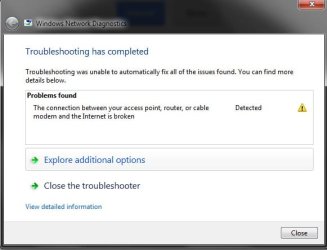
Here's what I got now after I diagnosed the Local Area Connection when the yellow triangle appeared:
 

Attachments

  • 1b.jpg
    1b.jpg
    24.8 KB · Views: 8

My Computer My Computer

Computer type
PC/Desktop
Computer Manufacturer/Model Number
Asus
OS
Windows 7 Ultimate 32-bit (6.1, Build 7601) Service Pack 1
CPU
Intel(R) Core(TM)2 Duo CPU E4600 @ 2.40GHz (2 CPUs), ~2
Motherboard
ASUS P5B Deluxe/WiFi-AP
Memory
2048MB RAM DDR2
Graphics Card(s)
AMD Radeon HD 6670
Sound Card
ASUS P5B Deluxe/WiFi-AP
Monitor(s) Displays
Samsung SyncMaster P2370H
Screen Resolution
1920x1080 32bit 60Hz
Hard Drives
Western Digital WD Blue WD10EZEX 1TB 7200 RPM 64MB Cache SATA 6.0Gb/s 3.5"
PSU
Antec 320W
Case
Antec
Internet Speed
8mbit download/0.5mbit upload
Antivirus
Avira 2013
Browser
Google Chrome
Well I just moved my DSL cable a bit, the one that goes from the router to phone and it seems to be alright now...ah.
Maybe there was the problem, I hope I don't have to replace it.
 

My Computer My Computer

Computer type
PC/Desktop
Computer Manufacturer/Model Number
Asus
OS
Windows 7 Ultimate 32-bit (6.1, Build 7601) Service Pack 1
CPU
Intel(R) Core(TM)2 Duo CPU E4600 @ 2.40GHz (2 CPUs), ~2
Motherboard
ASUS P5B Deluxe/WiFi-AP
Memory
2048MB RAM DDR2
Graphics Card(s)
AMD Radeon HD 6670
Sound Card
ASUS P5B Deluxe/WiFi-AP
Monitor(s) Displays
Samsung SyncMaster P2370H
Screen Resolution
1920x1080 32bit 60Hz
Hard Drives
Western Digital WD Blue WD10EZEX 1TB 7200 RPM 64MB Cache SATA 6.0Gb/s 3.5"
PSU
Antec 320W
Case
Antec
Internet Speed
8mbit download/0.5mbit upload
Antivirus
Avira 2013
Browser
Google Chrome
Do all computers connected to router have the same problem?

If you can ping 74.125.136.94 (google) you have connection with internet
 

My Computer My Computer

Computer type
Laptop
Computer Manufacturer/Model Number
ACER ASPIRE 5742G
OS
Microsoft Windows 7 Home Premium 64-bits 7601 Multiprocessor Free Service Pack 1
CPU
Intel(R) Core(TM) i3 CPU M 370 @ 2.40GHz
Motherboard
Acer Aspire 5742G
Memory
4,00 GB
Graphics Card(s)
ATI Mobility Radeon HD 5400 Series
Sound Card
(1) AMD High Definition Audio Device (2) Realtek High Defi
Screen Resolution
1366 x 768 x 32 bits (4294967296 colors) @ 60 Hz
Hard Drives
WDC WD5000BEVT-22ZAT0
Do all computers connected to router have the same problem?

If you can ping 74.125.136.94 (google) you have connection with internet

Nope the laptop that's connected with wireless to the router doesn't have problems, I think it was the problem with cable, it still works well after I twisted it around a bit, hope it'll keep working :)

Well thanks for helping everyone, I'll mark it as solved again and I'll give you +rep for your trouble.
 

My Computer My Computer

Computer type
PC/Desktop
Computer Manufacturer/Model Number
Asus
OS
Windows 7 Ultimate 32-bit (6.1, Build 7601) Service Pack 1
CPU
Intel(R) Core(TM)2 Duo CPU E4600 @ 2.40GHz (2 CPUs), ~2
Motherboard
ASUS P5B Deluxe/WiFi-AP
Memory
2048MB RAM DDR2
Graphics Card(s)
AMD Radeon HD 6670
Sound Card
ASUS P5B Deluxe/WiFi-AP
Monitor(s) Displays
Samsung SyncMaster P2370H
Screen Resolution
1920x1080 32bit 60Hz
Hard Drives
Western Digital WD Blue WD10EZEX 1TB 7200 RPM 64MB Cache SATA 6.0Gb/s 3.5"
PSU
Antec 320W
Case
Antec
Internet Speed
8mbit download/0.5mbit upload
Antivirus
Avira 2013
Browser
Google Chrome
"I twisted it around a bit"=>you mean cable between computer and router?
 

My Computer My Computer

Computer type
Laptop
Computer Manufacturer/Model Number
ACER ASPIRE 5742G
OS
Microsoft Windows 7 Home Premium 64-bits 7601 Multiprocessor Free Service Pack 1
CPU
Intel(R) Core(TM) i3 CPU M 370 @ 2.40GHz
Motherboard
Acer Aspire 5742G
Memory
4,00 GB
Graphics Card(s)
ATI Mobility Radeon HD 5400 Series
Sound Card
(1) AMD High Definition Audio Device (2) Realtek High Defi
Screen Resolution
1366 x 768 x 32 bits (4294967296 colors) @ 60 Hz
Hard Drives
WDC WD5000BEVT-22ZAT0
"I twisted it around a bit"=>you mean cable between computer and router?

Nope that's the yellow one, I twisted the grey one, that goes from router -> telephone.
 

My Computer My Computer

Computer type
PC/Desktop
Computer Manufacturer/Model Number
Asus
OS
Windows 7 Ultimate 32-bit (6.1, Build 7601) Service Pack 1
CPU
Intel(R) Core(TM)2 Duo CPU E4600 @ 2.40GHz (2 CPUs), ~2
Motherboard
ASUS P5B Deluxe/WiFi-AP
Memory
2048MB RAM DDR2
Graphics Card(s)
AMD Radeon HD 6670
Sound Card
ASUS P5B Deluxe/WiFi-AP
Monitor(s) Displays
Samsung SyncMaster P2370H
Screen Resolution
1920x1080 32bit 60Hz
Hard Drives
Western Digital WD Blue WD10EZEX 1TB 7200 RPM 64MB Cache SATA 6.0Gb/s 3.5"
PSU
Antec 320W
Case
Antec
Internet Speed
8mbit download/0.5mbit upload
Antivirus
Avira 2013
Browser
Google Chrome
"I twisted it around a bit"=>you mean cable between computer and router?

Nope that's the yellow one, I twisted the grey one, that goes from router -> telephone.
wireless and wired all connect to router. Router uses the cable you talk about to connect to telephone. So actually all bits go over that cable!! even if wireless access the internet
 

My Computer My Computer

Computer type
Laptop
Computer Manufacturer/Model Number
ACER ASPIRE 5742G
OS
Microsoft Windows 7 Home Premium 64-bits 7601 Multiprocessor Free Service Pack 1
CPU
Intel(R) Core(TM) i3 CPU M 370 @ 2.40GHz
Motherboard
Acer Aspire 5742G
Memory
4,00 GB
Graphics Card(s)
ATI Mobility Radeon HD 5400 Series
Sound Card
(1) AMD High Definition Audio Device (2) Realtek High Defi
Screen Resolution
1366 x 768 x 32 bits (4294967296 colors) @ 60 Hz
Hard Drives
WDC WD5000BEVT-22ZAT0
Back
Top