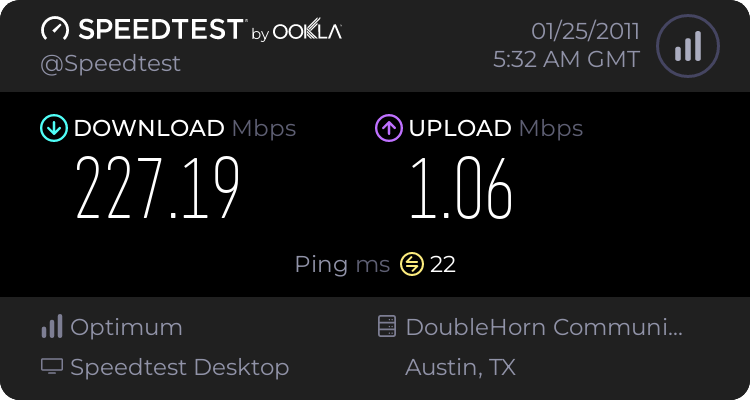
Internet super sloooww. Need help making it faster.

DBrown0738

New member
Local time
9:32 AM
Messages
1
Alrighty so is there anyway to speed it up for free?

1124766733.png


I really dont know what to do. Please help meh.
 

My Computer My Computer

At a glance

Windows 7 Home Premium 32bit
OS
Windows 7 Home Premium 32bit
First Question: How fast do you expect it to be (what speed are you paying for?)
The Ping itself is not all that bad for 50miles.
Second Question: Has it always be that slow or is that a more recent thing?

BTW: please go here and run this test and post the results

Pingtest.net - The Global Broadband Quality Test

-DG
 

My Computer My Computer

At a glance

Windows 7 Ultimate x86DualCore AMD Athlon 64 X2, 2600 MHz 5200+Samsung 2GB DDR2Onboard NVIDIA GeForce 6150SE nForce 430
Computer Manufacturer/Model Number
HP m8000n
OS
Windows 7 Ultimate x86
CPU
DualCore AMD Athlon 64 X2, 2600 MHz 5200+
Motherboard
Asus M2N68-LA (Narra)
Memory
Samsung 2GB DDR2
Graphics Card(s)
Onboard NVIDIA GeForce 6150SE nForce 430
Sound Card
Onboard nVIDIA nForce 6100-430 (MCP61P)
Monitor(s) Displays
Westinghouse 19" LED
Screen Resolution
1280x1024
Hard Drives
SATA II Seagate Barracuda 500GB
USB II WD Elements 500GB
USB II WD My Book 1TB
USB II WD My Book 2TB
PSU
Stock (HP)
Case
Stock (HP)
Cooling
Stock
Keyboard
Logitech Classic KB 200
Mouse
Standard HP opticle USB mouse
Alrighty so is there anyway to speed it up for free?

1124766733.png


I really dont know what to do. Please help meh.

Interesting, I am on cable broadband and getting 2.032 Mbps and I thought that was ok :sarc:

I recently had a dlink router and was getting 30 kbps. The router was faulty. I'm now using a netgear wnr3500 and getting 2.032mbps. A couple of days ago I had a DLINK DGL4100 extreme gamer and was getting 2.450 mbps. When my DIR-655 was working I was getting around the same.

Do routers really affect speed? Or is the answer to both questions "configuration"
 

My Computer My Computer

At a glance

Linux Mint 17 Cinnamon | Win 7 Ult x64Intel I7-3770K @ 4.2ghz32GB G-Skill C10QEVGA GTX 670 2GB SC
Computer type
PC/Desktop
Computer Manufacturer/Model Number
Home Made
OS
Linux Mint 17 Cinnamon | Win 7 Ult x64
CPU
Intel I7-3770K @ 4.2ghz
Motherboard
ASRock Extreme 4
Memory
32GB G-Skill C10Q
Graphics Card(s)
EVGA GTX 670 2GB SC
Sound Card
Creative Fatality ExtremeGamer
Monitor(s) Displays
LG E2742V x 2
Screen Resolution
1920x1080
Hard Drives
256GB Vertex 4 SSD
2TB Seagate ST2000DM001
1TB Seagate ST1000DM003
PSU
Corsair HX 650
Case
HAF 932 advanced
Cooling
Corsair H100i liquid cooler
Keyboard
Logitech Wireless
Mouse
Logitech Wireless
Internet Speed
OptusNet NBN 100/40
Antivirus
Malwarebytes
Browser
Firefox 30
Other Info
Router: Sagemcom F@st 3846 Crippled by Optus.
Alrighty so is there anyway to speed it up for free?

1124766733.png


I really dont know what to do. Please help meh.

Interesting, I am on cable broadband and getting 2.032 Mbps and I thought that was ok :sarc:

I recently had a dlink router and was getting 30 kbps. The router was faulty. I'm now using a netgear wnr3500 and getting 2.032mbps. A couple of days ago I had a DLINK DGL4100 extreme gamer and was getting 2.450 mbps. When my DIR-655 was working I was getting around the same.

Do routers really affect speed? Or is the answer to both questions "configuration"

The difference in speed is negligible (18%) and can simply be caused by different conditions @ your ISP. Before I would go tinkering I would get a history of what the router does under various conditons.


What does your ISP rate your service as? If it is a 3 Mb service you are fine if a 30Mb service you would have a problem.


Ken J
 

My Computer My Computer

At a glance

Win 8 Release candidate 8400[email protected]4 gigsNvidia 9600M
Computer Manufacturer/Model Number
HP Pavillion dv-7 1005 Tx
OS
Win 8 Release candidate 8400
CPU
[email protected]
Memory
4 gigs
Graphics Card(s)
Nvidia 9600M
Sound Card
HD built-in
Monitor(s) Displays
17" Wxga
Screen Resolution
1440x900
Cooling
none
Internet Speed
45Mb down 5Mb up
As Ken says...it mostly matters, what speed you're charged for. If it differs too much from your expectancy, it's time to call your ISP (to rule out their part of the equation ;)
If you do 10 Speed tests with the same conditions, you most likely getting 10 different results which are all independent from your configuration. Not that there is terribly much to configure anyways...usually W7 takes relatively good care of it on its own. In rare cases you can squeeze out a few more bps by adjusting the packet size (like if there is a miss configured server somewhere down the line)
If you want to know more about your actual condition, do the this test, which actually gives you a somewhat "surfacy" analysis of the usability of your current connection.
If you get a high value for Jitter or high packet loss, then it's time to look at your configuration/hardware condition.
Pingtest.net - The Global Broadband Quality Test

-DG
 

My Computer My Computer

At a glance

Windows 7 Ultimate x86DualCore AMD Athlon 64 X2, 2600 MHz 5200+Samsung 2GB DDR2Onboard NVIDIA GeForce 6150SE nForce 430
Computer Manufacturer/Model Number
HP m8000n
OS
Windows 7 Ultimate x86
CPU
DualCore AMD Athlon 64 X2, 2600 MHz 5200+
Motherboard
Asus M2N68-LA (Narra)
Memory
Samsung 2GB DDR2
Graphics Card(s)
Onboard NVIDIA GeForce 6150SE nForce 430
Sound Card
Onboard nVIDIA nForce 6100-430 (MCP61P)
Monitor(s) Displays
Westinghouse 19" LED
Screen Resolution
1280x1024
Hard Drives
SATA II Seagate Barracuda 500GB
USB II WD Elements 500GB
USB II WD My Book 1TB
USB II WD My Book 2TB
PSU
Stock (HP)
Case
Stock (HP)
Cooling
Stock
Keyboard
Logitech Classic KB 200
Mouse
Standard HP opticle USB mouse
. It appears it is time to contact your ISP. Your readings are showing Mb/s (megabits per second) and should be reading MB/s (Megabytes per second).

The above readings are from my system.
 

My Computer My Computer

At a glance

Windows 7 Ultimate 32 bitIntel Core i7-960 / 8MB L3 Cache, 3.2GHz4GB 1066MHZ DDR3 4DIMM1024MB nVidea GeForce GT220
Computer Manufacturer/Model Number
Dell / Studio XPS 9000 / 435T
OS
Windows 7 Ultimate 32 bit
CPU
Intel Core i7-960 / 8MB L3 Cache, 3.2GHz
Memory
4GB 1066MHZ DDR3 4DIMM
Graphics Card(s)
1024MB nVidea GeForce GT220
Sound Card
on board
Monitor(s) Displays
Dell 24" wide screen
Screen Resolution
1920 x 1200
Case
Dell
Keyboard
Logitech back-lit keyboard
Mouse
Logitech M505 cordless
Internet Speed
1.355 MB/s down load - 0.332MB/s upload
Back
Top