Internet working fine, but windows says "Not connected"

electromax

New member
Local time
5:29 AM
Messages
2
Hi, I seem to have a little problem for some time now, I didn't care much about it at the beginning but now it got somewhat sever.
So, at some point both my wireless and cable network started showing a not connected icon even though they were connected and Internet worked all fine. So of course I ignored it, but today I tried to access another computer from my network and it says I cant do that since I am "not connected" as he reports it. And that now is very bad.
Other info: Windows 7 32bit OS, scanned deeply for viruses and other threats, everything is ok and running except what I have earlier described.

So any ideas anyone?
 

My Computer My Computer

At a glance

Windows 7 Ultimate 32bit
OS
Windows 7 Ultimate 32bit
I had a same/similar problem.

But it was only Network and Sharing center SAYING I wasn't connected when I was, as well as the little network tray icon saying it.

I eventually had to uninstall my adapter in Device Manager, then reboot my PC, and let it reinstall when Windows booted up again.

Don't know if this will help, sounded similar to my issue a while back.
 

My Computer My Computer

At a glance

Windows 7 Professional 32-bit///Vista Home Pr...3GB RAM///2GB RAMBuilt-in, crap///NVIDIA GeForce 6150SE nForce...
Computer Manufacturer/Model Number
Acer Aspire 6930///Compaq Presario SR5152NX
OS
Windows 7 Professional 32-bit///Vista Home Premium 32-bit
Memory
3GB RAM///2GB RAM
Graphics Card(s)
Built-in, crap///NVIDIA GeForce 6150SE nForce 430
Sound Card
Built-in, alright///Realtek HD audio
Monitor(s) Displays
Built in and 26" LCD/40" LCD (VGA splitter)
Screen Resolution
Laptop: 1366X768 26"Mon: 1366X768 40"Mon:1920X1080
Hard Drives
Internal 350GB///250GB
2 Seagate 1TB HDD Ext.
1 Verbatim 500GB HDD Ext.
Cooling
Stock fans
Keyboard
Intelli-Type Wireless multimedia keyboard
Mouse
MS Wireless Notebook Optical Mouse 3000
Internet Speed
15Mbps Telus DSL
Other Info
2 PS3's, 1 XBOX360, and a Panasonic Blu-Ray player rendering media to various locations in house via PS3 Media Server*****
DIR-655 Xtreme N Gb router w/DAP-1522 bridge/access point******Using Input Director to share keyboard and mouse across all screens and PC's in my room.
hi you seem to be having the same problem as me so i will not start a new thread but add to yours if you dnt mind:) heres my problem:

  • I have a LAN connection that works im using it right now to write this post
  • My current profile is set to public
  • i need to change my current profile to home/work and join a homegroup
  • I go into network and sharing center
  • Under "View Your Active Networks" it states "You are not currently connected to any networks."
  • Windows is unable to create a network map (not sure if this helps)
  • I select "Connect to a network"
  • A small window in the bottom right of the screen says "Not Connected - No Connections are available."
I have tried the trouble shooters and numerous other fixes. One thing i have found though is that my 'PNRP Machine Name Publication Service' refuses to start and i get an access denied error when trying to start it. All the other services seem to be running just fine. Im not sure if this is the problem but its the closest i have come to finding something actually wrong. This has only been a recent problem and i was connected to my homegroup and network just fine, hope you guys can figure this one out!
 

My Computer My Computer

At a glance

Win 7 Ultimate 32bit
OS
Win 7 Ultimate 32bit
Using the Network troubleshooter in Windows 7
http://windows.microsoft.com/en-US/windows7/Using-the-Network-troubleshooter-in-Windows-7

If that doesn’t help try to totally rebuild your network connections.
1. Go to the start and type Device Manager.
2. Select device manager from the Control Panel list.
3. In the Device Manager, select View>Show Hidden Devices.
If the Show Hidden devices is not present, do the following command from a command prompt
Here’s how:

a) Go to start and type cmd.
b) Right click on cmd and select “Run as administrator”.
c) Type the following command and press enter.
set devmgr_show_nonpresent_devices=1.
4. Locate the Network Adapters and remove all of them from the device manager by right clicking and selecting Uninstall.
5. Close the device manager.

Once this is done get the latest driver updates for your network card by noting down the make and model from the device manager. Installing latest network card driver solves most of the networking issues. The best way to do this is by downloading from the Manufacturer’s website. Download the driver compatible with Windows 7.

Source> Windows 7 says I am not connected to a network and that connections are available, even though I am connected to a wireless connection with internet access
 

My Computer My Computer

At a glance

Windows 7 Ult, Windows 8.1 Pro,Q9650-4.275GHz, E8600 4.5GHz, E6750-3.8GHzG.Skill PC2 9600 1200Mhz 5 5 5 15 2TGTX480
Computer type
PC/Desktop
Computer Manufacturer/Model Number
Home built
OS
Windows 7 Ult, Windows 8.1 Pro,
CPU
Q9650-4.275GHz, E8600 4.5GHz, E6750-3.8GHz
Motherboard
Evga 780i FTW
Memory
G.Skill PC2 9600 1200Mhz 5 5 5 15 2T
Graphics Card(s)
GTX480
Sound Card
Asus Xonar D2
Monitor(s) Displays
HannsG
Screen Resolution
1680X1050
Hard Drives
GSkill Phoenix Pro 120GB SSD
PSU
ThermalTake Toughpower 1000Watt modular
Case
ThermalTake XaserV
Cooling
Xigmatek S1283
Keyboard
Logitech G15
Mouse
Logitech G9
Internet Speed
T1
thanks chev.. i tried your advice and tried resetting the tcp/ip using the autofix as well as through the cmd line... no change
 

My Computer My Computer

At a glance

Win 7 Ultimate 32bit
OS
Win 7 Ultimate 32bit
thanks chev.. i tried your advice and tried resetting the tcp/ip using the autofix as well as through the cmd line... no change

It's hard to find a conclusive fix for this problem anywhere I looked. The Technet link I posted above has links to other possible solutions.
 

My Computer My Computer

At a glance

Windows 7 Ult, Windows 8.1 Pro,Q9650-4.275GHz, E8600 4.5GHz, E6750-3.8GHzG.Skill PC2 9600 1200Mhz 5 5 5 15 2TGTX480
Computer type
PC/Desktop
Computer Manufacturer/Model Number
Home built
OS
Windows 7 Ult, Windows 8.1 Pro,
CPU
Q9650-4.275GHz, E8600 4.5GHz, E6750-3.8GHz
Motherboard
Evga 780i FTW
Memory
G.Skill PC2 9600 1200Mhz 5 5 5 15 2T
Graphics Card(s)
GTX480
Sound Card
Asus Xonar D2
Monitor(s) Displays
HannsG
Screen Resolution
1680X1050
Hard Drives
GSkill Phoenix Pro 120GB SSD
PSU
ThermalTake Toughpower 1000Watt modular
Case
ThermalTake XaserV
Cooling
Xigmatek S1283
Keyboard
Logitech G15
Mouse
Logitech G9
Internet Speed
T1
thanks again... thats my problem as well, 3hours plus of searching and 2 forums later and nothing conclusive, i appreciate your effort none the less ;)
 

My Computer My Computer

At a glance

Win 7 Ultimate 32bit
OS
Win 7 Ultimate 32bit
i feel a repair install heading my way:rolleyes:
 

My Computer My Computer

At a glance

Win 7 Ultimate 32bit
OS
Win 7 Ultimate 32bit
I would definately run the repair install from the Windows CD at this point.
 

My Computer My Computer

At a glance

Windows 7 Ult, Windows 8.1 Pro,Q9650-4.275GHz, E8600 4.5GHz, E6750-3.8GHzG.Skill PC2 9600 1200Mhz 5 5 5 15 2TGTX480
Computer type
PC/Desktop
Computer Manufacturer/Model Number
Home built
OS
Windows 7 Ult, Windows 8.1 Pro,
CPU
Q9650-4.275GHz, E8600 4.5GHz, E6750-3.8GHz
Motherboard
Evga 780i FTW
Memory
G.Skill PC2 9600 1200Mhz 5 5 5 15 2T
Graphics Card(s)
GTX480
Sound Card
Asus Xonar D2
Monitor(s) Displays
HannsG
Screen Resolution
1680X1050
Hard Drives
GSkill Phoenix Pro 120GB SSD
PSU
ThermalTake Toughpower 1000Watt modular
Case
ThermalTake XaserV
Cooling
Xigmatek S1283
Keyboard
Logitech G15
Mouse
Logitech G9
Internet Speed
T1
Thanks for the replies, I have tried what has been suggested, I uninstalled and reinstalled drivers and it only got worse, now my wireless connection can not auto obtain an IP I have to set everything manually and of course it still says "not connected". So... looks like I'll have to reinstall or something, thanks for all the help anyways.
 

My Computer My Computer

At a glance

Windows 7 Ultimate 32bit
OS
Windows 7 Ultimate 32bit
repair install done twice.. no change! this is starting to really annoy me, hope i dont have to do a clean install! I performed the upgrade option to repair, is this correct?
 

My Computer My Computer

At a glance

Win 7 Ultimate 32bit
OS
Win 7 Ultimate 32bit

My Computer My Computer

At a glance

Windows 7 Professional 32-bit///Vista Home Pr...3GB RAM///2GB RAMBuilt-in, crap///NVIDIA GeForce 6150SE nForce...
Computer Manufacturer/Model Number
Acer Aspire 6930///Compaq Presario SR5152NX
OS
Windows 7 Professional 32-bit///Vista Home Premium 32-bit
Memory
3GB RAM///2GB RAM
Graphics Card(s)
Built-in, crap///NVIDIA GeForce 6150SE nForce 430
Sound Card
Built-in, alright///Realtek HD audio
Monitor(s) Displays
Built in and 26" LCD/40" LCD (VGA splitter)
Screen Resolution
Laptop: 1366X768 26"Mon: 1366X768 40"Mon:1920X1080
Hard Drives
Internal 350GB///250GB
2 Seagate 1TB HDD Ext.
1 Verbatim 500GB HDD Ext.
Cooling
Stock fans
Keyboard
Intelli-Type Wireless multimedia keyboard
Mouse
MS Wireless Notebook Optical Mouse 3000
Internet Speed
15Mbps Telus DSL
Other Info
2 PS3's, 1 XBOX360, and a Panasonic Blu-Ray player rendering media to various locations in house via PS3 Media Server*****
DIR-655 Xtreme N Gb router w/DAP-1522 bridge/access point******Using Input Director to share keyboard and mouse across all screens and PC's in my room.
thanks, thats exactly what i follwed... did nothing:confused:
 

My Computer My Computer

At a glance

Win 7 Ultimate 32bit
OS
Win 7 Ultimate 32bit
thanks, thats exactly what i follwed... did nothing:confused:

Shoot! That sucks!

Well at this point, I think your best bet is a clean install, BUT, some of these other guys might have a better suggestion.

It would be nice if there was another suggestion that didn't involve starting from scratch, unfortunately I don't know what that would be.

Other than finding a suitable restore point, but I found sometimes those end up creating more work than going with a clean install. :(
 

My Computer My Computer

At a glance

Windows 7 Professional 32-bit///Vista Home Pr...3GB RAM///2GB RAMBuilt-in, crap///NVIDIA GeForce 6150SE nForce...
Computer Manufacturer/Model Number
Acer Aspire 6930///Compaq Presario SR5152NX
OS
Windows 7 Professional 32-bit///Vista Home Premium 32-bit
Memory
3GB RAM///2GB RAM
Graphics Card(s)
Built-in, crap///NVIDIA GeForce 6150SE nForce 430
Sound Card
Built-in, alright///Realtek HD audio
Monitor(s) Displays
Built in and 26" LCD/40" LCD (VGA splitter)
Screen Resolution
Laptop: 1366X768 26"Mon: 1366X768 40"Mon:1920X1080
Hard Drives
Internal 350GB///250GB
2 Seagate 1TB HDD Ext.
1 Verbatim 500GB HDD Ext.
Cooling
Stock fans
Keyboard
Intelli-Type Wireless multimedia keyboard
Mouse
MS Wireless Notebook Optical Mouse 3000
Internet Speed
15Mbps Telus DSL
Other Info
2 PS3's, 1 XBOX360, and a Panasonic Blu-Ray player rendering media to various locations in house via PS3 Media Server*****
DIR-655 Xtreme N Gb router w/DAP-1522 bridge/access point******Using Input Director to share keyboard and mouse across all screens and PC's in my room.
I know this thread was old but I'm hoping someone has read this and has the answer? the only diff;
mine is legit, no connection. I bought and installed a one time 32 bit to get away from the 64 bit.
Anyone , help?
 

My Computer My Computer

At a glance

windows7 home premium 32 bit
Computer type
Laptop
Computer Manufacturer/Model Number
acer
OS
windows7 home premium 32 bit
  1. Click Start, [click Run], type regedit, and then press ENTER.
  2. Locate and then click the following registry subkey:
    HKEY_LOCAL-MACHINE\SYSTEM\CurrentControlSet\Control\Network
  3. Right-click this subkey, click Export , and then save the selected branch in a file.
  4. Click the Network subkey again, and then delete the Config entry. Do not delete the >Network subkey. The Config entry will be reconstructed when you restart the computer.
  5. Restart the computer. You may have to manually turn off the computer.
  6. The config key is re-created on the next boot up.
 

My Computer My Computer

At a glance

windows 7 ultimate x64AMD Phenom II X4 965 3.4GHz16GB
Computer type
PC/Desktop
Computer Manufacturer/Model Number
custom build
OS
windows 7 ultimate x64
CPU
AMD Phenom II X4 965 3.4GHz
Memory
16GB
You the man~! That seemed to fix it but ill post back if it comes back with the yellow exclamation point on the network icon in the tasktray.
 

My Computer My Computer

At a glance

windows 7 64bit
Computer type
PC/Desktop
OS
windows 7 64bit
Sorry for the old topic reply, I recently fix this issue on Windows 10 and I'm trying to spread the tip. :D

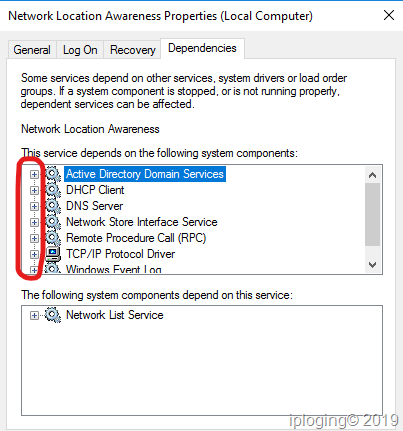
Here a solution that worked for me: check which "Network location Awareness" service dependency is not started.
Tip: use Search and Download International Terminology - Microsoft | Language Portal to find the service name in your language.

Follow thise steps to fix the issue:
- Click start
- Type "services" and hit Enter
- Right click on Network location Awareness service, click Properties
- Go in Dependancies tab
- Expand everything in the first box
- Now the trick: find each service (gear icon) and check if it is started, if don't start it
For me that was the Event Log service.

No need to restart your computer, it works. Windows is now aware you have a working network connection.
 

My Computer My Computer

At a glance

Windows 10 Pro (x64)
Computer type
PC/Desktop
OS
Windows 10 Pro (x64)
> Now the trick: find each service (gear icon) and check if it is started, if don't start it

Dude what does this even mean? There are no options when expanding the gears
 

My Computer My Computer

At a glance

Windows 10
Computer type
PC/Desktop
OS
Windows 10
In the Network location Awareness Properties window: browse the first box and expand all dependencies tree to reveal all services names.
In this box Services are specified by a gear icon at the start of the line. Note all of them.
Then, in the main Services window (behind the Network location Awareness Properties window) search all previously noted services and start them.

f9ouYIn.png
 

My Computer My Computer

At a glance

Windows 10 Pro (x64)
Computer type
PC/Desktop
OS
Windows 10 Pro (x64)
Back
Top