Inventions & wrinkles

ICIT2LOL

Confusion Therapist
Guru
Gold Member
VIP
Local time
2:33 PM
Messages
20,778
Location
Central West NSW
Thought a little thread here on what one can do themselves for improving their machines.

I do like fiddling and thinking up stuff and would be glad of others to share theirs too.

My first "tip" is when cleaning cooling fans is to remove the dust and grime with methylated spirits over a bath with hogs hair brush (all very cheap to buy hogs hair as the poly ones cause static) let dry and then apply some of that car vinyl embellishing spray either with the spray or cloth then wipe down and gently polish. The blades wil be super smooth and the air pass over them and the venturi far more efficiently. Therefore increasing (only moderately of course but even so more) the air in or out of your machine.

I did think of fitting model aircraft spinners the the incoming side of the fan but that is going to take some working out ie extra power needed to spin the fan and centreing.

If you use that furniture polish (spray form) you get the same result and some actially have an anti static effect therefore reducing the fast build up of dust on the fan blades.

One can also use this on the larger flat surfaces within the case fr the same reason, being careful not to ove do the application and it make removal so much easier the next time.

Plus I have started using more inake fans than out fans to produce an "positive" pressure within the case the rartionale being that the air inside the case is at a slightly increased pressure to the outside "ambient" pressure so keeping dust from entering even the smallest of chinks in the case. This came to me after working in operating thaetres where they employ this type of internal "positive" pressure to keep out any particulates or bacteria laden air. The incoming air of course has to be filtered well. But more of that next time.
 

My Computer

Computer type
PC/Desktop
Computer Manufacturer/Model Number
Own build (new) Desk1 / Asus ROG Win 7 / Desk2 1st build
OS
Desk1 7 Home Prem / Desk2 10 Pro / Main lap Asus ROG 10 Pro 2 laptop Toshiba 7 Pro Asus P2520 7 & 10
CPU
Desk1 i5 3750K / Laptop i7 GTX 860M / Desk2 i5 2500
Motherboard
Desk1 Asus P877-V / Desk2 Gigabyte H67 UD3H / Laptop ?
Memory
Desk1 8GB (1866) / Desk2 16GB (1333) / Laptop 8Gb DDR3
Graphics Card(s)
Desk 1& 2NVidia GTX 650 & Laptops on board Intel
Sound Card
Desk 1 & 2 -XONAR DG Realtek High Def audio Laptop
Monitor(s) Displays
Desk 1 Benq HD 2450 / Desk2 Philips 24" / Laptop 17.5"
Screen Resolution
1920x1080 D1 & D2 & Laptop 1
Hard Drives
Desk1 Samsung 120GB 830 SSD
Asus ROG 256GB 850 Pro SSD
Desk2 Samsung 840 256 SSD
Toshiba 120GB EVO
PSU
Desk 1 Corsair HX 1050/ Laptop ? / Desk 2 Corsair HX 650
Case
Desk 1 Cooler HAF XM ? Toshiba laptop / Desk2 Coolermaster
Cooling
Fans on all Desk1 -2 Desk2 - all Coolermasters 5 Laptop ?
Keyboard
Desk 1 MS Sidewinder X6 Desk 2 MS Sidewinder X 4
Mouse
Desk 1&2 - Gigabyte MS 900 gamer - laptop - Logitec wireless
Internet Speed
ADSL2+
Other Info
One other Desktop (tester) and spare Toshba laptop both with SSD's
Running Kaspersky 2016 ISS on all machines config'd identically
Logitec audio stereo systems on each machine (x3)
Canon MG5250MFC
Router/modem TP-Link running WPA2SK
Expanding on above suggestion.

Fan blades and case.
Pledge, Endust or similar brand in the States. Use the wipes and no over spray problem on the motor or electronics.
Can be applied while fan and other electronics are still mounted. ;)
 

My Computer

Computer Manufacturer/Model Number
Hopalong/ Godzilla
OS
Windows7 Pro 64bit SP-1; Windows XP Pro 32bit
CPU
Intel Core i7-870 Lynnfield 2.93GHz LGA 1156 95W Quad-Core
Motherboard
ASUS P7P55D-E PRO
Memory
8GB@1400MHz Crucial Ballistix DDR3-1600 4x2GB
Graphics Card(s)
ASUS ENGTX460 DirectCU/2DI/1GD5 1GB 256-bit GDDR5
Sound Card
VIA Onboard
Monitor(s) Displays
Asus VS248H-P 24"; Samsung SyncMaster 941BW 19"ws
Screen Resolution
1920x1080; 1440x900
Hard Drives
Samsung 830 120GB SSD
Intel 320 120GB SSD
Western Digital Caviar Black WD7501AALS 750GB 7200 RPM SATA 3.0Gb/s
Western Digital Caviar Black WD6401AALS 640GB 7200 RPM SATA 3.0Gb/s
PSU
COOLER MASTER Silent Pro RS850-AMBAJ3-US 850W Modular
Case
COOLER MASTER HAF 932 RC-932-KKN5-GP Black
Cooling
Scythe "Mugen-2 Rev.B" (2 ScytheKaze-Jyuni PWM fans)
Keyboard
Logitech K-320
Mouse
Kensington
Antivirus
Avast Inernet Suite
Browser
IE 9 ; Chrome
Expanding on above suggestion.

Fan blades and case.
Pledge, Endust or similar brand in the States. Use the wipes and no over spray problem on the motor or electronics.
Can be applied while fan and other electronics are still mounted. ;)
Yep Hoppy thats the stuff I just found the positive pressure works pretty darn good too.:)
 

My Computer

Computer type
PC/Desktop
Computer Manufacturer/Model Number
Own build (new) Desk1 / Asus ROG Win 7 / Desk2 1st build
OS
Desk1 7 Home Prem / Desk2 10 Pro / Main lap Asus ROG 10 Pro 2 laptop Toshiba 7 Pro Asus P2520 7 & 10
CPU
Desk1 i5 3750K / Laptop i7 GTX 860M / Desk2 i5 2500
Motherboard
Desk1 Asus P877-V / Desk2 Gigabyte H67 UD3H / Laptop ?
Memory
Desk1 8GB (1866) / Desk2 16GB (1333) / Laptop 8Gb DDR3
Graphics Card(s)
Desk 1& 2NVidia GTX 650 & Laptops on board Intel
Sound Card
Desk 1 & 2 -XONAR DG Realtek High Def audio Laptop
Monitor(s) Displays
Desk 1 Benq HD 2450 / Desk2 Philips 24" / Laptop 17.5"
Screen Resolution
1920x1080 D1 & D2 & Laptop 1
Hard Drives
Desk1 Samsung 120GB 830 SSD
Asus ROG 256GB 850 Pro SSD
Desk2 Samsung 840 256 SSD
Toshiba 120GB EVO
PSU
Desk 1 Corsair HX 1050/ Laptop ? / Desk 2 Corsair HX 650
Case
Desk 1 Cooler HAF XM ? Toshiba laptop / Desk2 Coolermaster
Cooling
Fans on all Desk1 -2 Desk2 - all Coolermasters 5 Laptop ?
Keyboard
Desk 1 MS Sidewinder X6 Desk 2 MS Sidewinder X 4
Mouse
Desk 1&2 - Gigabyte MS 900 gamer - laptop - Logitec wireless
Internet Speed
ADSL2+
Other Info
One other Desktop (tester) and spare Toshba laptop both with SSD's
Running Kaspersky 2016 ISS on all machines config'd identically
Logitec audio stereo systems on each machine (x3)
Canon MG5250MFC
Router/modem TP-Link running WPA2SK
If you hadn't mentioned the spray I would not have thought of the wipes.

My wife has a big container of those wipes for the furniture.
I'm going to have to borrow a few tomorrow. Cleaning day! ;)

HAF-932 case so I have pos. pressure. 2x240mm in and 1x240 out and 1x120mm out.
 

My Computer

Computer Manufacturer/Model Number
Hopalong/ Godzilla
OS
Windows7 Pro 64bit SP-1; Windows XP Pro 32bit
CPU
Intel Core i7-870 Lynnfield 2.93GHz LGA 1156 95W Quad-Core
Motherboard
ASUS P7P55D-E PRO
Memory
8GB@1400MHz Crucial Ballistix DDR3-1600 4x2GB
Graphics Card(s)
ASUS ENGTX460 DirectCU/2DI/1GD5 1GB 256-bit GDDR5
Sound Card
VIA Onboard
Monitor(s) Displays
Asus VS248H-P 24"; Samsung SyncMaster 941BW 19"ws
Screen Resolution
1920x1080; 1440x900
Hard Drives
Samsung 830 120GB SSD
Intel 320 120GB SSD
Western Digital Caviar Black WD7501AALS 750GB 7200 RPM SATA 3.0Gb/s
Western Digital Caviar Black WD6401AALS 640GB 7200 RPM SATA 3.0Gb/s
PSU
COOLER MASTER Silent Pro RS850-AMBAJ3-US 850W Modular
Case
COOLER MASTER HAF 932 RC-932-KKN5-GP Black
Cooling
Scythe "Mugen-2 Rev.B" (2 ScytheKaze-Jyuni PWM fans)
Keyboard
Logitech K-320
Mouse
Kensington
Antivirus
Avast Inernet Suite
Browser
IE 9 ; Chrome
If you hadn't mentioned the spray I would not have thought of the wipes.

My wife has a big container of those wipes for the furniture.
I'm going to have to borrow a few tomorrow. Cleaning day! ;)

HAF-932 case so I have pos. pressure. 2x240mm in and 1x240 out and 1x120mm out.
Yeah Hoppy you can always spray onto a piece of that microweave cloth too it's as cheap as chips in those dollar stores, and I am sure that the car spray stuff or one of them has that property too -I think maybe Armourall it was.

Now the next little wrinkle is the filtering as i have discussed with my Mate G it's easy to make up yourself instead of buying those medical grade filter material ones which I did with my machine at first until it got real expensive - the ones with a magnetic hold surround - especially good for stopping the top fans vents from letting dust fall in from just gravitational pull.
The best one I have found is one called Organza the wife will know which one I mean but I have found it difficult to get in black. So I eventually ended up using a fine sheer curtain material where the Organza would have shown up - a whole curtain makes hundreds of filters.:geek:

But I have more wrinkles in the pipe line:cool:
 

My Computer

Computer type
PC/Desktop
Computer Manufacturer/Model Number
Own build (new) Desk1 / Asus ROG Win 7 / Desk2 1st build
OS
Desk1 7 Home Prem / Desk2 10 Pro / Main lap Asus ROG 10 Pro 2 laptop Toshiba 7 Pro Asus P2520 7 & 10
CPU
Desk1 i5 3750K / Laptop i7 GTX 860M / Desk2 i5 2500
Motherboard
Desk1 Asus P877-V / Desk2 Gigabyte H67 UD3H / Laptop ?
Memory
Desk1 8GB (1866) / Desk2 16GB (1333) / Laptop 8Gb DDR3
Graphics Card(s)
Desk 1& 2NVidia GTX 650 & Laptops on board Intel
Sound Card
Desk 1 & 2 -XONAR DG Realtek High Def audio Laptop
Monitor(s) Displays
Desk 1 Benq HD 2450 / Desk2 Philips 24" / Laptop 17.5"
Screen Resolution
1920x1080 D1 & D2 & Laptop 1
Hard Drives
Desk1 Samsung 120GB 830 SSD
Asus ROG 256GB 850 Pro SSD
Desk2 Samsung 840 256 SSD
Toshiba 120GB EVO
PSU
Desk 1 Corsair HX 1050/ Laptop ? / Desk 2 Corsair HX 650
Case
Desk 1 Cooler HAF XM ? Toshiba laptop / Desk2 Coolermaster
Cooling
Fans on all Desk1 -2 Desk2 - all Coolermasters 5 Laptop ?
Keyboard
Desk 1 MS Sidewinder X6 Desk 2 MS Sidewinder X 4
Mouse
Desk 1&2 - Gigabyte MS 900 gamer - laptop - Logitec wireless
Internet Speed
ADSL2+
Other Info
One other Desktop (tester) and spare Toshba laptop both with SSD's
Running Kaspersky 2016 ISS on all machines config'd identically
Logitec audio stereo systems on each machine (x3)
Canon MG5250MFC
Router/modem TP-Link running WPA2SK
My desk sits close to the kitchen table.
There is just my wife and I so I have the HAF under the unused end of the kitchen table.
The table catches any dust from above.
 
Last edited:

My Computer

Computer Manufacturer/Model Number
Hopalong/ Godzilla
OS
Windows7 Pro 64bit SP-1; Windows XP Pro 32bit
CPU
Intel Core i7-870 Lynnfield 2.93GHz LGA 1156 95W Quad-Core
Motherboard
ASUS P7P55D-E PRO
Memory
8GB@1400MHz Crucial Ballistix DDR3-1600 4x2GB
Graphics Card(s)
ASUS ENGTX460 DirectCU/2DI/1GD5 1GB 256-bit GDDR5
Sound Card
VIA Onboard
Monitor(s) Displays
Asus VS248H-P 24"; Samsung SyncMaster 941BW 19"ws
Screen Resolution
1920x1080; 1440x900
Hard Drives
Samsung 830 120GB SSD
Intel 320 120GB SSD
Western Digital Caviar Black WD7501AALS 750GB 7200 RPM SATA 3.0Gb/s
Western Digital Caviar Black WD6401AALS 640GB 7200 RPM SATA 3.0Gb/s
PSU
COOLER MASTER Silent Pro RS850-AMBAJ3-US 850W Modular
Case
COOLER MASTER HAF 932 RC-932-KKN5-GP Black
Cooling
Scythe "Mugen-2 Rev.B" (2 ScytheKaze-Jyuni PWM fans)
Keyboard
Logitech K-320
Mouse
Kensington
Antivirus
Avast Inernet Suite
Browser
IE 9 ; Chrome
My desk sits close to the kitchen table.
There is just my wife and I so I have the HAF under the unused end of the kitchen table.
The table catches any dust from above.

You just gave me a great idea for a better side filter. I have some real small rare earth magnets. Super strong.
Black cloth side filter. I think they call it gauze.
Almost see through but finer tighter thread than a single layer of medical gauze.
Just need it in black.
Side panel fan has a bubble circle outward so 4 magnets should work well.

Front fan cover is plastic so I may have to be more creative on attachment.
Use same black material will blend right in.
Just figure out the attachment.

This should be fine enough. Of course I'll buy it local.
Island Breeze Gauze Fabric - Discount Designer Fabric - Fabric.com

Click the pic and you can see air will pass but should act as a good filter.

Hum mate I'd be careful with those magnets I used to use them when I was prospecting and get your skin caught between two and you will know what pain is all about. Plus dont forget the HARD DRIVES within the EM field!! I use that strip stuff you can buy.

Mate the pic didn't come through wasn't through a filter was it LOL!!

Anyway gotta dash for work talk to you soon

John

Another is just pinch some of her black panty hose thats good too lol!!
 

My Computer

Computer type
PC/Desktop
Computer Manufacturer/Model Number
Own build (new) Desk1 / Asus ROG Win 7 / Desk2 1st build
OS
Desk1 7 Home Prem / Desk2 10 Pro / Main lap Asus ROG 10 Pro 2 laptop Toshiba 7 Pro Asus P2520 7 & 10
CPU
Desk1 i5 3750K / Laptop i7 GTX 860M / Desk2 i5 2500
Motherboard
Desk1 Asus P877-V / Desk2 Gigabyte H67 UD3H / Laptop ?
Memory
Desk1 8GB (1866) / Desk2 16GB (1333) / Laptop 8Gb DDR3
Graphics Card(s)
Desk 1& 2NVidia GTX 650 & Laptops on board Intel
Sound Card
Desk 1 & 2 -XONAR DG Realtek High Def audio Laptop
Monitor(s) Displays
Desk 1 Benq HD 2450 / Desk2 Philips 24" / Laptop 17.5"
Screen Resolution
1920x1080 D1 & D2 & Laptop 1
Hard Drives
Desk1 Samsung 120GB 830 SSD
Asus ROG 256GB 850 Pro SSD
Desk2 Samsung 840 256 SSD
Toshiba 120GB EVO
PSU
Desk 1 Corsair HX 1050/ Laptop ? / Desk 2 Corsair HX 650
Case
Desk 1 Cooler HAF XM ? Toshiba laptop / Desk2 Coolermaster
Cooling
Fans on all Desk1 -2 Desk2 - all Coolermasters 5 Laptop ?
Keyboard
Desk 1 MS Sidewinder X6 Desk 2 MS Sidewinder X 4
Mouse
Desk 1&2 - Gigabyte MS 900 gamer - laptop - Logitec wireless
Internet Speed
ADSL2+
Other Info
One other Desktop (tester) and spare Toshba laptop both with SSD's
Running Kaspersky 2016 ISS on all machines config'd identically
Logitec audio stereo systems on each machine (x3)
Canon MG5250MFC
Router/modem TP-Link running WPA2SK
Mike I think the fridge magnet type magnet will be fine if on the outside of the case and are enough to keep the material tight against the fan opening.

If your case side panels have Phillips head screws, replace them with thumb screws. Much easier to remove if you are prone to getting inside your PC often.
screws.PNG
 

My Computer

Computer type
PC/Desktop
Computer Manufacturer/Model Number
Home Built Desktop By DataTech
OS
Windows 7 Ultimate X64 SP1
CPU
Intel i5-2550K, Differing ~4.4-4.8GHz No built in GPU
Motherboard
ASUS P8Z68-V PRO/GEN3
Memory
16GB G.Skill Sniper 1866MHz @ 2133MHz 2x8GB
Graphics Card(s)
ASUS GTX650TIB-DC2OC-2GD5, (650TI Boost)
Sound Card
Onboard Realtek 5-1
Monitor(s) Displays
Samsung P2570HD
Screen Resolution
1920x1080
Hard Drives
Samsung 840 Pro 256GB SSD for OS, 500GB Seagate Constellation (Enterprise drive) for Data
PSU
Corsair HX650W
Case
Inwin Dragon Rider
Cooling
Hyper 212 EVO w/two Noctua fans, push-pull, @1300 RPM
Keyboard
E-Z Eyes, bright yellow keys with large characters
Mouse
steelseries SENSEI Laser Pro Gaming
Internet Speed
48-51Mbs Mbs down, 11 Mbs up Xfinity Cable
Antivirus
Norton Internet Security 2013
Browser
IE 10, Opera, Pale Moon if needed
Other Info
4 case fans, LG BluRay-RE, ASUS DVD-RW, Mr. Fusion power supply, 1.21 gigawatts.
A couple of more of my wrinkles.

Lost a screw or want to put one in a difficult spot and keep your ferrous based screws in a non spill spot?

Get a prospecting rare earth magnet (you can find these on Ebay) attach to the handle end of a long (or short one if the screw won't stay on the the tip) screwdriver and put it as close to the handle as possible now the screwdriver becomes very magnetised and will hold the screw VERY firmly until engaged in the female thread.

Dropped a screw into the machine and don't want to up - end the thing to shake it out (but can see it and cannot get it with long nosed pliers or those long artery forceps - magnet on screwdriver problem solved.

Want to keep your screws out in a safe container and avoid spilling the lot if you happen to knock it over? (unlikely with my method) place the magnet on the outside of the container (outside - DO NOT put into the container you can wreck the threads if gripped to pull off the magnet) when you want to get a screw out just take it out or remove the magnet temporarily to get it.

You can use these extremely strong magnets used in microwave ovens in the magnetron for the same reasons although they tend to be too large for the screwdriver but make great stands (with a bit of felt glued to the table surface side) when using for screw storage containers (the "boss" might just have reason to kill you for scratching the table top LOL!!).

Sorry everyone I have tried to upload a shot of my wrinkles but won't do it strangeas I have done it from this camera before.

Anyway the magnetron magnet is a dull grey doughnut approx 5.5cmin diameter 1cm thick and a central hole 2cm in diameter (good for putting screwdriver bits in and leaving to magnetise if so required or storage) the prospecting one is 2x1cm disk and shiny metal (that does rust if left in damp circumstances.) Bot are quite heavy.

One or two words of caution
1. PLEASE BE VERY CAREFUL when handling two magnets together they will cause a very nasty pinch if you get your skin between them - they are extemey strong.
2. Be VERY careful when removing the microwave magnets some of the materials used in the manufacture of the magnetron use beryllium a known carcinogen cause as less dust as possible by wetting before gently tapping the magnet from the retainer with a sharp chisel (between the magnet and the separator and hammer (there are two magnets in each magnetron).
3. DO NOT attempt to break the magntron magnet by hiitting it - they are exactly the same in maunfacture as those used in loudspeakers - they shatter into very sharp and irregular pieces and if cutting with a diamond blade - if you so wish - use plenty of water or other coolant on the cutting site. I have never had to do this the shape is perfect as is.
4. When guiding into a tight spot use your dominant hand to hold the handle and guide the attached screw by holding the shaft of the screwdriver with your non dominant hand to stop it from attaching to ferrous based materials on the way in.
5. Best not let chilldren play with these magnets for (to me at least) OBVIOUS reasons.
 

My Computer

Computer type
PC/Desktop
Computer Manufacturer/Model Number
Own build (new) Desk1 / Asus ROG Win 7 / Desk2 1st build
OS
Desk1 7 Home Prem / Desk2 10 Pro / Main lap Asus ROG 10 Pro 2 laptop Toshiba 7 Pro Asus P2520 7 & 10
CPU
Desk1 i5 3750K / Laptop i7 GTX 860M / Desk2 i5 2500
Motherboard
Desk1 Asus P877-V / Desk2 Gigabyte H67 UD3H / Laptop ?
Memory
Desk1 8GB (1866) / Desk2 16GB (1333) / Laptop 8Gb DDR3
Graphics Card(s)
Desk 1& 2NVidia GTX 650 & Laptops on board Intel
Sound Card
Desk 1 & 2 -XONAR DG Realtek High Def audio Laptop
Monitor(s) Displays
Desk 1 Benq HD 2450 / Desk2 Philips 24" / Laptop 17.5"
Screen Resolution
1920x1080 D1 & D2 & Laptop 1
Hard Drives
Desk1 Samsung 120GB 830 SSD
Asus ROG 256GB 850 Pro SSD
Desk2 Samsung 840 256 SSD
Toshiba 120GB EVO
PSU
Desk 1 Corsair HX 1050/ Laptop ? / Desk 2 Corsair HX 650
Case
Desk 1 Cooler HAF XM ? Toshiba laptop / Desk2 Coolermaster
Cooling
Fans on all Desk1 -2 Desk2 - all Coolermasters 5 Laptop ?
Keyboard
Desk 1 MS Sidewinder X6 Desk 2 MS Sidewinder X 4
Mouse
Desk 1&2 - Gigabyte MS 900 gamer - laptop - Logitec wireless
Internet Speed
ADSL2+
Other Info
One other Desktop (tester) and spare Toshba laptop both with SSD's
Running Kaspersky 2016 ISS on all machines config'd identically
Logitec audio stereo systems on each machine (x3)
Canon MG5250MFC
Router/modem TP-Link running WPA2SK
My Wrinkle #2
Ever had a holder full of screws and nuts that you have knocked over and split the lot??

Get some old loudspeaker magnets or some of those out of an old microwave oven magnetron there are two in each magnetron.
Stick felt pads so cheap from dollar shops and usually use for protecting desktop surfaces from scratching on the "bottom" of the doughnut shaped magnet and some tiny pieces of double sided tape on the top. One could us the synthetic rubber type instead.
Place a food container I use anything like Tupperware stuff - on top of the double sided tape.
Throw in the screws as you take them out they will be captured by the magnet so in the event you knock the container over the screws stay put - at least the ferrous based ones do.
To remove the lot just remove the container form the tape and tip out but usually I use them as I need to.

My Wrinkle #3
Want to hold a screw really tightly to the end of the driver.
Just get one of those rare earth magnets that one can get from any prospecting store.
Attach it to the handle end of the screwdriver - it will stay in place with fixing but if you want some duct tape around it will suffice.
Result screw will stick to the driver even if knocked quite hard especially in places where you DO NOT want to drop the screw!
Once started or full driven home fully the driver can be easily removed.

Additt The other magnet pictured is holding screwdriver bits and it does magnetise them to use as such with small screws.

One word of WARNING the magnetron magnets and the rare earth ones are EXTREMELY strong and you MUST TAKE CARE when getting them close together as if you get your skin caught between the magnets it is VERY VERY painful - I know!!
Getting the magnets out of the magnetron (and loudspeaker ones) requires great care as they are brittle (can shatter into extremely sharp pieces) and the separator in the magnetron contains beryllium a known carcinogen so wear a mask when taking the magnets off.
The magnets are also polarized North/ South doughnut face (ring) to doughnut face and will repel in one configuration and attract in the other.
WHATEVER YOU DO KEEP AWAY FROM CHILDREN!!

I am working on using that repel feature for another wrinkle that I will post if it should work.
There are others to come!!
 

Attachments

  • WRINKLE1.PNG
    WRINKLE1.PNG
    315.1 KB · Views: 63
Last edited:

My Computer

Computer type
PC/Desktop
Computer Manufacturer/Model Number
Own build (new) Desk1 / Asus ROG Win 7 / Desk2 1st build
OS
Desk1 7 Home Prem / Desk2 10 Pro / Main lap Asus ROG 10 Pro 2 laptop Toshiba 7 Pro Asus P2520 7 & 10
CPU
Desk1 i5 3750K / Laptop i7 GTX 860M / Desk2 i5 2500
Motherboard
Desk1 Asus P877-V / Desk2 Gigabyte H67 UD3H / Laptop ?
Memory
Desk1 8GB (1866) / Desk2 16GB (1333) / Laptop 8Gb DDR3
Graphics Card(s)
Desk 1& 2NVidia GTX 650 & Laptops on board Intel
Sound Card
Desk 1 & 2 -XONAR DG Realtek High Def audio Laptop
Monitor(s) Displays
Desk 1 Benq HD 2450 / Desk2 Philips 24" / Laptop 17.5"
Screen Resolution
1920x1080 D1 & D2 & Laptop 1
Hard Drives
Desk1 Samsung 120GB 830 SSD
Asus ROG 256GB 850 Pro SSD
Desk2 Samsung 840 256 SSD
Toshiba 120GB EVO
PSU
Desk 1 Corsair HX 1050/ Laptop ? / Desk 2 Corsair HX 650
Case
Desk 1 Cooler HAF XM ? Toshiba laptop / Desk2 Coolermaster
Cooling
Fans on all Desk1 -2 Desk2 - all Coolermasters 5 Laptop ?
Keyboard
Desk 1 MS Sidewinder X6 Desk 2 MS Sidewinder X 4
Mouse
Desk 1&2 - Gigabyte MS 900 gamer - laptop - Logitec wireless
Internet Speed
ADSL2+
Other Info
One other Desktop (tester) and spare Toshba laptop both with SSD's
Running Kaspersky 2016 ISS on all machines config'd identically
Logitec audio stereo systems on each machine (x3)
Canon MG5250MFC
Router/modem TP-Link running WPA2SK
Good ones John. I can't get the driver to hold a screw by sticking a magnet to the shaft of it. I have taken a driver and pulled the tip across a magnet several times which does make it magnetic for quite awhile.

Also be aware of getting a strong magnet near a spinner drive, it can make it unusable.
 

My Computer

Computer type
PC/Desktop
Computer Manufacturer/Model Number
Home Built Desktop By DataTech
OS
Windows 7 Ultimate X64 SP1
CPU
Intel i5-2550K, Differing ~4.4-4.8GHz No built in GPU
Motherboard
ASUS P8Z68-V PRO/GEN3
Memory
16GB G.Skill Sniper 1866MHz @ 2133MHz 2x8GB
Graphics Card(s)
ASUS GTX650TIB-DC2OC-2GD5, (650TI Boost)
Sound Card
Onboard Realtek 5-1
Monitor(s) Displays
Samsung P2570HD
Screen Resolution
1920x1080
Hard Drives
Samsung 840 Pro 256GB SSD for OS, 500GB Seagate Constellation (Enterprise drive) for Data
PSU
Corsair HX650W
Case
Inwin Dragon Rider
Cooling
Hyper 212 EVO w/two Noctua fans, push-pull, @1300 RPM
Keyboard
E-Z Eyes, bright yellow keys with large characters
Mouse
steelseries SENSEI Laser Pro Gaming
Internet Speed
48-51Mbs Mbs down, 11 Mbs up Xfinity Cable
Antivirus
Norton Internet Security 2013
Browser
IE 10, Opera, Pale Moon if needed
Other Info
4 case fans, LG BluRay-RE, ASUS DVD-RW, Mr. Fusion power supply, 1.21 gigawatts.
A very simple tip that may make you smile, but two of the best tools I've found for keeping your keyboard free of dust and grime is a soft paintbrush wiped between the keys followed by a quick swipe with one of those baby wipes.
 

My Computer

Computer Manufacturer/Model Number
HP Pavilion Elite 495UK
OS
Windows 7 Ultimate SP1 64-Bit
CPU
Intel Core i7 870 @ 2.93GHz
Motherboard
MSI 2A9C (CPU1)
Memory
8Gb Dual-Channel DDR3 @ 664MHz
Graphics Card(s)
nVidia GeForce GTX 460 1024MB dedicated RAM
Sound Card
Realtek HD Audio
Monitor(s) Displays
HP2310i
Screen Resolution
1920 x 1080
Hard Drives
1x1954GB Hitachi HDS22020ALA 330 (RAID), 1x1954GB Hitachi External for backup and storage
PSU
460W
Case
HP Elite
Cooling
Air cooled
Keyboard
Logitech K750 solar-powered keyboard
Mouse
Logitech Wireless M180 mouse
Internet Speed
2Mb
Other Info
Pure Avanti Flow Internet Radio with iPod Dock, 64Gb iPod, HP USB Speakers, Sony MDR-V500 Headphones, Sony Vaio F-Series Laptop
Good ones John. I can't get the driver to hold a screw by sticking a magnet to the shaft of it. I have taken a driver and pulled the tip across a magnet several times which does make it magnetic for quite awhile.

Also be aware of getting a strong magnet near a spinner drive, it can make it unusable.

Yeah Gary you need a rare earth one mate like in the pic they are extremely powerful and can hold a small hammer from the tip when the magnet id in place.

As stated great caution is needed when getting two of these puppies together!
 

My Computer

Computer type
PC/Desktop
Computer Manufacturer/Model Number
Own build (new) Desk1 / Asus ROG Win 7 / Desk2 1st build
OS
Desk1 7 Home Prem / Desk2 10 Pro / Main lap Asus ROG 10 Pro 2 laptop Toshiba 7 Pro Asus P2520 7 & 10
CPU
Desk1 i5 3750K / Laptop i7 GTX 860M / Desk2 i5 2500
Motherboard
Desk1 Asus P877-V / Desk2 Gigabyte H67 UD3H / Laptop ?
Memory
Desk1 8GB (1866) / Desk2 16GB (1333) / Laptop 8Gb DDR3
Graphics Card(s)
Desk 1& 2NVidia GTX 650 & Laptops on board Intel
Sound Card
Desk 1 & 2 -XONAR DG Realtek High Def audio Laptop
Monitor(s) Displays
Desk 1 Benq HD 2450 / Desk2 Philips 24" / Laptop 17.5"
Screen Resolution
1920x1080 D1 & D2 & Laptop 1
Hard Drives
Desk1 Samsung 120GB 830 SSD
Asus ROG 256GB 850 Pro SSD
Desk2 Samsung 840 256 SSD
Toshiba 120GB EVO
PSU
Desk 1 Corsair HX 1050/ Laptop ? / Desk 2 Corsair HX 650
Case
Desk 1 Cooler HAF XM ? Toshiba laptop / Desk2 Coolermaster
Cooling
Fans on all Desk1 -2 Desk2 - all Coolermasters 5 Laptop ?
Keyboard
Desk 1 MS Sidewinder X6 Desk 2 MS Sidewinder X 4
Mouse
Desk 1&2 - Gigabyte MS 900 gamer - laptop - Logitec wireless
Internet Speed
ADSL2+
Other Info
One other Desktop (tester) and spare Toshba laptop both with SSD's
Running Kaspersky 2016 ISS on all machines config'd identically
Logitec audio stereo systems on each machine (x3)
Canon MG5250MFC
Router/modem TP-Link running WPA2SK
A very simple tip that may make you smile, but two of the best tools I've found for keeping your keyboard free of dust and grime is a soft paintbrush wiped between the keys followed by a quick swipe with one of those baby wipes.

Hum sounds good to me SV I use a hogs hair paint brush for in and around the fans and inside the case to prevent as much static as I can. Didn't think of those baby wipes though.

I just use straight metho on the fans - when they are out of course and then the vinyl polish or like Gary suggested some Mr.Sheen to make a smooth as possible the blades and venturi, plus some anti static action too.
 

My Computer

Computer type
PC/Desktop
Computer Manufacturer/Model Number
Own build (new) Desk1 / Asus ROG Win 7 / Desk2 1st build
OS
Desk1 7 Home Prem / Desk2 10 Pro / Main lap Asus ROG 10 Pro 2 laptop Toshiba 7 Pro Asus P2520 7 & 10
CPU
Desk1 i5 3750K / Laptop i7 GTX 860M / Desk2 i5 2500
Motherboard
Desk1 Asus P877-V / Desk2 Gigabyte H67 UD3H / Laptop ?
Memory
Desk1 8GB (1866) / Desk2 16GB (1333) / Laptop 8Gb DDR3
Graphics Card(s)
Desk 1& 2NVidia GTX 650 & Laptops on board Intel
Sound Card
Desk 1 & 2 -XONAR DG Realtek High Def audio Laptop
Monitor(s) Displays
Desk 1 Benq HD 2450 / Desk2 Philips 24" / Laptop 17.5"
Screen Resolution
1920x1080 D1 & D2 & Laptop 1
Hard Drives
Desk1 Samsung 120GB 830 SSD
Asus ROG 256GB 850 Pro SSD
Desk2 Samsung 840 256 SSD
Toshiba 120GB EVO
PSU
Desk 1 Corsair HX 1050/ Laptop ? / Desk 2 Corsair HX 650
Case
Desk 1 Cooler HAF XM ? Toshiba laptop / Desk2 Coolermaster
Cooling
Fans on all Desk1 -2 Desk2 - all Coolermasters 5 Laptop ?
Keyboard
Desk 1 MS Sidewinder X6 Desk 2 MS Sidewinder X 4
Mouse
Desk 1&2 - Gigabyte MS 900 gamer - laptop - Logitec wireless
Internet Speed
ADSL2+
Other Info
One other Desktop (tester) and spare Toshba laptop both with SSD's
Running Kaspersky 2016 ISS on all machines config'd identically
Logitec audio stereo systems on each machine (x3)
Canon MG5250MFC
Router/modem TP-Link running WPA2SK
Now wrinkle # 2
Ever had afan go bung and all you have is soem old ones or the one that is playing up. Now mostly it is through lackof or drying up of the lubrication.

My methos involves firstly cleaning the fan as previously described and then applying some lube I usually use one of those produts that get rid of moisture and loosen rusted bolts / nuts - WD40 or RP7 and follow it up with some light sewing machine oil.
Method:
* Remove the fan from the case, PSU CPU heatsink etc
* First clean the dust and rubbish from the fan blades and venturi as stated using methylated spirits.( I use hogs hair brushes on all computer stuff to minimise the production of static)
* Once clean carefully peel back the round label on the fan body usually away from the domed and / or intake side)
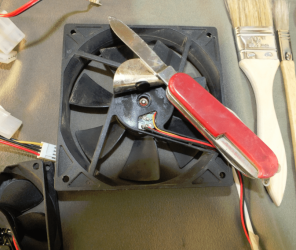
* Carefully prise out the small neoprene plug covering the bearing aperture (I use an old penknife)
* Drop in some of the free up lube (WD40 or RP7 whatever it's called wherever you live)
*Connect to a power source (I have an old PSU rigged for this purpose and testing drives) and turn on the power.
* Let the fan run for some time say a couple of minutes - some that are really quite hard to turn may need a bit of assistance.
* Turn off the power
* Then drop in a couple of drops of light machine oil (I use Singer sewing machine oil)
* Restart the fan with the power supply.
* Let it run again for a few minutes - 2 is usually enough.
* Take a twist of kitchen paper towel and gently blot the excess out of the bearing cavity.
* Replace the neoprene plug
* Stick down the round seal - it might need touch of supaglue - depends if you have spilt any oil on the contact surface.
* Replace the fan to its position - wherever that was.
Result is you now have a fan that will run for as long as you want it too or until you can replace it.
Cost $0.05 as opposed to $9 thereabouts for a new fan plus the wait (and you maynot nee to replace it!
I do this to all old revivals / rejuvenating / dissembles and have never had a problem.
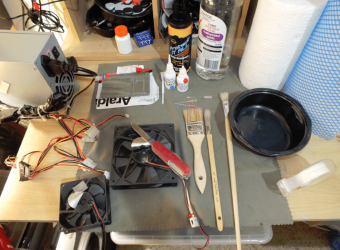
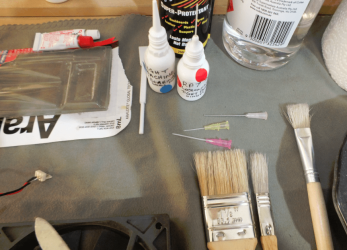
In the pics you will see the materials needed. The small lube bottles are ones that is for instilling ear drops in dogs and cats (comes with screw on top) and one that is an old eye drop container that I have "modified" with an intravenous cannula glued into the removable top - you need to cut down the syringe end first as it is too long. The other is a draw up needle (blunt) and same thing - cut down to fit.

You may need to know some friendly medical person or health professional to get the cannullae - they are Teflon so flexible and the different colours are different gauges - depends on what you want. The very pale pink is the steel one - the cut to the syringe attachment needs to be about 1.5cm from where the tube emerges form the syringe attachment.

The other little gadget is a spatula for mixing the five minute epoxy glue and is fantastic for applying thermal paste to those older (and new CPUs) north bridges.

Oh the PSU is fixed on boot start - green to black and sealed with cloth duct tape and worked with the power switch - not pretty but does the job.:cool:
 

Attachments

  • WRINK1.PNG
    WRINK1.PNG
    344.5 KB · Views: 60
  • WRINK4.PNG
    WRINK4.PNG
    291.5 KB · Views: 51
  • WRINK2.PNG
    WRINK2.PNG
    292.3 KB · Views: 50

My Computer

Computer type
PC/Desktop
Computer Manufacturer/Model Number
Own build (new) Desk1 / Asus ROG Win 7 / Desk2 1st build
OS
Desk1 7 Home Prem / Desk2 10 Pro / Main lap Asus ROG 10 Pro 2 laptop Toshiba 7 Pro Asus P2520 7 & 10
CPU
Desk1 i5 3750K / Laptop i7 GTX 860M / Desk2 i5 2500
Motherboard
Desk1 Asus P877-V / Desk2 Gigabyte H67 UD3H / Laptop ?
Memory
Desk1 8GB (1866) / Desk2 16GB (1333) / Laptop 8Gb DDR3
Graphics Card(s)
Desk 1& 2NVidia GTX 650 & Laptops on board Intel
Sound Card
Desk 1 & 2 -XONAR DG Realtek High Def audio Laptop
Monitor(s) Displays
Desk 1 Benq HD 2450 / Desk2 Philips 24" / Laptop 17.5"
Screen Resolution
1920x1080 D1 & D2 & Laptop 1
Hard Drives
Desk1 Samsung 120GB 830 SSD
Asus ROG 256GB 850 Pro SSD
Desk2 Samsung 840 256 SSD
Toshiba 120GB EVO
PSU
Desk 1 Corsair HX 1050/ Laptop ? / Desk 2 Corsair HX 650
Case
Desk 1 Cooler HAF XM ? Toshiba laptop / Desk2 Coolermaster
Cooling
Fans on all Desk1 -2 Desk2 - all Coolermasters 5 Laptop ?
Keyboard
Desk 1 MS Sidewinder X6 Desk 2 MS Sidewinder X 4
Mouse
Desk 1&2 - Gigabyte MS 900 gamer - laptop - Logitec wireless
Internet Speed
ADSL2+
Other Info
One other Desktop (tester) and spare Toshba laptop both with SSD's
Running Kaspersky 2016 ISS on all machines config'd identically
Logitec audio stereo systems on each machine (x3)
Canon MG5250MFC
Router/modem TP-Link running WPA2SK
Good tips John. :)
 

My Computer

Computer type
PC/Desktop
Computer Manufacturer/Model Number
Home Built Desktop By DataTech
OS
Windows 7 Ultimate X64 SP1
CPU
Intel i5-2550K, Differing ~4.4-4.8GHz No built in GPU
Motherboard
ASUS P8Z68-V PRO/GEN3
Memory
16GB G.Skill Sniper 1866MHz @ 2133MHz 2x8GB
Graphics Card(s)
ASUS GTX650TIB-DC2OC-2GD5, (650TI Boost)
Sound Card
Onboard Realtek 5-1
Monitor(s) Displays
Samsung P2570HD
Screen Resolution
1920x1080
Hard Drives
Samsung 840 Pro 256GB SSD for OS, 500GB Seagate Constellation (Enterprise drive) for Data
PSU
Corsair HX650W
Case
Inwin Dragon Rider
Cooling
Hyper 212 EVO w/two Noctua fans, push-pull, @1300 RPM
Keyboard
E-Z Eyes, bright yellow keys with large characters
Mouse
steelseries SENSEI Laser Pro Gaming
Internet Speed
48-51Mbs Mbs down, 11 Mbs up Xfinity Cable
Antivirus
Norton Internet Security 2013
Browser
IE 10, Opera, Pale Moon if needed
Other Info
4 case fans, LG BluRay-RE, ASUS DVD-RW, Mr. Fusion power supply, 1.21 gigawatts.
Another little wrinkle I use #4 for earthing the machine while you are working on it nothing better than the earth system from your house wiring earth stake.

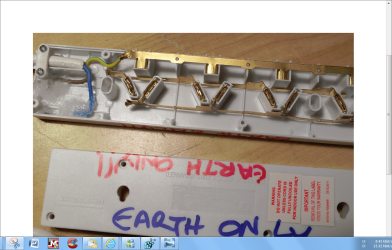
I just got hold of a small cheap power board (we call them here - extension leads in the US?) and cut the live and negative leads to the plug in contacts.
Bury the cut ends in silicone and you have a board you can plug the machine in with without fear of introducing power. You can then clip yourself or anything else like the suction device I am working on to the case via the wrist strap.


You can of course remove the brass contact strips for the live and negative sockets but this makes the device a tad sloppy but one can always make the earth socket tighter.

The anti static suction device is on trial and I will post as soon as I get it perfected.

I do so this because I think it is a much safer bet than the current (no pun) MEN negative line earth system that most power systems have.

An alternative is to get a power plug and just run a thickish green / yellow wire from the earth pin in it alone to the power board and attach that to the case wit a crocodile clip. The plug if you want to be absolutely sure can be filled with silicone after the earth wire is firmly (?soldered?) to the earth pin
 

Attachments

  • BOARD.png
    BOARD.png
    464 KB · Views: 47

My Computer

Computer type
PC/Desktop
Computer Manufacturer/Model Number
Own build (new) Desk1 / Asus ROG Win 7 / Desk2 1st build
OS
Desk1 7 Home Prem / Desk2 10 Pro / Main lap Asus ROG 10 Pro 2 laptop Toshiba 7 Pro Asus P2520 7 & 10
CPU
Desk1 i5 3750K / Laptop i7 GTX 860M / Desk2 i5 2500
Motherboard
Desk1 Asus P877-V / Desk2 Gigabyte H67 UD3H / Laptop ?
Memory
Desk1 8GB (1866) / Desk2 16GB (1333) / Laptop 8Gb DDR3
Graphics Card(s)
Desk 1& 2NVidia GTX 650 & Laptops on board Intel
Sound Card
Desk 1 & 2 -XONAR DG Realtek High Def audio Laptop
Monitor(s) Displays
Desk 1 Benq HD 2450 / Desk2 Philips 24" / Laptop 17.5"
Screen Resolution
1920x1080 D1 & D2 & Laptop 1
Hard Drives
Desk1 Samsung 120GB 830 SSD
Asus ROG 256GB 850 Pro SSD
Desk2 Samsung 840 256 SSD
Toshiba 120GB EVO
PSU
Desk 1 Corsair HX 1050/ Laptop ? / Desk 2 Corsair HX 650
Case
Desk 1 Cooler HAF XM ? Toshiba laptop / Desk2 Coolermaster
Cooling
Fans on all Desk1 -2 Desk2 - all Coolermasters 5 Laptop ?
Keyboard
Desk 1 MS Sidewinder X6 Desk 2 MS Sidewinder X 4
Mouse
Desk 1&2 - Gigabyte MS 900 gamer - laptop - Logitec wireless
Internet Speed
ADSL2+
Other Info
One other Desktop (tester) and spare Toshba laptop both with SSD's
Running Kaspersky 2016 ISS on all machines config'd identically
Logitec audio stereo systems on each machine (x3)
Canon MG5250MFC
Router/modem TP-Link running WPA2SK
Wrinkle #6
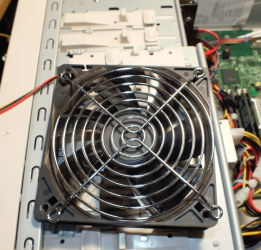
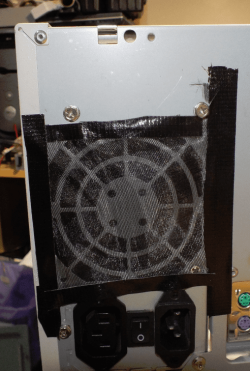
When cleaning up the case and PSU fans on reassembly cover the openings with some sheer curtain material - old coarse pantyhose, net curtaining or Organza will also do.
The front case fan is done exactly as th PSU one in the pics.

This I found not only filters the air but at least halves the noise created by the honeycomb grills that you find on the older machines especially.

Now admittedly it doesn't look pretty (over the PSU intake) but at least it makes for some quieter operation.

Now before anyone says what about the air flow I (at least) cannot find any noticeable decrease in same.

The other thing I found too was that placing one of those large chromed grills between the honeycomb and the larger case fans - inside the case also cuts down the noise level as both methods it occurs to me cuts down on the turbulence caused by the close proximity of the fan to the honeycomb mesh
 

Attachments

  • Jing2.png
    Jing2.png
    285.1 KB · Views: 270
  • Jing4.png
    Jing4.png
    164.9 KB · Views: 181

My Computer

Computer type
PC/Desktop
Computer Manufacturer/Model Number
Own build (new) Desk1 / Asus ROG Win 7 / Desk2 1st build
OS
Desk1 7 Home Prem / Desk2 10 Pro / Main lap Asus ROG 10 Pro 2 laptop Toshiba 7 Pro Asus P2520 7 & 10
CPU
Desk1 i5 3750K / Laptop i7 GTX 860M / Desk2 i5 2500
Motherboard
Desk1 Asus P877-V / Desk2 Gigabyte H67 UD3H / Laptop ?
Memory
Desk1 8GB (1866) / Desk2 16GB (1333) / Laptop 8Gb DDR3
Graphics Card(s)
Desk 1& 2NVidia GTX 650 & Laptops on board Intel
Sound Card
Desk 1 & 2 -XONAR DG Realtek High Def audio Laptop
Monitor(s) Displays
Desk 1 Benq HD 2450 / Desk2 Philips 24" / Laptop 17.5"
Screen Resolution
1920x1080 D1 & D2 & Laptop 1
Hard Drives
Desk1 Samsung 120GB 830 SSD
Asus ROG 256GB 850 Pro SSD
Desk2 Samsung 840 256 SSD
Toshiba 120GB EVO
PSU
Desk 1 Corsair HX 1050/ Laptop ? / Desk 2 Corsair HX 650
Case
Desk 1 Cooler HAF XM ? Toshiba laptop / Desk2 Coolermaster
Cooling
Fans on all Desk1 -2 Desk2 - all Coolermasters 5 Laptop ?
Keyboard
Desk 1 MS Sidewinder X6 Desk 2 MS Sidewinder X 4
Mouse
Desk 1&2 - Gigabyte MS 900 gamer - laptop - Logitec wireless
Internet Speed
ADSL2+
Other Info
One other Desktop (tester) and spare Toshba laptop both with SSD's
Running Kaspersky 2016 ISS on all machines config'd identically
Logitec audio stereo systems on each machine (x3)
Canon MG5250MFC
Router/modem TP-Link running WPA2SK
Two more good ones John.:D
 

My Computer

Computer type
PC/Desktop
Computer Manufacturer/Model Number
Home Built Desktop By DataTech
OS
Windows 7 Ultimate X64 SP1
CPU
Intel i5-2550K, Differing ~4.4-4.8GHz No built in GPU
Motherboard
ASUS P8Z68-V PRO/GEN3
Memory
16GB G.Skill Sniper 1866MHz @ 2133MHz 2x8GB
Graphics Card(s)
ASUS GTX650TIB-DC2OC-2GD5, (650TI Boost)
Sound Card
Onboard Realtek 5-1
Monitor(s) Displays
Samsung P2570HD
Screen Resolution
1920x1080
Hard Drives
Samsung 840 Pro 256GB SSD for OS, 500GB Seagate Constellation (Enterprise drive) for Data
PSU
Corsair HX650W
Case
Inwin Dragon Rider
Cooling
Hyper 212 EVO w/two Noctua fans, push-pull, @1300 RPM
Keyboard
E-Z Eyes, bright yellow keys with large characters
Mouse
steelseries SENSEI Laser Pro Gaming
Internet Speed
48-51Mbs Mbs down, 11 Mbs up Xfinity Cable
Antivirus
Norton Internet Security 2013
Browser
IE 10, Opera, Pale Moon if needed
Other Info
4 case fans, LG BluRay-RE, ASUS DVD-RW, Mr. Fusion power supply, 1.21 gigawatts.
Ok wrinkle #7
Looking for something to clean out those tiny apertures and sockets.

Found some small devices at the pharmacy for cleaning teeth that are brilliant for cleaning out the socket ends of SATA cables, board SATA sockets - especially the ones that haven't been used for ages and other small apertures that are around the machine.

The material used are synthetic and come in various sizes (widths) but I have had no trouble in using them for this purpose - dipped in a little alcohol first of course. Don't use very vigorously as you may damage the pins surfaces you need cleaned. Oh and better keep tooth ones and machine ones separate SATA sockets don't like left overs LOL!!

They make real good toothpicks and also good for cleaning your teeth of course LOL!!
 

Attachments

  • PICK1.png
    PICK1.png
    447.5 KB · Views: 54

My Computer

Computer type
PC/Desktop
Computer Manufacturer/Model Number
Own build (new) Desk1 / Asus ROG Win 7 / Desk2 1st build
OS
Desk1 7 Home Prem / Desk2 10 Pro / Main lap Asus ROG 10 Pro 2 laptop Toshiba 7 Pro Asus P2520 7 & 10
CPU
Desk1 i5 3750K / Laptop i7 GTX 860M / Desk2 i5 2500
Motherboard
Desk1 Asus P877-V / Desk2 Gigabyte H67 UD3H / Laptop ?
Memory
Desk1 8GB (1866) / Desk2 16GB (1333) / Laptop 8Gb DDR3
Graphics Card(s)
Desk 1& 2NVidia GTX 650 & Laptops on board Intel
Sound Card
Desk 1 & 2 -XONAR DG Realtek High Def audio Laptop
Monitor(s) Displays
Desk 1 Benq HD 2450 / Desk2 Philips 24" / Laptop 17.5"
Screen Resolution
1920x1080 D1 & D2 & Laptop 1
Hard Drives
Desk1 Samsung 120GB 830 SSD
Asus ROG 256GB 850 Pro SSD
Desk2 Samsung 840 256 SSD
Toshiba 120GB EVO
PSU
Desk 1 Corsair HX 1050/ Laptop ? / Desk 2 Corsair HX 650
Case
Desk 1 Cooler HAF XM ? Toshiba laptop / Desk2 Coolermaster
Cooling
Fans on all Desk1 -2 Desk2 - all Coolermasters 5 Laptop ?
Keyboard
Desk 1 MS Sidewinder X6 Desk 2 MS Sidewinder X 4
Mouse
Desk 1&2 - Gigabyte MS 900 gamer - laptop - Logitec wireless
Internet Speed
ADSL2+
Other Info
One other Desktop (tester) and spare Toshba laptop both with SSD's
Running Kaspersky 2016 ISS on all machines config'd identically
Logitec audio stereo systems on each machine (x3)
Canon MG5250MFC
Router/modem TP-Link running WPA2SK
Back
Top