Invisible Remote desktop

3DPiper

New member
Member
VIP
Local time
8:43 AM
Messages
109
Is there a way I can invisibly log into a remote desktop?

I want to monitor my home computer while I am away without any users knowing I'm watching their desktop..

Is this built in, or do I need a special program?
 

My Computer

Computer Manufacturer/Model Number
Dell M6400
OS
Windows 7
You can do that with one tools called Keyloggers.
But that tools are dangerous. They contains viruses and may harm your computer.

Also you can remote your pc with Team Viewer or LogMe In,but the user on the pc can see that mouse moving...
 

My Computer

Computer type
PC/Desktop
Computer Manufacturer/Model Number
Custom Build
OS
Windows 10 Pro x64
CPU
Intel Core i5 4440 @Stock
Motherboard
Gigabyte Z97 D3H
Memory
4 x 4GB HyperX Fury DDR3
Graphics Card(s)
Gigabyte GTX 1050Ti O4G
Sound Card
Integrated
Monitor(s) Displays
Dell P2417H
Screen Resolution
1920 x 1080
Hard Drives
Samsung EVO 850 120GB / Toshiba DT01ACA050 1TB 7200prm 32MB
PSU
Riotoro Onyx 750W
Case
NZXT H500 Black-Red
Cooling
Stock CPU + NZXT 120mm + 2x120mm red fans
Keyboard
Modecom Volcano Lanparty
Mouse
Asus ROG Gladius / DeepCool E-Pad Plus
Internet Speed
DOCSIS 50/3 Mbit
Browser
Google Chrome
Other Info
Asus K55VJ(i5 3210M, GT635M / 2GB, 8GB DDR3, 500GB HDD)
Is there a way I can invisibly log into a remote desktop?

I want to monitor my home computer while I am away without any users knowing I'm watching their desktop..

Is this built in, or do I need a special program?

Hi there

What OS is the desktop running -- if it's NOT a server then presumably only ONE person can be logged on at a time. If you want to check Internet sites visited etc simply use the logging in the Router -- by far the easiest method.

Who is actually allowed to use this desktop.

IMO you might be better off setting up a "Virtual Server" if you have several users able to use the machine -- then its easy using server logging to keep tabs on users etc -- you can set all sorts of privilege levels etc etc.

So I'm not sure what you are trying to achieve here.

If you DON'T want people to use your home computer then just secure it with a proper password.

I think also most Windows versions allow you to set users in groups with different privileges.

Linux certainly does.

Cheers
jimbo
 

My Computer

Computer type
PC/Desktop
Computer Manufacturer/Model Number
Custom built, several laptops HP/ASUS
OS
Linux CENTOS 7 / various Windows OS'es and servers
CPU
Intel i7 Intel i5
Memory
8GB, 16GB
Graphics Card(s)
On Motherboard
Sound Card
Realtek HD audio
Monitor(s) Displays
Apple Cinema display, Samsung LCD
Screen Resolution
1920 X 1080
Hard Drives
4 X 1TB SATA
Mouse
Toshiba wireless laser
Internet Speed
> 20MB up
Hi,

Both computers are using Win7Ultimate64x..

I am on a notebook, they are on a home PC..

The PC has 5 user accounts with only one the administrator (my wife).. We have recently been given custody of my nephew, a very sly 15 year old boy.. He has been in trouble before and we would like to make sure there are no problems in our own home.. I have HideTools Parental Controls running to keep him from social sites, but he still has to use the computer for school work.. I just want to be able to check in while he is 'working' to make sure he is working.. I can check the Parental Controls log later to see what happened, but it is easier to just say 'get off youtube' or 'stop surfing google and get your homework done'..

If I own both computers, and I authorize it, I should be able to just check the desktop remotely to monitor activity.. yes?
 

My Computer

Computer Manufacturer/Model Number
Dell M6400
OS
Windows 7
Understandable situation, but you might want to be subtle about the way you confront him. If he is on youtube and you are not there and you call and say get off youtube, he will know the computer is being watched and he will try to get around the watching. At that point you dont need to be sly and all secretive about when you are watching....

I would use the logs if that already is enough. and then scold him when he does misbehave and take away his computer priveledges. Let him work on the computer for schoolwork when you get home from work.

And keep the computer in a part of the house that it can easily be seen from.

Good Luck
 

My Computer

Computer type
Laptop
Computer Manufacturer/Model Number
ASUS G60-RBBX05
OS
Win7 Home Premium 64x
CPU
Intel Core 2 Duo P7450 / 2.13 GHz (2.29 with Extreme Turbo)
Memory
4 GB PC-6400 Hyundai (2X2) at 800Mhz
Graphics Card(s)
NVIDIA GeForce GTX 260M 1GB DDR3 VRAM
Monitor(s) Displays
16" LED Backlit
Screen Resolution
1366 x 768 on laptop 1600x1050 max res on 22" external mon
Hard Drives
OCZ Agility 3 60GB SSD / 320 GB - Serial ATA-150 - 7200 rpm
PSU
6-cell Lithium ion { lasts 1.5 hours }
Case
ASUS G60 Laptop
Keyboard
Chicklet type back-lit (white light) keyboard
Mouse
Logitech G9 Laser Mouse 3200dpi and 1000 reports per minute
Internet Speed
Comcast 8.60mb/s up - 3.11mb/s down
Antivirus
MSE
Browser
Firefox
Other Info
General mid-budget gaming Comp. Low batterylife - High FrameRates - currently overheating problems :(

2nd Rig: Case: Rosewill BLACKHAWK Gaming ATX Mid Tower Computer Case

Mobo: GIGABYTE GA-990FXA-UD3
CPU: AMD FX-6200 Zambezi 3.8GHz (4.1GHz Turbo)
Heatsink: COOLER MASTER V8 CPU Cooler
RAM: Patriot Viper 3 8GB (2 x 4GB) 240-Pin DDR3 SDRAM 1866 (PC3 15000)
GPU: SAPPHIRE Radeon HD 6850 1GB 2
Hi there
For Internet access you could ensure that 1) The router blocks certain sites,
2) his computer only gets Internet access via another machine (like a server or whatever) and this machine can easily control the Internet access.

Set it up so his I.E (or whatever browser he's using) has to use a Proxy server -- this sounds complex but isn't actually too difficult to do -- this is how a lot of companies control Internet access.

Just search Google on Setting up a Home proxy server - there's too many links to paste one here -

However the easiest method is to use a program (Free) called Winproxy .

Instructions here

WinProxy :: Installing and configuring WinProxy

Once you've got this working you could get the program (server) to send you an email or message immediately he logs on to something he shouldn't be doing.

You can even set it up that Internet access is only allowed at certain times and for certain periods.

Actually blocking Google is IMO a bad idea as this site is probably a great help for people when doing homework -- I just wish I'd had a tool like google when I was 15 !!.

Your server can still block the sites if google re-directs to a site you don't want him access to.

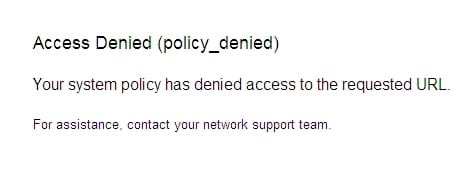
The server will send this type of message (you can customize it to whatever you want BTW)

enc screenshot


Cheers
jimbo

 

Attachments

  • proxy.jpg
    proxy.jpg
    8.7 KB · Views: 6

My Computer

Computer type
PC/Desktop
Computer Manufacturer/Model Number
Custom built, several laptops HP/ASUS
OS
Linux CENTOS 7 / various Windows OS'es and servers
CPU
Intel i7 Intel i5
Memory
8GB, 16GB
Graphics Card(s)
On Motherboard
Sound Card
Realtek HD audio
Monitor(s) Displays
Apple Cinema display, Samsung LCD
Screen Resolution
1920 X 1080
Hard Drives
4 X 1TB SATA
Mouse
Toshiba wireless laser
Internet Speed
> 20MB up
Back
Top