
Iolo Sys. Mechanic gadget

Generator85

New member
Local time
10:48 AM
Messages
9
Ok yet another gadget thread..
So I have Iolo System Mechanic and it comes with this gadget..
I've used it along with others for a while now..
I go to renew and upgrade ISM.. and when I do the gadget stops working..
I contact customer support (just loads of help) and they swear up and down that it has nothing to do with their software.. that it's a MS thing.
Evey "solution" I have come across has been no help.
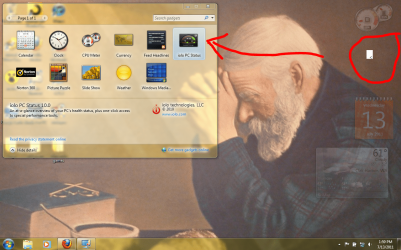
7forumsnapshot.PNG

This is what's going on here.. If anyone can help it'd be much appreciated.
 

My Computer

Computer Manufacturer/Model Number
HP Pavilion dv6000
OS
Windows 7 Home Premium 32bit.
CPU
Intel Core2 Duo CPU T5550 @ 1.83GHz 1.83GHz
Motherboard
Quanta 30CC Version 79.29
Memory
3GB
Graphics Card(s)
Mobile Intel 965 Express Chipset Family, 358 MB
Sound Card
Realtek High Definition Audio, Unimodem Half-Duplex Audio
Monitor(s) Displays
Generic PnP
Hard Drives
WDC WD2500BEVS-60UST (238472 MB)

My Computer

Computer type
PC/Desktop
Computer Manufacturer/Model Number
Self built custom
OS
64-bit Windows 11 Pro for Workstations
CPU
Intel i7-8700K OC'd to 5 GHz
Motherboard
ASUS ROG Maximus XI Formula Z390
Memory
64 GB (4x16GB) G.SKILL TridentZ RGB DDR4 3600 MHz
Graphics Card(s)
ASUS ROG-STRIX-GTX1080TI-O11G-GAMING
Sound Card
Integrated
Monitor(s) Displays
2 x Samsung Odyssey G7 27"
Screen Resolution
2560x1440
Hard Drives
1TB Samsung 990 PRO M.2,
4TB Samsung 990 PRO PRO M.2,
TerraMaster F8 SSD Plus NAS
PSU
Seasonic Prime Titanium 850W
Case
Thermaltake Core P3
Cooling
Corsair Hydro H115i
Keyboard
Logitech wireless K800
Mouse
Logitech MX Master 4
Internet Speed
2 Gb/s Download and 100 Mb/s Upload
Antivirus
Malwarebyte Anti-Malware Premium
Browser
Google Chrome
Other Info
Logitech Z625 speaker system,
Logitech BRIO 4K Pro webcam,
HP Color LaserJet Pro MFP M477fdn,
APC SMART-UPS RT 1000 XL - SURT1000XLI,
Galaxy S23 Plus phone
No, I hadn't tried that, but I gave it a whirl just now, and no luck. Thanks anyhow.
 

My Computer

Computer Manufacturer/Model Number
HP Pavilion dv6000
OS
Windows 7 Home Premium 32bit.
CPU
Intel Core2 Duo CPU T5550 @ 1.83GHz 1.83GHz
Motherboard
Quanta 30CC Version 79.29
Memory
3GB
Graphics Card(s)
Mobile Intel 965 Express Chipset Family, 358 MB
Sound Card
Realtek High Definition Audio, Unimodem Half-Duplex Audio
Monitor(s) Displays
Generic PnP
Hard Drives
WDC WD2500BEVS-60UST (238472 MB)
Two things to try. Turn off the gadget, then re-enable through System Mechanic:

From the Individual Tools pane, click Manage Add-ons and then click Stop next to Configure PC Health Status Gadget.

From the Individual Tools pane, click Manage Add-ons and then click Start next to Configure PC Health Status Gadget.

Try turning off, then re-enabling the Windows Gadget Platform

http://www.sevenforums.com/tutorials/5023-windows-features-turn-off.html

Scroll down to Windows Gadget Platform> Untick it and reboot> Repeat, but retick it> Open gadgets and add the SM gadget again. A Guy
 

My Computer

Computer type
PC/Desktop
OS
Windows 10 Home x64
CPU
INTEL Core i5-750 Quad-Core 3.37GHz
Motherboard
ASUS P7P55D
Memory
HyperX Fury Black Series 8GB (2 x 4GB) 1866Mhz
Graphics Card(s)
EVGA GeForce GTX 750 Superclocked 1GB 128-Bit GDDR5
Monitor(s) Displays
LG 32MA68HY 32" IPS
Screen Resolution
1920 x 1080
Hard Drives
Samsung 840 Evo 120GB, SEAGATE 500GB Barracuda® 7200.12, SATA 3 Gb/s, 7200 RPM, 16MB cache
PSU
ANTEC TruePower New TP-550, 80 PLUS, 550W
Case
ANTEC Three Hundred Illusion
Cooling
COOLER MASTER Hyper 212 Plus, 4 x 120mm 1 x 140mm Noctua's
Internet Speed
85 + Mbps
Antivirus
Avast
Browser
Vivaldi
I appreciate your help, but I've already tried both of those things. I realize that this problem is petty, but it's driving me up the wall.. I guess I can attribute it to laziness as it's much easier to rely on a gadget to tell you when to clean up rather than clicking a few times to find out yourself.
 

My Computer

Computer Manufacturer/Model Number
HP Pavilion dv6000
OS
Windows 7 Home Premium 32bit.
CPU
Intel Core2 Duo CPU T5550 @ 1.83GHz 1.83GHz
Motherboard
Quanta 30CC Version 79.29
Memory
3GB
Graphics Card(s)
Mobile Intel 965 Express Chipset Family, 358 MB
Sound Card
Realtek High Definition Audio, Unimodem Half-Duplex Audio
Monitor(s) Displays
Generic PnP
Hard Drives
WDC WD2500BEVS-60UST (238472 MB)
I'd say uninstalling System Mechanic and the gadget, and reinstalling SM would be the only thing left. If you've tried that, then I'm out of ideas, sorry. A Guy
 

My Computer

Computer type
PC/Desktop
OS
Windows 10 Home x64
CPU
INTEL Core i5-750 Quad-Core 3.37GHz
Motherboard
ASUS P7P55D
Memory
HyperX Fury Black Series 8GB (2 x 4GB) 1866Mhz
Graphics Card(s)
EVGA GeForce GTX 750 Superclocked 1GB 128-Bit GDDR5
Monitor(s) Displays
LG 32MA68HY 32" IPS
Screen Resolution
1920 x 1080
Hard Drives
Samsung 840 Evo 120GB, SEAGATE 500GB Barracuda® 7200.12, SATA 3 Gb/s, 7200 RPM, 16MB cache
PSU
ANTEC TruePower New TP-550, 80 PLUS, 550W
Case
ANTEC Three Hundred Illusion
Cooling
COOLER MASTER Hyper 212 Plus, 4 x 120mm 1 x 140mm Noctua's
Internet Speed
85 + Mbps
Antivirus
Avast
Browser
Vivaldi
Yeah.. I guess I should've done that first, but at least I know what to do in the event other gadgets mess up.. Thanks a bunch.
 

My Computer

Computer Manufacturer/Model Number
HP Pavilion dv6000
OS
Windows 7 Home Premium 32bit.
CPU
Intel Core2 Duo CPU T5550 @ 1.83GHz 1.83GHz
Motherboard
Quanta 30CC Version 79.29
Memory
3GB
Graphics Card(s)
Mobile Intel 965 Express Chipset Family, 358 MB
Sound Card
Realtek High Definition Audio, Unimodem Half-Duplex Audio
Monitor(s) Displays
Generic PnP
Hard Drives
WDC WD2500BEVS-60UST (238472 MB)
No problem, glad I could attempt to help :)

A Guy
 

My Computer

Computer type
PC/Desktop
OS
Windows 10 Home x64
CPU
INTEL Core i5-750 Quad-Core 3.37GHz
Motherboard
ASUS P7P55D
Memory
HyperX Fury Black Series 8GB (2 x 4GB) 1866Mhz
Graphics Card(s)
EVGA GeForce GTX 750 Superclocked 1GB 128-Bit GDDR5
Monitor(s) Displays
LG 32MA68HY 32" IPS
Screen Resolution
1920 x 1080
Hard Drives
Samsung 840 Evo 120GB, SEAGATE 500GB Barracuda® 7200.12, SATA 3 Gb/s, 7200 RPM, 16MB cache
PSU
ANTEC TruePower New TP-550, 80 PLUS, 550W
Case
ANTEC Three Hundred Illusion
Cooling
COOLER MASTER Hyper 212 Plus, 4 x 120mm 1 x 140mm Noctua's
Internet Speed
85 + Mbps
Antivirus
Avast
Browser
Vivaldi
So I reinstalled ISM, but no luck. I'm doing more research now, still, any help, hints or ideas are welcome.. from anybody.
 

My Computer

Computer Manufacturer/Model Number
HP Pavilion dv6000
OS
Windows 7 Home Premium 32bit.
CPU
Intel Core2 Duo CPU T5550 @ 1.83GHz 1.83GHz
Motherboard
Quanta 30CC Version 79.29
Memory
3GB
Graphics Card(s)
Mobile Intel 965 Express Chipset Family, 358 MB
Sound Card
Realtek High Definition Audio, Unimodem Half-Duplex Audio
Monitor(s) Displays
Generic PnP
Hard Drives
WDC WD2500BEVS-60UST (238472 MB)
Last edited by a moderator:

My Computer

Computer type
PC/Desktop
OS
Windows 10 Home x64
CPU
INTEL Core i5-750 Quad-Core 3.37GHz
Motherboard
ASUS P7P55D
Memory
HyperX Fury Black Series 8GB (2 x 4GB) 1866Mhz
Graphics Card(s)
EVGA GeForce GTX 750 Superclocked 1GB 128-Bit GDDR5
Monitor(s) Displays
LG 32MA68HY 32" IPS
Screen Resolution
1920 x 1080
Hard Drives
Samsung 840 Evo 120GB, SEAGATE 500GB Barracuda® 7200.12, SATA 3 Gb/s, 7200 RPM, 16MB cache
PSU
ANTEC TruePower New TP-550, 80 PLUS, 550W
Case
ANTEC Three Hundred Illusion
Cooling
COOLER MASTER Hyper 212 Plus, 4 x 120mm 1 x 140mm Noctua's
Internet Speed
85 + Mbps
Antivirus
Avast
Browser
Vivaldi
Thanks for the help again... I tried the clean startup, and the problem wasn't there. I opened the guest account and tried opening the gadget, but the problem was there too. So I just decided to ignore it... but, as it turns out, I'm not good at that either. I gotta figure this out.. it's like an annoying eye twitch, or a hair in your throat.
 

My Computer

Computer Manufacturer/Model Number
HP Pavilion dv6000
OS
Windows 7 Home Premium 32bit.
CPU
Intel Core2 Duo CPU T5550 @ 1.83GHz 1.83GHz
Motherboard
Quanta 30CC Version 79.29
Memory
3GB
Graphics Card(s)
Mobile Intel 965 Express Chipset Family, 358 MB
Sound Card
Realtek High Definition Audio, Unimodem Half-Duplex Audio
Monitor(s) Displays
Generic PnP
Hard Drives
WDC WD2500BEVS-60UST (238472 MB)
Had the same problem. Couldn't find the gadget. But I found it. Where ???
Go to Control Panel, select Desktop Gadgets...and there it is ! "iolo PC Status" .
Just double click it and it will appear on your desktop.
Now that was easy !
 

My Computer

Computer Manufacturer/Model Number
HP Pavilion Slimline S5560F
OS
home premium 64
CPU
AMD Phenom IIx4 830 processor 2.8GHz
Memory
6gb
Graphics Card(s)
ATI Radeon HD5450
Sound Card
AMD HD Audio
Monitor(s) Displays
HP 2210m x 2
Hard Drives
WDC WD10 EADS-65P6B0 SATA
IOMEGA LP-HD UP
(SM: System Mechanic (Pro). I am presuming you are running on an Administrator account)

If everything fails,


Try turning UAC all down (or up 1 if its all down as some report problems with side panel and UAC off). Mine is off and I don't have a problem with side panel. Log in again after each change. If it doesn't help leave the UAC all the way down.

Don't uninstall/Install yet. I will tell you soon enough.

Write down your SM registration code if needed.

Make sure windows is updated. .NET might be needed (not sure) try updating it at least to ensure resolving some compatibility issues.

Make sure graphics drivers are updated. (might be various drivers you can update. I find Driver Agent a good source).


Install SM if it's not installed.

There is a chance that the panel is a ressidue from an old installation. Hopefully the many following steps will catch that. You can try looking a bit on the harddisk/registry yourself.

The control panel item is called Desktop Gadgets as pfauteux said. Open it and uninstall the iolo gadget if it doesn't work in side panel.

Install Revo uninstaller (Free) and tell it to uninstall SM and clean it all up. Restart and reinstall SM.

Start SM manually and scan for any errors. (read next first) You should also fix them all.

If you got extern usb drives be careful about SM scanning these .. You could disconnect them or tell SM to bypass them.


When done with SM: Remember to reinstall bluetooth drivers if you make a registry cleanup. Telling SM to ignore registry keys/problems permanently doesn't work for me
:cry:. So reinstalling driver each time I clean registry fully. I don't know about any other drivers with problems.

Restart. Chances is that System Mechanic is now installed and working correctly. If the gadget still isn't displayed even after restart, we should turn our attention to the side panel.

Start
optionalfeatures.exe (Features also found in Control Panel --> Programs and Features).
Try disabling and then enabling Windows Gadget Platform, each time relogging into the account.
Try another gadget to see if it works.

Have you disabled any services? This might be worth investigating. Try to restore default values for those related to explorer/desktop at least.


I would also try to uninstall software I don't need:
Using Revo and google, identify installed programs. Things that change Windows UI behavior are good suspects.
You can try disabling them first in msconfig, if you think they are important to you. Be sure not to disable things needed for gadget side panel or system mechanic.


If still no luck, a Windows restore or even reinstall, probably is the easier way to go.
Be sure to backup as much as you need if you reinstall Windows.
Before taking such a step, I would use Recover Keys (or similar) to backup my registration keys and copy the users under C:\Users at the very least (deleting/skipping directories that has become to big with trivial downloads etc.)

 
Last edited:

My Computer

Computer Manufacturer/Model Number
ASUS
OS
Windows 7 Ultimate x64
CPU
intel core i7 3.06GHz
Back
Top