Solved IP Changing Disconnect my connection

lkurrt

New member
Member
VIP
Local time
4:48 PM
Messages
110
I have a question. Why does my laptop disconnect me whenever I am trying to change my IPv4 address? And also about the DNS Settings.
 

Attachments

  • 12.jpg
    12.jpg
    136.2 KB · Views: 9
  • 13.jpg
    13.jpg
    120.7 KB · Views: 9

My Computer

Computer type
Laptop
Computer Manufacturer/Model Number
Asus
OS
Windows 7 x64
CPU
Intel (R) Core TM i7 CPU @ 2.7ghz
Motherboard
ASUS
Memory
8.00 gb
Graphics Card(s)
Built in
Antivirus
Kaspersky
Browser
Google Chrome
I'm not very familiar with networking. Someone correct me if I'm wrong.

From what I understand, I think you want your computer to set a static IP probably for port forwarding purposes. The problem is that the computer usually gets its IP address from the DHCP server (e.g. the router) and the computer is configured to get a static IP but the DHCP is giving a different IP lease for your computer. That's probably why you lose connectivity.

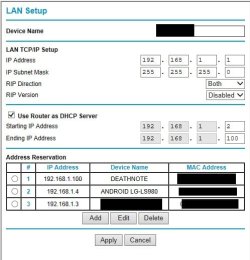
The best way is to assign a static IP for your computer through the router's firmware. This way your computer will always get that IP you set on the router and you won't need to change any settings from Windows. See the screenshot below:

Untitled.jpg
 

My Computer

Computer type
Laptop
Computer Manufacturer/Model Number
Dell Optiplex SX270, Lenovo Z470
OS
Windows 7 Professional x64 SP1
CPU
Intel® Pentium® 4 @ 2.26 GHz, Intel Core i7-2670QM @ 2.20 GH
Motherboard
Dell, Lenovo
Memory
512MB Dual channel DDR SDRAM @ 400MHz 2.5-3-3-7, 8 GB DDR3
Graphics Card(s)
Intel 82865G, Nvidia GeForce 520M Graphics
Sound Card
SoundMax Integrated Audio, Integrated HD Audio
Monitor(s) Displays
LG W1952
Screen Resolution
1440x900, 1366 x 768
Hard Drives
40 GB 2.5" IDE 4200 RPM HDD, 500 GB 5400 RPM Sata 1.5 + 32 GB SSD
PSU
Dell 145 Watt, Lenovo 120 Watt Power Adapter
Case
Optiplex SX270 Small Form Factor, Laptop
Cooling
Dell Proprietary Air Cooling, Stock laptop cooling
Keyboard
Dell SK-8125 USB Keyboard
Mouse
Dell PS/2 2 button ball mouse with wheel scroll
Internet Speed
300 Mbit down / 20 Mbps up Time Warner Cable
Antivirus
MSE, Malwarebytes Scanner
Browser
Internet (Aizawa) Explorer 11
Other Info
Running Windows Server 2012 Datacenter on a virtual machine to run Metro Apps.
I think it's because the IP your assigning to yourself is already in use. What router are you using, or are you using a DHCP Server?
On Cisco routers you can reserve an IP Address so it doesn't get assigned to anyone and then you can manually assign it to yourself. The other option is, if you are using a DHCP server, that you tell it to assign a certain IP only to you. This is done by looking the source MAC-Address in the DHCP-Request packet. Even though you don't have a static IP, you will always get the same IP. This is very comfortable if your Laptop/PC often changes between networks, otherwise you always need to assign a static IP to yourself.
Hope this helps
 

My Computer

Computer type
Laptop
Computer Manufacturer/Model Number
HP
OS
Windows 7 Professional 64-Bit
CPU
i7
Memory
8Gb
Hard Drives
240GB Intel SSD Series 5
Antivirus
Norton
Browser
Internet Explorer
I'm not very familiar with networking. Someone correct me if I'm wrong.

From what I understand, I think you want your computer to set a static IP probably for port forwarding purposes. The problem is that the computer usually gets its IP address from the DHCP server (e.g. the router) and the computer is configured to get a static IP but the DHCP is giving a different IP lease for your computer. That's probably why you lose connectivity.

The best way is to assign a static IP for your computer through the router's firmware. This way your computer will always get that IP you set on the router and you won't need to change any settings from Windows. See the screenshot below:

View attachment 302819

We are using a BUffalo router, I dont know what the model is.
 

My Computer

Computer type
Laptop
Computer Manufacturer/Model Number
Asus
OS
Windows 7 x64
CPU
Intel (R) Core TM i7 CPU @ 2.7ghz
Motherboard
ASUS
Memory
8.00 gb
Graphics Card(s)
Built in
Antivirus
Kaspersky
Browser
Google Chrome
I have a question. Why does my laptop disconnect me whenever I am trying to change my IPv4 address? And also about the DNS Settings.

This isn't something you can just guess at.

The IP you are using isn't even in the correct subnet to work with this router.

You need to use an IP that is in the same subnet "third octet needs to be the same as the router is using" so use 192.168.2.xxx" and also you need to use an IP that isn't in the range of DHCP. So if DHCP is from 192.168.1.2/199 you need to use an IP higher than .199 like .200

The DNS servers also need to be valid, you can use the router for DNS or type in valid DNS IP address's like Google at 8.8.8.8 and 8.8.4.4
 

My Computer

Computer type
PC/Desktop
Computer Manufacturer/Model Number
Home built
OS
Windows 7 Ult, Windows 8.1 Pro,
CPU
Q9650-4.275GHz, E8600 4.5GHz, E6750-3.8GHz
Motherboard
Evga 780i FTW
Memory
G.Skill PC2 9600 1200Mhz 5 5 5 15 2T
Graphics Card(s)
GTX480
Sound Card
Asus Xonar D2
Monitor(s) Displays
HannsG
Screen Resolution
1680X1050
Hard Drives
GSkill Phoenix Pro 120GB SSD
PSU
ThermalTake Toughpower 1000Watt modular
Case
ThermalTake XaserV
Cooling
Xigmatek S1283
Keyboard
Logitech G15
Mouse
Logitech G9
Internet Speed
T1
Basically you're moving. Just as the Post Office has to stop mail to the old address and start mail to the new address

Changing IP addresses requires a disconnect and reconnect with your new address.
 

My Computer

Computer type
Laptop
Computer Manufacturer/Model Number
HP Pavilion dv6-6c10us
OS
x64 (6.3.9600) Win8.1 Pro & soon dual boot x64 (6.1.7601) Win7_SP1 HomePrem
CPU
AMD A6-3420M APU with Radeon(tm) HD Graphics
Motherboard
Hewlett-Packard 1805
Memory
6.00 GB
Graphics Card(s)
AMD Radeon(TM) HD 6520G
Sound Card
(1) AMD High Definition Audio Device (2) IDT High Definiti
Monitor(s) Displays
HP W2072a 20" LCD (1600 x 900) @ 60 Hz
Screen Resolution
1366 x 768 x 32 bits (4294967296 colors) @ 60 Hz
Hard Drives
ST640LM0 00 HM641JI SATA Disk Device
Keyboard
Logitech k520 wireless KB
Mouse
Logitech m320 wireless mouse (bundled with KB)
Internet Speed
15/5 | 54 MB Wireless 'n'
Antivirus
Realtime: Defender or Avast | On-demand: Malwarebytes, ESET
Browser
IE 11 on Win8, IE 10 on win 7
Other Info
Media: [Gimp, Audacity, VLC] || Comm: [WEmail 2012, Skype] || Productivity: [OpenOffice,| Textpad] || Utils: [Sysinternals, cCleaner, Speccy, Defraggler]
Basically you're moving. Just as the Post Office has to stop mail to the old address and start mail to the new address

Changing IP addresses requires a disconnect and reconnect with your new address.


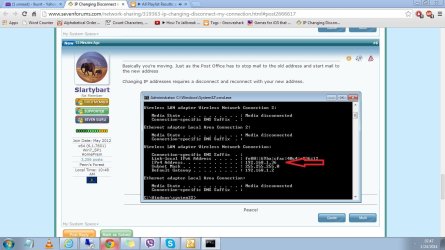
So lets say I change the Ipv4 from .36 to .xx I need to disconnect first right? Sorry guys Im noob.:(
 

Attachments

  • Untitled.jpg
    Untitled.jpg
    113 KB · Views: 2

My Computer

Computer type
Laptop
Computer Manufacturer/Model Number
Asus
OS
Windows 7 x64
CPU
Intel (R) Core TM i7 CPU @ 2.7ghz
Motherboard
ASUS
Memory
8.00 gb
Graphics Card(s)
Built in
Antivirus
Kaspersky
Browser
Google Chrome
First you have to know how the router is configured.

It's normally setup with a subnet of 0 or 1 in home networks.
192.168.0.xx or 192.168.1.xx

Let's start with
Has this ever worked?
Why do you want to change the IP address?
 

My Computer

Computer type
Laptop
Computer Manufacturer/Model Number
HP Pavilion dv6-6c10us
OS
x64 (6.3.9600) Win8.1 Pro & soon dual boot x64 (6.1.7601) Win7_SP1 HomePrem
CPU
AMD A6-3420M APU with Radeon(tm) HD Graphics
Motherboard
Hewlett-Packard 1805
Memory
6.00 GB
Graphics Card(s)
AMD Radeon(TM) HD 6520G
Sound Card
(1) AMD High Definition Audio Device (2) IDT High Definiti
Monitor(s) Displays
HP W2072a 20" LCD (1600 x 900) @ 60 Hz
Screen Resolution
1366 x 768 x 32 bits (4294967296 colors) @ 60 Hz
Hard Drives
ST640LM0 00 HM641JI SATA Disk Device
Keyboard
Logitech k520 wireless KB
Mouse
Logitech m320 wireless mouse (bundled with KB)
Internet Speed
15/5 | 54 MB Wireless 'n'
Antivirus
Realtime: Defender or Avast | On-demand: Malwarebytes, ESET
Browser
IE 11 on Win8, IE 10 on win 7
Other Info
Media: [Gimp, Audacity, VLC] || Comm: [WEmail 2012, Skype] || Productivity: [OpenOffice,| Textpad] || Utils: [Sysinternals, cCleaner, Speccy, Defraggler]
First you have to know how the router is configured.

It's normally setup with a subnet of 0 or 1 in home networks.
192.168.0.xx or 192.168.1.xx

Let's start with
Has this ever worked?
Why do you want to change the IP address?

Its 192.168.1.xx that's the configuration. I did try changing the .xx to .36. I'm connected to the router but I don't have an internet connection. I want to change it because someone is spoofing with my Ip address here in the office
 

My Computer

Computer type
Laptop
Computer Manufacturer/Model Number
Asus
OS
Windows 7 x64
CPU
Intel (R) Core TM i7 CPU @ 2.7ghz
Motherboard
ASUS
Memory
8.00 gb
Graphics Card(s)
Built in
Antivirus
Kaspersky
Browser
Google Chrome
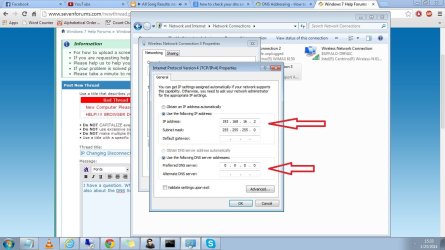
It requires more than just a disconnect and reconnect. An incorrect static IP of 192.168.16.2 was typed into the static IP settings. This IP is in the wrong subnet to work with this network, you only want to change the last octet.

You would be far better served using the DHCP reservation for this as it's better to just use a reservation from a known working IP address.

For a static IP to work it is required that you use an IP that is outside the range of DHCP or you could end up using an IP that is already in use or will be assigned to another machine later which won't work.

It's very simple, just follow directions which have already been posted.
 

My Computer

Computer type
PC/Desktop
Computer Manufacturer/Model Number
Home built
OS
Windows 7 Ult, Windows 8.1 Pro,
CPU
Q9650-4.275GHz, E8600 4.5GHz, E6750-3.8GHz
Motherboard
Evga 780i FTW
Memory
G.Skill PC2 9600 1200Mhz 5 5 5 15 2T
Graphics Card(s)
GTX480
Sound Card
Asus Xonar D2
Monitor(s) Displays
HannsG
Screen Resolution
1680X1050
Hard Drives
GSkill Phoenix Pro 120GB SSD
PSU
ThermalTake Toughpower 1000Watt modular
Case
ThermalTake XaserV
Cooling
Xigmatek S1283
Keyboard
Logitech G15
Mouse
Logitech G9
Internet Speed
T1
OK ill see , I'll try it.
 

My Computer

Computer type
Laptop
Computer Manufacturer/Model Number
Asus
OS
Windows 7 x64
CPU
Intel (R) Core TM i7 CPU @ 2.7ghz
Motherboard
ASUS
Memory
8.00 gb
Graphics Card(s)
Built in
Antivirus
Kaspersky
Browser
Google Chrome
It requires more than just a disconnect and reconnect. An incorrect static IP of 192.168.16.2 was typed into the static IP settings. This IP is in the wrong subnet to work with this network, you only want to change the last octet.

You would be far better served using the DHCP reservation for this as it's better to just use a reservation from a known working IP address.

For a static IP to work it is required that you use an IP that is outside the range of DHCP or you could end up using an IP that is already in use or will be assigned to another machine later which won't work.

It's very simple, just follow directions which have already been posted.


I did try changing it to 192.168.1.xx digits. I'm connected to the router but I cant access the internet.
 

My Computer

Computer type
Laptop
Computer Manufacturer/Model Number
Asus
OS
Windows 7 x64
CPU
Intel (R) Core TM i7 CPU @ 2.7ghz
Motherboard
ASUS
Memory
8.00 gb
Graphics Card(s)
Built in
Antivirus
Kaspersky
Browser
Google Chrome
Could you explain what is happening that causes you to believe someone is spoofing your address?

If someone is spoofing your address at the office, you need to resolve that with your IT department. Changing the IP address won't prevent someone from messing around, if that's the case.

I'm going to guess that spoofing isn't really what is happening, but I don't know the situation. It might be error msgs about IP address conflicts.

Post a screen shot of what happens - why you think it's spoofing. Again, if it is spoofing, talk to your IT person or network admin. Spoofing is not something that should take place in a work environment.

Thanks
 

My Computer

Computer type
Laptop
Computer Manufacturer/Model Number
HP Pavilion dv6-6c10us
OS
x64 (6.3.9600) Win8.1 Pro & soon dual boot x64 (6.1.7601) Win7_SP1 HomePrem
CPU
AMD A6-3420M APU with Radeon(tm) HD Graphics
Motherboard
Hewlett-Packard 1805
Memory
6.00 GB
Graphics Card(s)
AMD Radeon(TM) HD 6520G
Sound Card
(1) AMD High Definition Audio Device (2) IDT High Definiti
Monitor(s) Displays
HP W2072a 20" LCD (1600 x 900) @ 60 Hz
Screen Resolution
1366 x 768 x 32 bits (4294967296 colors) @ 60 Hz
Hard Drives
ST640LM0 00 HM641JI SATA Disk Device
Keyboard
Logitech k520 wireless KB
Mouse
Logitech m320 wireless mouse (bundled with KB)
Internet Speed
15/5 | 54 MB Wireless 'n'
Antivirus
Realtime: Defender or Avast | On-demand: Malwarebytes, ESET
Browser
IE 11 on Win8, IE 10 on win 7
Other Info
Media: [Gimp, Audacity, VLC] || Comm: [WEmail 2012, Skype] || Productivity: [OpenOffice,| Textpad] || Utils: [Sysinternals, cCleaner, Speccy, Defraggler]
It requires more than just a disconnect and reconnect. An incorrect static IP of 192.168.16.2 was typed into the static IP settings. This IP is in the wrong subnet to work with this network, you only want to change the last octet.

You would be far better served using the DHCP reservation for this as it's better to just use a reservation from a known working IP address.

For a static IP to work it is required that you use an IP that is outside the range of DHCP or you could end up using an IP that is already in use or will be assigned to another machine later which won't work.

It's very simple, just follow directions which have already been posted.


I did try changing it to 192.168.1.xx digits. I'm connected to the router but I cant access the internet.

Well actually your router uses a default gateway of 192.168.2.1 therefore the static IP needs to look something like 192.168.2.xx not 1.xx :)

Use DHCP reservation if you are having problems with the static IP settings. It makes no difference either way and it's much easier to set up because you do not need to worry about using an IP that is outside the DHCP range. :cool:
 

My Computer

Computer type
PC/Desktop
Computer Manufacturer/Model Number
Home built
OS
Windows 7 Ult, Windows 8.1 Pro,
CPU
Q9650-4.275GHz, E8600 4.5GHz, E6750-3.8GHz
Motherboard
Evga 780i FTW
Memory
G.Skill PC2 9600 1200Mhz 5 5 5 15 2T
Graphics Card(s)
GTX480
Sound Card
Asus Xonar D2
Monitor(s) Displays
HannsG
Screen Resolution
1680X1050
Hard Drives
GSkill Phoenix Pro 120GB SSD
PSU
ThermalTake Toughpower 1000Watt modular
Case
ThermalTake XaserV
Cooling
Xigmatek S1283
Keyboard
Logitech G15
Mouse
Logitech G9
Internet Speed
T1
Ikurrt, you are not entering "xx" as the octet, are you? "xx" means an unknown number.
 

My Computer

Computer type
PC/Desktop
Computer Manufacturer/Model Number
Home Built Desktop By DataTech
OS
Windows 7 Ultimate X64 SP1
CPU
Intel i5-2550K, Differing ~4.4-4.8GHz No built in GPU
Motherboard
ASUS P8Z68-V PRO/GEN3
Memory
16GB G.Skill Sniper 1866MHz @ 2133MHz 2x8GB
Graphics Card(s)
ASUS GTX650TIB-DC2OC-2GD5, (650TI Boost)
Sound Card
Onboard Realtek 5-1
Monitor(s) Displays
Samsung P2570HD
Screen Resolution
1920x1080
Hard Drives
Samsung 840 Pro 256GB SSD for OS, 500GB Seagate Constellation (Enterprise drive) for Data
PSU
Corsair HX650W
Case
Inwin Dragon Rider
Cooling
Hyper 212 EVO w/two Noctua fans, push-pull, @1300 RPM
Keyboard
E-Z Eyes, bright yellow keys with large characters
Mouse
steelseries SENSEI Laser Pro Gaming
Internet Speed
48-51Mbs Mbs down, 11 Mbs up Xfinity Cable
Antivirus
Norton Internet Security 2013
Browser
IE 10, Opera, Pale Moon if needed
Other Info
4 case fans, LG BluRay-RE, ASUS DVD-RW, Mr. Fusion power supply, 1.21 gigawatts.

My Computer

Computer type
Laptop
Computer Manufacturer/Model Number
Asus
OS
Windows 7 x64
CPU
Intel (R) Core TM i7 CPU @ 2.7ghz
Motherboard
ASUS
Memory
8.00 gb
Graphics Card(s)
Built in
Antivirus
Kaspersky
Browser
Google Chrome
It requires more than just a disconnect and reconnect. An incorrect static IP of 192.168.16.2 was typed into the static IP settings. This IP is in the wrong subnet to work with this network, you only want to change the last octet.

You would be far better served using the DHCP reservation for this as it's better to just use a reservation from a known working IP address.

For a static IP to work it is required that you use an IP that is outside the range of DHCP or you could end up using an IP that is already in use or will be assigned to another machine later which won't work.

It's very simple, just follow directions which have already been posted.


I did try changing it to 192.168.1.xx digits. I'm connected to the router but I cant access the internet.

Well actually your router uses a default gateway of 192.168.2.1 therefore the static IP needs to look something like 192.168.2.xx not 1.xx :)

Use DHCP reservation if you are having problems with the static IP settings. It makes no difference either way and it's much easier to set up because you do not need to worry about using an IP that is outside the DHCP range. :cool:

So im gonna try setting it too 192.168.2.xx


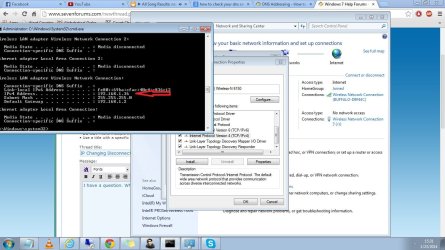
You mean this?
 

Attachments

  • 1.jpg
    1.jpg
    114.7 KB · Views: 2
  • 2.jpg
    2.jpg
    116 KB · Views: 1

My Computer

Computer type
Laptop
Computer Manufacturer/Model Number
Asus
OS
Windows 7 x64
CPU
Intel (R) Core TM i7 CPU @ 2.7ghz
Motherboard
ASUS
Memory
8.00 gb
Graphics Card(s)
Built in
Antivirus
Kaspersky
Browser
Google Chrome
Ikurrt, you are not entering "xx" as the octet, are you? "xx" means an unknown number.

Yes as unknown number.

Which is why I mentioned using DHCP reservation.

If you don't know what your doing this is much easier and saves me hours of trying to explain how IP addresses work.

.XX is just an example, you would need to use an actual number where .XX is. This number also needs to be outside the DHCP range so it won't be repeated.

This entire thing is really blown way out of proportion now, this is very simple. :)
 

My Computer

Computer type
PC/Desktop
Computer Manufacturer/Model Number
Home built
OS
Windows 7 Ult, Windows 8.1 Pro,
CPU
Q9650-4.275GHz, E8600 4.5GHz, E6750-3.8GHz
Motherboard
Evga 780i FTW
Memory
G.Skill PC2 9600 1200Mhz 5 5 5 15 2T
Graphics Card(s)
GTX480
Sound Card
Asus Xonar D2
Monitor(s) Displays
HannsG
Screen Resolution
1680X1050
Hard Drives
GSkill Phoenix Pro 120GB SSD
PSU
ThermalTake Toughpower 1000Watt modular
Case
ThermalTake XaserV
Cooling
Xigmatek S1283
Keyboard
Logitech G15
Mouse
Logitech G9
Internet Speed
T1
Could you explain what is happening that causes you to believe someone is spoofing your address?

If someone is spoofing your address at the office, you need to resolve that with your IT department. Changing the IP address won't prevent someone from messing around, if that's the case.

I'm going to guess that spoofing isn't really what is happening, but I don't know the situation. It might be error msgs about IP address conflicts.

Post a screen shot of what happens - why you think it's spoofing. Again, if it is spoofing, talk to your IT person or network admin. Spoofing is not something that should take place in a work environment.

Thanks

Spoofing , re routing websites, turning the images upside down blurring the images etc.. Things like that.
 

My Computer

Computer type
Laptop
Computer Manufacturer/Model Number
Asus
OS
Windows 7 x64
CPU
Intel (R) Core TM i7 CPU @ 2.7ghz
Motherboard
ASUS
Memory
8.00 gb
Graphics Card(s)
Built in
Antivirus
Kaspersky
Browser
Google Chrome
Good catch Britton30.

Maybe this will help everyone.

Set your IP config to "Obtain automatically" for the IP address and DNS servers

connect and post an ipconfig - all
 

My Computer

Computer type
Laptop
Computer Manufacturer/Model Number
HP Pavilion dv6-6c10us
OS
x64 (6.3.9600) Win8.1 Pro & soon dual boot x64 (6.1.7601) Win7_SP1 HomePrem
CPU
AMD A6-3420M APU with Radeon(tm) HD Graphics
Motherboard
Hewlett-Packard 1805
Memory
6.00 GB
Graphics Card(s)
AMD Radeon(TM) HD 6520G
Sound Card
(1) AMD High Definition Audio Device (2) IDT High Definiti
Monitor(s) Displays
HP W2072a 20" LCD (1600 x 900) @ 60 Hz
Screen Resolution
1366 x 768 x 32 bits (4294967296 colors) @ 60 Hz
Hard Drives
ST640LM0 00 HM641JI SATA Disk Device
Keyboard
Logitech k520 wireless KB
Mouse
Logitech m320 wireless mouse (bundled with KB)
Internet Speed
15/5 | 54 MB Wireless 'n'
Antivirus
Realtime: Defender or Avast | On-demand: Malwarebytes, ESET
Browser
IE 11 on Win8, IE 10 on win 7
Other Info
Media: [Gimp, Audacity, VLC] || Comm: [WEmail 2012, Skype] || Productivity: [OpenOffice,| Textpad] || Utils: [Sysinternals, cCleaner, Speccy, Defraggler]
Back
Top