IP Config not valid- the 9th hour in

RedsennaCy

New member
Local time
11:33 PM
Messages
21
I'm almost ready to break down in tears...I've been working on trying to resolve this for 9 hours now. Same ol' song, but I just have not been able to fix this.

Brand new parts, brand new computer (built myself), but when Local Area connection was plugged in..nada. Wireless works.

I have downloaded drivers for my mobo, i've searched for firmware, I have reset my router/modem/ipconfig, I have tried to manually change the IP...I've searched high and low via the internet for similar situations that have been solved (which none have been)

I have no clue what to do.

my spec's:
Asus M4A88T-M Mobo
AMD Phenom II cpu
DDR3 1600 4 Gb (2x2) RAM
Radeon HD 4850 GPU
Modx Stream pro PSU
1Tb HDD
Windows 7 64 Bit Ultimate - OS

Please please please please please...if you can help solve this, all I want to do is get online via land line. The issue is not the jack or the cord.

I really don't know if it's Win 7 or my mobo

Thank you
 

My Computer My Computer

OS
Windows 7 64 bit
CPU
AMD Phenom II
Motherboard
ASUS M4A88T-M
Memory
DDR3 1600 RAM
Graphics Card(s)
Radeon HD 4850
Sound Card
mobo
Monitor(s) Displays
Asus 23" LCD
Hard Drives
1Tb
PSU
500+W
RedsennaCy, what exactly is the problem? You can't get online on wired connection? If so, can you elaborate what you've done so far in detail (including IP addresses you put in, etc).

zzz2496
 

My Computer My Computer

Computer Manufacturer/Model Number
Self Built
OS
Windows7 Ultimate 64bit
CPU
Intel Core 2 Quad Q6600
Motherboard
Abit IN9-32X-MMAX
Memory
DDR2 Adata 4GB
Graphics Card(s)
Nvidia GeForce GTX 285 1024 and Nvidia GeForce 8800GT 512
Sound Card
Asus Xonar HDAV 1.3
Monitor(s) Displays
Dell 2407WFP and BenQ 2400v and Philips 150v3
Screen Resolution
3840x1200 and 1024x768
Hard Drives
2 WDC 1TB
1 WDC 1.5TB
1 WDC 640GB
1 WDC 320GB
1 Seagate 200GB
PSU
Corsair TX 850W
Case
Cooler Master HAF932
Cooling
Arctic Cooling Freezer Extreme and plenty of fans...
Keyboard
MicrosoftNaturalKeyboard 4000/Apple Alu keyboard/Dinovo mini
Mouse
Logitech G5/MarbleMouseTrackball/PerformanceMX/SpacePilotPRO
Internet Speed
1.5Mbps down/384Kbps up
Other Info
APC SURT 1000XL
Logitech Z-560
Wiimote
Mikrotik Router
Linksys (now Cisco) SD2008 8 port Gigabit switch
Linksys WRT54G (acting as AP)
Apple wireless Aluminium keyboard
Apple Magic Mouse
Xbox360 wired controller
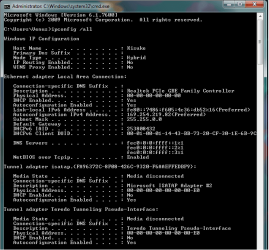
Yes, I cannot get online with a wired connection. I will post my IP config /all here in a moment

I have tried to refresh my address, I am unsure of how to go in and manually change it. I know mine starts with 169.xx and that is not what I want (192.xx)

I have read that if I go in and reset or renew the address, changing it to all 1's and then letting the comp find an automatic address it might help.

At this point, I'm willing to repeat any steps/try something new...this comp is only a day old
 

Attachments

  • ip config all 10102010.png
    ip config all 10102010.png
    20.1 KB · Views: 10

My Computer My Computer

OS
Windows 7 64 bit
CPU
AMD Phenom II
Motherboard
ASUS M4A88T-M
Memory
DDR3 1600 RAM
Graphics Card(s)
Radeon HD 4850
Sound Card
mobo
Monitor(s) Displays
Asus 23" LCD
Hard Drives
1Tb
PSU
500+W
I also want to mention that I built my boyfriend's computer exactly like mine. However...his laptop (which I'm typing from) can get internet from the cable, but the two towers that are identical both cannot
 

My Computer My Computer

OS
Windows 7 64 bit
CPU
AMD Phenom II
Motherboard
ASUS M4A88T-M
Memory
DDR3 1600 RAM
Graphics Card(s)
Radeon HD 4850
Sound Card
mobo
Monitor(s) Displays
Asus 23" LCD
Hard Drives
1Tb
PSU
500+W
1. Open "Network and Sharing Center"->"Change adapter settings", right click the wired connection - click properties.
2. On "Networking" tab, look for "Internet Protocol Version 4", double click it.
3. Now, in there, define your static IP address. Don't forget to put in DNS server and Default Gateway too. If you're confused as of what to put in, post me a screenshot of your wifi's ipconfig /all info...

zzz2496.
 

My Computer My Computer

Computer Manufacturer/Model Number
Self Built
OS
Windows7 Ultimate 64bit
CPU
Intel Core 2 Quad Q6600
Motherboard
Abit IN9-32X-MMAX
Memory
DDR2 Adata 4GB
Graphics Card(s)
Nvidia GeForce GTX 285 1024 and Nvidia GeForce 8800GT 512
Sound Card
Asus Xonar HDAV 1.3
Monitor(s) Displays
Dell 2407WFP and BenQ 2400v and Philips 150v3
Screen Resolution
3840x1200 and 1024x768
Hard Drives
2 WDC 1TB
1 WDC 1.5TB
1 WDC 640GB
1 WDC 320GB
1 Seagate 200GB
PSU
Corsair TX 850W
Case
Cooler Master HAF932
Cooling
Arctic Cooling Freezer Extreme and plenty of fans...
Keyboard
MicrosoftNaturalKeyboard 4000/Apple Alu keyboard/Dinovo mini
Mouse
Logitech G5/MarbleMouseTrackball/PerformanceMX/SpacePilotPRO
Internet Speed
1.5Mbps down/384Kbps up
Other Info
APC SURT 1000XL
Logitech Z-560
Wiimote
Mikrotik Router
Linksys (now Cisco) SD2008 8 port Gigabit switch
Linksys WRT54G (acting as AP)
Apple wireless Aluminium keyboard
Apple Magic Mouse
Xbox360 wired controller
we can't get wifi here. The reason I know I can get wireless is from when I built it last night and got online (we built the comp's at my friend's house) but didn't try it when we got to my bf's apartment complex last night.

Still want a wifi ip config /all?

I have the IPv4 pulled up waiting for entry, and I posted my last IP config /all
 

My Computer My Computer

OS
Windows 7 64 bit
CPU
AMD Phenom II
Motherboard
ASUS M4A88T-M
Memory
DDR3 1600 RAM
Graphics Card(s)
Radeon HD 4850
Sound Card
mobo
Monitor(s) Displays
Asus 23" LCD
Hard Drives
1Tb
PSU
500+W
or maybe, do you want an IP config /all from the laptop? (the comp that can get online)
 

My Computer My Computer

OS
Windows 7 64 bit
CPU
AMD Phenom II
Motherboard
ASUS M4A88T-M
Memory
DDR3 1600 RAM
Graphics Card(s)
Radeon HD 4850
Sound Card
mobo
Monitor(s) Displays
Asus 23" LCD
Hard Drives
1Tb
PSU
500+W
Yes, the ipconfig /all from a working computer, please.

zzz2496
 

My Computer My Computer

Computer Manufacturer/Model Number
Self Built
OS
Windows7 Ultimate 64bit
CPU
Intel Core 2 Quad Q6600
Motherboard
Abit IN9-32X-MMAX
Memory
DDR2 Adata 4GB
Graphics Card(s)
Nvidia GeForce GTX 285 1024 and Nvidia GeForce 8800GT 512
Sound Card
Asus Xonar HDAV 1.3
Monitor(s) Displays
Dell 2407WFP and BenQ 2400v and Philips 150v3
Screen Resolution
3840x1200 and 1024x768
Hard Drives
2 WDC 1TB
1 WDC 1.5TB
1 WDC 640GB
1 WDC 320GB
1 Seagate 200GB
PSU
Corsair TX 850W
Case
Cooler Master HAF932
Cooling
Arctic Cooling Freezer Extreme and plenty of fans...
Keyboard
MicrosoftNaturalKeyboard 4000/Apple Alu keyboard/Dinovo mini
Mouse
Logitech G5/MarbleMouseTrackball/PerformanceMX/SpacePilotPRO
Internet Speed
1.5Mbps down/384Kbps up
Other Info
APC SURT 1000XL
Logitech Z-560
Wiimote
Mikrotik Router
Linksys (now Cisco) SD2008 8 port Gigabit switch
Linksys WRT54G (acting as AP)
Apple wireless Aluminium keyboard
Apple Magic Mouse
Xbox360 wired controller
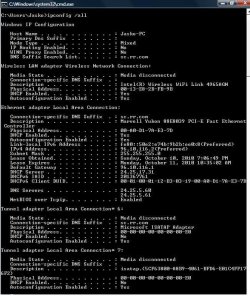
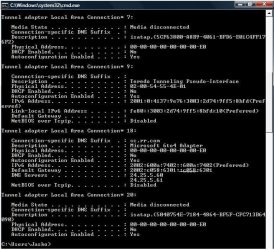
mk, got part 1 and 2 here. 7 is repeated to show I wasn't missing anything
 

Attachments

  • ip10_10_2010_1.jpg
    ip10_10_2010_1.jpg
    84.4 KB · Views: 8
  • ip10_10_2010_2.jpg
    ip10_10_2010_2.jpg
    77 KB · Views: 5

My Computer My Computer

OS
Windows 7 64 bit
CPU
AMD Phenom II
Motherboard
ASUS M4A88T-M
Memory
DDR3 1600 RAM
Graphics Card(s)
Radeon HD 4850
Sound Card
mobo
Monitor(s) Displays
Asus 23" LCD
Hard Drives
1Tb
PSU
500+W
RedsennaCy, that's a "public" IP address... What is the make/model of your "router"? Here's what I understand: your current computer got it's IP address directly from your ISP. As far as I know, ISPs will only issue 1 IP address to each customer. Now, normally you have a "router" which will do Network Address Translation for you, I don't see your router doing that...

zzz2496
 

My Computer My Computer

Computer Manufacturer/Model Number
Self Built
OS
Windows7 Ultimate 64bit
CPU
Intel Core 2 Quad Q6600
Motherboard
Abit IN9-32X-MMAX
Memory
DDR2 Adata 4GB
Graphics Card(s)
Nvidia GeForce GTX 285 1024 and Nvidia GeForce 8800GT 512
Sound Card
Asus Xonar HDAV 1.3
Monitor(s) Displays
Dell 2407WFP and BenQ 2400v and Philips 150v3
Screen Resolution
3840x1200 and 1024x768
Hard Drives
2 WDC 1TB
1 WDC 1.5TB
1 WDC 640GB
1 WDC 320GB
1 Seagate 200GB
PSU
Corsair TX 850W
Case
Cooler Master HAF932
Cooling
Arctic Cooling Freezer Extreme and plenty of fans...
Keyboard
MicrosoftNaturalKeyboard 4000/Apple Alu keyboard/Dinovo mini
Mouse
Logitech G5/MarbleMouseTrackball/PerformanceMX/SpacePilotPRO
Internet Speed
1.5Mbps down/384Kbps up
Other Info
APC SURT 1000XL
Logitech Z-560
Wiimote
Mikrotik Router
Linksys (now Cisco) SD2008 8 port Gigabit switch
Linksys WRT54G (acting as AP)
Apple wireless Aluminium keyboard
Apple Magic Mouse
Xbox360 wired controller
It looks like a Linksys SD208 is the router

did I misunderstand something? Or do something wrong? The only thing I'm doing in between this laptop and the new desktop is taking out the loCal ConneCtion (C is broken on his Comp) and swapping it between the two. Should I do something with the router?
 

My Computer My Computer

OS
Windows 7 64 bit
CPU
AMD Phenom II
Motherboard
ASUS M4A88T-M
Memory
DDR3 1600 RAM
Graphics Card(s)
Radeon HD 4850
Sound Card
mobo
Monitor(s) Displays
Asus 23" LCD
Hard Drives
1Tb
PSU
500+W
Linksys SD208 is not a router, it's a switch... What else do you have attached to that Linksys box?

zzz2496
 

My Computer My Computer

Computer Manufacturer/Model Number
Self Built
OS
Windows7 Ultimate 64bit
CPU
Intel Core 2 Quad Q6600
Motherboard
Abit IN9-32X-MMAX
Memory
DDR2 Adata 4GB
Graphics Card(s)
Nvidia GeForce GTX 285 1024 and Nvidia GeForce 8800GT 512
Sound Card
Asus Xonar HDAV 1.3
Monitor(s) Displays
Dell 2407WFP and BenQ 2400v and Philips 150v3
Screen Resolution
3840x1200 and 1024x768
Hard Drives
2 WDC 1TB
1 WDC 1.5TB
1 WDC 640GB
1 WDC 320GB
1 Seagate 200GB
PSU
Corsair TX 850W
Case
Cooler Master HAF932
Cooling
Arctic Cooling Freezer Extreme and plenty of fans...
Keyboard
MicrosoftNaturalKeyboard 4000/Apple Alu keyboard/Dinovo mini
Mouse
Logitech G5/MarbleMouseTrackball/PerformanceMX/SpacePilotPRO
Internet Speed
1.5Mbps down/384Kbps up
Other Info
APC SURT 1000XL
Logitech Z-560
Wiimote
Mikrotik Router
Linksys (now Cisco) SD2008 8 port Gigabit switch
Linksys WRT54G (acting as AP)
Apple wireless Aluminium keyboard
Apple Magic Mouse
Xbox360 wired controller
in this apartment Complex, the "switCh" is given by the leasing offiCe. from the switCh, everything is plugged into the wall. lemme go ask the roommates.

Maybe it's just this Complex that's tripping out the Computer's?
 

My Computer My Computer

OS
Windows 7 64 bit
CPU
AMD Phenom II
Motherboard
ASUS M4A88T-M
Memory
DDR3 1600 RAM
Graphics Card(s)
Radeon HD 4850
Sound Card
mobo
Monitor(s) Displays
Asus 23" LCD
Hard Drives
1Tb
PSU
500+W
I just reCheCked, all that's in the apartment is the Linksys SD208, all wires going into and out of it are attaChed next to the wall right beside it. Let me see if I Can Call someone real quiCk
 

My Computer My Computer

OS
Windows 7 64 bit
CPU
AMD Phenom II
Motherboard
ASUS M4A88T-M
Memory
DDR3 1600 RAM
Graphics Card(s)
Radeon HD 4850
Sound Card
mobo
Monitor(s) Displays
Asus 23" LCD
Hard Drives
1Tb
PSU
500+W
Reboot (power off for 15 seconds and power back on) the switch if you haven't done so and see what difference that makes. If that still doesn't work, I would contact whomever manages this complex and see what's going on with the router that ultimately allows this switch to get connections and if the router works directly and allows internet connections or if other parts of the complex can get internet through their switches, there may be something wrong with the switch you have.
 

My Computer My Computer

OS
Windows 7 Ultimate x64 SP1
CPU
Intel Core i3 530 2.93 Ghz Clarkdale
Motherboard
ASRock P55 PRO/USB3 LGA 1156
Memory
4 GB OCZ DDR3 1600 (PC12800) Low Voltage Desktop Memory
Graphics Card(s)
Nvidia GeForce GTX 550 Ti with 1 GB of RAM
Sound Card
Realtek HD ALC892
Monitor(s) Displays
20'' eMachines E202HDbmd Glare Panel Widescreen
Screen Resolution
1600 x 900
Hard Drives
Western Digital 1 TB Caviar Black Edition (7200 RPM) SATA
Hitachi Deskstar 500 GB (7200 RPM) SATA
Samsung SpinPoint 400 GB (7200 RPM) SATA
PSU
Rosewill Xtreme Series RX750-D-B ATX12V v2.2 & EPS12V (750W)
Case
Cooler Master Centurion 534 RC-534-KKN2-GP Mid-Tower
Cooling
Standard Case Fans and Stock CPU Heatsink
Keyboard
Microsoft Wireless Optical Desktop Elite
Mouse
Microsoft Wireless Optical Desktop Elite
Internet Speed
7.1 Mbps Verizon DSL
Just got off the phone with road runner, they don't know what the router is for this apartment speCifiCally, and for me, there is no way to tell.

What should I do? What #'s should I insert for DNS and IPv4?
 

My Computer My Computer

OS
Windows 7 64 bit
CPU
AMD Phenom II
Motherboard
ASUS M4A88T-M
Memory
DDR3 1600 RAM
Graphics Card(s)
Radeon HD 4850
Sound Card
mobo
Monitor(s) Displays
Asus 23" LCD
Hard Drives
1Tb
PSU
500+W
I doubt it's the router. The internet Cable I'm using right now works, and then when i hook it up 5 ft to my right, the Computer doesn't register the network, it Comes up as "unidentified." Diagnosing it tells me the IP Config isn't valid. I've restarted the linksys box idk how many times...but it probably won't do anything sinCe i'm not restarting the router, right?
 

My Computer My Computer

OS
Windows 7 64 bit
CPU
AMD Phenom II
Motherboard
ASUS M4A88T-M
Memory
DDR3 1600 RAM
Graphics Card(s)
Radeon HD 4850
Sound Card
mobo
Monitor(s) Displays
Asus 23" LCD
Hard Drives
1Tb
PSU
500+W
That Linksys box is a switch, it doesn't have anything in it that has anything to do with IP addressing. Restarting it many times won't solve your problem. Currently you can only have one computer active at a time, right? To have more computers active, you need to have a NAT between your building's connection and your "local" network.

I think you need to contact your apartment's network administrator(s) to solve this... The problem is not your computer, but the building's network.

zzz2496
 

My Computer My Computer

Computer Manufacturer/Model Number
Self Built
OS
Windows7 Ultimate 64bit
CPU
Intel Core 2 Quad Q6600
Motherboard
Abit IN9-32X-MMAX
Memory
DDR2 Adata 4GB
Graphics Card(s)
Nvidia GeForce GTX 285 1024 and Nvidia GeForce 8800GT 512
Sound Card
Asus Xonar HDAV 1.3
Monitor(s) Displays
Dell 2407WFP and BenQ 2400v and Philips 150v3
Screen Resolution
3840x1200 and 1024x768
Hard Drives
2 WDC 1TB
1 WDC 1.5TB
1 WDC 640GB
1 WDC 320GB
1 Seagate 200GB
PSU
Corsair TX 850W
Case
Cooler Master HAF932
Cooling
Arctic Cooling Freezer Extreme and plenty of fans...
Keyboard
MicrosoftNaturalKeyboard 4000/Apple Alu keyboard/Dinovo mini
Mouse
Logitech G5/MarbleMouseTrackball/PerformanceMX/SpacePilotPRO
Internet Speed
1.5Mbps down/384Kbps up
Other Info
APC SURT 1000XL
Logitech Z-560
Wiimote
Mikrotik Router
Linksys (now Cisco) SD2008 8 port Gigabit switch
Linksys WRT54G (acting as AP)
Apple wireless Aluminium keyboard
Apple Magic Mouse
Xbox360 wired controller
well I don't need to keep my laptop online onCe my new desktop gets online, that's the one I really want
 

My Computer My Computer

OS
Windows 7 64 bit
CPU
AMD Phenom II
Motherboard
ASUS M4A88T-M
Memory
DDR3 1600 RAM
Graphics Card(s)
Radeon HD 4850
Sound Card
mobo
Monitor(s) Displays
Asus 23" LCD
Hard Drives
1Tb
PSU
500+W
bump.

and, slightly new issue. When I went to go Change the physiCal IP's and DNS, the first Comp started Blue SCreening over and over. Tried to on the seCond Comp, same result

Could this be an issue with the motherboards, and not the NIC, or possibly the same issue?
 

My Computer My Computer

OS
Windows 7 64 bit
CPU
AMD Phenom II
Motherboard
ASUS M4A88T-M
Memory
DDR3 1600 RAM
Graphics Card(s)
Radeon HD 4850
Sound Card
mobo
Monitor(s) Displays
Asus 23" LCD
Hard Drives
1Tb
PSU
500+W
Back
Top