Is anyone still using Windows 7?

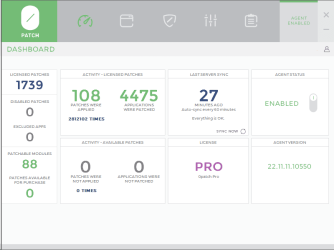
I have subscribed to 0patch ever since MS stopped updating W7. Honestly I don't know what problems may have been avoided therefore what good it has done me, but I CAN say I've had zero problems in the years it has been installed.

image.png
 

My Computer

Computer type
Laptop
Computer Manufacturer/Model Number
Dell Latitude E6540 Laptop
OS
Windows 7 Professional 64bit
CPU
Intel Core i7 4600M @ 2.90GHz
Motherboard
Dell Inc. 0CYT5F (SOCKET 0)
Memory
16.0GB Dual-Channel DDR3 @ 797MHz (11-11-11-28)
Graphics Card(s)
Intel HD Graphics 4600 (Dell) 2048MB ATI AMD Radeon HD 8790M
Sound Card
Realtek High Definition Audio
Monitor(s) Displays
HP ZR30w (2560x1600@60Hz)
Hard Drives
256GB LITEONIT LMT-256M6M-41 mm SATA (SSD)
1TB Samsung SSD 860 EVO mSATA SATA (SSD)
2TB USB 3.0 USB Device
115GB SanDisk Ultra Fit USB
Other Info
Multiple Dell E-Port Plus II Port Replicator/Docking Stations 0Y72NH USB 3.0 + 130W AC Adapters
I had forgoten it was a Ukranian site. So maybe I should have said Russian speaking. OK?

Yes, Russian-speaking makes a different distinction vs. saying it's a Russian site. With the current anti-Russian political climate, it's important to make that distinction lest readers extrapolate that to mean Simplix could be a Putin-controlled malware vector against the West. AFAIK, it is not.
 

My Computer

Computer type
PC/Desktop
Computer Manufacturer/Model Number
Dell Optiplex 7050
OS
Windows 7/8.1/10 multiboot
CPU
Intel Core i7-7700
Motherboard
Dell, Intel Q270 chipset
Memory
48GB (2x16GB Crucial DDR4-3200 + 2x8GB Hynix DDR4-2400)
Graphics Card(s)
Intel HD630 + AMD Radeon R7 450 PCIe
Monitor(s) Displays
Asus VC279 (27")
Screen Resolution
1920x1080
Hard Drives
Toshiba M.2 NVMe (256GB),
Samsung 960 Evo (500GB),
WD Red Plus 80EFBX (8TB)
Useful info here I am sure for my Windows 7 systems..
Windows 7 is like a good quality dinner set (or an old but well maintained Roller): Look after it and it'll last you for ever ;)
 

My Computer

Computer type
PC/Desktop
Computer Manufacturer/Model Number
My build
OS
Win7 Ultimate SP1
CPU
Intel Core i5 9400 Coffee Lake 14nm
Motherboard
Asus Prime H310M-E R2.0 (LGA1151)
Memory
16G DDR4
Graphics Card(s)
NVidia GeForce GTX 960
Sound Card
Realtek High Definition Audio (mobo)
Monitor(s) Displays
Asus PA248 24" 16:10 format
Screen Resolution
1920x1200@59Hz
Hard Drives
1863GB Seagate ST2000DM
3726GB Seagate ST4000DM
1863GB Seagate ST2000DM
6TB Seagate
465GB NVMe Samsung SSD 970
PSU
750G2
Case
Tower
Cooling
Standard
Keyboard
USB
Mouse
USB
Internet Speed
920Mbs/480Mbs
Antivirus
Malwarebytes
Browser
Firefox
Windows 7 SP1 32-bit is the latest version for my old Intel Pentium 4 socket 478 computer. When I find some free time, I will do a clean install and load it with casual games. It is just fine for my 4 year old boy so he can play without risk ruining my main PC. He can even use it to download stuff for School a couple of years later. They ask them to download and print stuff from the School website.
 

My Computer

Computer type
PC/Desktop
Computer Manufacturer/Model Number
custom
OS
Windows 7 Ultimate 64-bit (now 11 24H2)
CPU
Intel Core-i3 3770 3.5GHz
Motherboard
Asus P8H61
Memory
16GB DDR3 1600Mhz
Graphics Card(s)
nVidia Geforce RTX 3050
Sound Card
Realtek HD audio
Monitor(s) Displays
Sony 19" LCD TV via VGA
Screen Resolution
1440x900
Hard Drives
WD 1TB SATA III SSD
PSU
unknown
Case
unknown
Cooling
Intel's provided with CPU
Antivirus
Windows Defender (Windows 11)
Browser
Microsoft Edge
Other Info
Previously Windows 7 Ultimate, now Windows 11 24H2
Windows 7 SP1 32-bit is the latest version for my old Intel Pentium 4 socket 478 computer. When I find some free time, I will do a clean install and load it with casual games. It is just fine for my 4 year old boy so he can play without risk ruining my main PC. He can even use it to download stuff for School a couple of years later. They ask them to download and print stuff from the School website.
Good for you. Though I fear that your young man might one day come home with a teacher's note recommending the adoption of a more modern Windows system. Stay strong ;)
 

My Computer

Computer type
PC/Desktop
Computer Manufacturer/Model Number
My build
OS
Win7 Ultimate SP1
CPU
Intel Core i5 9400 Coffee Lake 14nm
Motherboard
Asus Prime H310M-E R2.0 (LGA1151)
Memory
16G DDR4
Graphics Card(s)
NVidia GeForce GTX 960
Sound Card
Realtek High Definition Audio (mobo)
Monitor(s) Displays
Asus PA248 24" 16:10 format
Screen Resolution
1920x1200@59Hz
Hard Drives
1863GB Seagate ST2000DM
3726GB Seagate ST4000DM
1863GB Seagate ST2000DM
6TB Seagate
465GB NVMe Samsung SSD 970
PSU
750G2
Case
Tower
Cooling
Standard
Keyboard
USB
Mouse
USB
Internet Speed
920Mbs/480Mbs
Antivirus
Malwarebytes
Browser
Firefox
Let them upgrade the school computers first that are over 10 years old, at least in public schools.
 

My Computer

Computer type
PC/Desktop
Computer Manufacturer/Model Number
custom
OS
Windows 7 Ultimate 64-bit (now 11 24H2)
CPU
Intel Core-i3 3770 3.5GHz
Motherboard
Asus P8H61
Memory
16GB DDR3 1600Mhz
Graphics Card(s)
nVidia Geforce RTX 3050
Sound Card
Realtek HD audio
Monitor(s) Displays
Sony 19" LCD TV via VGA
Screen Resolution
1440x900
Hard Drives
WD 1TB SATA III SSD
PSU
unknown
Case
unknown
Cooling
Intel's provided with CPU
Antivirus
Windows Defender (Windows 11)
Browser
Microsoft Edge
Other Info
Previously Windows 7 Ultimate, now Windows 11 24H2
and those school Chromebooks are really crappy with many bans, can access webs only offered by school. nearly useless. their hardware setting had been out-of-date from first day in classroom. such as 2GB RAM, 16GB storage.
I was shocked on it when my kid brought with it home for his home work first time. absolutely a piece of hardware garbage.

Let them upgrade the school computers first that are over 10 years old, at least in public schools.
 

My Computers

System One System Two

  • Computer type
    PC/Desktop
    Computer Manufacturer/Model Number
    HP Elite 800 G5
    OS
    Windows 7 Pro 64-bit
    CPU
    I7-9700
    Memory
    32 GB
  • Computer type
    Laptop
    System Manufacturer/Model Number
    ASUS UX305C
    OS
    Windows 7 Pro 64-bit
Windows 7 is like a good quality dinner set (or an old but well maintained Roller): Look after it and it'll last you for ever ;)
Seriously. My existing laptop was a Fujitsu A531 (i5 2nd gen), I got it in 2012-ish, and it's still going well, although the fan sounds like a plane taking off. (new SSD, new RAM, fan+vents cleaned out fairly regularly with a dob of heat paste)

in Feb 2024 I bought a Lenovo Ideapad 3 i5 11th gen to take some load off of the Fujitsu. I tried many things to get W7 working on the Lenovo, but the UEFI BIOS said no? 6 months of Windows 10 tells me I hate windows 10. I can back that up with a document.

Buying the Fujitsu A557 and the HP Probook 6570b, and installing W7 on them, and seeing everything compared to W10? it's almost like returning to an old friends house...

Win 10 with aero I may be able to live with. I tried a lot of things to get an aero theme on the Lenovo, which didn't work. there's been a few more suggestions in this thread I might try. I mean, seriously. W10 has 2 different control panels (settings and control panel), and 3 different settings interface styles. It's like Microsoft thought "yeah, let's change what all the main settings windows look like....but if you click "advanced options"?....goes back to Win 7 style settings interface. It's like re manufacturing the door of a car, but if you open it, the inner door trim is from the existing model. (yes, which happens, just a random example)
 

My Computers

System One System Two

  • OS
    W10 unfortunately, that's why I'm here
  • Computer type
    PC/Desktop
Installing Windows 7 on a modern computer is not a new idea. Many have done it. One challenge is to find appropriate controller drivers so Setup can see the disk. Another is finding as many as possible Windows 7 drivers for the modern hardware. Of course the manufacturer is not going to offer Windows 7 drivers on his site, so you must download them directly from the individual device manufacturers. Some Windows 8 or even Windows 10 drivers might work if manually forced from Device Manager.
 

My Computer

Computer type
PC/Desktop
Computer Manufacturer/Model Number
custom
OS
Windows 7 Ultimate 64-bit (now 11 24H2)
CPU
Intel Core-i3 3770 3.5GHz
Motherboard
Asus P8H61
Memory
16GB DDR3 1600Mhz
Graphics Card(s)
nVidia Geforce RTX 3050
Sound Card
Realtek HD audio
Monitor(s) Displays
Sony 19" LCD TV via VGA
Screen Resolution
1440x900
Hard Drives
WD 1TB SATA III SSD
PSU
unknown
Case
unknown
Cooling
Intel's provided with CPU
Antivirus
Windows Defender (Windows 11)
Browser
Microsoft Edge
Other Info
Previously Windows 7 Ultimate, now Windows 11 24H2
Motherboard incompatibility is the main problem for anyone wanting to install W7, followed by the CPU type. My desktop hardware, which works perfectly well with my W7 Ultimate system, has an Asus 310M-E R.2 board with an Intel Core i5 9400 2.9GHZ 6 core Coffee Lake 14nm CPU. I recently upgraded my RAM from 16GB to 32GB, but the extra 16GB hasn't made much difference.

I also have W10 and W11 Enterprise systems running on other desk and lap computers (for comparison and experimental purposes) and they're not a patch, performance-wise, on my W7. Plus, and this is a BIG downside for me, they look terrible. Flat, bland and ugly, like a slice of stale white bread compared with a chocolate coated full cream donut with strawberry jam topping ;)
 

My Computer

Computer type
PC/Desktop
Computer Manufacturer/Model Number
My build
OS
Win7 Ultimate SP1
CPU
Intel Core i5 9400 Coffee Lake 14nm
Motherboard
Asus Prime H310M-E R2.0 (LGA1151)
Memory
16G DDR4
Graphics Card(s)
NVidia GeForce GTX 960
Sound Card
Realtek High Definition Audio (mobo)
Monitor(s) Displays
Asus PA248 24" 16:10 format
Screen Resolution
1920x1200@59Hz
Hard Drives
1863GB Seagate ST2000DM
3726GB Seagate ST4000DM
1863GB Seagate ST2000DM
6TB Seagate
465GB NVMe Samsung SSD 970
PSU
750G2
Case
Tower
Cooling
Standard
Keyboard
USB
Mouse
USB
Internet Speed
920Mbs/480Mbs
Antivirus
Malwarebytes
Browser
Firefox
You could use any 300 series intel consumer motherboard with win7

It doesn't need to be 310 or r2.0
 

My Computers

System One System Two

  • Computer type
    PC/Desktop
    OS
    7 X64
    CPU
    i5 8400
    Motherboard
    gigabyte b365m ds3h
    Memory
    2x8gb 3200mhz
    Hard Drives
    various
    PSU
    pure power 11 400w cm
    Case
    Coolermaster
    Cooling
    cryorig m9i
  • Computer type
    PC/Desktop
    OS
    7x64
    CPU
    g5400
    Motherboard
    ga b365m ds3h
    Memory
    8gb ddr4 2400
    PSU
    xfx pro 450w
Installing Windows 7 on a modern computer is not a new idea. Many have done it. One challenge is to find appropriate controller drivers so Setup can see the disk. Another is finding as many as possible Windows 7 drivers for the modern hardware. Of course the manufacturer is not going to offer Windows 7 drivers on his site, so you must download them directly from the individual device manufacturers. Some Windows 8 or even Windows 10 drivers might work if manually forced from Device Manager.
My reading so far has told me that W7 can't be installed on a Unified EFI BIOS - at least not without effort that I'm not educated with. I've put W7 on the Fujitsu i5 6th gen - windows update wasn't keen on it though. I kept getting "CPU too new for operating system" type messages, until I installed some random patch I found somewhere. In all honesty, I've just spent £150 on two laptops that officially support W7, which I'm reasonably happy with. fingers crossed that 10 year old hardware still has some life left in it.

tbh one of the purposes of a W7 system, is that my Fujitsu A531 has been as close to rock solid as it can be - so a W7 system that didn't have actual W7 drivers might be defeating the purpose. I mean it might work, but I'd always be thinking.....is it, isn't it (going to crash)
 

My Computers

System One System Two

  • OS
    W10 unfortunately, that's why I'm here
  • Computer type
    PC/Desktop
You could use any 300 series intel consumer motherboard with win7
It doesn't need to be 310 or r2.0
Thanks. But are those boards still available? Last time I looked, I found a few listings but it turned out they were just clickbait. Actually I have a new, boxed Biostar H310MHC2 (takes an LGA1151 CPU) that I bought a few years back, but its features are limited, like no SSD M2 mount.
 
Last edited:

My Computer

Computer type
PC/Desktop
Computer Manufacturer/Model Number
My build
OS
Win7 Ultimate SP1
CPU
Intel Core i5 9400 Coffee Lake 14nm
Motherboard
Asus Prime H310M-E R2.0 (LGA1151)
Memory
16G DDR4
Graphics Card(s)
NVidia GeForce GTX 960
Sound Card
Realtek High Definition Audio (mobo)
Monitor(s) Displays
Asus PA248 24" 16:10 format
Screen Resolution
1920x1200@59Hz
Hard Drives
1863GB Seagate ST2000DM
3726GB Seagate ST4000DM
1863GB Seagate ST2000DM
6TB Seagate
465GB NVMe Samsung SSD 970
PSU
750G2
Case
Tower
Cooling
Standard
Keyboard
USB
Mouse
USB
Internet Speed
920Mbs/480Mbs
Antivirus
Malwarebytes
Browser
Firefox
I have given up building home PC. it's bulky, took much room in Office. and NOT green. :D
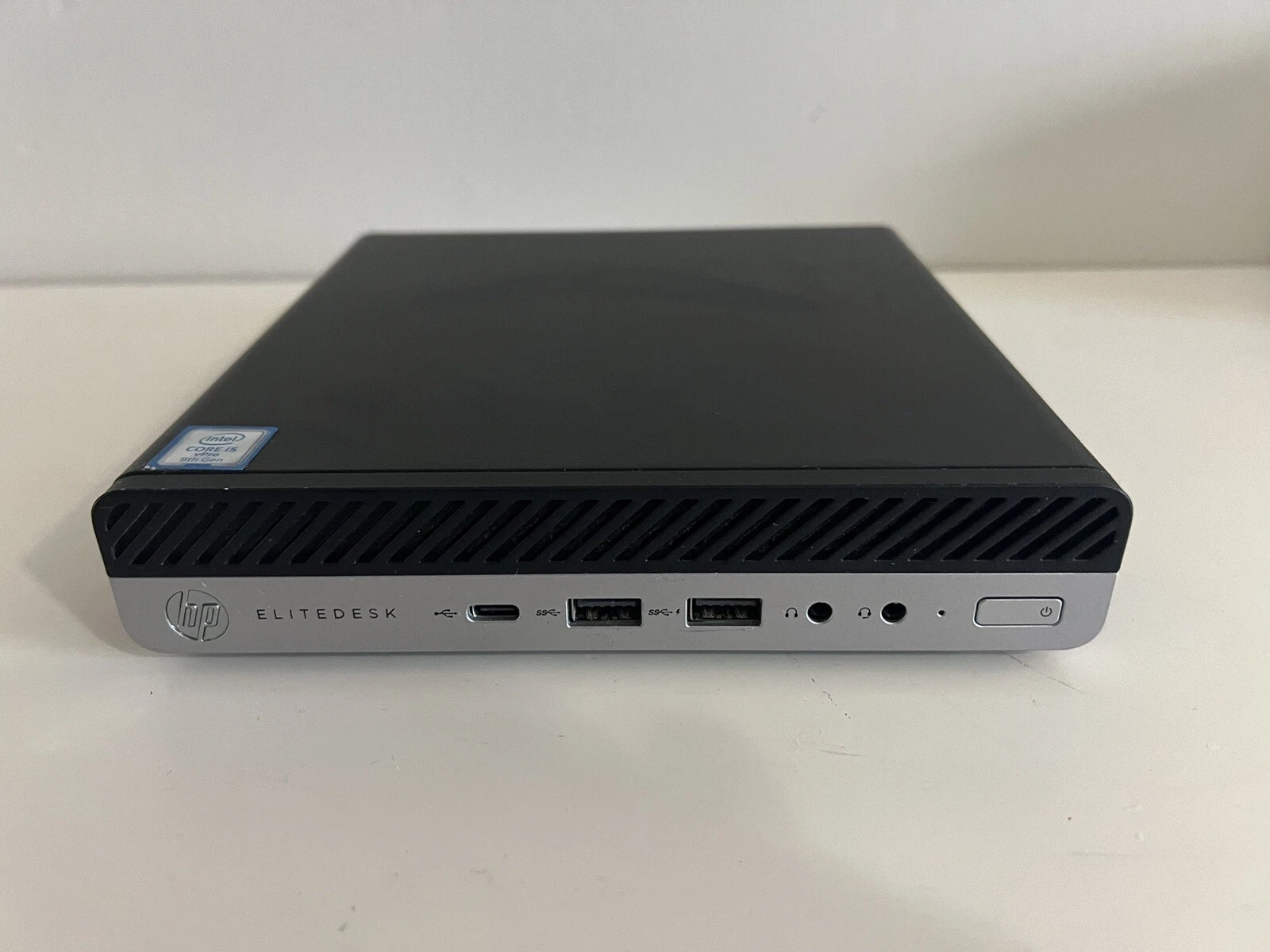
my favorite is HP 800 DM (miniDesk), G4-G6 can do what I want. these mini PC are powerful. Just need a proper way to install Win7 on them.

HP EliteDesk 800 G5 Desktop Mini i5-9600T
s-l1600.webp


SIW2 and SF Team are really helpful.
 

My Computers

System One System Two

  • Computer type
    PC/Desktop
    Computer Manufacturer/Model Number
    HP Elite 800 G5
    OS
    Windows 7 Pro 64-bit
    CPU
    I7-9700
    Memory
    32 GB
  • Computer type
    Laptop
    System Manufacturer/Model Number
    ASUS UX305C
    OS
    Windows 7 Pro 64-bit
But are those boards still available?

They crop up on places like ebay. Several on there now mostly z390 .

z390 will typically go for £60-£70. If you are going for a z390 worth checking it isn't festooned with those ghastly cheap brothel lights, and it is better to have at least one usb3 gen 2 C

b360/365 are not much less probably £50 if you keep your eye out.

I am typing from one of these
B365M DS3H (rev. 1.0) Key Features | Motherboard - GIGABYTE Global
 

My Computers

System One System Two

  • Computer type
    PC/Desktop
    OS
    7 X64
    CPU
    i5 8400
    Motherboard
    gigabyte b365m ds3h
    Memory
    2x8gb 3200mhz
    Hard Drives
    various
    PSU
    pure power 11 400w cm
    Case
    Coolermaster
    Cooling
    cryorig m9i
  • Computer type
    PC/Desktop
    OS
    7x64
    CPU
    g5400
    Motherboard
    ga b365m ds3h
    Memory
    8gb ddr4 2400
    PSU
    xfx pro 450w
Thanks SIW2, I'll look for those. So, pretty much any 300 series should be OK?

- - - Updated - - -
 
Last edited:

My Computer

Computer type
PC/Desktop
Computer Manufacturer/Model Number
My build
OS
Win7 Ultimate SP1
CPU
Intel Core i5 9400 Coffee Lake 14nm
Motherboard
Asus Prime H310M-E R2.0 (LGA1151)
Memory
16G DDR4
Graphics Card(s)
NVidia GeForce GTX 960
Sound Card
Realtek High Definition Audio (mobo)
Monitor(s) Displays
Asus PA248 24" 16:10 format
Screen Resolution
1920x1200@59Hz
Hard Drives
1863GB Seagate ST2000DM
3726GB Seagate ST4000DM
1863GB Seagate ST2000DM
6TB Seagate
465GB NVMe Samsung SSD 970
PSU
750G2
Case
Tower
Cooling
Standard
Keyboard
USB
Mouse
USB
Internet Speed
920Mbs/480Mbs
Antivirus
Malwarebytes
Browser
Firefox
Don't worry about M.2 slots or USB 3.0, SATA III. All these can be added with a PCIe expansion card. For instance, I use a PCIe USB 3.0 card in my Intel socket 1155 motherboard and I am fine. I could also use a PCIe M.2 card, but I don't have any free PCIe 1x slot. I don't care, my SATA SSD is fast enough for my needs. For those wondering, back when I bought my Intel socket 1155 motherboard I had 3-4 legacy PCI (not PCIe) cards in my old computer I wanted to keep using. This model, Asus P8H61, was the only one with three legacy PCI slots, but this had no SATA III or USB 3.0. I had to either choose new technology and one legacy PCI slot, or three legacy PCI slots so I chose the latter. I can add USB 3.0 or SATA III with a respective PCIe card, so I didn't care. Needless to say there are Windows 7 drivers for this old hardware, so I could run Windows 7 64-bit fine until I upgraded to Windows 8, then 8.1 and later 10. Now I am running Windows 11 without any issues. All I had to do was bypass hardware compatibility check to install or upgrade from one version of Windows 11 to the next.

PS: I too don't like the plain flat icons of Windows 10/11, so I used Customizer God to extract all system icons from Windows 7 and 8.1 and use them in Windows 10/11. I have replaced all those ugly system icons with the respective icons from Windows 7 or 8.1 (for those that didn't have a Windows 7 equivalent). I have also installed 8gadgetpack to use my old Windows 7 gadgets, Open Shell (formerly known as Classic Shell) to have the Windows 7 start button and start menu and Winaero utilities to get the old versions of Calculator, Microsoft Paint, Notepad and others. Now that I have completely transformed Windows 11, they are not that bad. I have even installed the good old "Windows Lite" theme (the one with the familiar red close icon on top right of each application).

PS2: I had downloaded the Beta version of Windows 10 and installed it on a virtual machine to have a look at the new features before I upgrade from 8.1 I was shocked to see VERY UGLY icons, almost seem like drawn by kindergarten children! I almost swear to never upgrade to Windows 10! Everyone was demanding to change these ridiculous icons, so the official release of Windows 10 had nicer redesigned icons, but they are still very flat compared to the 3D icons icons of Windows 7 and 8.1 I wouldn't mind using the original system icons of Windows 10/11 but they are too flat for my taste. The default Windows 11 icons are redesigned and a little nicer that those of 10, but still I prefer the Windows 7/8.1 icons and hence the customization. You can read all details in the respective threads in Personalization section of Tenforums and Elevenforum.

Windows 10 Beta vs 21H2 Release Icons! (youtube.com)

 
Last edited:

My Computer

Computer type
PC/Desktop
Computer Manufacturer/Model Number
custom
OS
Windows 7 Ultimate 64-bit (now 11 24H2)
CPU
Intel Core-i3 3770 3.5GHz
Motherboard
Asus P8H61
Memory
16GB DDR3 1600Mhz
Graphics Card(s)
nVidia Geforce RTX 3050
Sound Card
Realtek HD audio
Monitor(s) Displays
Sony 19" LCD TV via VGA
Screen Resolution
1440x900
Hard Drives
WD 1TB SATA III SSD
PSU
unknown
Case
unknown
Cooling
Intel's provided with CPU
Antivirus
Windows Defender (Windows 11)
Browser
Microsoft Edge
Other Info
Previously Windows 7 Ultimate, now Windows 11 24H2
My Dell Inspiron has been running strong with Windows 7 Ultimate ever since 2012. To this day it still does most of my Workhorse daily activities.
 

My Computers

System One System Two

  • Computer type
    Laptop
    Computer Manufacturer/Model Number
    DELL
    OS
    Windows 7 Ultimate
  • Computer type
    PC/Desktop
If there was a way to hide Windows 7 from new applications and let us install them on Windows 7, would be great. There is a custom kernel for Windows 98 called Kernelex that adds Windows 2000 and XP compatibility mode to Windows 98. Of course not all applications work, but you can right-click on the shortcut, go to Compatibility tab and set to Windows XP SP3 and find out.
 

My Computer

Computer type
PC/Desktop
Computer Manufacturer/Model Number
custom
OS
Windows 7 Ultimate 64-bit (now 11 24H2)
CPU
Intel Core-i3 3770 3.5GHz
Motherboard
Asus P8H61
Memory
16GB DDR3 1600Mhz
Graphics Card(s)
nVidia Geforce RTX 3050
Sound Card
Realtek HD audio
Monitor(s) Displays
Sony 19" LCD TV via VGA
Screen Resolution
1440x900
Hard Drives
WD 1TB SATA III SSD
PSU
unknown
Case
unknown
Cooling
Intel's provided with CPU
Antivirus
Windows Defender (Windows 11)
Browser
Microsoft Edge
Other Info
Previously Windows 7 Ultimate, now Windows 11 24H2
Back
Top