Is anyone still using Windows 7?

@Bree

On Windows 11, typically requests 1-2 more clicks than Windows 7, do you have any tips?

For example,
on Windows 7, right-click a file to "Send to" or "Open with", one-click can do (to Notepad.exe, or Notepad++.exe). While on Windows 11, it has 1-2 more steps, show more options -->Send to (some run requests Admin, at least one more step)

Similar to access python Edit with IDLE. On Windows 7, one right-click. while on Windows 11, requests 1-2 steps more.

In daily programming/text editing, say, my mouse will do "right-click" 500 times on Windows 7. When move to Windows 11, becomes 1000-1500 times. that will be beyond human hand limits, hurt my fingers eventually. :D
 

My Computers

System One System Two

  • Computer type
    PC/Desktop
    Computer Manufacturer/Model Number
    HP Elite 800 G5
    OS
    Windows 7 Pro 64-bit
    CPU
    I7-9700
    Memory
    32 GB
  • Computer type
    Laptop
    System Manufacturer/Model Number
    ASUS UX305C
    OS
    Windows 7 Pro 64-bit
I still run win7 Pro on my home-built offline, graphics workstation..why?

It runs all my old painting programs; Corel Painter12, Corel PhotoPaint x14, Adobe PS CS2, & a bunch of effects plugins that do exactly what I need. It even has it's builtin virtual PC to run a couple of programs that are too old for w7!

My10 yr old scanner works perfectly from those programs. My large format (17x22") Epson pro 3800 runs off of it's dedicated offline win-Vista laptop.

I also have an online w7 18" laptop used for casual web surfing as well as this online w10 10yr old homemade desktop for more serious stuff

Yes, newer S/W can do a lot more with BRAND NEW FEATURES!!!...but I go w/ what i was taught in my college photography classes..it's not what model of camera you use, it's what you do with the camera you have. I spent years learning to use the above equipment & programs...& would rather do what i do, than spend more years learning to use all the BRAND NEW FEATURES of newer OS's & programs.

A nod to the comment about seeing a Hot Rod...I also routinely drive my 1960s Oldtimers (German word for classic cars & yes, they use the English word).

Sign me,
Dinosaur
 

My Computers

System One System Two

  • Computer type
    PC/Desktop
    Computer Manufacturer/Model Number
    OnlyMe
    OS
    Win 7 Pro
    CPU
    ntel Core i7 CPU 920-OC'd @ 4.4GHz
    Motherboard
    GB X58A-OC
    Memory
    24GB
    Graphics Card(s)
    AMD Radeon HD 7700
    Hard Drives
    C:\
    Samsung 840Pro SSD

    D:\ & E:\
    WD Black
    Antivirus
    none- Offline puter
    Browser
    FF
  • Computer type
    PC/Desktop
    Antivirus
    none on offline w7, MS on this online w10
I still run win7 Pro on my home-built offline, graphics workstation..why?

It runs all my old painting programs; Corel Painter12, Corel PhotoPaint x14, Adobe PS CS2, & a bunch of effects plugins that do exactly what I need. It even has it's builtin virtual PC to run a couple of programs that are too old for w7!

My10 yr old scanner works perfectly from those programs. My large format (17x22") Epson pro 3800 runs off of it's dedicated offline win-Vista laptop.

I also have an online w7 18" laptop used for casual web surfing as well as this online w10 10yr old homemade desktop for more serious stuff

Yes, newer S/W can do a lot more with BRAND NEW FEATURES!!!...but I go w/ what i was taught in my college photography classes..it's not what model of camera you use, it's what you do with the camera you have. I spent years learning to use the above equipment & programs...& would rather do what i do, than spend more years learning to use all the BRAND NEW FEATURES of newer OS's & programs.

A nod to the comment about seeing a Hot Rod...I also routinely drive my 1960s Oldtimers (German word for classic cars & yes, they use the English word).

Sign me,
Dinosaur


With you all the way in this, Oldtimer. Priority #1 with PCs is functionality. Doesn't matter how new the features are, if they don't work properly the system is useless. Brand new features tend to be buggy. Win 7 is an old OS, tried and tested. When one considers the experience they have with their OS over the years, fixing issues that are no longer foreign to them, have learned the system backwards and forwards, have tweaked, and trimmed and personalized it until it runs like a finely-tuned, well-oiled, piece of machinery, not much is going to compete with it.

One of the things that annoyed me the most about Windows 7 was having to give up Win XP and learn everything all over again. I never did put Win 10 on my Work Station because it is just too bloody invasive for my personal preferences. AND YES, you can cut most of that junk out, AND YES, you can do massive surgery on Windows 10 to make it "something other" and yes you get a ton of those modifications back in the next Win update, (some working some not quite working anymore) and yes you can wind up with a half-assed operating system suffering from an identity crisis. :cool: The options are endless! Just think of the potential. The user could waste a lifetime of hours that could have been better spent on productivity but instead they get to fix their PC and, in many cases, pay Microsoft to do it.

Naw. I think I'll keep my WIN 7 for as long as possible. It's never worked so good since the updates 'stopped' coming.
 

My Computers

System One System Two

  • Computer type
    PC/Desktop
    Computer Manufacturer/Model Number
    ASUS CUSTOM BUILD IN THERMALTAKE LEVEL 10 GT CASE
    OS
    Windows 7 Ultimate, Windows 8.1 Pro, Linux Mint/Cinnimon (Triple Boot)
    CPU
    INTEL 6900K
    Motherboard
    X99-E WS USB 3.1
    Memory
    CORSAIR DOMINATOR PLATINUM 128GB
    Graphics Card(s)
    EVGA GTX 1070 FTW
    Sound Card
    Onboard Crystal Sound - very nice ;)
    Monitor(s) Displays
    SAMSUNG 4K 28"
    Screen Resolution
    3140 x 2160 - A little extreme. Need to change it.
    Hard Drives
    1) LSI LOGICAL VOLUME RAID 10 (250 GBX4) SSD ARRAY
    2) INTEL RAID 0 KINGSTON (2) SSD ARRAY
    3) INTEL RAID 1 SEAGATE (2) 1TB ARRAY (secured backup)
    4) INTEL RAID 1 SEAGATE HYBRID (2) (secure secured backup)
    5) AHCI SEAGATE 3TB (1) BACKUP & STORAGE (back
    PSU
    CORSAIR HX 1000i
    Case
    THERMAL TAKE LEVEL 10 GT
    Cooling
    NOCTUA TOWER COOLING - PUSH/PULL
    Keyboard
    LOGITECH PRODIGY (One day I'll get a real keyboard.)
    Mouse
    LOGITECH (One day I'll get a real mouse.)
    Internet Speed
    300 Gb down 12 up Intel(R) I210 Gigabit Network Connection
    Antivirus
    several - Network implementing vs from other PCs - ask me
    Browser
    Mostly FireFox these days
    Other Info
    NOT ENOUGH ROOM TO LIST ALL HARD DRIVES HERE. Cuts me off at 5. Did you know that if you run a network you can scan your PC for viruses via other PCs using several different virus scanners? No virus scanner gets it all. This is narrows down the window for contracting a virus. By using multiple operating systems you can use different virus scanners with no risk of conflict.
  • Antivirus
    KASPERSKY
I started using Windows 7 in 2019, and still using it for the Windows side of my computering ---for internet I use Slackware.

NT 3.51 was the best Microsoft ever had (that is why they never put it on desktop computers)

Perhaps, NVMe might motivate me to give Windows 8 a try ---but mSata and M.2 sata works just fine
 

My Computers

System One System Two

  • Computer type
    PC/Desktop
    Computer Manufacturer/Model Number
    IBM, HP, Gateway, Dell
    OS
    slackware
    CPU
    haswell amd
    Motherboard
    q87
    Memory
    have some
    Graphics Card(s)
    built in
    Hard Drives
    spinning m.2 mSata
  • Computer type
    PC/Desktop
@Bree

On Windows 11, typically requests 1-2 more clicks than Windows 7, do you have any tips?

For example,
on Windows 7, right-click a file to "Send to" or "Open with", one-click can do (to Notepad.exe, or Notepad++.exe). While on Windows 11, it has 1-2 more steps, show more options -->Send to...

In Windows 11 you can go straight to the menu that clicking on 'Show more options' takes you to if you hold down the Shift key while you right click, cutting you 'click count' by one.

- - - Updated - - -

I still run win7 Pro on my home-built offline, graphics workstation..why?

It runs all my old painting programs; Corel Painter12, Corel PhotoPaint x14, Adobe PS CS2, & a bunch of effects plugins that do exactly what I need. It even has it's builtin virtual PC to run a couple of programs that are too old for w7!
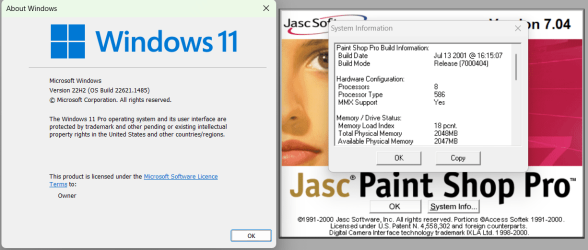
I don't know about Adobe, but I'm running PaintShop Pro 7.04 in Windows 11.
image.png

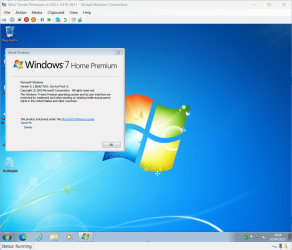
As it's 11 Pro I also have Hyper-V to run VMs, if needed.

image.png
 

My Computers

System One System Two

  • Computer type
    Laptop
    Computer Manufacturer/Model Number
    Toshiba satellite C650D
    OS
    Windows 7 Home Premium x64
    CPU
    AMD V120
    Memory
    4GB
    Internet Speed
    150 Mbps
    Antivirus
    MSE
    Browser
    IE11, Edge, Firefox
    Other Info
    I also have W7 Pro on my System Two, and several W7 Hyper-V VMs. My other machines run Windows 10/11. Their specs are in my Ten Forums & Eleven Forum profiles.
  • Computer type
    Laptop
    System Manufacturer/Model Number
    Lenovo Thinkpad T430
    OS
    Windows 7 Pro x64
    CPU
    Intel i5-3320M
    Memory
    8 GB
    Hard Drives
    250GB Samsung SSD 860 EVO
    Other Info
    Antivirus: MSE
Pressing the shift key before clicking on an icon doesn't really reduce the click count. It just changes where the first click is made from. It's still two clicks, but I do find it easier to hold the shift key and clicking the icon. Of course, with Windows 7 no such nonsense is required. I wonder if this feature will be included with Windows 12. Perhaps it won't be needed at all in Neon. I like the idea that Microsoft is at least considering the development of a functional modular OS for legacy systems. I hope they pursue it. If not there's always Linux.
 

My Computers

System One System Two

  • Computer type
    PC/Desktop
    Computer Manufacturer/Model Number
    ASUS CUSTOM BUILD IN THERMALTAKE LEVEL 10 GT CASE
    OS
    Windows 7 Ultimate, Windows 8.1 Pro, Linux Mint/Cinnimon (Triple Boot)
    CPU
    INTEL 6900K
    Motherboard
    X99-E WS USB 3.1
    Memory
    CORSAIR DOMINATOR PLATINUM 128GB
    Graphics Card(s)
    EVGA GTX 1070 FTW
    Sound Card
    Onboard Crystal Sound - very nice ;)
    Monitor(s) Displays
    SAMSUNG 4K 28"
    Screen Resolution
    3140 x 2160 - A little extreme. Need to change it.
    Hard Drives
    1) LSI LOGICAL VOLUME RAID 10 (250 GBX4) SSD ARRAY
    2) INTEL RAID 0 KINGSTON (2) SSD ARRAY
    3) INTEL RAID 1 SEAGATE (2) 1TB ARRAY (secured backup)
    4) INTEL RAID 1 SEAGATE HYBRID (2) (secure secured backup)
    5) AHCI SEAGATE 3TB (1) BACKUP & STORAGE (back
    PSU
    CORSAIR HX 1000i
    Case
    THERMAL TAKE LEVEL 10 GT
    Cooling
    NOCTUA TOWER COOLING - PUSH/PULL
    Keyboard
    LOGITECH PRODIGY (One day I'll get a real keyboard.)
    Mouse
    LOGITECH (One day I'll get a real mouse.)
    Internet Speed
    300 Gb down 12 up Intel(R) I210 Gigabit Network Connection
    Antivirus
    several - Network implementing vs from other PCs - ask me
    Browser
    Mostly FireFox these days
    Other Info
    NOT ENOUGH ROOM TO LIST ALL HARD DRIVES HERE. Cuts me off at 5. Did you know that if you run a network you can scan your PC for viruses via other PCs using several different virus scanners? No virus scanner gets it all. This is narrows down the window for contracting a virus. By using multiple operating systems you can use different virus scanners with no risk of conflict.
  • Antivirus
    KASPERSKY
Pressing the shift key before clicking on an icon doesn't really reduce the click count. It just changes where the first click is made from. It's still two clicks, but I do find it easier to hold the shift key and clicking the icon. Of course, with Windows 7 no such nonsense is required. I wonder if this feature will be included with Windows 12. Perhaps it won't be needed at all in Neon. I like the idea that Microsoft is at least considering the development of a functional modular OS for legacy systems. I hope they pursue it. If not there's always Linux.
Well there isn't "always Linux" though is there. At least, I have numerous programs that are "Windows only" and I need to keep running.

I do like the idea that MS would revive W7 in some fashion. I get that they wanted to modernize, and apparently the data-gathering must provide them revenue in some manner, but I might even be willing to pop for some modest "subscription fee" if they were to revive support for the 7 platform, enough so that sw mfrs embrace and support such.
 

My Computer

Computer type
Laptop
Computer Manufacturer/Model Number
Dell Latitude E6540 Laptop
OS
Windows 7 Professional 64bit
CPU
Intel Core i7 4600M @ 2.90GHz
Motherboard
Dell Inc. 0CYT5F (SOCKET 0)
Memory
16.0GB Dual-Channel DDR3 @ 797MHz (11-11-11-28)
Graphics Card(s)
Intel HD Graphics 4600 (Dell) 2048MB ATI AMD Radeon HD 8790M
Sound Card
Realtek High Definition Audio
Monitor(s) Displays
HP ZR30w (2560x1600@60Hz)
Hard Drives
256GB LITEONIT LMT-256M6M-41 mm SATA (SSD)
1TB Samsung SSD 860 EVO mSATA SATA (SSD)
2TB USB 3.0 USB Device
115GB SanDisk Ultra Fit USB
Other Info
Multiple Dell E-Port Plus II Port Replicator/Docking Stations 0Y72NH USB 3.0 + 130W AC Adapters
I agree!
 

My Computer

Computer type
PC/Desktop
Computer Manufacturer/Model Number
Two HP Desktops. One in the Laundry Room / Bed Room.
OS
Microsoft Windows 7 Professional 64-bit 7601 Multiprocessor Free Service Pack 1
CPU
Intel(R) Core(TM) i7-3770 CPU @ 3.40GHz
Motherboard
Hewlett-Packard 3396
Memory
8.00 GB
Graphics Card(s)
Intel(R) HD Graphics 4000
Sound Card
(1) Realtek High Definition Audio (2) Intel(R) Display Aud
Monitor(s) Displays
Hanns-G
Screen Resolution
1440 x 900 x 32 bits (4294967296 colors) @ 59 Hz
Hard Drives
(1) ATA WDC WD40EZRX-00S SCSI Disk Device (2) HP Officejet Pro 86 USB Device (3) WD My Book 1230 USB Device
PSU
Whatever came with the CMT.
Case
HP CMT Black.
Cooling
Whatever came with the CMT.
Keyboard
Logitech K740.
Mouse
Microsoft Optical Mouse 1000.
Internet Speed
Spectrum 25Mbs.
Antivirus
WebRoot, Microsoft Security Essentials.
Browser
EDGE
Other Info
HP Officejet Pro 8600 Plus.
WD MyBook 4TB.
Well there isn't "always Linux" though is there. At least, I have numerous programs that are "Windows only" and I need to keep running.
I do like the idea that MS would revive W7 in some fashion. I get that they wanted to modernize, and apparently the data-gathering must provide them revenue in some manner, but I might even be willing to pop for some modest "subscription fee" if they were to revive support for the 7 platform, enough so that sw mfrs embrace and support such.

In that respect you are correct. Nonetheless there's always Linux — even if it means dropping your favourite flavor of software for a more lean and meagre diet. This is why monopolies are dangerous and options are essential. Trust me when I say I know what you mean. I just finished forking out once again for Microsoft Office even though I greatly dislike what they're doing to it. None of the open source programs provide the fonts that I require and the format I need for the book I'm writing. Linux can't help me here.

I like the idea of modules that is reported to be part of the integral structure in the coming Windows 12. I like the idea of a bare bones OS with strictly the basics so that one might only pay for the aps that they need as they need them and not have to worry about upgrading to a new OS every five years. If this whole TPM thing would allow us to run a flawless Windows 7 OS then so much the better but I just don't see it happening.
 

My Computers

System One System Two

  • Computer type
    PC/Desktop
    Computer Manufacturer/Model Number
    ASUS CUSTOM BUILD IN THERMALTAKE LEVEL 10 GT CASE
    OS
    Windows 7 Ultimate, Windows 8.1 Pro, Linux Mint/Cinnimon (Triple Boot)
    CPU
    INTEL 6900K
    Motherboard
    X99-E WS USB 3.1
    Memory
    CORSAIR DOMINATOR PLATINUM 128GB
    Graphics Card(s)
    EVGA GTX 1070 FTW
    Sound Card
    Onboard Crystal Sound - very nice ;)
    Monitor(s) Displays
    SAMSUNG 4K 28"
    Screen Resolution
    3140 x 2160 - A little extreme. Need to change it.
    Hard Drives
    1) LSI LOGICAL VOLUME RAID 10 (250 GBX4) SSD ARRAY
    2) INTEL RAID 0 KINGSTON (2) SSD ARRAY
    3) INTEL RAID 1 SEAGATE (2) 1TB ARRAY (secured backup)
    4) INTEL RAID 1 SEAGATE HYBRID (2) (secure secured backup)
    5) AHCI SEAGATE 3TB (1) BACKUP & STORAGE (back
    PSU
    CORSAIR HX 1000i
    Case
    THERMAL TAKE LEVEL 10 GT
    Cooling
    NOCTUA TOWER COOLING - PUSH/PULL
    Keyboard
    LOGITECH PRODIGY (One day I'll get a real keyboard.)
    Mouse
    LOGITECH (One day I'll get a real mouse.)
    Internet Speed
    300 Gb down 12 up Intel(R) I210 Gigabit Network Connection
    Antivirus
    several - Network implementing vs from other PCs - ask me
    Browser
    Mostly FireFox these days
    Other Info
    NOT ENOUGH ROOM TO LIST ALL HARD DRIVES HERE. Cuts me off at 5. Did you know that if you run a network you can scan your PC for viruses via other PCs using several different virus scanners? No virus scanner gets it all. This is narrows down the window for contracting a virus. By using multiple operating systems you can use different virus scanners with no risk of conflict.
  • Antivirus
    KASPERSKY
Absolutely! Windows 10 and Windows 11 are simply polite names for spyware. Those OS'es are a total steaming pile.
 

My Computer

Computer type
PC/Desktop
OS
Windows 7 x64 Pro
CPU
Core i7 860 @ 3.8 GHz
Motherboard
MSI P55-GD80
Memory
16 GB F3-12800CL7D (DDR3 1600 7-7-7-24)
Graphics Card(s)
Sapphire Vapor-X 100283VXL Radeon HD 5770
Monitor(s) Displays
NEC LCD3090WQXi-BK
Agreed!
 

My Computer

Computer type
PC/Desktop
Computer Manufacturer/Model Number
Two HP Desktops. One in the Laundry Room / Bed Room.
OS
Microsoft Windows 7 Professional 64-bit 7601 Multiprocessor Free Service Pack 1
CPU
Intel(R) Core(TM) i7-3770 CPU @ 3.40GHz
Motherboard
Hewlett-Packard 3396
Memory
8.00 GB
Graphics Card(s)
Intel(R) HD Graphics 4000
Sound Card
(1) Realtek High Definition Audio (2) Intel(R) Display Aud
Monitor(s) Displays
Hanns-G
Screen Resolution
1440 x 900 x 32 bits (4294967296 colors) @ 59 Hz
Hard Drives
(1) ATA WDC WD40EZRX-00S SCSI Disk Device (2) HP Officejet Pro 86 USB Device (3) WD My Book 1230 USB Device
PSU
Whatever came with the CMT.
Case
HP CMT Black.
Cooling
Whatever came with the CMT.
Keyboard
Logitech K740.
Mouse
Microsoft Optical Mouse 1000.
Internet Speed
Spectrum 25Mbs.
Antivirus
WebRoot, Microsoft Security Essentials.
Browser
EDGE
Other Info
HP Officejet Pro 8600 Plus.
WD MyBook 4TB.
Absolutely! Windows 10 and Windows 11 are simply polite names for spyware. Those OS'es are a total steaming pile.

A hot mess. :cool:
 

My Computers

System One System Two

  • Computer type
    PC/Desktop
    Computer Manufacturer/Model Number
    ASUS CUSTOM BUILD IN THERMALTAKE LEVEL 10 GT CASE
    OS
    Windows 7 Ultimate, Windows 8.1 Pro, Linux Mint/Cinnimon (Triple Boot)
    CPU
    INTEL 6900K
    Motherboard
    X99-E WS USB 3.1
    Memory
    CORSAIR DOMINATOR PLATINUM 128GB
    Graphics Card(s)
    EVGA GTX 1070 FTW
    Sound Card
    Onboard Crystal Sound - very nice ;)
    Monitor(s) Displays
    SAMSUNG 4K 28"
    Screen Resolution
    3140 x 2160 - A little extreme. Need to change it.
    Hard Drives
    1) LSI LOGICAL VOLUME RAID 10 (250 GBX4) SSD ARRAY
    2) INTEL RAID 0 KINGSTON (2) SSD ARRAY
    3) INTEL RAID 1 SEAGATE (2) 1TB ARRAY (secured backup)
    4) INTEL RAID 1 SEAGATE HYBRID (2) (secure secured backup)
    5) AHCI SEAGATE 3TB (1) BACKUP & STORAGE (back
    PSU
    CORSAIR HX 1000i
    Case
    THERMAL TAKE LEVEL 10 GT
    Cooling
    NOCTUA TOWER COOLING - PUSH/PULL
    Keyboard
    LOGITECH PRODIGY (One day I'll get a real keyboard.)
    Mouse
    LOGITECH (One day I'll get a real mouse.)
    Internet Speed
    300 Gb down 12 up Intel(R) I210 Gigabit Network Connection
    Antivirus
    several - Network implementing vs from other PCs - ask me
    Browser
    Mostly FireFox these days
    Other Info
    NOT ENOUGH ROOM TO LIST ALL HARD DRIVES HERE. Cuts me off at 5. Did you know that if you run a network you can scan your PC for viruses via other PCs using several different virus scanners? No virus scanner gets it all. This is narrows down the window for contracting a virus. By using multiple operating systems you can use different virus scanners with no risk of conflict.
  • Antivirus
    KASPERSKY
In that respect you are correct. Nonetheless there's always Linux — even if it means dropping your favourite flavor of software for a more lean and meagre diet...
I have a handful of essential programs that don't run on Linux, including e.g. FileCenter and Quicken and my page scanner software and iMazing and a few others. So I'm stuck.
I have used and like Linux-alternative software as much as the next guy, but it simply can't meet my needs. And no, I will never give-up Quicken et al.

Still, I am glad to find this thread which bolsters my suspicions in re: 10/11. I will try my damndest to keep W7Pro 64-bit working as best I can.
 

My Computer

Computer type
Laptop
Computer Manufacturer/Model Number
Dell Latitude E6540 Laptop
OS
Windows 7 Professional 64bit
CPU
Intel Core i7 4600M @ 2.90GHz
Motherboard
Dell Inc. 0CYT5F (SOCKET 0)
Memory
16.0GB Dual-Channel DDR3 @ 797MHz (11-11-11-28)
Graphics Card(s)
Intel HD Graphics 4600 (Dell) 2048MB ATI AMD Radeon HD 8790M
Sound Card
Realtek High Definition Audio
Monitor(s) Displays
HP ZR30w (2560x1600@60Hz)
Hard Drives
256GB LITEONIT LMT-256M6M-41 mm SATA (SSD)
1TB Samsung SSD 860 EVO mSATA SATA (SSD)
2TB USB 3.0 USB Device
115GB SanDisk Ultra Fit USB
Other Info
Multiple Dell E-Port Plus II Port Replicator/Docking Stations 0Y72NH USB 3.0 + 130W AC Adapters
Thank you for your persistence!
 

My Computer

Computer type
PC/Desktop
Computer Manufacturer/Model Number
Two HP Desktops. One in the Laundry Room / Bed Room.
OS
Microsoft Windows 7 Professional 64-bit 7601 Multiprocessor Free Service Pack 1
CPU
Intel(R) Core(TM) i7-3770 CPU @ 3.40GHz
Motherboard
Hewlett-Packard 3396
Memory
8.00 GB
Graphics Card(s)
Intel(R) HD Graphics 4000
Sound Card
(1) Realtek High Definition Audio (2) Intel(R) Display Aud
Monitor(s) Displays
Hanns-G
Screen Resolution
1440 x 900 x 32 bits (4294967296 colors) @ 59 Hz
Hard Drives
(1) ATA WDC WD40EZRX-00S SCSI Disk Device (2) HP Officejet Pro 86 USB Device (3) WD My Book 1230 USB Device
PSU
Whatever came with the CMT.
Case
HP CMT Black.
Cooling
Whatever came with the CMT.
Keyboard
Logitech K740.
Mouse
Microsoft Optical Mouse 1000.
Internet Speed
Spectrum 25Mbs.
Antivirus
WebRoot, Microsoft Security Essentials.
Browser
EDGE
Other Info
HP Officejet Pro 8600 Plus.
WD MyBook 4TB.
Will continue using Win7 as long as it is a viable OS (I will probably expire before it does); when/if I can on longer use it I will learn Linux.

Every new iteration of windows removes more and more end user options and and implements more and more invasive snoopware and petty licensing issues.
How long before "Desktop wallpaper has been changed! Click here to restore default." or "Windows has determined your computer is not connected to a Microsoft certified power strip. The system will now shut down for security reasons." or "Windows 15 can not install on this computer, the motherboard was manufactured on Friday 13th".
 

My Computers

System One System Two

  • Computer type
    PC/Desktop
    Computer Manufacturer/Model Number
    custom
    OS
    win7 Pro SP1 x86
    CPU
    64x2 6000+
    Motherboard
    winfast
    Memory
    2gig
    Graphics Card(s)
    GTX950
    Antivirus
    Avast
    Browser
    Brave
  • Computer type
    PC/Desktop
    Antivirus
    Avast
"Windows 15 can not install on this computer, the motherboard was manufactured on Friday 13th".

lol :cool: Remember when they said Windows 10 would be the last OS and then after that everything would be modular updates? That sure didn't last long. Actually, in practice, that's probably precisely what they did but then decided to rename the updates Win 11, Win 12, Win Freddy etc. I'm pretty sure it was a marketing strategy from the git go.

Monopolies are always a lethal thing for the consumer. In the end the end user always gets owned. Whatever happened to good ole fashioned Free Enterprise? Somebody must have bought it out. ::: sigh ::: I'm a hypocrite. I have Win 11 and I don't much care for it. :(
 

My Computers

System One System Two

  • Computer type
    PC/Desktop
    Computer Manufacturer/Model Number
    ASUS CUSTOM BUILD IN THERMALTAKE LEVEL 10 GT CASE
    OS
    Windows 7 Ultimate, Windows 8.1 Pro, Linux Mint/Cinnimon (Triple Boot)
    CPU
    INTEL 6900K
    Motherboard
    X99-E WS USB 3.1
    Memory
    CORSAIR DOMINATOR PLATINUM 128GB
    Graphics Card(s)
    EVGA GTX 1070 FTW
    Sound Card
    Onboard Crystal Sound - very nice ;)
    Monitor(s) Displays
    SAMSUNG 4K 28"
    Screen Resolution
    3140 x 2160 - A little extreme. Need to change it.
    Hard Drives
    1) LSI LOGICAL VOLUME RAID 10 (250 GBX4) SSD ARRAY
    2) INTEL RAID 0 KINGSTON (2) SSD ARRAY
    3) INTEL RAID 1 SEAGATE (2) 1TB ARRAY (secured backup)
    4) INTEL RAID 1 SEAGATE HYBRID (2) (secure secured backup)
    5) AHCI SEAGATE 3TB (1) BACKUP & STORAGE (back
    PSU
    CORSAIR HX 1000i
    Case
    THERMAL TAKE LEVEL 10 GT
    Cooling
    NOCTUA TOWER COOLING - PUSH/PULL
    Keyboard
    LOGITECH PRODIGY (One day I'll get a real keyboard.)
    Mouse
    LOGITECH (One day I'll get a real mouse.)
    Internet Speed
    300 Gb down 12 up Intel(R) I210 Gigabit Network Connection
    Antivirus
    several - Network implementing vs from other PCs - ask me
    Browser
    Mostly FireFox these days
    Other Info
    NOT ENOUGH ROOM TO LIST ALL HARD DRIVES HERE. Cuts me off at 5. Did you know that if you run a network you can scan your PC for viruses via other PCs using several different virus scanners? No virus scanner gets it all. This is narrows down the window for contracting a virus. By using multiple operating systems you can use different virus scanners with no risk of conflict.
  • Antivirus
    KASPERSKY
I haven't been on here for a few years, but just curious - is anyone still using Windows 7 and if so, how? Offline or paying for updates?
Yes, I'm still using Win-7 . . . What do you mean "How"?
I'm just still using it. I also use XP and Win-10 but Win-7 64 is my main OP
What updates are there that you can pay for? I just do a lot of full backups in case of ransomware but safe surfing is better than prophylactic s
 

My Computer

Computer type
PC/Desktop
Computer Manufacturer/Model Number
Custom built
OS
Win-7 32bit. 64bit, Win-10 and XP
CPU
i5-3570K 3.40Ghz
Motherboard
GA-Z77-HD3
Memory
16 GB
Graphics Card(s)
NVIDIA GeForce 1050
Sound Card
On Motherboard
Monitor(s) Displays
Asus VP278H-P
Screen Resolution
1920x1080
Hard Drives
Samsung 840 EVO 120GB SSD
Samsung 840 EVO 250GB SSD
Samsung 850 PRO 256GB SSD
WDC_WD1001FALS-00E8B0
PSU
EVGA 550W
Case
Gigabyte
Keyboard
Fujitsu FKB70D (dont laugh)
Internet Speed
15
Antivirus
Windows Defender
Browser
Mostly Fire Fox
And the Anal Dam's that the Windows 10 and 11 Users must use!
 

My Computer

Computer type
PC/Desktop
Computer Manufacturer/Model Number
Two HP Desktops. One in the Laundry Room / Bed Room.
OS
Microsoft Windows 7 Professional 64-bit 7601 Multiprocessor Free Service Pack 1
CPU
Intel(R) Core(TM) i7-3770 CPU @ 3.40GHz
Motherboard
Hewlett-Packard 3396
Memory
8.00 GB
Graphics Card(s)
Intel(R) HD Graphics 4000
Sound Card
(1) Realtek High Definition Audio (2) Intel(R) Display Aud
Monitor(s) Displays
Hanns-G
Screen Resolution
1440 x 900 x 32 bits (4294967296 colors) @ 59 Hz
Hard Drives
(1) ATA WDC WD40EZRX-00S SCSI Disk Device (2) HP Officejet Pro 86 USB Device (3) WD My Book 1230 USB Device
PSU
Whatever came with the CMT.
Case
HP CMT Black.
Cooling
Whatever came with the CMT.
Keyboard
Logitech K740.
Mouse
Microsoft Optical Mouse 1000.
Internet Speed
Spectrum 25Mbs.
Antivirus
WebRoot, Microsoft Security Essentials.
Browser
EDGE
Other Info
HP Officejet Pro 8600 Plus.
WD MyBook 4TB.
New to the group

Still using Windows 7? The 4 computers in the house are all Windows 7 and they are being updated all the time. Bunch of hooey that MS is not updating the OS, they are not building new updates but using Windows defender it is updating regularly. I like and know this OS and I do not like Microsoft being able to update as they see fit, too many experiences with their updates causing issues with the OS. Gonna ride this wave till I hit the beach. When I hit the beach I will move over to Linux OS. I just joined this group to be with like minded Windows 7 users. I expect Google will make it difficult for us in the future if you run Chrome (Firefox user).
 

My Computers

System One System Two

  • Computer type
    PC/Desktop
    Computer Manufacturer/Model Number
    custom
    OS
    Windows 7 Pro 64
    CPU
    3.60 gigahertz AMD FX-4100 Quad-Core
    Motherboard
    Gigabyte Technology Co., Ltd. GA-970A-D3
    Memory
    16366 Megabytes
    Graphics Card(s)
    NVIDIA GeForce 210
    Hard Drives
    Samsung SSD 860 EVO 1TB
    Antivirus
    Defender / Malwarebytes
    Browser
    Firefox
  • Computer type
    PC/Desktop
Welcome to the Group :)

Still using Windows 7? The 4 computers in the house are all Windows 7 and they are being updated all the time. Bunch of hooey that MS is not updating the OS, they are not building new updates but using Windows defender it is updating regularly. I like and know this OS and I do not like Microsoft being able to update as they see fit, too many experiences with their updates causing issues with the OS. Gonna ride this wave till I hit the beach. When I hit the beach I will move over to Linux OS. I just joined this group to be with like minded Windows 7 users. I expect Google will make it difficult for us in the future if you run Chrome (Firefox user).
We are flexible here @ this household of five but we all still have and use Windows 7. Unfortunately there are features that Win 7 does not have or no longer has so we suffer some of Microsoft's more commercialized operating systems. Remember when cable TV first came out and it was the rage because you could watch television with no commercials? That's what happened to the internet and that's what happened to Windows. Yes, Windows is still updating the security on Win7 because others paid for the extended security. I suspect that some versions of Win 7 today probably can't even get security updates now.

I've never really been a big fan of GOOGLE and if people took a good look at how intensely GOOGLE infiltrates their OS they might have a change in thinking about using GOOGLE. I'm more of a FireFox/StartPage user myself. There are a good many features that Windows offers that Linux simply doesn't have. I am a Linux user also but even I get tired of having to use terminal every time I want to do something of significance on my PC. Windows power users are probably more comfortable with using Linux as they are more familiar with CMD than the average Windows user; but yeah... We are riding out the wave to the bitter end even as the die hard XP fans have done.
 

My Computers

System One System Two

  • Computer type
    PC/Desktop
    Computer Manufacturer/Model Number
    ASUS CUSTOM BUILD IN THERMALTAKE LEVEL 10 GT CASE
    OS
    Windows 7 Ultimate, Windows 8.1 Pro, Linux Mint/Cinnimon (Triple Boot)
    CPU
    INTEL 6900K
    Motherboard
    X99-E WS USB 3.1
    Memory
    CORSAIR DOMINATOR PLATINUM 128GB
    Graphics Card(s)
    EVGA GTX 1070 FTW
    Sound Card
    Onboard Crystal Sound - very nice ;)
    Monitor(s) Displays
    SAMSUNG 4K 28"
    Screen Resolution
    3140 x 2160 - A little extreme. Need to change it.
    Hard Drives
    1) LSI LOGICAL VOLUME RAID 10 (250 GBX4) SSD ARRAY
    2) INTEL RAID 0 KINGSTON (2) SSD ARRAY
    3) INTEL RAID 1 SEAGATE (2) 1TB ARRAY (secured backup)
    4) INTEL RAID 1 SEAGATE HYBRID (2) (secure secured backup)
    5) AHCI SEAGATE 3TB (1) BACKUP & STORAGE (back
    PSU
    CORSAIR HX 1000i
    Case
    THERMAL TAKE LEVEL 10 GT
    Cooling
    NOCTUA TOWER COOLING - PUSH/PULL
    Keyboard
    LOGITECH PRODIGY (One day I'll get a real keyboard.)
    Mouse
    LOGITECH (One day I'll get a real mouse.)
    Internet Speed
    300 Gb down 12 up Intel(R) I210 Gigabit Network Connection
    Antivirus
    several - Network implementing vs from other PCs - ask me
    Browser
    Mostly FireFox these days
    Other Info
    NOT ENOUGH ROOM TO LIST ALL HARD DRIVES HERE. Cuts me off at 5. Did you know that if you run a network you can scan your PC for viruses via other PCs using several different virus scanners? No virus scanner gets it all. This is narrows down the window for contracting a virus. By using multiple operating systems you can use different virus scanners with no risk of conflict.
  • Antivirus
    KASPERSKY
Back
Top