
Is Clean command needed, convert MBR partition to GPT with Diskpart?

Anthony Indiana

New member
Local time
1:48 PM
Messages
2
Good Day,

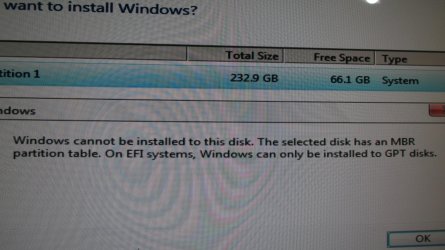
I was installing Windows 7 Pro, 64 bit on my desktop computer. I tried several times, and kept running into this error message:

Windows cannot be installed to this disk. The selected disk has an MBR partition table. On EFI systems, Windows can only be installed to GPT disks.

I looked at several You Tube videos on how to convert a partition from MBR to GPT using Diskpart. They all used the clean command, which erases * EVERYTHING * on the hard drive. Sure, I have 2 backups of everything on that drive, but I would rather not reinstall everything for no reason.

The question - is it necessary to use the clean command when using Diskpart to convert a partition from MBR to GPT? Why not just leave all the files alone?

Also, it was annoying that not one of those people mentioned - Oh, by the way, this clean command will erase every single file on your hard drive! Did you back up your stuff?

I skipped Diskpart, and used Aomei Partition Manager to make the conversion. But I want to make my own video, for people who are not super nerds, and dealing with the same error message.

Problem 2: Converting the partition from MBR to GPT did me no good at all! I kept trying various things, and still running into error messages. After 4 hours of this nonsense, I came across a video about making an EFI partition. I was wondering, maybe with a GPT partition Windows needs it's own partition, it's own special safe space.

Oh frabjous day, that was the answer! Once you switch to GPT, Windows needs its own partition of at least 100 megabytes. It was super annoying that out of all the articles I read and videos I watched, not one person mentioned this obvious and essential fact!

So that's why I want to make my own video, to explain how to deal with this error message, and include all the important parts that the other guys left out.

Thank you much for you insights.
 

Attachments
  • IMG_1690 Windows 7 error not GPT disk.jpg.jpg
    IMG_1690 Windows 7 error not GPT disk.jpg.jpg
    1.8 MB · Views: 0

My Computer My Computer

At a glance

Windows 7 Professional, 64 bitIntel Core i5, 4460, running at 3.2 gigahertz32 gigabytes of DDR 3 memoryGigabyte GTX 1050
Computer type
PC/Desktop
Computer Manufacturer/Model Number
I pieced it together myself.
OS
Windows 7 Professional, 64 bit
CPU
Intel Core i5, 4460, running at 3.2 gigahertz
Motherboard
MSI PC Mate, Z97
Memory
32 gigabytes of DDR 3 memory
Graphics Card(s)
Gigabyte GTX 1050
Hard Drives
Crucial MX200 solid state drive, 232 gigabytes.

And I have a Hitachi, 6 terabyte spinning hard drive for back ups.
Antivirus
Avast Anti-virus
Browser
Firefox 77 and Opera 69.
Hi Anthony,

Welcome to Sevenforums!

I don't use diskpart for this and other reasons. The Windows built-in Diskpart Command can only convert MBR to GPT by cleaning the disk first, which will lead to a great data loss.

I use EaseUS Partition Master Free. Or AOMEI Partition Assistant Free.
You can convert MBR to GPT or GPT to MBR, no formatting or erasing disk.

Googled mbr gpt explained

Some basics of MBR v/s GPT and BIOS v/s UEFI - Manjaro Wiki

What's the Difference Between GPT and MBR When Partitioning

Briefly MBR vs GPT | What are the main differences between ...

Videos

MBR and GPT Partition Tables - YouTube

UEFI vs Legacy BIOS Boot | GPT vs MBR (DOS) | Explained ...

Snick


My Computer My Computer

At a glance

Win 10 x64, Linux Lite, Win 7 x64, BlackArch,...
Computer type
PC/Desktop
Computer Manufacturer/Model Number
HP Desktop & Compaq Laptop
OS
Win 10 x64, Linux Lite, Win 7 x64, BlackArch, & Kali
Hard Drives
Samsung 850 Pro 256Gb,
Hitachi HDD 1Tb,
Crucial MX SSD 250Gb
Segate 3Tb USB 3.0 Ext. Backup HDD
Internet Speed
150Mbps dn, 20Mbps up
Antivirus
Avast Free, Malwarebytes Anti-Exploit & Anti-Ransomware
Browser
Firefox, Chrome, Opera, & VPN
You're mixing concepts.
- A drive standard for the layout of partition tables can be GPT or MBR type.
- Boot systems can be Legacy - MBR or UEFI - GPT

You can easily convert a MBR drive to GPT and from GPT to MBR changing the layout of partition tables.
But to convert a Legacy - MBR boot able drive to a UEFI - GPT boot able drive it needs more than just convert a MBR drive to GPT changing the layout of partition tables.

A UEFI - GPT boot able drive requires:
- The computer must have a UEFI BIOS.
- The OS must be 64 bits.
- The drive must be GPT with a Fat32 partition with the boot loader (must be created on the conversion)

Win 10 and Win 10 installation drive has a tool (mbr2gpt.exe) that can convert a Windows Legacy- MBR boot able drive into a UEFI - GPT boot able drive. It was created for Win 10 conversion but also works on Win 7.

ALWAYS backup your drive before you do anything.

Boot from Win 10 installation drive, launch a CMD window and type:
Diskpart (to enter diskpart)
List disk (take note from the win 7 disk you want to convert)
exit (to exit diskpart)
MBR2GPT /convert /disk:<diskNumber>

Brink tutorial Convert Windows Legacy-MBR to UEFI-GPT without data loss
 
Last edited:

My Computers My Computers

  • At a glance

    Windows 7 HP 64i5 6600K - 800MHz to 4200MHz4+4G GSkill DDR4 3000IG - Intel 530
    Computer type
    PC/Desktop
    Computer Manufacturer/Model Number
    custom build
    OS
    Windows 7 HP 64
    CPU
    i5 6600K - 800MHz to 4200MHz
    Motherboard
    GA-Z170-HD3P
    Memory
    4+4G GSkill DDR4 3000
    Graphics Card(s)
    IG - Intel 530
    Monitor(s) Displays
    Samsung 226BW
    Screen Resolution
    1680x1050
    Hard Drives
    (1) -1 SM951 – 128GB M.2 AHCI PCIe SSD drive for Windows 7 and Lubuntu
    (2) -1 WD SATA 3 - 1T for Data
    (3) -1 WD SATA 3 - 1T for backup
    PSU
    Thermaltake 450W TR2 gold
    Keyboard
    Old and good Chicony mechanical keyboard
    Mouse
    Logitech mX performance - 9 buttons (had to disable some)
    Internet Speed
    500Mb/s
    Browser
    Firefox 64
    Other Info
    TinyWall firewall
  • At a glance

    Windows 7 Proi7-4500U 800MHz to 3.0GHz(4+4)G DDR3 1600IG intel 4400 + NVIDIA GeForce GT 745M
    Computer type
    Laptop
    System Manufacturer/Model Number
    Asus Q550LF
    OS
    Windows 7 Pro
    CPU
    i7-4500U 800MHz to 3.0GHz
    Motherboard
    Asus Q550LF
    Memory
    (4+4)G DDR3 1600
    Graphics Card(s)
    IG intel 4400 + NVIDIA GeForce GT 745M
    Sound Card
    Realtek
    Monitor(s) Displays
    LG Display LP156WF4-SPH1
    Screen Resolution
    1920 x 1080
    Hard Drives
    BX500 120G SSD for Windows and programs +
    1T HDD for data
    Internet Speed
    500 Mb/s
    Browser
    Firefox
    Other Info
    TinyWall firewall
That is odd. Aomei creates an esp partition when converting mbr>gpt.

Not sure what you did wrong.
 

My Computers My Computers

  • At a glance

    7 X64i5 84002x8gb 3200mhz
    Computer type
    PC/Desktop
    OS
    7 X64
    CPU
    i5 8400
    Motherboard
    gigabyte b365m ds3h
    Memory
    2x8gb 3200mhz
    Hard Drives
    various
    PSU
    pure power 11 400w cm
    Case
    Coolermaster
    Cooling
    cryorig m9i
  • At a glance

    7x64g54008gb ddr4 2400
    Computer type
    PC/Desktop
    OS
    7x64
    CPU
    g5400
    Motherboard
    ga b365m ds3h
    Memory
    8gb ddr4 2400
    PSU
    xfx pro 450w
If the disk is full (fully partitioned), there's no space to put the EFI partition. I also think the EFI partition needs to be the first partition in physical order, but less sure about that.

You could've saved yourself the trouble by flipping the IDE/AHCI switch in your BIOS to IDE (sometimes called Legacy mode). If you boot the Windows 7 install drive in AHCI mode, it will only want to install to an EFI system. (Some very new mobos don't do IDE anymore, but they probably also won't run a vanilla Win7 install disc.)
 

My Computer My Computer

At a glance

Windows 7 Ultimate x64 (single boot)
Computer type
PC/Desktop
OS
Windows 7 Ultimate x64 (single boot)
Antivirus
Cryptoprevent
Browser
Pale Moon
If the disk is full (fully partitioned), there's no space to put the EFI partition. I also think the EFI partition needs to be the first partition in physical order, but less sure about that.

You could've saved yourself the trouble by flipping the IDE/AHCI switch in your BIOS to IDE (sometimes called Legacy mode). If you boot the Windows 7 install drive in AHCI mode, it will only want to install to an EFI system. (Some very new mobos don't do IDE anymore, but they probably also won't run a vanilla Win7 install disc.)

You're mixing things. IDE/AHCI has nothing to do with the type of the disk (MBR / GPT) or the way you want to boot (Legacy - MBR or UEFI - GPT).
 

My Computers My Computers

  • At a glance

    Windows 7 HP 64i5 6600K - 800MHz to 4200MHz4+4G GSkill DDR4 3000IG - Intel 530
    Computer type
    PC/Desktop
    Computer Manufacturer/Model Number
    custom build
    OS
    Windows 7 HP 64
    CPU
    i5 6600K - 800MHz to 4200MHz
    Motherboard
    GA-Z170-HD3P
    Memory
    4+4G GSkill DDR4 3000
    Graphics Card(s)
    IG - Intel 530
    Monitor(s) Displays
    Samsung 226BW
    Screen Resolution
    1680x1050
    Hard Drives
    (1) -1 SM951 – 128GB M.2 AHCI PCIe SSD drive for Windows 7 and Lubuntu
    (2) -1 WD SATA 3 - 1T for Data
    (3) -1 WD SATA 3 - 1T for backup
    PSU
    Thermaltake 450W TR2 gold
    Keyboard
    Old and good Chicony mechanical keyboard
    Mouse
    Logitech mX performance - 9 buttons (had to disable some)
    Internet Speed
    500Mb/s
    Browser
    Firefox 64
    Other Info
    TinyWall firewall
  • At a glance

    Windows 7 Proi7-4500U 800MHz to 3.0GHz(4+4)G DDR3 1600IG intel 4400 + NVIDIA GeForce GT 745M
    Computer type
    Laptop
    System Manufacturer/Model Number
    Asus Q550LF
    OS
    Windows 7 Pro
    CPU
    i7-4500U 800MHz to 3.0GHz
    Motherboard
    Asus Q550LF
    Memory
    (4+4)G DDR3 1600
    Graphics Card(s)
    IG intel 4400 + NVIDIA GeForce GT 745M
    Sound Card
    Realtek
    Monitor(s) Displays
    LG Display LP156WF4-SPH1
    Screen Resolution
    1920 x 1080
    Hard Drives
    BX500 120G SSD for Windows and programs +
    1T HDD for data
    Internet Speed
    500 Mb/s
    Browser
    Firefox
    Other Info
    TinyWall firewall
As I said if you boot Windows setup disc in UEFI mode it won't install to an MBR-formatted disk. "UEFI mode" is also called "AHCI" or "SATA" in many BIOSes (or "many UEFIs" if you want to make it more confusing). Of course the terminology is all wrong and this is conflating two switches and giving them a third name (nobody even has IDE disks anymore?), but don't shoot the messenger :D

This setup quirk may have been fixed in setup discs newer than mine, but clearly this is the problem OP ran into. Win 7x64 will install to non-EFI (non-GPT, that is MBR) disks at least when "Legacy" (aka "IDE") mode is turned on. It's less of a hassle to flip a bit in BIOS (if the BIOS has the bit) than to repartition the disk.
 

My Computer My Computer

At a glance

Windows 7 Ultimate x64 (single boot)
Computer type
PC/Desktop
OS
Windows 7 Ultimate x64 (single boot)
Antivirus
Cryptoprevent
Browser
Pale Moon
Will Easeus Partition Master Free convert a bootable drive MBR to GPT?

Snick, I read the articles and watched the videos.

With Easeus Partition Master Free, can I convert a * system * hard drive from MBR to GPT, without losing files on the hard drive? Or maybe I should say a bootable hard drive. (There is nothing on the hard drive that I want to keep. I just want to know if it's possible.)

I tried this with Aomei Partition Assistant Free, but I discovered the free version of Aomei will only convert data drives from MBR to GPT. To convert a system hard drive from MBR to GPT, I have to pony up and pay for the professional edition.

I connected the drive to my working computer with a little hard drive adapter cable. Then I used Aomei to change it from MBR to GPT. When I tried to install Windows 7, I just got an error message.

I'm wondering if this will work with Easeus Partition Master Free.

Thank you much for your help! :-)

Megahertz07, I am trying to install Windows 7. You're on the Windows 7 forum. That MBR2GPT command is only available in later versions of Windows 10.
 

My Computer My Computer

At a glance

Windows 7 Professional, 64 bitIntel Core i5, 4460, running at 3.2 gigahertz32 gigabytes of DDR 3 memoryGigabyte GTX 1050
Computer type
PC/Desktop
Computer Manufacturer/Model Number
I pieced it together myself.
OS
Windows 7 Professional, 64 bit
CPU
Intel Core i5, 4460, running at 3.2 gigahertz
Motherboard
MSI PC Mate, Z97
Memory
32 gigabytes of DDR 3 memory
Graphics Card(s)
Gigabyte GTX 1050
Hard Drives
Crucial MX200 solid state drive, 232 gigabytes.

And I have a Hitachi, 6 terabyte spinning hard drive for back ups.
Antivirus
Avast Anti-virus
Browser
Firefox 77 and Opera 69.

My Computers My Computers

  • At a glance

    7 X64i5 84002x8gb 3200mhz
    Computer type
    PC/Desktop
    OS
    7 X64
    CPU
    i5 8400
    Motherboard
    gigabyte b365m ds3h
    Memory
    2x8gb 3200mhz
    Hard Drives
    various
    PSU
    pure power 11 400w cm
    Case
    Coolermaster
    Cooling
    cryorig m9i
  • At a glance

    7x64g54008gb ddr4 2400
    Computer type
    PC/Desktop
    OS
    7x64
    CPU
    g5400
    Motherboard
    ga b365m ds3h
    Memory
    8gb ddr4 2400
    PSU
    xfx pro 450w
Snick, I read the articles and watched the videos.

With Easeus Partition Master Free, can I convert a * system * hard drive from MBR to GPT, without losing files on the hard drive? Or maybe I should say a bootable hard drive. (There is nothing on the hard drive that I want to keep. I just want to know if it's possible.)

I'm wondering if this will work with Easeus Partition Master Free.

Thank you much for your help! :-)


Yes, I do it all the time, MBR>GPT GPT>MBR That is why I suggested it. I never recommend an app without knowing about how it works. If I research an OP's issue & I'm not familiar with an app or a set of instructions, if I can, I test it on my test drive.

Google is well my friend. here you go from EaseUS
Free Convert MBR to GPT Without Data Loss - EaseUS
Change GPT Disk to MBR Disk Without Formatting - EaseUS

Question: Have you ever tried to shrink a Windows partition on a drive with Disk Management?

Quite often you can't shrink it much due to unmovable files at the end or near the end of the partition. If you simply download and try a partition resizing program, and you just resize the Win partition, it will most probably trash your OS because the program does not take into consideration those files exist.

Disk Perfect is what I use. It does recognize those files, saves and moves them to the end or near the end of the resized partition. Works for me, every time I've used it. If you install the trial paid version I believe. To remove the trial cookie, run Revo Uninstaller and you can do that again and again.!


Snick


My Computer My Computer

At a glance

Win 10 x64, Linux Lite, Win 7 x64, BlackArch,...
Computer type
PC/Desktop
Computer Manufacturer/Model Number
HP Desktop & Compaq Laptop
OS
Win 10 x64, Linux Lite, Win 7 x64, BlackArch, & Kali
Hard Drives
Samsung 850 Pro 256Gb,
Hitachi HDD 1Tb,
Crucial MX SSD 250Gb
Segate 3Tb USB 3.0 Ext. Backup HDD
Internet Speed
150Mbps dn, 20Mbps up
Antivirus
Avast Free, Malwarebytes Anti-Exploit & Anti-Ransomware
Browser
Firefox, Chrome, Opera, & VPN
What is ESP?

The EFI system partition (ESP) is a partition on a data storage device (usually a hard disk drive or solid-state drive) that is used by computers adhering to the Unified Extensible Firmware Interface (UEFI). What that means is that the EFI Partition is an interface for the computer to boot windows off of.
 

My Computer My Computer

At a glance

Win 10 x64, Linux Lite, Win 7 x64, BlackArch,...
Computer type
PC/Desktop
Computer Manufacturer/Model Number
HP Desktop & Compaq Laptop
OS
Win 10 x64, Linux Lite, Win 7 x64, BlackArch, & Kali
Hard Drives
Samsung 850 Pro 256Gb,
Hitachi HDD 1Tb,
Crucial MX SSD 250Gb
Segate 3Tb USB 3.0 Ext. Backup HDD
Internet Speed
150Mbps dn, 20Mbps up
Antivirus
Avast Free, Malwarebytes Anti-Exploit & Anti-Ransomware
Browser
Firefox, Chrome, Opera, & VPN

Megahertz07, I am trying to install Windows 7. You're on the Windows 7 forum. That MBR2GPT command is only available in later versions of Windows 10.

I know you're trying to install Win 7.
If you carefully read my post #3 you will see that I mention that with a Win 10 installation disk you can use mbr2gpt tool to convert a Win 7 Legacy-MBR drive into a Win 7 UEFI-GPT drive.
 

My Computers My Computers

  • At a glance

    Windows 7 HP 64i5 6600K - 800MHz to 4200MHz4+4G GSkill DDR4 3000IG - Intel 530
    Computer type
    PC/Desktop
    Computer Manufacturer/Model Number
    custom build
    OS
    Windows 7 HP 64
    CPU
    i5 6600K - 800MHz to 4200MHz
    Motherboard
    GA-Z170-HD3P
    Memory
    4+4G GSkill DDR4 3000
    Graphics Card(s)
    IG - Intel 530
    Monitor(s) Displays
    Samsung 226BW
    Screen Resolution
    1680x1050
    Hard Drives
    (1) -1 SM951 – 128GB M.2 AHCI PCIe SSD drive for Windows 7 and Lubuntu
    (2) -1 WD SATA 3 - 1T for Data
    (3) -1 WD SATA 3 - 1T for backup
    PSU
    Thermaltake 450W TR2 gold
    Keyboard
    Old and good Chicony mechanical keyboard
    Mouse
    Logitech mX performance - 9 buttons (had to disable some)
    Internet Speed
    500Mb/s
    Browser
    Firefox 64
    Other Info
    TinyWall firewall
  • At a glance

    Windows 7 Proi7-4500U 800MHz to 3.0GHz(4+4)G DDR3 1600IG intel 4400 + NVIDIA GeForce GT 745M
    Computer type
    Laptop
    System Manufacturer/Model Number
    Asus Q550LF
    OS
    Windows 7 Pro
    CPU
    i7-4500U 800MHz to 3.0GHz
    Motherboard
    Asus Q550LF
    Memory
    (4+4)G DDR3 1600
    Graphics Card(s)
    IG intel 4400 + NVIDIA GeForce GT 745M
    Sound Card
    Realtek
    Monitor(s) Displays
    LG Display LP156WF4-SPH1
    Screen Resolution
    1920 x 1080
    Hard Drives
    BX500 120G SSD for Windows and programs +
    1T HDD for data
    Internet Speed
    500 Mb/s
    Browser
    Firefox
    Other Info
    TinyWall firewall
Back
Top