
Anthony Indiana
New member
- Local time
- 3:47 PM
- Messages
- 2
Good Day,
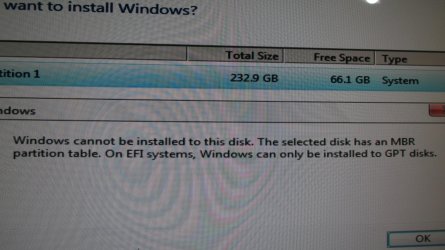
I was installing Windows 7 Pro, 64 bit on my desktop computer. I tried several times, and kept running into this error message:
Windows cannot be installed to this disk. The selected disk has an MBR partition table. On EFI systems, Windows can only be installed to GPT disks.
I looked at several You Tube videos on how to convert a partition from MBR to GPT using Diskpart. They all used the clean command, which erases * EVERYTHING * on the hard drive. Sure, I have 2 backups of everything on that drive, but I would rather not reinstall everything for no reason.
The question - is it necessary to use the clean command when using Diskpart to convert a partition from MBR to GPT? Why not just leave all the files alone?
Also, it was annoying that not one of those people mentioned - Oh, by the way, this clean command will erase every single file on your hard drive! Did you back up your stuff?
I skipped Diskpart, and used Aomei Partition Manager to make the conversion. But I want to make my own video, for people who are not super nerds, and dealing with the same error message.
Problem 2: Converting the partition from MBR to GPT did me no good at all! I kept trying various things, and still running into error messages. After 4 hours of this nonsense, I came across a video about making an EFI partition. I was wondering, maybe with a GPT partition Windows needs it's own partition, it's own special safe space.
Oh frabjous day, that was the answer! Once you switch to GPT, Windows needs its own partition of at least 100 megabytes. It was super annoying that out of all the articles I read and videos I watched, not one person mentioned this obvious and essential fact!
So that's why I want to make my own video, to explain how to deal with this error message, and include all the important parts that the other guys left out.
Thank you much for you insights.
I was installing Windows 7 Pro, 64 bit on my desktop computer. I tried several times, and kept running into this error message:
Windows cannot be installed to this disk. The selected disk has an MBR partition table. On EFI systems, Windows can only be installed to GPT disks.
I looked at several You Tube videos on how to convert a partition from MBR to GPT using Diskpart. They all used the clean command, which erases * EVERYTHING * on the hard drive. Sure, I have 2 backups of everything on that drive, but I would rather not reinstall everything for no reason.
The question - is it necessary to use the clean command when using Diskpart to convert a partition from MBR to GPT? Why not just leave all the files alone?
Also, it was annoying that not one of those people mentioned - Oh, by the way, this clean command will erase every single file on your hard drive! Did you back up your stuff?
I skipped Diskpart, and used Aomei Partition Manager to make the conversion. But I want to make my own video, for people who are not super nerds, and dealing with the same error message.
Problem 2: Converting the partition from MBR to GPT did me no good at all! I kept trying various things, and still running into error messages. After 4 hours of this nonsense, I came across a video about making an EFI partition. I was wondering, maybe with a GPT partition Windows needs it's own partition, it's own special safe space.
Oh frabjous day, that was the answer! Once you switch to GPT, Windows needs its own partition of at least 100 megabytes. It was super annoying that out of all the articles I read and videos I watched, not one person mentioned this obvious and essential fact!
So that's why I want to make my own video, to explain how to deal with this error message, and include all the important parts that the other guys left out.
Thank you much for you insights.
Attachments
My Computer
At a glance
Windows 7 Professional, 64 bitIntel Core i5, 4460, running at 3.2 gigahertz32 gigabytes of DDR 3 memoryGigabyte GTX 1050
- Computer type
- PC/Desktop
- Computer Manufacturer/Model Number
- I pieced it together myself.
- OS
- Windows 7 Professional, 64 bit
- CPU
- Intel Core i5, 4460, running at 3.2 gigahertz
- Motherboard
- MSI PC Mate, Z97
- Memory
- 32 gigabytes of DDR 3 memory
- Graphics Card(s)
- Gigabyte GTX 1050
- Hard Drives
- Crucial MX200 solid state drive, 232 gigabytes.
And I have a Hitachi, 6 terabyte spinning hard drive for back ups.
- Antivirus
- Avast Anti-virus
- Browser
- Firefox 77 and Opera 69.


