
Is google dns real safe? no answer from google

jraju

New member
Member
VIP
Local time
8:35 PM
Messages
759
Hi, i changed my ISP service provider dns to public google dns, as avast prompted some network vulnerabilities.
But , after changing to google.dns, a scan at dnsleak.com, found a server in malaysia accessing my network connection. I also noticed some popup from that server in malaysia.
i wrote to google forum, which did not evince any reply.
i wrote in some other forums but could not get a satisfying reply.
I also read forum topics here, which suggest switching to public dns,if we come across internet access loss or any dns inherent problems.
Either the trace could be my ISP servers or Google servers in my networking connections. What a malaysian server , not at all connected would be doing , i.e accessing my network or router?
It was almost nov 4,2017, when i did the dnsleak com test. But still puzzled by this behaviour of google, giving access to unknown service to the users .
The curse is if i use firefox also, the search engine is google .
Is google giving access to web servers for advertisement or other purpose
i really rate dnsleak.com test as perfect.
Normally one would not check those things, if one has internet access
i changed to my ISP immediately for safety purpose, as any query could be easily answered to my ISp, thro which i am getting internet connection. Any idea
After switching to my ISP, the dnsleaktest com does not produce so many servers as before
 

Attachments
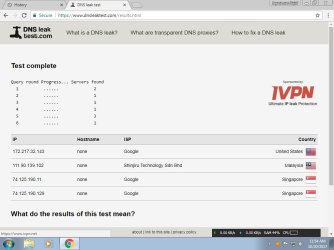
  • dnsextended test.jpg
    dnsextended test.jpg
    56.9 KB · Views: 1

My Computer My Computer

Computer type
PC/Desktop
Computer Manufacturer/Model Number
custom build
OS
Microsoft Windows 7 Ultimate 64-bit 7601 Multiprocessor Free Service Pack 1
CPU
Intel(R) Core(TM)2 Duo CPU E7200 @ 2.53GHz
Motherboard
To be filled by O.E.M. To be filled by O.E.M.
Memory
4.00 GB
Graphics Card(s)
NVIDIA GeForce 210
Sound Card
(1) NVIDIA High Definition Audio (2) Realtek High Definiti
Screen Resolution
1920 x 1080 x 32 bits (4294967296 colors) @ 60 Hz
Hard Drives
ST3500312CS ATA Device
There is a new fast DNS 1.1.1.1 the leak basically means a server has done a DNS lookup on your PC possibly when you connected to their server this is often done to give you related content Netflix who won't supply some services if your not in USA
 

My Computer My Computer

Computer type
PC/Desktop
OS
win 8 32 bit
Google will read the IP you are using, Google will read the ISP you are looking at, Google will serve adverts to the IP you are using in the page you are reading

This is the way that google works and makes their vast fortune - They do not care who you are. If you are looking at a gardening page they will serve adverts about gardening If you are looking at a page showing holidays they will serve holiday ads and maybe cheap airline fares. The reason they do this is to sell products for their customers that Pay Google for this service. Without this link provided by google you would still get adverts, but they would be for random items that would probably not interest you.

Your ISP will also take the same information about what sites you visit from their DNS, the difference is that they will sell your information to anyone with the money to pay, and of course the ISP knows who you are and where you live so can sell postal information as well as the IP Data. Most people change their IP address regularly but their name and postal address a lot less often

the new Cloudflare 1.1.1.1 DNS does things a little differently Cloudflare are one of the major Internet Network infrastructure suppliers on the planet so they have an interest in better quality data transfer through theitr naetworks and the rest of the Internet so have worked with the people who issue IP Numbers to provide a service that is quicker, private and more reliable that the others ( they claim, and my experience so far agrees with this)

What is 1.1.1.1? | Cloudflare
 

My Computers My Computers

System One System Two

  • Computer type
    PC/Desktop
    Computer Manufacturer/Model Number
    ChillBlast - Custom to my design
    OS
    Windows 11 Pro x64 [Latest Release and Release Preview]
    CPU
    Ryzen 9 5950X, 3.8 - 5.2 MHz
    Motherboard
    Asus Prime X570-Pro
    Memory
    64GB [2 x 32GB] DDR4 3200MHz
    Graphics Card(s)
    4GB NVIDIA GEFORCE GTX 1650 Ti
    Sound Card
    On-board SPDIF to 5.1 System + HDMI [5.1 system]
    Monitor(s) Displays
    32" UHD 32 Bit HDR Monitor + 43" UHD 4K 32Bit HDR TV
    Screen Resolution
    2 x 3840 x 2160 @60Hz
    Hard Drives
    1TB M2 SSD OS, 500GB Fast Access SSD, 2 x 8TB Data + Various Externals from 1TB to 4TB, 10TB NAS
    PSU
    NZXT C750 80 PLUS Gold 750W Modular PSU
    Case
    Workstation Case [Matt Black]
    Cooling
    NZXT Kraken X63 280mm CPU Cooler +2x Quiet Case fans
    Keyboard
    Logitech Wireless MX Keys & K400 + others
    Mouse
    Logitech Wireless MX Master 3S
    Internet Speed
    920 MB Down 50 MB Up
    Antivirus
    BitDefender Total Security Pro
    Browser
    Chrome (always run latest Non-Beta)
    Other Info
    Also run ...
    Laptop - Quad 8GB - Windows 10 Pro x64
    Nexus 7 Android tablet x2
    Samsung 10.2" tablet
    Blackview TAB 8 4G Android Tablet c/w Keyboard
    Wacom Intuos Pro Medium Pen Pad
    Wacom Intuos Pro Small Pen Pad
    Wacom Expresskeys Remote
    Loopdeck+ Graphics Controller
    Shuttle Pro v2 Control
  • Computer type
    Laptop
    System Manufacturer/Model Number
    Dell XPS 17 10750H
    OS
    Windows 11 Pro x64 Latest RP
    CPU
    Intel I7 10750H 5.0GHz
    Motherboard
    Dell XPS
    Memory
    32GB [2x16GB] DDR4 2933 MHz
    Graphics Card(s)
    nVidia GTX1650Ti 4 GB GDDR6
    Sound Card
    Stock [Realtek] 4 Speaker
    Monitor(s) Displays
    17" IPS UHD+ Infinity Edge Touchscreen
    Screen Resolution
    3840 x 2400
    Hard Drives
    2TB M2 NVMe, 4TB External + various 500GB & 1TB External NVMe (also have access to spinner HDD from
    PSU
    Stock
    Case
    Stock XPS Aluminium & Carbon Fibre
    Cooling
    Stock - Active Fan Control
    Keyboard
    Backlit + Various Logitech
    Mouse
    Stock Track Pad + Logitech MX Trackball
    Internet Speed
    72 MB Down 18MB Up
    Browser
    Chrome
    Other Info
    Also run ...
    Laptop - Quad 8GB - Windows 10 Pro x64
    Nexus 7 Android tablet x2
    10.2" tablet
    Sony Z3 Android Smartphone
    Wacom Intuos Pro Medium Pen Pad
    Wacom Intuos Pro Small Pen Pad
    Wacom Expresskeys Remote
    Loopdeck+ Graphics Controller
    Shuttle Pro v2 Control Pad
    10TB NAS
Hi, thanks for the reply. The fact that i do notice is that while adverts and all related stuff is one thing, the allowing of a dns server, as actual dns server at a time of browsing is puzzling me. Why do google do this? Already face book leaks are doing round the corner.
Elsewhere in some of the threads, i do come across the recommendations of using public dns, especially google 8.8.8.8. The peculiar thing i noticed that this is always not allowed, but at times , say odd hours, or dull hours of the day.
when i switched back to my ISP, the dnsleak.com test only show one server of my ISP as my actual dns server.
There is a beta version of router check beta for pc, that list the actual dns servers besides scanning for vulnerabilities in the routerset up.
Now google ask you to do a survey of your standing place, to gather more local nature and data of the users.
 

My Computer My Computer

Computer type
PC/Desktop
Computer Manufacturer/Model Number
custom build
OS
Microsoft Windows 7 Ultimate 64-bit 7601 Multiprocessor Free Service Pack 1
CPU
Intel(R) Core(TM)2 Duo CPU E7200 @ 2.53GHz
Motherboard
To be filled by O.E.M. To be filled by O.E.M.
Memory
4.00 GB
Graphics Card(s)
NVIDIA GeForce 210
Sound Card
(1) NVIDIA High Definition Audio (2) Realtek High Definiti
Screen Resolution
1920 x 1080 x 32 bits (4294967296 colors) @ 60 Hz
Hard Drives
ST3500312CS ATA Device
DNS is best provided by a network of servers, this means that if a server fails then you retain service. This is the way the Internet is designed to work, The original concept taken from the Military Communications system designed to re-route messages if a particular location was Taken out.

One of the problems with small ISPs , (and even some large ones ), is that the only run one or a small number of DNS servers, this means that they can get swamped and fail to work properly and at best most are slow

Google provides this service as it helps them collect more data as I mentioned above, they can also afford to use multiple servers which gives speed and reliability.

There is also Open DNS which allows you to block some types of site

Cloudflare are a large organisation who own and run a huge number of servers anyway they are simply making these available to private users for free
 

My Computers My Computers

System One System Two

  • Computer type
    PC/Desktop
    Computer Manufacturer/Model Number
    ChillBlast - Custom to my design
    OS
    Windows 11 Pro x64 [Latest Release and Release Preview]
    CPU
    Ryzen 9 5950X, 3.8 - 5.2 MHz
    Motherboard
    Asus Prime X570-Pro
    Memory
    64GB [2 x 32GB] DDR4 3200MHz
    Graphics Card(s)
    4GB NVIDIA GEFORCE GTX 1650 Ti
    Sound Card
    On-board SPDIF to 5.1 System + HDMI [5.1 system]
    Monitor(s) Displays
    32" UHD 32 Bit HDR Monitor + 43" UHD 4K 32Bit HDR TV
    Screen Resolution
    2 x 3840 x 2160 @60Hz
    Hard Drives
    1TB M2 SSD OS, 500GB Fast Access SSD, 2 x 8TB Data + Various Externals from 1TB to 4TB, 10TB NAS
    PSU
    NZXT C750 80 PLUS Gold 750W Modular PSU
    Case
    Workstation Case [Matt Black]
    Cooling
    NZXT Kraken X63 280mm CPU Cooler +2x Quiet Case fans
    Keyboard
    Logitech Wireless MX Keys & K400 + others
    Mouse
    Logitech Wireless MX Master 3S
    Internet Speed
    920 MB Down 50 MB Up
    Antivirus
    BitDefender Total Security Pro
    Browser
    Chrome (always run latest Non-Beta)
    Other Info
    Also run ...
    Laptop - Quad 8GB - Windows 10 Pro x64
    Nexus 7 Android tablet x2
    Samsung 10.2" tablet
    Blackview TAB 8 4G Android Tablet c/w Keyboard
    Wacom Intuos Pro Medium Pen Pad
    Wacom Intuos Pro Small Pen Pad
    Wacom Expresskeys Remote
    Loopdeck+ Graphics Controller
    Shuttle Pro v2 Control
  • Computer type
    Laptop
    System Manufacturer/Model Number
    Dell XPS 17 10750H
    OS
    Windows 11 Pro x64 Latest RP
    CPU
    Intel I7 10750H 5.0GHz
    Motherboard
    Dell XPS
    Memory
    32GB [2x16GB] DDR4 2933 MHz
    Graphics Card(s)
    nVidia GTX1650Ti 4 GB GDDR6
    Sound Card
    Stock [Realtek] 4 Speaker
    Monitor(s) Displays
    17" IPS UHD+ Infinity Edge Touchscreen
    Screen Resolution
    3840 x 2400
    Hard Drives
    2TB M2 NVMe, 4TB External + various 500GB & 1TB External NVMe (also have access to spinner HDD from
    PSU
    Stock
    Case
    Stock XPS Aluminium & Carbon Fibre
    Cooling
    Stock - Active Fan Control
    Keyboard
    Backlit + Various Logitech
    Mouse
    Stock Track Pad + Logitech MX Trackball
    Internet Speed
    72 MB Down 18MB Up
    Browser
    Chrome
    Other Info
    Also run ...
    Laptop - Quad 8GB - Windows 10 Pro x64
    Nexus 7 Android tablet x2
    10.2" tablet
    Sony Z3 Android Smartphone
    Wacom Intuos Pro Medium Pen Pad
    Wacom Intuos Pro Small Pen Pad
    Wacom Expresskeys Remote
    Loopdeck+ Graphics Controller
    Shuttle Pro v2 Control Pad
    10TB NAS
Back
Top