
Solved Is it my motherboard?!?!

johnblanker

New member
Local time
2:34 PM
Messages
11
I have been running windows 8 for a while now without problems. Then all the sudden I could not update my Radeon video card/chipset drivers. When I installed the catalyst software suite, the system would just restart and win8 would restart like normal but without the ccc drivers. Tried it in safe mode too. figured I would wipe the ssd and put win7 back on. Figured I would update both BIOS and SSD firmware, booted back into win8 to check, all firmware updates seems to be ok.

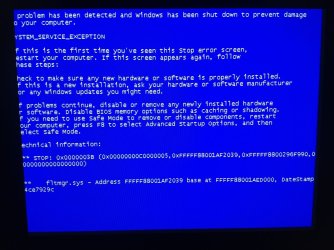
Wiped the ssd, preparing to do fresh install of win7 x64. But now I am getting BSOD when installing the OS. I tried switching sata ports from AHCI to IDE, I tried just using the AMD ports, and just the GSATA ports. When booting from win7 cd it takes a long time to load. The blue start screen comes up for about 10 minutes before asking "English, US" before getting to the install option. Then it says "Setup is Starting.." for about 10 minutes. All the while the cdrom is silent and then kicks into gear and the setup continues. Then, I can see the ssd, format it, win7 starts installing. It copies the windows files in a sec and then hangs on Expanding windows files..., then that starts and takes forever to get to 100% and as soon at that happens, BSOD. 0X0000003B, fltrmgr.sys. system_service_exception.

I'm guessing something went wrong with the chipset, (either north or southbridge). This explains why updating ATI ccc didn't work, and why this is happening.

Anyone else? I would hate to get a new mobo and go through all that work to hook it up and have the same thing happen. Help!

BSOD pic is attached
 

Attachments
  • image.jpg
    image.jpg
    204.5 KB · Views: 6

My Computer My Computer

At a glance

win 7 x64
Computer type
PC/Desktop
OS
win 7 x64
johnblanker,
Welcome to SF and help is on the way. Have you tried removing all but one stick of ram in the mobo's #1 ram position and seeing if helps. The BSOD team can look at your info as well and maybe it will point towards a culprit. It could also be helpful to clear your bios settings back to default and try again. As well disconnect all un-needed hardward from mobo and just have the optical and target SSD drive installed, get to bios and then configure the settings to AHCI for the ssd but the optical in the #1 boot option and fire away !
 

My Computer My Computer

At a glance

Windows 7 Ultimate 64i7 3770k OC'd 4.6 @ 1.17v, also FX 8120 & i5 ...32 gb G.Skill Sniper DDR3 10-12-12-31 @ 2133XFX Radeon 7870 2GB DDR5
Computer type
PC/Desktop
Computer Manufacturer/Model Number
A blend of brains, brawn and dumb luck.
OS
Windows 7 Ultimate 64
CPU
i7 3770k OC'd 4.6 @ 1.17v, also FX 8120 & i5 miniITX
Motherboard
MSI P67A-GD80 b3
Memory
32 gb G.Skill Sniper DDR3 10-12-12-31 @ 2133
Graphics Card(s)
XFX Radeon 7870 2GB DDR5
Sound Card
Sound Blaster Z Series Card
Monitor(s) Displays
(2) LG LED 23" 1920 x 1080 2ms Monitors via mini d-port
Screen Resolution
1680 X 1050 p
Hard Drives
Samsung 256 gb 830 SSD sata III
(1) 1 tb WD Black
(2) 1 tb Hitachi deskmates/sata II
(2) 1 tb WD green/sata II
(2) 3 tb Seagate Barracuda
(1) 120 gb OCZ Vertex SS
(1) Drobo 5N w/5 Seagate 3tb
PSU
EVGA modular 1000G2 80% gold rating & APC 1200 RS
Case
CoolerMaster Storm Styker
Cooling
7 case fans 140mm & 120mm, NZXT Kraken X60
Keyboard
(2) Logitech Illuminated Keyboards (1) usb (1) wireless
Mouse
Logitech G700 & T-BC21 - nano nx for the laptop
Internet Speed
Basic 120mbps down
Antivirus
Trend Micro Titanium Max Security & Malwarebytes Premium
Browser
Chrome and IE 10
Other Info
5 Noctua case fans + 3 Noctua in p/p on NZXT cooler
Integrated hot swap drive bays for 2.5" Drives
(2) Lite-on dvd/cd/Blu Ray optical 22X
Integrated fan controller and led on/off
HP Officejet Pro 8630 all-n-one
Hot-swappable 3.5" hard drive bay
Netgear Nighthawk router
Asus USB 3 & sata 6 PCIe card
Vantec IDE to sata adptr./Ultra sata adptr
Lenovo L420 i5 lappy with m sata
Drobo 5N advanced NAS
ok, let me try that.

oops, forgot specs:

gigabyte ga-890fxa-ud5 rev 3.1
AMD 1090T black edition.
gskill ripjaws 1333, 4 sticks of 4GB.
Crucial m4 60GB ssd.
Corsair 750 watt PSU
Radeon 5770 PCIe GPU
 

My Computer My Computer

At a glance

win 7 x64
Computer type
PC/Desktop
OS
win 7 x64
johnblanker,
Welcome to SF and help is on the way. Have you tried removing all but one stick of ram in the mobo's #1 ram position and seeing if helps. The BSOD team can look at your info as well and maybe it will point towards a culprit. It could also be helpful to clear your bios settings back to default and try again. As well disconnect all un-needed hardward from mobo and just have the optical and target SSD drive installed, get to bios and then configure the settings to AHCI for the ssd but the optical in the #1 boot option and fire away !

Thanks, I did all this. I wonder if it is a problem with my sata ports. I have 6 sata3 ports controlled by AMD board, and 2 sata2 ports controlled by a gygabyte chip (GSATA).

right now I only have the ssd and the optical drive on the sata3 ports, which are set to ahci. Normally, I put the 2 optical drives on the GSATA ports and set them to IDE, this is how I usually do it, but now I'm trying all combinations.
 

My Computer My Computer

At a glance

win 7 x64
Computer type
PC/Desktop
OS
win 7 x64
It worked! The only problem is that i don't know what fixed it, the ram or the combo of how I hooked the ssd & optical drive! I'm guessing the ram. What is a good way to test each stick? I'm guessing boot into memtest and test each stick rotating them in the #1 slot? Or should I just put all in there and test?

Thanks so much, I can't believe it was something so stupid as the ram! I never even thought that could be it.
 

My Computer My Computer

At a glance

win 7 x64
Computer type
PC/Desktop
OS
win 7 x64
I always place the target C drive in the #1 sata 3 port where ever that may be then place the optical in any other sata port. I'm not familiar with your mobo's bios but it sounds like you are. Keep at it as it will likely just turn out to be something simple!.
 

My Computer My Computer

At a glance

Windows 7 Ultimate 64i7 3770k OC'd 4.6 @ 1.17v, also FX 8120 & i5 ...32 gb G.Skill Sniper DDR3 10-12-12-31 @ 2133XFX Radeon 7870 2GB DDR5
Computer type
PC/Desktop
Computer Manufacturer/Model Number
A blend of brains, brawn and dumb luck.
OS
Windows 7 Ultimate 64
CPU
i7 3770k OC'd 4.6 @ 1.17v, also FX 8120 & i5 miniITX
Motherboard
MSI P67A-GD80 b3
Memory
32 gb G.Skill Sniper DDR3 10-12-12-31 @ 2133
Graphics Card(s)
XFX Radeon 7870 2GB DDR5
Sound Card
Sound Blaster Z Series Card
Monitor(s) Displays
(2) LG LED 23" 1920 x 1080 2ms Monitors via mini d-port
Screen Resolution
1680 X 1050 p
Hard Drives
Samsung 256 gb 830 SSD sata III
(1) 1 tb WD Black
(2) 1 tb Hitachi deskmates/sata II
(2) 1 tb WD green/sata II
(2) 3 tb Seagate Barracuda
(1) 120 gb OCZ Vertex SS
(1) Drobo 5N w/5 Seagate 3tb
PSU
EVGA modular 1000G2 80% gold rating & APC 1200 RS
Case
CoolerMaster Storm Styker
Cooling
7 case fans 140mm & 120mm, NZXT Kraken X60
Keyboard
(2) Logitech Illuminated Keyboards (1) usb (1) wireless
Mouse
Logitech G700 & T-BC21 - nano nx for the laptop
Internet Speed
Basic 120mbps down
Antivirus
Trend Micro Titanium Max Security & Malwarebytes Premium
Browser
Chrome and IE 10
Other Info
5 Noctua case fans + 3 Noctua in p/p on NZXT cooler
Integrated hot swap drive bays for 2.5" Drives
(2) Lite-on dvd/cd/Blu Ray optical 22X
Integrated fan controller and led on/off
HP Officejet Pro 8630 all-n-one
Hot-swappable 3.5" hard drive bay
Netgear Nighthawk router
Asus USB 3 & sata 6 PCIe card
Vantec IDE to sata adptr./Ultra sata adptr
Lenovo L420 i5 lappy with m sata
Drobo 5N advanced NAS
As you didn't have an issue before with the ram I would say place them all in the slots and re-boot. If an issue then test each with memtest as mentioned.
 

My Computer My Computer

At a glance

Windows 7 Ultimate 64i7 3770k OC'd 4.6 @ 1.17v, also FX 8120 & i5 ...32 gb G.Skill Sniper DDR3 10-12-12-31 @ 2133XFX Radeon 7870 2GB DDR5
Computer type
PC/Desktop
Computer Manufacturer/Model Number
A blend of brains, brawn and dumb luck.
OS
Windows 7 Ultimate 64
CPU
i7 3770k OC'd 4.6 @ 1.17v, also FX 8120 & i5 miniITX
Motherboard
MSI P67A-GD80 b3
Memory
32 gb G.Skill Sniper DDR3 10-12-12-31 @ 2133
Graphics Card(s)
XFX Radeon 7870 2GB DDR5
Sound Card
Sound Blaster Z Series Card
Monitor(s) Displays
(2) LG LED 23" 1920 x 1080 2ms Monitors via mini d-port
Screen Resolution
1680 X 1050 p
Hard Drives
Samsung 256 gb 830 SSD sata III
(1) 1 tb WD Black
(2) 1 tb Hitachi deskmates/sata II
(2) 1 tb WD green/sata II
(2) 3 tb Seagate Barracuda
(1) 120 gb OCZ Vertex SS
(1) Drobo 5N w/5 Seagate 3tb
PSU
EVGA modular 1000G2 80% gold rating & APC 1200 RS
Case
CoolerMaster Storm Styker
Cooling
7 case fans 140mm & 120mm, NZXT Kraken X60
Keyboard
(2) Logitech Illuminated Keyboards (1) usb (1) wireless
Mouse
Logitech G700 & T-BC21 - nano nx for the laptop
Internet Speed
Basic 120mbps down
Antivirus
Trend Micro Titanium Max Security & Malwarebytes Premium
Browser
Chrome and IE 10
Other Info
5 Noctua case fans + 3 Noctua in p/p on NZXT cooler
Integrated hot swap drive bays for 2.5" Drives
(2) Lite-on dvd/cd/Blu Ray optical 22X
Integrated fan controller and led on/off
HP Officejet Pro 8630 all-n-one
Hot-swappable 3.5" hard drive bay
Netgear Nighthawk router
Asus USB 3 & sata 6 PCIe card
Vantec IDE to sata adptr./Ultra sata adptr
Lenovo L420 i5 lappy with m sata
Drobo 5N advanced NAS
BCCode: 3b 0x0000003b
3b is usually a graphic's driver (display adapter/video driver), and even memory (mapping).
Suggestions:
1.Update your BIOS
2.Reset your BIOS to the default settings.
3.Boot into Ubuntu(live cd) and re installing the video card chipset.(If you know how).
 

My Computer My Computer

At a glance

Windows 7 Ultimate x64Intel® Core™ i7-2670QM8GB DDR3 1333Mhz1GB Nvidia 520MX
Computer type
PC/Desktop
Computer Manufacturer/Model Number
Samsung Series 3 NP300V5A
OS
Windows 7 Ultimate x64
CPU
Intel® Core™ i7-2670QM
Memory
8GB DDR3 1333Mhz
Graphics Card(s)
1GB Nvidia 520MX
Monitor(s) Displays
1
Screen Resolution
1366x768
Hard Drives
750GB HDD
Plus other external HDD's
PSU
(laptop)
Internet Speed
~300Mbit
Antivirus
Eset 5.2.9.1
Browser
Chrome v.26
Other Info
(laptop)
John,
Good luck with the clean install of windows sounds like you're back on your way. Take some pictures and post your rig in "Show Us Your Rig" in the Overclocking and Case Mods section.
 

My Computer My Computer

At a glance

Windows 7 Ultimate 64i7 3770k OC'd 4.6 @ 1.17v, also FX 8120 & i5 ...32 gb G.Skill Sniper DDR3 10-12-12-31 @ 2133XFX Radeon 7870 2GB DDR5
Computer type
PC/Desktop
Computer Manufacturer/Model Number
A blend of brains, brawn and dumb luck.
OS
Windows 7 Ultimate 64
CPU
i7 3770k OC'd 4.6 @ 1.17v, also FX 8120 & i5 miniITX
Motherboard
MSI P67A-GD80 b3
Memory
32 gb G.Skill Sniper DDR3 10-12-12-31 @ 2133
Graphics Card(s)
XFX Radeon 7870 2GB DDR5
Sound Card
Sound Blaster Z Series Card
Monitor(s) Displays
(2) LG LED 23" 1920 x 1080 2ms Monitors via mini d-port
Screen Resolution
1680 X 1050 p
Hard Drives
Samsung 256 gb 830 SSD sata III
(1) 1 tb WD Black
(2) 1 tb Hitachi deskmates/sata II
(2) 1 tb WD green/sata II
(2) 3 tb Seagate Barracuda
(1) 120 gb OCZ Vertex SS
(1) Drobo 5N w/5 Seagate 3tb
PSU
EVGA modular 1000G2 80% gold rating & APC 1200 RS
Case
CoolerMaster Storm Styker
Cooling
7 case fans 140mm & 120mm, NZXT Kraken X60
Keyboard
(2) Logitech Illuminated Keyboards (1) usb (1) wireless
Mouse
Logitech G700 & T-BC21 - nano nx for the laptop
Internet Speed
Basic 120mbps down
Antivirus
Trend Micro Titanium Max Security & Malwarebytes Premium
Browser
Chrome and IE 10
Other Info
5 Noctua case fans + 3 Noctua in p/p on NZXT cooler
Integrated hot swap drive bays for 2.5" Drives
(2) Lite-on dvd/cd/Blu Ray optical 22X
Integrated fan controller and led on/off
HP Officejet Pro 8630 all-n-one
Hot-swappable 3.5" hard drive bay
Netgear Nighthawk router
Asus USB 3 & sata 6 PCIe card
Vantec IDE to sata adptr./Ultra sata adptr
Lenovo L420 i5 lappy with m sata
Drobo 5N advanced NAS
BCCode: 3b 0x0000003b
3b is usually a graphic's driver (display adapter/video driver), and even memory (mapping).
Suggestions:
1.Update your BIOS
2.Reset your BIOS to the default settings.
3.Boot into Ubuntu(live cd) and re installing the video card chipset.(If you know how).

1 & 2 were done.
Video card chipset? Win7 is up, I'm goin to install the mobo chipset drivers first, and then the AMD ccc drivers. Not sure about video card chipset drivers....
 

My Computer My Computer

At a glance

win 7 x64
Computer type
PC/Desktop
OS
win 7 x64
This week I'm kinda slow on reply's, sorry for the late reply :/
 

My Computer My Computer

At a glance

Windows 7 Ultimate x64Intel® Core™ i7-2670QM8GB DDR3 1333Mhz1GB Nvidia 520MX
Computer type
PC/Desktop
Computer Manufacturer/Model Number
Samsung Series 3 NP300V5A
OS
Windows 7 Ultimate x64
CPU
Intel® Core™ i7-2670QM
Memory
8GB DDR3 1333Mhz
Graphics Card(s)
1GB Nvidia 520MX
Monitor(s) Displays
1
Screen Resolution
1366x768
Hard Drives
750GB HDD
Plus other external HDD's
PSU
(laptop)
Internet Speed
~300Mbit
Antivirus
Eset 5.2.9.1
Browser
Chrome v.26
Other Info
(laptop)
John,
You're right do the mobo drivers all (look on websites for latest versions), then video drivers, add your AV and Malware programs then do all the OS updates. I like to run scans then once all my OS and software are installed and my setting are complete I like to make an image of the SSD and save as well create a repair disk.
 

My Computer My Computer

At a glance

Windows 7 Ultimate 64i7 3770k OC'd 4.6 @ 1.17v, also FX 8120 & i5 ...32 gb G.Skill Sniper DDR3 10-12-12-31 @ 2133XFX Radeon 7870 2GB DDR5
Computer type
PC/Desktop
Computer Manufacturer/Model Number
A blend of brains, brawn and dumb luck.
OS
Windows 7 Ultimate 64
CPU
i7 3770k OC'd 4.6 @ 1.17v, also FX 8120 & i5 miniITX
Motherboard
MSI P67A-GD80 b3
Memory
32 gb G.Skill Sniper DDR3 10-12-12-31 @ 2133
Graphics Card(s)
XFX Radeon 7870 2GB DDR5
Sound Card
Sound Blaster Z Series Card
Monitor(s) Displays
(2) LG LED 23" 1920 x 1080 2ms Monitors via mini d-port
Screen Resolution
1680 X 1050 p
Hard Drives
Samsung 256 gb 830 SSD sata III
(1) 1 tb WD Black
(2) 1 tb Hitachi deskmates/sata II
(2) 1 tb WD green/sata II
(2) 3 tb Seagate Barracuda
(1) 120 gb OCZ Vertex SS
(1) Drobo 5N w/5 Seagate 3tb
PSU
EVGA modular 1000G2 80% gold rating & APC 1200 RS
Case
CoolerMaster Storm Styker
Cooling
7 case fans 140mm & 120mm, NZXT Kraken X60
Keyboard
(2) Logitech Illuminated Keyboards (1) usb (1) wireless
Mouse
Logitech G700 & T-BC21 - nano nx for the laptop
Internet Speed
Basic 120mbps down
Antivirus
Trend Micro Titanium Max Security & Malwarebytes Premium
Browser
Chrome and IE 10
Other Info
5 Noctua case fans + 3 Noctua in p/p on NZXT cooler
Integrated hot swap drive bays for 2.5" Drives
(2) Lite-on dvd/cd/Blu Ray optical 22X
Integrated fan controller and led on/off
HP Officejet Pro 8630 all-n-one
Hot-swappable 3.5" hard drive bay
Netgear Nighthawk router
Asus USB 3 & sata 6 PCIe card
Vantec IDE to sata adptr./Ultra sata adptr
Lenovo L420 i5 lappy with m sata
Drobo 5N advanced NAS
So I started testing my ram. Bear with me!

First I put 1 stick in the #1 slot, ran memtest86, no errors.
Then I put another stick in the #3 slot (dual channel) = fine.
Then put all 4 sticks in= I got errors. I think it was the last stick.
I took that last stick and put it in the first slot = no errors.
Put that same stick in the last #4 slot, no other sticks installed = errors!

To me this seems that it is not the ram but a faulty #4 DIMM slot!?!
 

My Computer My Computer

At a glance

win 7 x64
Computer type
PC/Desktop
OS
win 7 x64
So I started testing my ram. Bear with me!

First I put 1 stick in the #1 slot, ran memtest86, no errors.
Then I put another stick in the #3 slot (dual channel) = fine.
Then put all 4 sticks in= I got errors. I think it was the last stick.
I took that last stick and put it in the first slot = no errors.
Put that same stick in the last #4 slot, no other sticks installed = errors!

To me this seems that it is not the ram but a faulty #4 DIMM slot!?!

Try adding other ram sticks into that 4'th slot and test them.
 

My Computer My Computer

At a glance

Windows 7 Ultimate x64Intel® Core™ i7-2670QM8GB DDR3 1333Mhz1GB Nvidia 520MX
Computer type
PC/Desktop
Computer Manufacturer/Model Number
Samsung Series 3 NP300V5A
OS
Windows 7 Ultimate x64
CPU
Intel® Core™ i7-2670QM
Memory
8GB DDR3 1333Mhz
Graphics Card(s)
1GB Nvidia 520MX
Monitor(s) Displays
1
Screen Resolution
1366x768
Hard Drives
750GB HDD
Plus other external HDD's
PSU
(laptop)
Internet Speed
~300Mbit
Antivirus
Eset 5.2.9.1
Browser
Chrome v.26
Other Info
(laptop)
Back
Top