Is it Nvidia's lousy drivers with windows 7, or my card

madcat75

New member
Local time
3:28 PM
Messages
31
Sometimes when I'm using the unreal editor (UT3), my screen will blank out for about 5 seconds, come back on, with an error message in the taskbar, with this in event viewer:

Display driver nvlddmkm stopped responding and has successfully recovered.

Never happened to me with my GTS 8800 with my old system, so is it the card or the drivers? I've tried multiple versions of Nvidia drivers too.
 

My Computer My Computer

At a glance

windows 7
OS
windows 7
We need a bit more information in order to tell you anything at all. You need to fill out your system specs and then explain the entire problem in detail. Also, see if you can find any event logs and/or crash logs that describe your problem.
 

My Computer My Computer

At a glance

W7 Ult. x64 | OS XIntel Mobile Core 2 Duo 2.93Ghz [T9800 Penryn]4096MB Samsung DDR3 Dual Channel [PC3-8500F 1...NVIDIA GeForce 9600M GT 512MB [G96M Rev. C1]
Computer Manufacturer/Model Number
Apple Macbook Pro (April 2009)
OS
W7 Ult. x64 | OS X
CPU
Intel Mobile Core 2 Duo 2.93Ghz [T9800 Penryn]
Motherboard
NVIDIA nForce 730i Rev. B1 [Mac-F2268EC8 (U2E1)]
Memory
4096MB Samsung DDR3 Dual Channel [PC3-8500F 1066Mhz]
Graphics Card(s)
NVIDIA GeForce 9600M GT 512MB [G96M Rev. C1]
Sound Card
SB X-Fi Surround 5.1 USB | Onboard Realtek (Disabled)
Monitor(s) Displays
Acer x223wbd 22" | Apple Anti-Glare 17" (Disabled)
Screen Resolution
{Current} 1440x900 {Acer} 1680x1050 {Apple} 1920x1200
Hard Drives
{Internal}
Seagate Momentus 320GB 2.5" 7200RPM [ST9320421AS]

{Externals}
LaCie 320GB USB 2.0 HDD [301284UR]
LaCie 750GB USB 2.0 FW400 eSATA HDD [301314U]
LaCie 1TB USB 2.0 HDD [301304UR]
PSU
Magsafe
Case
Aluminum/Unibody (MBP52)
Cooling
2 x 6000 RPM Fans
Keyboard
Logitech G-15v2 [PN 920-000379]
Mouse
Logitech G-9 [PN 910-000338]
Internet Speed
12Mbps/2.5Mbps w/ 24Mbps Speed Boost [Comcast]
Other Info
Logitech X-540 Speakers [PN 970223-0122]
Sennheiser PC-151 Headset
That's the only thing that the event log will tell me when it happens. I'm running windows 7 x64 bit fresh install, computer is 6 months old, Nvidia GTX 285 card, 6 gigs ram PC 12800 triple channel, so I don't know why it only does it with this one program and nothing else?
 

My Computer My Computer

At a glance

windows 7
OS
windows 7
If you type event log in start menu search, then click on that and look for events there related to your problem, post the details here.
 

My Computer My Computer

At a glance

Win 10 Pro x64Intel I5-2500K @3.3GHz16GB G.Skill Ripjaws X (4x4GB)EVGA GeForce 750 Ti SC 2GB
Computer type
PC/Desktop
Computer Manufacturer/Model Number
Self Built
OS
Win 10 Pro x64
CPU
Intel I5-2500K @3.3GHz
Motherboard
Asrock P67 Extreme4
Memory
16GB G.Skill Ripjaws X (4x4GB)
Graphics Card(s)
EVGA GeForce 750 Ti SC 2GB
Sound Card
ASUS Xonar DG 5.1 Channels 24-bit 96KHz PCI Interface Sound
Monitor(s) Displays
auria eq2367
Screen Resolution
1920 x 1080
Hard Drives
250GB Samsung 850 EVO SSD
1TB WD Blue
1TB Hitachi
PSU
SeaSonic X 650W 80 Plus Gold
Case
Corsair Obsidian 750D
Cooling
Corsair H60, Three 140mm case fans
Keyboard
Logitech Wireless Keyboard K520
Mouse
Logitech Wireless Mouse M310
Internet Speed
Wave Broadband ~ 100 dn 5 up
Antivirus
Windows Defender, Malwarebytes Premium
Browser
Edge, IE11, Chrome
Other Info
Laptop specs: HP g7-1365dx /
CPU: AMD A6-3420M APU with Radeon(tm) HD Graphics /
RAM: Crucial 8Gb (2x4Gb) /
SSD: Crucial M4-CT128M4SSD2 ATA Device/ FW 000F /
GFX: AMD Radeon HD 6520G /
OS: Windows 10 Pro x64
That's the only thing that the event log will tell me when it happens. I'm running windows 7 x64 bit fresh install, computer is 6 months old, Nvidia GTX 285 card, 6 gigs ram PC 12800 triple channel, so I don't know why it only does it with this one program and nothing else?

Check the actual Event Log that was referenced by the OP.

Also, Download Speccy and run it. Tell us all of the specs in that page.

Last thing, tell us what version of NVIDIA's drivers you're using.
 

My Computer My Computer

At a glance

W7 Ult. x64 | OS XIntel Mobile Core 2 Duo 2.93Ghz [T9800 Penryn]4096MB Samsung DDR3 Dual Channel [PC3-8500F 1...NVIDIA GeForce 9600M GT 512MB [G96M Rev. C1]
Computer Manufacturer/Model Number
Apple Macbook Pro (April 2009)
OS
W7 Ult. x64 | OS X
CPU
Intel Mobile Core 2 Duo 2.93Ghz [T9800 Penryn]
Motherboard
NVIDIA nForce 730i Rev. B1 [Mac-F2268EC8 (U2E1)]
Memory
4096MB Samsung DDR3 Dual Channel [PC3-8500F 1066Mhz]
Graphics Card(s)
NVIDIA GeForce 9600M GT 512MB [G96M Rev. C1]
Sound Card
SB X-Fi Surround 5.1 USB | Onboard Realtek (Disabled)
Monitor(s) Displays
Acer x223wbd 22" | Apple Anti-Glare 17" (Disabled)
Screen Resolution
{Current} 1440x900 {Acer} 1680x1050 {Apple} 1920x1200
Hard Drives
{Internal}
Seagate Momentus 320GB 2.5" 7200RPM [ST9320421AS]

{Externals}
LaCie 320GB USB 2.0 HDD [301284UR]
LaCie 750GB USB 2.0 FW400 eSATA HDD [301314U]
LaCie 1TB USB 2.0 HDD [301304UR]
PSU
Magsafe
Case
Aluminum/Unibody (MBP52)
Cooling
2 x 6000 RPM Fans
Keyboard
Logitech G-15v2 [PN 920-000379]
Mouse
Logitech G-9 [PN 910-000338]
Internet Speed
12Mbps/2.5Mbps w/ 24Mbps Speed Boost [Comcast]
Other Info
Logitech X-540 Speakers [PN 970223-0122]
Sennheiser PC-151 Headset

My Computer My Computer

At a glance

Win7 64bitIntel i5 Quad 2.67GHz4 GBGeForce 8600
OS
Win7 64bit
CPU
Intel i5 Quad 2.67GHz
Motherboard
P55M-GD41
Memory
4 GB
Graphics Card(s)
GeForce 8600
Sound Card
Realtek HD
Monitor(s) Displays
HPw1907
Screen Resolution
1440x900
Hard Drives
WD7500AADS SATA
PSU
Ultra LSP 650 watt
That's the only thing that the event log will tell me when it happens. I'm running windows 7 x64 bit fresh install, computer is 6 months old, Nvidia GTX 285 card, 6 gigs ram PC 12800 triple channel, so I don't know why it only does it with this one program and nothing else?

It could be the only program you use that taxes the graphics engine.
Couple quick tests:
Go to Start > Games > and open Chess Titans. Move some pieces around.
Open nVidia Control Panel and try and change your 3D settings.
See if you get the TDR doing those things.

Please fill out your system specs.
 

My Computer My Computer

At a glance

Windows 7 64 Bit Home Premium SP1i7-3820GSkill F3-14900CL9Q - 16GBEVGA GeForce GTX660 - Driver 352.86
Computer type
PC/Desktop
Computer Manufacturer/Model Number
Home Built - Jan 2013
OS
Windows 7 64 Bit Home Premium SP1
CPU
i7-3820
Motherboard
Asus P9X79-PRO - Bios 4608
Memory
GSkill F3-14900CL9Q - 16GB
Graphics Card(s)
EVGA GeForce GTX660 - Driver 352.86
Sound Card
On board Realtek ALC898
Monitor(s) Displays
Acer S271HL
Screen Resolution
1920 x 1080
Hard Drives
#1- Samsung 840 Pro Series
#2- Western Digital WD1002FAEX Sata3 Black
#3- Western Digital WD1002FAEX Sata3 Black
PSU
Corsair CMPSU-850TX-V2 - 850 watt (by Seasonic)
Case
Corsair Obsidian 550D
Cooling
Standard 3 120mm case fans, Cooler Master Hyper 212 EVO
Keyboard
MS KC-0405
Mouse
Intellimouse 5-button
Internet Speed
56 Mbits/Sec (on a good day)
Antivirus
Avast & Malwarebytes
Browser
Firefox
Other Info
Asus DVD - DRW-24B1ST 24X
there are many solutions offered for this problem... I went through every single one of them.

Never had any issues with Nvidia cards on my old Win XP Pro rig, but Win7 64bit, doesn't fare so well...

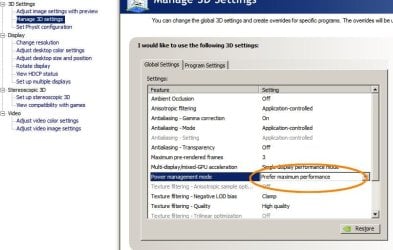
The only thing that actually made things better was to go into the Nvidia control panel under 3D Settings, navigate to Manage 3D Settings then on the right hand side panel under global settings tab, scroll down to Power Management Mode entry and change the setting from Adaptive to "Prefer maximum Performance", then click Apply and exit the panel.
see attached image.

nvidia.jpg

Never had a problem since.
 

My Computer My Computer

At a glance

Windows 7 Professional 64bitIntel i712GB CORSAIR XMS3 TRI-DDR3 1333MHz1GB NVIDIA GEFORCE GTX285 PCI EXPRESS
OS
Windows 7 Professional 64bit
CPU
Intel i7
Motherboard
ASUS® P6T DELUXE V2
Memory
12GB CORSAIR XMS3 TRI-DDR3 1333MHz
Graphics Card(s)
1GB NVIDIA GEFORCE GTX285 PCI EXPRESS
Sound Card
Sound Blaster® X-Fi™ Titanium PCI Express
Monitor(s) Displays
Samsung SyncMaster 24"
Screen Resolution
1920x1200
PSU
800W Quiet Quad Rail
Case
COOLERMASTER COSMOS 1000 SILVER SILENT CASE
Cooling
COOLERMASTER V8 EXTREME CPU COOLER
Keyboard
Logitech WAVE
Mouse
RAZER Copperhead
Back
Top