
Is it possible to format the Recovery Partition & make it usable?

nashama

New member
Member
Local time
11:52 PM
Messages
33
Hello,

My first post on this forum.

Here's my situation: I bought a new Fujitsu laptop which had Win7 Home Basic 64-bit. After making recovery DVDs, I replaced the Win7 Home Basic with Win7 Ultimate SP1 64-bit (because some of my softwares don't "sit" easily on Win7 Home Basic, they are more "friendly" with Win7 Ultimate/Professional)
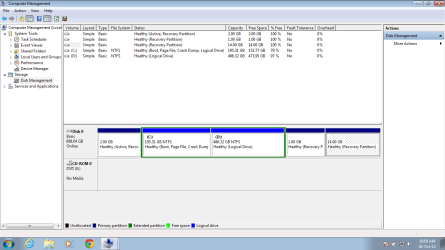
Plz find the screenshot of the Disk Management view after I installed Win7 Ultimate.
1) What I do not understand is why Fujitsu needs the 3 partitions ; namely the 2GB , 1GB and a huge 14GB as Recovery Partitions?
2) Is it possible to format the Recovery Partitions & make it usable for storing my personal folders or add this 14GB to the existing C: drive or D:drive?
3) Am I wrong if I say this format & recovery option (point nr 2 above) was available ONLY during installation of Win7 Ultimate and cannot be done now when Win7 Ultimate is already installed?

I know the hard drive has huge capacity (750GB); I don't have to regret loosing a little space but I'm curious to know why the manufacturer needed 3 recovery partitions on one hard disk.
And will it be ok if I format these partitions and just make 2 logical drives (C: and D) the next time I reformat my laptop?

Regards
 

Attachments
  • Fujitsu Disk Management - Partitions.png
    Fujitsu Disk Management - Partitions.png
    29.9 KB · Views: 54

My Computer My Computer

At a glance

Windows 7 Ultimate 64-bit SP1i7-3612QM16GBNVIDIA GeForce GT 620 + Intel HD Graphics 4000
Computer Manufacturer/Model Number
Lifebook AH532
OS
Windows 7 Ultimate 64-bit SP1
CPU
i7-3612QM
Motherboard
Fujitsu
Memory
16GB
Graphics Card(s)
NVIDIA GeForce GT 620 + Intel HD Graphics 4000
Monitor(s) Displays
LED Backlight screen
Screen Resolution
1366 * 768 HD LED Backlight screen
Hard Drives
750GB

My Computer My Computer

At a glance

Windows 10 Pro x64 ; Xubuntu x64Intel i7 860 @ 2.80 GHz O/C'ed to 4.0GHz16GB Corsair Vengance DDR3 @ 661 MHz Dual Cha...EVGA NVidia GTX 560 1024MB
Computer type
PC/Desktop
Computer Manufacturer/Model Number
Golden Mk. I.4
OS
Windows 10 Pro x64 ; Xubuntu x64
CPU
Intel i7 860 @ 2.80 GHz O/C'ed to 4.0GHz
Motherboard
Gigabyte P55A-UD3R Rev.1. Award BIOS F13
Memory
16GB Corsair Vengance DDR3 @ 661 MHz Dual Channel (9-9-9-24)
Graphics Card(s)
EVGA NVidia GTX 560 1024MB
Sound Card
Realtek Integrated
Monitor(s) Displays
Dual Samsung SyncMaster 2494HS
Screen Resolution
1920*1080 and 1920*1080
Hard Drives
1*Samsung 840 EVO 120GB SSD;
1*OCZ Vertex 2 60GB SSD;
2*Samsung F3 SpinPoint 1TB in RAID0;
1*Samsung F1 SpinPoint 1TB;
2*Western Digital 1TB External USB 3.0
1*Western Digital 500GB External USB 3.0
1*Seagate 500GB External USB 2.0
PSU
Thermaltake ToughPower QFan 750W
Case
Thermaltake Element S VK60001W2Z
Cooling
Corsair H60 Water Cooling, 2*230mm and 2*80mm case fans
Keyboard
Logitech G110
Mouse
Logitech MX518
If you have an installation disc then you don't need the recovery partition(s). They are only for people that don't have an installation disc readily available OR for people that want to set their PC back to factory default with all of the crapware still installed.

Also, fill in your system specs so others have an idea of what your computer is :)
 

My Computer My Computer

At a glance

Windows 7 Ultimate x64AMD Phenom 9850 x4 2.50GHz4GB DDR2nVidia GeFore 210
Computer type
PC/Desktop
Computer Manufacturer/Model Number
Custom Built
OS
Windows 7 Ultimate x64
CPU
AMD Phenom 9850 x4 2.50GHz
Motherboard
ASUS M4A785-M
Memory
4GB DDR2
Graphics Card(s)
nVidia GeFore 210
Sound Card
Onboard
Monitor(s) Displays
Samsung SyncMaster BX2031 20" LED
Screen Resolution
1600x900
Hard Drives
Western Digital Caviar Blue 500 GB SATA III 7200 RPM
PSU
450 Watt
Case
Raygo R12-40835 ATX Mid-Tower Case
Cooling
Air
Antivirus
Microsoft Security Essentials
Browser
Google Chrome
Other Info
Laptop:
Intel Core Duo T2450 @ 2.00GHz
2GB RAM
Windows 7 Ultimate x86
Besides, clean reinstall suggested by Golden, aren't there other ways / options to format that 14GB and merge it with existing C: or D: drive? ....... some third party tools?
 

My Computer My Computer

At a glance

Windows 7 Ultimate 64-bit SP1i7-3612QM16GBNVIDIA GeForce GT 620 + Intel HD Graphics 4000
Computer Manufacturer/Model Number
Lifebook AH532
OS
Windows 7 Ultimate 64-bit SP1
CPU
i7-3612QM
Motherboard
Fujitsu
Memory
16GB
Graphics Card(s)
NVIDIA GeForce GT 620 + Intel HD Graphics 4000
Monitor(s) Displays
LED Backlight screen
Screen Resolution
1366 * 768 HD LED Backlight screen
Hard Drives
750GB
You can use the free MiniTool Partition Wizard to do what you want BUT the reason Golden and now I are suggesting a clean install is because right now your C: and D: drives are extended. It would be much simpler and easier in the long run if you just did a clean install.
 

My Computer My Computer

At a glance

Windows 7 Ultimate x64AMD Phenom 9850 x4 2.50GHz4GB DDR2nVidia GeFore 210
Computer type
PC/Desktop
Computer Manufacturer/Model Number
Custom Built
OS
Windows 7 Ultimate x64
CPU
AMD Phenom 9850 x4 2.50GHz
Motherboard
ASUS M4A785-M
Memory
4GB DDR2
Graphics Card(s)
nVidia GeFore 210
Sound Card
Onboard
Monitor(s) Displays
Samsung SyncMaster BX2031 20" LED
Screen Resolution
1600x900
Hard Drives
Western Digital Caviar Blue 500 GB SATA III 7200 RPM
PSU
450 Watt
Case
Raygo R12-40835 ATX Mid-Tower Case
Cooling
Air
Antivirus
Microsoft Security Essentials
Browser
Google Chrome
Other Info
Laptop:
Intel Core Duo T2450 @ 2.00GHz
2GB RAM
Windows 7 Ultimate x86
Yes you can but I wouldn`t. It`s only 14 GBs and you may need it someday.

But if you have the rec dvds, I`d wipe the entire drive, split it in 2, C: and D: using partition wizard bootable cd and install windows.

http://partitionwizard.com/partition-wizard-bootable-cd.html

Have you tested your rec discs ?
 

My Computer My Computer

At a glance

Windows 10 Pro x64Intel Core i7 6700KGSkill TridentZ RGB 16GB 3600 16-16-16-36EVGA GTX 980 Ti SC x2
Computer type
PC/Desktop
Computer Manufacturer/Model Number
Skylake Special #666
OS
Windows 10 Pro x64
CPU
Intel Core i7 6700K
Motherboard
Asus Sabertooth Z170 Mark 1
Memory
GSkill TridentZ RGB 16GB 3600 16-16-16-36
Graphics Card(s)
EVGA GTX 980 Ti SC x2
Sound Card
Realtek High Definition
Monitor(s) Displays
AOC G2460PG
Screen Resolution
1920 x 1080 144Hz
Hard Drives
Samsung 860 Pro 256GB, Seagate Barracuda 4TB x2
PSU
EVGA 1000 P2, EVGA White Custom Braided Cables
Case
Corsair Vengeance C70 Gunmetal Black
Cooling
Corsair H100i v2, Corsair ML120 x2, Thermal Grizzly Kryonaut
Keyboard
Logitech G910 Orion Spectrum
Mouse
Logitech G700s
Internet Speed
Verizon Fios Quantum Gateway 75/75
Antivirus
Windows Defender, Malwarebytes Free 3.8.3
Browser
Chrome
Other Info
Corsair SP120 x4, LG Blu-ray Drive, Durabrand HT-395 100 Watt Dolby Digital Amp, Corsair H2100 Wireless 7.1 Headset
It's a concern that the Active partition holding the System boot files doesn't also have the System Flag. We can be pretty sure it is booting the PC since Win7 partition is on a Logical volume which cannot hold boot files. But it should still say System and it always concerns me when it doesn't.

Since you've already reinstalled if you want to do it over and follow the steps devleoped here to get a perfect Clean Reinstall then that would probably be your best course given the dodgy flaggin of your boot files on a useless partition now anyway. Part of cleaning up the pathetic mess OEM's make of Win7 is to also streamline the HD and yours needs it.
 
Dear Gregrocker,

Do you mean the booting still takes place from one of those Recovery partitions and not from the C: drive? (I'm sorry I could not understand your post).

Regards
 

My Computer My Computer

At a glance

Windows 7 Ultimate 64-bit SP1i7-3612QM16GBNVIDIA GeForce GT 620 + Intel HD Graphics 4000
Computer Manufacturer/Model Number
Lifebook AH532
OS
Windows 7 Ultimate 64-bit SP1
CPU
i7-3612QM
Motherboard
Fujitsu
Memory
16GB
Graphics Card(s)
NVIDIA GeForce GT 620 + Intel HD Graphics 4000
Monitor(s) Displays
LED Backlight screen
Screen Resolution
1366 * 768 HD LED Backlight screen
Hard Drives
750GB
The Active Partition, as evident from the screenshot, is the first 2GB,if I'm not mistaken.

So far I was under the impression that my Win7 installation took place on C: drive and thats where my machine boots from.

Plz bear with my questions ........ I'm just beginning to explore Windows7 and this forum has a wealth of information .

I really appreciate your patience and hope to gain something from your experience and expertise.

Regards
 

My Computer My Computer

At a glance

Windows 7 Ultimate 64-bit SP1i7-3612QM16GBNVIDIA GeForce GT 620 + Intel HD Graphics 4000
Computer Manufacturer/Model Number
Lifebook AH532
OS
Windows 7 Ultimate 64-bit SP1
CPU
i7-3612QM
Motherboard
Fujitsu
Memory
16GB
Graphics Card(s)
NVIDIA GeForce GT 620 + Intel HD Graphics 4000
Monitor(s) Displays
LED Backlight screen
Screen Resolution
1366 * 768 HD LED Backlight screen
Hard Drives
750GB
As I wrote in my first post Win7 cannot boot from a Logical partition which is what you've got for C. So it is booting from the original Factory boot partition.

I gave you my advice in post #7 on what I would do with your situation.
 
Back
Top