Solved Can I delete the recovery partition and then re-install it

Deaf Dave

New member
Local time
8:51 PM
Messages
45
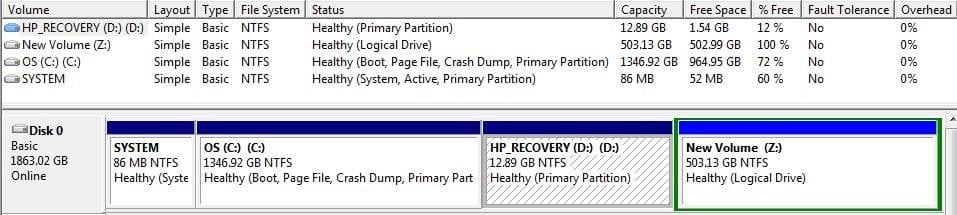
I would like to merge two partitions, Partition (C) and Partition (Z). The problem is that the Recovery partition (D) is in between the two partitions I want to merge and only adjacent partitions can be merged.:confused: I would like to know if I can copy & paste the (D) partition to an external drive and after the partitions are merged, re-install the (D) partition.
 

Attachments

  • 6-5-14 Disk Partitions Z1E3EYZK.JPG
    6-5-14 Disk Partitions Z1E3EYZK.JPG
    66.1 KB · Views: 13

My Computer My Computer

At a glance

Windows 7 64-bit Home PremiumAMD Athlon II X4 640 Quad Core6GB PC3-10600 DDR3 SDRAM (3x2GB) expandable t...ATI Radeon HD 4200 integrayed graphics up to ...
Computer type
PC/Desktop
Computer Manufacturer/Model Number
HP P6716F
OS
Windows 7 64-bit Home Premium
CPU
AMD Athlon II X4 640 Quad Core
Motherboard
N-Alvorix-RS880-uATX
Memory
6GB PC3-10600 DDR3 SDRAM (3x2GB) expandable to 16GB
Graphics Card(s)
ATI Radeon HD 4200 integrayed graphics up to 2943MB total
Sound Card
Realtek Hi Def Audio. ATI HDMI Audio
Monitor(s) Displays
HP S2031Series Wide LCD
Hard Drives
1TB 7200 Serial ATA. ST310005 28AS SATA Disk Device.
Case
HP Desktop
Keyboard
Logitech MK320
Mouse
Logitech wireless
Antivirus
Avast InternetSecurity,SpyBotS&D,SuperAntiSpyware,Malwarebyt
Browser
Firefox
Other Info
This is my Main PC. I also use another HP P7-1120 as a backup.
How to extend partition easily with Partition Wizard - video help. This will show you how to extend any partition into any other partition's available space, even if they are not adjacent. Do not borrow from Recovery or it won't boot, if you really want a Recovery partition which reinstalls the worst install of Win7 one can have.

Do you really want the HP Factory Win7 install which is the worst install of Win7 one can have, larded with bloatware and duplicate utiltiies which interfere with better versions built into Win7? Most tech enthusiasts prefer to Clean Reinstall - Factory OEM Windows 7 in which case you can delete all partitions during the booted reinstall.

I see you already deleted the OEM Tools partition which is the only one worth keeping so you'd have bootable Diagnostics from the ESC menu. Too late now.
 
Hello Greg,
This is a new drive that was imaged using Macrium Free V 5.2.6504. The old drive was a 1TB drive that was 3 years old and the new drive is 2TB. I had thought that the new drive's partition (C) would have been expanded from the old one. It was not and as you can see, it created a new partition I labeled (Z) instead. Having said that, Macrium was the one that deleted the OEM Tools partition. I didn't and in fact, I wasn't even aware of where it was.

Keeping the HP (D) partition doesn't really concern me unless it's needed for a recovery operation. In that regard, I have recovery CD's as well as Macrium's Rescue Media Win PE 3.1 on a USB flash drive. So, do I really need the HD Recovery partition (D) if I have these other recovery options?

You mentioned that this partition (D) is needed for boot. I didn't know that and thought booting the O/S was in the (C) partition. At least that's what it appears to say.

I agree with your assessment of the HP Factory Win7 install and I had previously deleted all the bloatware and duplicate utilities I could find.

I'll try the MiniTool Partition Wizard and hope it does the job. Thank you for taking your time to reply to my thread.
Dave
 

My Computer My Computer

At a glance

Windows 7 64-bit Home PremiumAMD Athlon II X4 640 Quad Core6GB PC3-10600 DDR3 SDRAM (3x2GB) expandable t...ATI Radeon HD 4200 integrayed graphics up to ...
Computer type
PC/Desktop
Computer Manufacturer/Model Number
HP P6716F
OS
Windows 7 64-bit Home Premium
CPU
AMD Athlon II X4 640 Quad Core
Motherboard
N-Alvorix-RS880-uATX
Memory
6GB PC3-10600 DDR3 SDRAM (3x2GB) expandable to 16GB
Graphics Card(s)
ATI Radeon HD 4200 integrayed graphics up to 2943MB total
Sound Card
Realtek Hi Def Audio. ATI HDMI Audio
Monitor(s) Displays
HP S2031Series Wide LCD
Hard Drives
1TB 7200 Serial ATA. ST310005 28AS SATA Disk Device.
Case
HP Desktop
Keyboard
Logitech MK320
Mouse
Logitech wireless
Antivirus
Avast InternetSecurity,SpyBotS&D,SuperAntiSpyware,Malwarebyt
Browser
Firefox
Other Info
This is my Main PC. I also use another HP P7-1120 as a backup.
Instead of deleting the Recovery Partition, delete the partition that is Z:, move the recovery partition to the end of the drive and then resize the C: drive. Acronis makes some great software for doing this.
 

My Computer My Computer

At a glance

Windows 7 Pro 64bit
Computer type
PC/Desktop
OS
Windows 7 Pro 64bit
Have you tested if the Recovery Partition will even boot and run after the cloning? If not I'd delete it and rely on an image you save of a Clean Reinstall - Factory OEM Windows 7.

However if you want Recovery partition and it won't boot, we can show you how to Boot Recovery Partition using EasyBCD by creating a Dual Boot with it and setting its timeout to 5-10 seconds so its always available. Our colleague SIW2 can even show you how to restore its hotlink.

If you want to keep Recovery, you can also delete Z which is empty. Rightclick Z to delete it twice in Disk Mgmt to delete Volume and then Partition until it becomes Unallocated Space. Partition or Volume - Delete

You can then use Partition Wizard to rightclick Recovery to Resize, grab it with mouse and drag intact to the far right, click OK, then Apply. Partition Wizard Resize Partition - Video Help.

Now go back to Disk Mgmt to rightclick C to Extend into the Unallocated Space as far as you want. Leave space if you'd like to create a new Data Partition in Disk Mgmt.
Partition or Volume - Extend
Partition or Volume - Create New
 
Can you delete the Recovery partition?
Yes.

Can you reinstall it?
Yes and No.
Yes - You can put the data on the Recovery partition anywhere.
No - You will not be able to boot to Recovery with the F11 key (I think it's the F11 key on HP machines)

I have a few HP machines and after I create the Recovery Media, I remove the (D:) Recovery partitions so I can partition the drive to my preferences (HP uses all four partitions - System, OS, Recovery, HP Tools).

If your image has the (D:) Recovery partition in it (I think so) then it shouldn't be a problem to delete the (D:) Recovery partition.

I would also delete the extended partition (Z:) - now comes the opinion.

I think it's better to isolate the OS from the data. Instead of merging the available disk space back into (C:), I would actually shrink (C:) to 100 GB (Win7 takes 15-20 GB). You might not be able to shrink it that much, it depends on what resides on the partition. But take as much as it allows and then re-organize the data - moving it to one of the new partitions (next steps)

Then I would create an extended partition that can be divvied up any way you like.

The trick is, now that you only have 2 partitions, the next partitions you try to create with Disk Management will be another primary. You could make a 3rd Primary, say 50 GB and make that your User Profile location. The 4th partition you make will be an extended partition. Then you can make logical drives for Documents, Music, Pictures, Videos, Backups, Cold Storage, Install packages... whatever you need them to hold. You have lots of room.

There's a tutorial that explains how to make user profiles on a partition other than the (C:) drive. I have done this on all of my machines.

I also agree with Greg, in that if you have Win7 Install media, there's no real need for (D:). If you really need or want anything HP originally put on your machine, you can download it from HP.

Bill
.
 

My Computer My Computer

At a glance

x64 (6.3.9600) Win8.1 Pro & soon dual boot x6...AMD A6-3420M APU with Radeon(tm) HD Graphics6.00 GBAMD Radeon(TM) HD 6520G
Computer type
Laptop
Computer Manufacturer/Model Number
HP Pavilion dv6-6c10us
OS
x64 (6.3.9600) Win8.1 Pro & soon dual boot x64 (6.1.7601) Win7_SP1 HomePrem
CPU
AMD A6-3420M APU with Radeon(tm) HD Graphics
Motherboard
Hewlett-Packard 1805
Memory
6.00 GB
Graphics Card(s)
AMD Radeon(TM) HD 6520G
Sound Card
(1) AMD High Definition Audio Device (2) IDT High Definiti
Monitor(s) Displays
HP W2072a 20" LCD (1600 x 900) @ 60 Hz
Screen Resolution
1366 x 768 x 32 bits (4294967296 colors) @ 60 Hz
Hard Drives
ST640LM0 00 HM641JI SATA Disk Device
Keyboard
Logitech k520 wireless KB
Mouse
Logitech m320 wireless mouse (bundled with KB)
Internet Speed
15/5 | 54 MB Wireless 'n'
Antivirus
Realtime: Defender or Avast | On-demand: Malwarebytes, ESET
Browser
IE 11 on Win8, IE 10 on win 7
Other Info
Media: [Gimp, Audacity, VLC] || Comm: [WEmail 2012, Skype] || Productivity: [OpenOffice,| Textpad] || Utils: [Sysinternals, cCleaner, Speccy, Defraggler]
The primary benefit of having data on its Own partition is to keep the OS/programs partition smaller for imaging purposes. So if Win7 becomes irreparable you can reimage C and your data will be safe and current waiting in its own partition.

The best way to organize is sort data into User folders then either move them to data partition http://www.sevenforums.com/tutorials/18629-user-folders-change-default-location.html, or right click each on the data partition to add to http://www.sevenforums.com/tutorials/585-library-include-folder.html setting each as default http://www.sevenforums.com/tutorials/595-library-set-save-folder.htm

I prefer moving the User folders to data drive since I don't use Win7 Backup imaging which will want to include data partition in image defeating the purpose. I move my User folders into a OneDrive folder so they are stored simultaneously to the web and sync with all my other devices as detailed in http://www.sevenforums.com/backup-restore/275667-sync-backup-store-your-files-cloud-onedrive.html
 
Greg,
The MiniTool Partition Wizard worked like a charm! I learn something new every day. Kudos! :)
:thumbsup::thumbsup:
Dave
 

My Computer My Computer

At a glance

Windows 7 64-bit Home PremiumAMD Athlon II X4 640 Quad Core6GB PC3-10600 DDR3 SDRAM (3x2GB) expandable t...ATI Radeon HD 4200 integrayed graphics up to ...
Computer type
PC/Desktop
Computer Manufacturer/Model Number
HP P6716F
OS
Windows 7 64-bit Home Premium
CPU
AMD Athlon II X4 640 Quad Core
Motherboard
N-Alvorix-RS880-uATX
Memory
6GB PC3-10600 DDR3 SDRAM (3x2GB) expandable to 16GB
Graphics Card(s)
ATI Radeon HD 4200 integrayed graphics up to 2943MB total
Sound Card
Realtek Hi Def Audio. ATI HDMI Audio
Monitor(s) Displays
HP S2031Series Wide LCD
Hard Drives
1TB 7200 Serial ATA. ST310005 28AS SATA Disk Device.
Case
HP Desktop
Keyboard
Logitech MK320
Mouse
Logitech wireless
Antivirus
Avast InternetSecurity,SpyBotS&D,SuperAntiSpyware,Malwarebyt
Browser
Firefox
Other Info
This is my Main PC. I also use another HP P7-1120 as a backup.
My Apologies to: Slartybart, Dlc41 and Greg for not replying to your replies after the one Greg sent about the MiniTool. I was not notified that I had replies. :huh: I will do my best to absorb those replies.
Thank you all for your valuable time you put in. One quick note to Slartybart, my HP never had 4 partitions only three (System), OS (C), and HP Recovery (D). It never had an HP Tools partition. It was purchased on 5-19-2011. Maybe it was too old to have HP Tools..:what::doh:
Again, thank you all...
 

My Computer My Computer

At a glance

Windows 7 64-bit Home PremiumAMD Athlon II X4 640 Quad Core6GB PC3-10600 DDR3 SDRAM (3x2GB) expandable t...ATI Radeon HD 4200 integrayed graphics up to ...
Computer type
PC/Desktop
Computer Manufacturer/Model Number
HP P6716F
OS
Windows 7 64-bit Home Premium
CPU
AMD Athlon II X4 640 Quad Core
Motherboard
N-Alvorix-RS880-uATX
Memory
6GB PC3-10600 DDR3 SDRAM (3x2GB) expandable to 16GB
Graphics Card(s)
ATI Radeon HD 4200 integrayed graphics up to 2943MB total
Sound Card
Realtek Hi Def Audio. ATI HDMI Audio
Monitor(s) Displays
HP S2031Series Wide LCD
Hard Drives
1TB 7200 Serial ATA. ST310005 28AS SATA Disk Device.
Case
HP Desktop
Keyboard
Logitech MK320
Mouse
Logitech wireless
Antivirus
Avast InternetSecurity,SpyBotS&D,SuperAntiSpyware,Malwarebyt
Browser
Firefox
Other Info
This is my Main PC. I also use another HP P7-1120 as a backup.
Almost forgot. Here's the new layout;
 

Attachments

  • 6-6-14 Z1E3EYZK After Extend, Disk Mgt.JPG
    6-6-14 Z1E3EYZK After Extend, Disk Mgt.JPG
    50.1 KB · Views: 1

My Computer My Computer

At a glance

Windows 7 64-bit Home PremiumAMD Athlon II X4 640 Quad Core6GB PC3-10600 DDR3 SDRAM (3x2GB) expandable t...ATI Radeon HD 4200 integrayed graphics up to ...
Computer type
PC/Desktop
Computer Manufacturer/Model Number
HP P6716F
OS
Windows 7 64-bit Home Premium
CPU
AMD Athlon II X4 640 Quad Core
Motherboard
N-Alvorix-RS880-uATX
Memory
6GB PC3-10600 DDR3 SDRAM (3x2GB) expandable to 16GB
Graphics Card(s)
ATI Radeon HD 4200 integrayed graphics up to 2943MB total
Sound Card
Realtek Hi Def Audio. ATI HDMI Audio
Monitor(s) Displays
HP S2031Series Wide LCD
Hard Drives
1TB 7200 Serial ATA. ST310005 28AS SATA Disk Device.
Case
HP Desktop
Keyboard
Logitech MK320
Mouse
Logitech wireless
Antivirus
Avast InternetSecurity,SpyBotS&D,SuperAntiSpyware,Malwarebyt
Browser
Firefox
Other Info
This is my Main PC. I also use another HP P7-1120 as a backup.
Hmmmm, do your drive labels include drive letters?

OS (C:) (C:)
HP RECOVERY (D:) (D:)

That's probably the case, it just looks odd. It was the same way in your first Disk Mgmt screen shot too.

Thanks for posting the new schema.

Bill
.
 

My Computer My Computer

At a glance

x64 (6.3.9600) Win8.1 Pro & soon dual boot x6...AMD A6-3420M APU with Radeon(tm) HD Graphics6.00 GBAMD Radeon(TM) HD 6520G
Computer type
Laptop
Computer Manufacturer/Model Number
HP Pavilion dv6-6c10us
OS
x64 (6.3.9600) Win8.1 Pro & soon dual boot x64 (6.1.7601) Win7_SP1 HomePrem
CPU
AMD A6-3420M APU with Radeon(tm) HD Graphics
Motherboard
Hewlett-Packard 1805
Memory
6.00 GB
Graphics Card(s)
AMD Radeon(TM) HD 6520G
Sound Card
(1) AMD High Definition Audio Device (2) IDT High Definiti
Monitor(s) Displays
HP W2072a 20" LCD (1600 x 900) @ 60 Hz
Screen Resolution
1366 x 768 x 32 bits (4294967296 colors) @ 60 Hz
Hard Drives
ST640LM0 00 HM641JI SATA Disk Device
Keyboard
Logitech k520 wireless KB
Mouse
Logitech m320 wireless mouse (bundled with KB)
Internet Speed
15/5 | 54 MB Wireless 'n'
Antivirus
Realtime: Defender or Avast | On-demand: Malwarebytes, ESET
Browser
IE 11 on Win8, IE 10 on win 7
Other Info
Media: [Gimp, Audacity, VLC] || Comm: [WEmail 2012, Skype] || Productivity: [OpenOffice,| Textpad] || Utils: [Sysinternals, cCleaner, Speccy, Defraggler]
SlartyBart,
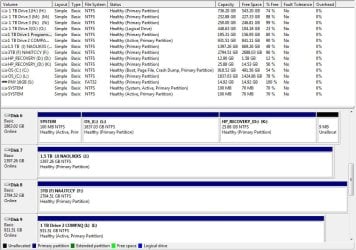
Yes they do. The reason they are double [(C:) (C:) and (D:) (D:)] is because (I think) I have external drives that I had used to save my info to and when these drives were set up, they were assigned a second letter to differentiate which was which. An example is (C:) - (G:). That way I know that (C:)-(C:) is the internal drive and (C:)-(G:) is the external one.
I have attached a snip of some external disks I had along on 11-9-12 with the internal disk, to give you a better picture.

As you can gather, I'm still a neophyte in the learning stage...learning new things every day..:)
 

Attachments

  • 11-9-12, All Disks.JPG
    11-9-12, All Disks.JPG
    125.1 KB · Views: 1

My Computer My Computer

At a glance

Windows 7 64-bit Home PremiumAMD Athlon II X4 640 Quad Core6GB PC3-10600 DDR3 SDRAM (3x2GB) expandable t...ATI Radeon HD 4200 integrayed graphics up to ...
Computer type
PC/Desktop
Computer Manufacturer/Model Number
HP P6716F
OS
Windows 7 64-bit Home Premium
CPU
AMD Athlon II X4 640 Quad Core
Motherboard
N-Alvorix-RS880-uATX
Memory
6GB PC3-10600 DDR3 SDRAM (3x2GB) expandable to 16GB
Graphics Card(s)
ATI Radeon HD 4200 integrayed graphics up to 2943MB total
Sound Card
Realtek Hi Def Audio. ATI HDMI Audio
Monitor(s) Displays
HP S2031Series Wide LCD
Hard Drives
1TB 7200 Serial ATA. ST310005 28AS SATA Disk Device.
Case
HP Desktop
Keyboard
Logitech MK320
Mouse
Logitech wireless
Antivirus
Avast InternetSecurity,SpyBotS&D,SuperAntiSpyware,Malwarebyt
Browser
Firefox
Other Info
This is my Main PC. I also use another HP P7-1120 as a backup.
Partiiton Wizard has a newer feature that allows you to move around unused partition space to any other partition no matter if it is adjacent. This would be ideal for redistributing your space from C to the data partition or even make more space should you like to add another Logical partition at the end of the drive. How to extend partition easily with Partition Wizard - video help.

There remains the question if the HP Recovery partition will even boot now, so you might want to test it by queuing up HP System Recovery. Again it is only good for reinstalling the HP bloatware which is the worst load in the industry. If it doesn't boot then your choices are to delete it or you can add it to a Dual Boot menu (ideally with a 5-10 second timeout) using Boot Recovery Partition using EasyBCD. You may decide you don't need it if you've made your HP Recov DIsks - make another set
 
SlartyBart,
Yes they do. The reason they are double [(C:) (C:) and (D:) (D:)] is because (I think) I have external drives that I had used to save my info to and when these drives were set up, they were assigned a second letter to differentiate which was which. An example is (C:) - (G:). That way I know that (C:)-(C:) is the internal drive and (C:)-(G:) is the external one.
I have attached a snip of some external disks I had along on 11-9-12 with the internal disk, to give you a better picture.

As you can gather, I'm still a neophyte in the learning stage...learning new things every day..:)

No sweat Dave, we all learn something every day.

I understand the concept and used something like it myself once. I put the drive letter first though because of the way Windows sorts in Disk management. It looked funny
(C:) Win7 (C:)
(D:) Profiles (D:)
(E:) Local Store (E:)

But the sort was always correct regardless of how I viewed the disks.

It's not really important- what works for you is what's important.

Side note: if you select advanced when posting, then scroll down and tick Disable smilies in text, you won't get the automatic smileys for drive letters.

edit: I just took a closer look at your Disk Mgmt screen shot.
Do you ever use 1 TB Drive Compaq (I:) (I:) to boot?
If not, then you should remove the active flag.
I'll look for a tutorial, but Greg might pop back in and post it before I find it (he knows where all the good stuff is)
 

My Computer My Computer

At a glance

x64 (6.3.9600) Win8.1 Pro & soon dual boot x6...AMD A6-3420M APU with Radeon(tm) HD Graphics6.00 GBAMD Radeon(TM) HD 6520G
Computer type
Laptop
Computer Manufacturer/Model Number
HP Pavilion dv6-6c10us
OS
x64 (6.3.9600) Win8.1 Pro & soon dual boot x64 (6.1.7601) Win7_SP1 HomePrem
CPU
AMD A6-3420M APU with Radeon(tm) HD Graphics
Motherboard
Hewlett-Packard 1805
Memory
6.00 GB
Graphics Card(s)
AMD Radeon(TM) HD 6520G
Sound Card
(1) AMD High Definition Audio Device (2) IDT High Definiti
Monitor(s) Displays
HP W2072a 20" LCD (1600 x 900) @ 60 Hz
Screen Resolution
1366 x 768 x 32 bits (4294967296 colors) @ 60 Hz
Hard Drives
ST640LM0 00 HM641JI SATA Disk Device
Keyboard
Logitech k520 wireless KB
Mouse
Logitech m320 wireless mouse (bundled with KB)
Internet Speed
15/5 | 54 MB Wireless 'n'
Antivirus
Realtime: Defender or Avast | On-demand: Malwarebytes, ESET
Browser
IE 11 on Win8, IE 10 on win 7
Other Info
Media: [Gimp, Audacity, VLC] || Comm: [WEmail 2012, Skype] || Productivity: [OpenOffice,| Textpad] || Utils: [Sysinternals, cCleaner, Speccy, Defraggler]
No, I never used 1 TB Drive Compaq (I:) (I:) to boot. In fact, I have never had to use anything other than the original hard drive and now it's replacement (the one I'm using now). I'm usually afraid to monkey around with things I don't understand. I do have repair and rescue disks but thank goodness, have never had the need to resort to their use. Remove the Active flag? How do I do that?

That was the way disk manager set up the drive letters and that's why I continued using that format. Your way of putting the drive letter first looks like a good idea. So that I understand correctly; would the copy of OS (C:) (C:) - [OS (C:) (L:)] be set up as; (L:) OS (C:) ?

Thanks for the trick for removing the smilies. I wondered how they mysteriously appeared.
 
Last edited:

My Computer My Computer

At a glance

Windows 7 64-bit Home PremiumAMD Athlon II X4 640 Quad Core6GB PC3-10600 DDR3 SDRAM (3x2GB) expandable t...ATI Radeon HD 4200 integrayed graphics up to ...
Computer type
PC/Desktop
Computer Manufacturer/Model Number
HP P6716F
OS
Windows 7 64-bit Home Premium
CPU
AMD Athlon II X4 640 Quad Core
Motherboard
N-Alvorix-RS880-uATX
Memory
6GB PC3-10600 DDR3 SDRAM (3x2GB) expandable to 16GB
Graphics Card(s)
ATI Radeon HD 4200 integrayed graphics up to 2943MB total
Sound Card
Realtek Hi Def Audio. ATI HDMI Audio
Monitor(s) Displays
HP S2031Series Wide LCD
Hard Drives
1TB 7200 Serial ATA. ST310005 28AS SATA Disk Device.
Case
HP Desktop
Keyboard
Logitech MK320
Mouse
Logitech wireless
Antivirus
Avast InternetSecurity,SpyBotS&D,SuperAntiSpyware,Malwarebyt
Browser
Firefox
Other Info
This is my Main PC. I also use another HP P7-1120 as a backup.
I thought Greg would beat me posting the tutorial - he's really great at this stuff.

Thanks Greg!

.....
Your way of putting the drive letter first looks like a good idea. So that I understand correctly; would the copy of OS (C:) (C:) - [OS (C:) (L:)] be set up as; (L:) OS (C:) ?

Thanks for the trick for removing the smilies. I wondered how they mysteriously appeared.

Yes, I think you have my OCD naming convention figured out - lol.

The only reason I marked the volume with a drive letter is because I had applications that depended on data being accessed on a certain drive letter (that was a long time ago). When I reinstalled or moved the external to another machine, the drive letters changed and the applications either didn't find the data or found a different data set.

Interestingly, the naming convention I use now is more like the one you use - DriveSizeVol# Content
2t01 Libs
2t02 Media

2t99 Storage - Ok this isn't really Volume# 99, but it puts it last in the 2t drive sort.

You have many drives, so you'd need to differentiate the label in some manner similar to what you do now with Drive #.

Here's another naming convention:
1 TB Drive 1 (H:) (H:) becomes 1tDrv1 Contents
1 TB Drive 3 (M:) (M:) becomes 1tDrv3 Contents
.....
1 TB Drive 1 COMPAQ (I:) (I:) becomes 1tDrv1 COMPAQ

If you need to know the drive letter then stick it on the front of the label, but Windows will remember the drive and assign it the same letter every time it's connected (Unless you have a few drives that use that letter and both are connected).

Anyway, the naming convention is not all that important, yours seems fine. It's a personal choice on how you name the drives and as long as it makes sense to you, there is no right or wrong.

I've changed the way I label volumes many times, trying to get it to work / look the way I want it to. I always end up saying "If only Windows would present the drive letter first, I wouldn't have to try and figure out a workaround" - LOL

Glad to pass along any tips I have - the smilies got me a few times too.

Bill
.
 
Last edited:

My Computer My Computer

At a glance

x64 (6.3.9600) Win8.1 Pro & soon dual boot x6...AMD A6-3420M APU with Radeon(tm) HD Graphics6.00 GBAMD Radeon(TM) HD 6520G
Computer type
Laptop
Computer Manufacturer/Model Number
HP Pavilion dv6-6c10us
OS
x64 (6.3.9600) Win8.1 Pro & soon dual boot x64 (6.1.7601) Win7_SP1 HomePrem
CPU
AMD A6-3420M APU with Radeon(tm) HD Graphics
Motherboard
Hewlett-Packard 1805
Memory
6.00 GB
Graphics Card(s)
AMD Radeon(TM) HD 6520G
Sound Card
(1) AMD High Definition Audio Device (2) IDT High Definiti
Monitor(s) Displays
HP W2072a 20" LCD (1600 x 900) @ 60 Hz
Screen Resolution
1366 x 768 x 32 bits (4294967296 colors) @ 60 Hz
Hard Drives
ST640LM0 00 HM641JI SATA Disk Device
Keyboard
Logitech k520 wireless KB
Mouse
Logitech m320 wireless mouse (bundled with KB)
Internet Speed
15/5 | 54 MB Wireless 'n'
Antivirus
Realtime: Defender or Avast | On-demand: Malwarebytes, ESET
Browser
IE 11 on Win8, IE 10 on win 7
Other Info
Media: [Gimp, Audacity, VLC] || Comm: [WEmail 2012, Skype] || Productivity: [OpenOffice,| Textpad] || Utils: [Sysinternals, cCleaner, Speccy, Defraggler]
SlartyBart,
At one time I had 6 external drives hooked up for various tasks. What I started doing to keep from getting them confused was to name them using their S/N as in Z1E3EYZK. Seeing as how I only installed this replacement internal drive (Z1E3EYZK) a week ago, I still haven't got around to naming it. I'm thinking of naming it; SystemZ1E3EYZK.
OS (C:)Z1E3EYZK(C:). and if I keep it, (D:) HP_RecoveryZ1E3EYZK (D:). Hopefully, everything will be recognized properly. After that, as time allows, reduce the OS to it's own partition. What do you think? DD
 
Last edited:

My Computer My Computer

At a glance

Windows 7 64-bit Home PremiumAMD Athlon II X4 640 Quad Core6GB PC3-10600 DDR3 SDRAM (3x2GB) expandable t...ATI Radeon HD 4200 integrayed graphics up to ...
Computer type
PC/Desktop
Computer Manufacturer/Model Number
HP P6716F
OS
Windows 7 64-bit Home Premium
CPU
AMD Athlon II X4 640 Quad Core
Motherboard
N-Alvorix-RS880-uATX
Memory
6GB PC3-10600 DDR3 SDRAM (3x2GB) expandable to 16GB
Graphics Card(s)
ATI Radeon HD 4200 integrayed graphics up to 2943MB total
Sound Card
Realtek Hi Def Audio. ATI HDMI Audio
Monitor(s) Displays
HP S2031Series Wide LCD
Hard Drives
1TB 7200 Serial ATA. ST310005 28AS SATA Disk Device.
Case
HP Desktop
Keyboard
Logitech MK320
Mouse
Logitech wireless
Antivirus
Avast InternetSecurity,SpyBotS&D,SuperAntiSpyware,Malwarebyt
Browser
Firefox
Other Info
This is my Main PC. I also use another HP P7-1120 as a backup.
If that works for you, it works for me Dave. A serial # is as good as any other identifier.

Hold off on re-labeling HP_Recovery, there's something in the back of my mind that says "HP_Recovery can be any drive letter, but it must be labeled HP_Recovery". I'm not certain about that though - it is true for HP TOOLS in that the volume label matters. Don't change the HP_Recovery drive letter or the label just yet based on my sometimes slow memory.

Other than that, it sounds like a plan. Windows doesn't care about the volume labels, HP software only cares about the two I already mentioned.

Our conversation on volume labels might have side-tracked the thread a bit. So I'll try to refocus the discussion back to the original question.

You still owe Greg an answer; re: HP Recovery in Post# 13
Does the partition still boot into HP Recovery?

Bill
.
 

My Computer My Computer

At a glance

x64 (6.3.9600) Win8.1 Pro & soon dual boot x6...AMD A6-3420M APU with Radeon(tm) HD Graphics6.00 GBAMD Radeon(TM) HD 6520G
Computer type
Laptop
Computer Manufacturer/Model Number
HP Pavilion dv6-6c10us
OS
x64 (6.3.9600) Win8.1 Pro & soon dual boot x64 (6.1.7601) Win7_SP1 HomePrem
CPU
AMD A6-3420M APU with Radeon(tm) HD Graphics
Motherboard
Hewlett-Packard 1805
Memory
6.00 GB
Graphics Card(s)
AMD Radeon(TM) HD 6520G
Sound Card
(1) AMD High Definition Audio Device (2) IDT High Definiti
Monitor(s) Displays
HP W2072a 20" LCD (1600 x 900) @ 60 Hz
Screen Resolution
1366 x 768 x 32 bits (4294967296 colors) @ 60 Hz
Hard Drives
ST640LM0 00 HM641JI SATA Disk Device
Keyboard
Logitech k520 wireless KB
Mouse
Logitech m320 wireless mouse (bundled with KB)
Internet Speed
15/5 | 54 MB Wireless 'n'
Antivirus
Realtime: Defender or Avast | On-demand: Malwarebytes, ESET
Browser
IE 11 on Win8, IE 10 on win 7
Other Info
Media: [Gimp, Audacity, VLC] || Comm: [WEmail 2012, Skype] || Productivity: [OpenOffice,| Textpad] || Utils: [Sysinternals, cCleaner, Speccy, Defraggler]
Greg & Bill,
You still owe Greg an answer; re: HP Recovery in Post# 13
Does the partition still boot into HP Recovery?
-----------------------------------------------------------------------
Oops, got carried away.

Yes, F-11 Recovery gives all the options: Microsoft System Restore, Microsoft Startup Repair Tool, System Recovery, File Backup Programs and Contact HP Support.

Will wait for a while before renaming/lettering the partitions. No rush! No smilies either...
 

My Computer My Computer

At a glance

Windows 7 64-bit Home PremiumAMD Athlon II X4 640 Quad Core6GB PC3-10600 DDR3 SDRAM (3x2GB) expandable t...ATI Radeon HD 4200 integrayed graphics up to ...
Computer type
PC/Desktop
Computer Manufacturer/Model Number
HP P6716F
OS
Windows 7 64-bit Home Premium
CPU
AMD Athlon II X4 640 Quad Core
Motherboard
N-Alvorix-RS880-uATX
Memory
6GB PC3-10600 DDR3 SDRAM (3x2GB) expandable to 16GB
Graphics Card(s)
ATI Radeon HD 4200 integrayed graphics up to 2943MB total
Sound Card
Realtek Hi Def Audio. ATI HDMI Audio
Monitor(s) Displays
HP S2031Series Wide LCD
Hard Drives
1TB 7200 Serial ATA. ST310005 28AS SATA Disk Device.
Case
HP Desktop
Keyboard
Logitech MK320
Mouse
Logitech wireless
Antivirus
Avast InternetSecurity,SpyBotS&D,SuperAntiSpyware,Malwarebyt
Browser
Firefox
Other Info
This is my Main PC. I also use another HP P7-1120 as a backup.
Back
Top