My desktop resolution is 1920x1200. But when I watch TV on WMC the image seems stretched...People seem tall and thin. Is it possible to set a separate resolution for WMC than the one I use for everything else? So that when I watch TV on WMC it automatically switches to a resolution of say 1080x1920 without having to go into my GPU and change the resolution manually.
Thanks for any help provided.
My Computer
At a glance
Windows 7 Home Premium 64bit.intel core i7-3770 CPU @ 3.44 GHzCorsair 16GB 2x8GB DDR3 1600Geforce GTX 670
Computer type
PC/Desktop
Computer Manufacturer/Model Number
Custom Build
OS
Windows 7 Home Premium 64bit.
CPU
intel core i7-3770 CPU @ 3.44 GHz
Motherboard
Gigabyte Z77-DS3H
Memory
Corsair 16GB 2x8GB DDR3 1600
Graphics Card(s)
Geforce GTX 670
Sound Card
Realtek HD audio
Monitor(s) Displays
ASUS PA248Q
Screen Resolution
1920x1200
Hard Drives
Samsung SSD 840 Pro 256GB
Seagate Barracuda SATA V 500GB 7200rpm
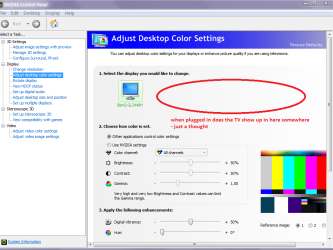
Hello again H mate you must have the NVidia control centre and in mine it only lists the computer monitor so I am wondering if you plug in the TV does it get listed in there? If so looks like you can pre set it maybe click on it when using the TV??
Attachments
TV.PNG
43.2 KB
· Views: 1
My Computer
At a glance
Desk1 7 Home Prem / Desk2 10 Pro / Main lap A...Desk1 i5 3750K / Laptop i7 GTX 860M / Desk2 i...Desk1 8GB (1866) / Desk2 16GB (1333) / Laptop...Desk 1& 2NVidia GTX 650 & Laptops on board Intel
Computer type
PC/Desktop
Computer Manufacturer/Model Number
Own build (new) Desk1 / Asus ROG Win 7 / Desk2 1st build
OS
Desk1 7 Home Prem / Desk2 10 Pro / Main lap Asus ROG 10 Pro 2 laptop Toshiba 7 Pro Asus P2520 7 & 10
One other Desktop (tester) and spare Toshba laptop both with SSD's
Running Kaspersky 2016 ISS on all machines config'd identically
Logitec audio stereo systems on each machine (x3)
Canon MG5250MFC
Router/modem TP-Link running WPA2SK
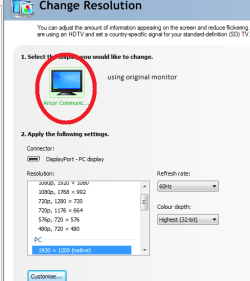
I wanted to try and get a different resolution with WMC(full screen)....still using the same monitor....but then go back to original resolution when coming out of full screen and back to desktop. Hope this makes some sort of sense LOL It maybe just my imagination but folk look slightly stretched...(taller/thinner)
Time zone now changed...cheers for the heads-up
Attachments
Capture.PNG
13.8 KB
· Views: 2
My Computer
At a glance
Windows 7 Home Premium 64bit.intel core i7-3770 CPU @ 3.44 GHzCorsair 16GB 2x8GB DDR3 1600Geforce GTX 670
Computer type
PC/Desktop
Computer Manufacturer/Model Number
Custom Build
OS
Windows 7 Home Premium 64bit.
CPU
intel core i7-3770 CPU @ 3.44 GHz
Motherboard
Gigabyte Z77-DS3H
Memory
Corsair 16GB 2x8GB DDR3 1600
Graphics Card(s)
Geforce GTX 670
Sound Card
Realtek HD audio
Monitor(s) Displays
ASUS PA248Q
Screen Resolution
1920x1200
Hard Drives
Samsung SSD 840 Pro 256GB
Seagate Barracuda SATA V 500GB 7200rpm