
Is it possible to have two XP virtual machines?

Jeffs

New member
Member
VIP
Local time
5:13 PM
Messages
116
Location
New Jersey USA
I would like to have two independent XP virtual machines. I already have it installed, and have some programs installed in it. I'd like to create another XP machine which is completely independent to the other that I can install software I'd like to test. When I'd done testing, I'll just delete this new VM, and create a new one for future use.

Can someone explain how I would go about doing this, step-by-step?

Install 2nd instance, then delete when done.

Thanks.
 

My Computer My Computer

At a glance

Win 7 x64 ProfessionalIntel Core i5-750 2.67Ghz4gbNvidia GeForce 9500GT 512mb
Computer Manufacturer/Model Number
DYI
OS
Win 7 x64 Professional
CPU
Intel Core i5-750 2.67Ghz
Motherboard
Gigabyte P55M-UD4
Memory
4gb
Graphics Card(s)
Nvidia GeForce 9500GT 512mb
Sound Card
On MB
Monitor(s) Displays
Lg Flatron
Screen Resolution
1280 x 1024
Hard Drives
C: 200mb Maxtor SATA 3
D: 500gb WD SATA 3

My Computer My Computer

At a glance

Windows 2000 5.0 Build 2195Intel Core i7-2630QM@2GHz(2.9GHz Turbo Boost)...Kingston DDR3 1333 16GB (4GBx4)nVidia GTX 460m 1.5GB
Computer Manufacturer/Model Number
Asus G73SW-XN2
OS
Windows 2000 5.0 Build 2195
CPU
Intel Core i7-2630QM@2GHz(2.9GHz Turbo Boost) [Sandy Bridge]
Motherboard
Asus G73SW (Intel HM65 Chipset)
Memory
Kingston DDR3 1333 16GB (4GBx4)
Graphics Card(s)
nVidia GTX 460m 1.5GB
Sound Card
EAX Advanced HD 5.0, THX TruStudio
Monitor(s) Displays
17.3 in. primary & 23 in. secondary
Screen Resolution
1920x1080
Hard Drives
Seagate Momentus XT (SATA II) 500 GB @ 7200 RPM
Hitachi (SATA II) 500GB @ 7200 RPM

Non Raid because ASUS was crappy to choose an HM65 Chipset
Keyboard
Built-in 102-Key Backlit Keyboard
Other Info
It's a Laptop.
I followed the steps exactly. It doesn't seem to work for me.

After I'm all done, I double click on

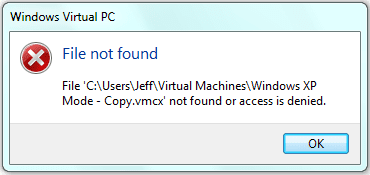
C:\Users\Jeff\Virtual Machines\Windows XP Mode - Copy.vmcx

to start the copy virtual XP machine, and I get the following (attached below).

Also, at the instant I double click on the file (in the hope this will start the copy VM), the file C:\Users\Jeff\Virtual Machines\Windows XP Mode - Copy.vmcx disappears (it deletes itself).

I copied the files exactly as described. I double checked the editing of the .vmc file and the .vmcx file.

Can anyone offer any help? Am I missing something?
 

Attachments

  • VMCapture.PNG
    VMCapture.PNG
    5.8 KB · Views: 0

My Computer My Computer

At a glance

Win 7 x64 ProfessionalIntel Core i5-750 2.67Ghz4gbNvidia GeForce 9500GT 512mb
Computer Manufacturer/Model Number
DYI
OS
Win 7 x64 Professional
CPU
Intel Core i5-750 2.67Ghz
Motherboard
Gigabyte P55M-UD4
Memory
4gb
Graphics Card(s)
Nvidia GeForce 9500GT 512mb
Sound Card
On MB
Monitor(s) Displays
Lg Flatron
Screen Resolution
1280 x 1024
Hard Drives
C: 200mb Maxtor SATA 3
D: 500gb WD SATA 3
For starters you would need 2 product keys. If you use Virtual Box, you can have as many as you want. Make sure you install the Guest Additions inside the XP system.
 

My Computer My Computer

At a glance

Vista, Windows7, Mint Mate, Zorin, Windows 8from 1.6GHz Duo to i7
Computer Manufacturer/Model Number
HP, Dell, Gateway, Toshiba - 4 laptops and 2 desktops
OS
Vista, Windows7, Mint Mate, Zorin, Windows 8
CPU
from 1.6GHz Duo to i7
Monitor(s) Displays
2x HP w2207
Hard Drives
5x HDD, 7x SSD, 12x Externals
Keyboard
with trackball - no mices
Mouse
Trackball mice
Internet Speed
DSL 6000
Not Virtual Box, using the Virtual machine included with Win 7 Pro X64.
 

My Computer My Computer

At a glance

Win 7 x64 ProfessionalIntel Core i5-750 2.67Ghz4gbNvidia GeForce 9500GT 512mb
Computer Manufacturer/Model Number
DYI
OS
Win 7 x64 Professional
CPU
Intel Core i5-750 2.67Ghz
Motherboard
Gigabyte P55M-UD4
Memory
4gb
Graphics Card(s)
Nvidia GeForce 9500GT 512mb
Sound Card
On MB
Monitor(s) Displays
Lg Flatron
Screen Resolution
1280 x 1024
Hard Drives
C: 200mb Maxtor SATA 3
D: 500gb WD SATA 3

My Computer My Computer

At a glance

Vista, Windows7, Mint Mate, Zorin, Windows 8from 1.6GHz Duo to i7
Computer Manufacturer/Model Number
HP, Dell, Gateway, Toshiba - 4 laptops and 2 desktops
OS
Vista, Windows7, Mint Mate, Zorin, Windows 8
CPU
from 1.6GHz Duo to i7
Monitor(s) Displays
2x HP w2207
Hard Drives
5x HDD, 7x SSD, 12x Externals
Keyboard
with trackball - no mices
Mouse
Trackball mice
Internet Speed
DSL 6000
I'm with WHS. If not virtualbox, then VMWare player. They're both free, excellent, and easy to set up.
 

My Computer My Computer

At a glance

Systems 1 and 2: Windows 7 Enterprise x64, Wi...System 1: i7 [email protected], System 2: AMD FX-41...System 1: 8GB System 2: 8GBSystem 1: ATI FirePro V4800 System 2: Radeon ...
Computer Manufacturer/Model Number
Dell and Custom
OS
Systems 1 and 2: Windows 7 Enterprise x64, Win 8 Developer
CPU
System 1: i7 [email protected], System 2: AMD FX-4100 Zambezi 3.6G
Motherboard
System 1:Dell 06NWYK System 2: ASUS M5A97 AM3+
Memory
System 1: 8GB System 2: 8GB
Graphics Card(s)
System 1: ATI FirePro V4800 System 2: Radeon HD 6850
Sound Card
System 1: onboard System 2: onboard
Monitor(s) Displays
System1: Viewsonic HDMI 24"
Screen Resolution
System 1: 1920x1080 System 2: 1920x1080
Hard Drives
System 1: Mirrored .5B drives System 2: Seagate Barracuda ST1000DM003 1TB 7200 RPM 64MB Cache SATA 6.0Gb/s
Case
System 1: Dell System 2: Cooler Master
Internet Speed
10 MBPS
Are you implying I can't do this with the Windows VM> The article I was referred to said nothing about it not working with Windows.
 

My Computer My Computer

At a glance

Win 7 x64 ProfessionalIntel Core i5-750 2.67Ghz4gbNvidia GeForce 9500GT 512mb
Computer Manufacturer/Model Number
DYI
OS
Win 7 x64 Professional
CPU
Intel Core i5-750 2.67Ghz
Motherboard
Gigabyte P55M-UD4
Memory
4gb
Graphics Card(s)
Nvidia GeForce 9500GT 512mb
Sound Card
On MB
Monitor(s) Displays
Lg Flatron
Screen Resolution
1280 x 1024
Hard Drives
C: 200mb Maxtor SATA 3
D: 500gb WD SATA 3
I just tested the procedure as described in tutorial, once again. Absolutely no problems.

Did you shut down instead of hibernate the XP Mode before trying this? Default closing action when clicking the Close button for XP Mode is to hibernate. It must be shut down before copied.

Shut down XP Mode. Delete Windows XP Mode.vmc.backup from %userprofile%\AppDta\Local\Microsoft\Windows Virtual PC\Virtual Machines. Also, if file Windows XP Mode.vsv exists in this location you should now delete it. A .vsv file is the same than hiberfile.sys on real physical computers, containing hibernation information. It only exists when XP Mode is running, or when it is hibernated. When XP Mode is closed but this file exists, it simply means XP Mode is hibernated instead of shut down. Deleting the .vsv file "shuts down" XP Mode by deleting hibernation data.

Try now the copy procedure once again, following instructions exactly as written.

Copying XP Mode, having several XP Mode virtual machines, does not require additional product keys for activation. You are entitled to run as many copies as you wish, as long as you have Windows 7 Professional or better.

Kari
 

My Computer My Computer

At a glance

Windows 10 Pro x64 EN-GB1.6 GHz Intel Core i7-720QM Processor6 GBATI Mobility Radeon HD 5850 Graphics
Computer type
Laptop
Computer Manufacturer/Model Number
HP ENVY 17-1150eg
OS
Windows 10 Pro x64 EN-GB
CPU
1.6 GHz Intel Core i7-720QM Processor
Memory
6 GB
Graphics Card(s)
ATI Mobility Radeon HD 5850 Graphics
Sound Card
Beats sound system with integrated subwoofer
Monitor(s) Displays
17" laptop display, 22" LED and 32" Full HD TV through HDMI
Screen Resolution
1600*900 (1), 1920*1080 (2&3)
Hard Drives
Internal: 2 x 500 GB SATA Hard Disk Drive 7200 rpm
External: 2TB for backups, 3TB USB3 network drive for media
Cooling
As Envy runs a bit warm, I have it on a Cooler Master pad
Keyboard
Logitech diNovo Media Desktop Laser (bluetooth)
Mouse
Logitech Performance Mouse MX
Internet Speed
50/10 Mbps VDSL
Antivirus
Windows Defender 4.3.9431.0
Browser
Maxthon 3.5.2., IE11
I did "Shut Down", yes. "Machine Status" of C:\Users\Jeff\Virtual Machines\Windows XP Mode - Copy.vmcx is "Powered Down".

Am I correct in trying to start the copy XP machine by double clicking on the .vmcx file? If not, what is the correct procedure to start the copy XP machine, as it does not show anywhere else.
 

My Computer My Computer

At a glance

Win 7 x64 ProfessionalIntel Core i5-750 2.67Ghz4gbNvidia GeForce 9500GT 512mb
Computer Manufacturer/Model Number
DYI
OS
Win 7 x64 Professional
CPU
Intel Core i5-750 2.67Ghz
Motherboard
Gigabyte P55M-UD4
Memory
4gb
Graphics Card(s)
Nvidia GeForce 9500GT 512mb
Sound Card
On MB
Monitor(s) Displays
Lg Flatron
Screen Resolution
1280 x 1024
Hard Drives
C: 200mb Maxtor SATA 3
D: 500gb WD SATA 3
Yes, you start it normally by double clicking it.

With shut down I meant the original XP Mode has to be shutdown and the vmc.backup file deleted before making a copy.

Kari
 

My Computer My Computer

At a glance

Windows 10 Pro x64 EN-GB1.6 GHz Intel Core i7-720QM Processor6 GBATI Mobility Radeon HD 5850 Graphics
Computer type
Laptop
Computer Manufacturer/Model Number
HP ENVY 17-1150eg
OS
Windows 10 Pro x64 EN-GB
CPU
1.6 GHz Intel Core i7-720QM Processor
Memory
6 GB
Graphics Card(s)
ATI Mobility Radeon HD 5850 Graphics
Sound Card
Beats sound system with integrated subwoofer
Monitor(s) Displays
17" laptop display, 22" LED and 32" Full HD TV through HDMI
Screen Resolution
1600*900 (1), 1920*1080 (2&3)
Hard Drives
Internal: 2 x 500 GB SATA Hard Disk Drive 7200 rpm
External: 2TB for backups, 3TB USB3 network drive for media
Cooling
As Envy runs a bit warm, I have it on a Cooler Master pad
Keyboard
Logitech diNovo Media Desktop Laser (bluetooth)
Mouse
Logitech Performance Mouse MX
Internet Speed
50/10 Mbps VDSL
Antivirus
Windows Defender 4.3.9431.0
Browser
Maxthon 3.5.2., IE11
Yes, the original was shut down before I started copying, editing, etc.

I'm trying again.
 

My Computer My Computer

At a glance

Win 7 x64 ProfessionalIntel Core i5-750 2.67Ghz4gbNvidia GeForce 9500GT 512mb
Computer Manufacturer/Model Number
DYI
OS
Win 7 x64 Professional
CPU
Intel Core i5-750 2.67Ghz
Motherboard
Gigabyte P55M-UD4
Memory
4gb
Graphics Card(s)
Nvidia GeForce 9500GT 512mb
Sound Card
On MB
Monitor(s) Displays
Lg Flatron
Screen Resolution
1280 x 1024
Hard Drives
C: 200mb Maxtor SATA 3
D: 500gb WD SATA 3
OK, mystery solved. I got it to work.

It appears that when I edited the .vmcx file in the \users\jeff\virtual machines folder, my text editor did something to the file format. I wasn't using notepad, I was using textpad. The format LOOKED correct, but it must have been some invisible characters that were changed - perhaps CF or LF.

I noticed that when I saved the .vmcx file, all the status information disappeared. I tried again with notepad, and it was fine, and I could start the copy XP machine.

So, all appears well, I made RAR files of all the copied files so I can pull back a "clean" copy on demand. Time to experiment now.

Thanks
 

My Computer My Computer

At a glance

Win 7 x64 ProfessionalIntel Core i5-750 2.67Ghz4gbNvidia GeForce 9500GT 512mb
Computer Manufacturer/Model Number
DYI
OS
Win 7 x64 Professional
CPU
Intel Core i5-750 2.67Ghz
Motherboard
Gigabyte P55M-UD4
Memory
4gb
Graphics Card(s)
Nvidia GeForce 9500GT 512mb
Sound Card
On MB
Monitor(s) Displays
Lg Flatron
Screen Resolution
1280 x 1024
Hard Drives
C: 200mb Maxtor SATA 3
D: 500gb WD SATA 3
Good to hear you got it working. :)
 

My Computer My Computer

At a glance

Windows 10 Pro x64 EN-GB1.6 GHz Intel Core i7-720QM Processor6 GBATI Mobility Radeon HD 5850 Graphics
Computer type
Laptop
Computer Manufacturer/Model Number
HP ENVY 17-1150eg
OS
Windows 10 Pro x64 EN-GB
CPU
1.6 GHz Intel Core i7-720QM Processor
Memory
6 GB
Graphics Card(s)
ATI Mobility Radeon HD 5850 Graphics
Sound Card
Beats sound system with integrated subwoofer
Monitor(s) Displays
17" laptop display, 22" LED and 32" Full HD TV through HDMI
Screen Resolution
1600*900 (1), 1920*1080 (2&3)
Hard Drives
Internal: 2 x 500 GB SATA Hard Disk Drive 7200 rpm
External: 2TB for backups, 3TB USB3 network drive for media
Cooling
As Envy runs a bit warm, I have it on a Cooler Master pad
Keyboard
Logitech diNovo Media Desktop Laser (bluetooth)
Mouse
Logitech Performance Mouse MX
Internet Speed
50/10 Mbps VDSL
Antivirus
Windows Defender 4.3.9431.0
Browser
Maxthon 3.5.2., IE11
For starters you would need 2 product keys. If you use Virtual Box, you can have as many as you want. Make sure you install the Guest Additions inside the XP system.


Hi there
You DON'T necessarily need more than one product key

with vmware you can "Clone" a Virtual Machine. Only if you SIGNIFICANTLY change the Virtual hardware will you get asked for re-activation.

Note however if you want to run these concurrently (at the same time) then you will have to give them DIFFERENT NAMES on your LAN.

Cheers
jimbo
 

My Computer My Computer

At a glance

Linux CENTOS 7 / various Windows OS'es and se...Intel i7 Intel i58GB, 16GBOn Motherboard
Computer type
PC/Desktop
Computer Manufacturer/Model Number
Custom built, several laptops HP/ASUS
OS
Linux CENTOS 7 / various Windows OS'es and servers
CPU
Intel i7 Intel i5
Memory
8GB, 16GB
Graphics Card(s)
On Motherboard
Sound Card
Realtek HD audio
Monitor(s) Displays
Apple Cinema display, Samsung LCD
Screen Resolution
1920 X 1080
Hard Drives
4 X 1TB SATA
Mouse
Toshiba wireless laser
Internet Speed
> 20MB up
As mentioned before, you can make hundred copies of your Virtual PC's XP Mode and still you don't need a product key. I currently have four XP Mode's set up for different purposes, all copies of original which I keep untouched in case I need to make a new copy to start all over again.

Kari
 

My Computer My Computer

At a glance

Windows 10 Pro x64 EN-GB1.6 GHz Intel Core i7-720QM Processor6 GBATI Mobility Radeon HD 5850 Graphics
Computer type
Laptop
Computer Manufacturer/Model Number
HP ENVY 17-1150eg
OS
Windows 10 Pro x64 EN-GB
CPU
1.6 GHz Intel Core i7-720QM Processor
Memory
6 GB
Graphics Card(s)
ATI Mobility Radeon HD 5850 Graphics
Sound Card
Beats sound system with integrated subwoofer
Monitor(s) Displays
17" laptop display, 22" LED and 32" Full HD TV through HDMI
Screen Resolution
1600*900 (1), 1920*1080 (2&3)
Hard Drives
Internal: 2 x 500 GB SATA Hard Disk Drive 7200 rpm
External: 2TB for backups, 3TB USB3 network drive for media
Cooling
As Envy runs a bit warm, I have it on a Cooler Master pad
Keyboard
Logitech diNovo Media Desktop Laser (bluetooth)
Mouse
Logitech Performance Mouse MX
Internet Speed
50/10 Mbps VDSL
Antivirus
Windows Defender 4.3.9431.0
Browser
Maxthon 3.5.2., IE11
Back
Top