Is it possible to install Windows 7 on a Windows 8 computer?

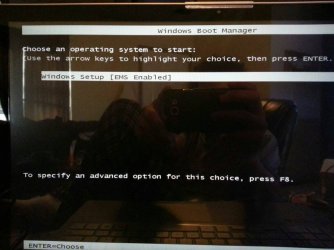
I took a picture

1) Make sure Windows Boot Manager is first boot device.

2) Are booting the DVD in UEFI mode from Boot OverRide or One Time Boot Menu.
 

My Computer My Computer

At a glance

ME/XP/Vista/Win7
OS
ME/XP/Vista/Win7
Do I want to click windows setup [EMS Enabled] or f8 for advanced options?
 

Attachments

  • uploadfromtaptalk1369667733613.jpg
    uploadfromtaptalk1369667733613.jpg
    46.7 KB · Views: 5

My Computer My Computer

At a glance

windows 8 x64intel core i7-365qm cpu @ 2.40ghz 2.40ghz8GB?
Computer type
Laptop
Computer Manufacturer/Model Number
samsung
OS
windows 8 x64
CPU
intel core i7-365qm cpu @ 2.40ghz 2.40ghz
Motherboard
?
Memory
8GB
Graphics Card(s)
?
Hard Drives
1Tb
Antivirus
?
Browser
firefox, chrome
I tried both and either way they freeze. I restet the bios to default and disabled fast boot snd secure boot. I burned the iso at 4x speed and the drive is showing up as a UEFI drive. I am booting from boot override and windows boot manager is before the drive. Are there any other suggestions?
 

My Computer My Computer

At a glance

windows 8 x64intel core i7-365qm cpu @ 2.40ghz 2.40ghz8GB?
Computer type
Laptop
Computer Manufacturer/Model Number
samsung
OS
windows 8 x64
CPU
intel core i7-365qm cpu @ 2.40ghz 2.40ghz
Motherboard
?
Memory
8GB
Graphics Card(s)
?
Hard Drives
1Tb
Antivirus
?
Browser
firefox, chrome
It fails when trying to us automatic update and it proceeds to the install screen when I dont automatically update. But then it freezes at the starting screen. Im going to get dvd-r in a little bit I dont figure it will help but its the only thing I can think to try.
 

My Computer My Computer

At a glance

windows 8 x64intel core i7-365qm cpu @ 2.40ghz 2.40ghz8GB?
Computer type
Laptop
Computer Manufacturer/Model Number
samsung
OS
windows 8 x64
CPU
intel core i7-365qm cpu @ 2.40ghz 2.40ghz
Motherboard
?
Memory
8GB
Graphics Card(s)
?
Hard Drives
1Tb
Antivirus
?
Browser
firefox, chrome
What automatic updates?

Are you referring to this Window?


If you receive this window then the install is not being booted but run from another OS desktop.
 
That was when I was trying to install it from windows 8 when I install it from boot I get stuck here:
 

Attachments

  • uploadfromtaptalk1369672728551.jpg
    uploadfromtaptalk1369672728551.jpg
    24.3 KB · Views: 2

My Computer My Computer

At a glance

windows 8 x64intel core i7-365qm cpu @ 2.40ghz 2.40ghz8GB?
Computer type
Laptop
Computer Manufacturer/Model Number
samsung
OS
windows 8 x64
CPU
intel core i7-365qm cpu @ 2.40ghz 2.40ghz
Motherboard
?
Memory
8GB
Graphics Card(s)
?
Hard Drives
1Tb
Antivirus
?
Browser
firefox, chrome
It is the iso I downloaded from the link provided and I had ultra iso verify the burn
 

My Computer My Computer

At a glance

windows 8 x64intel core i7-365qm cpu @ 2.40ghz 2.40ghz8GB?
Computer type
Laptop
Computer Manufacturer/Model Number
samsung
OS
windows 8 x64
CPU
intel core i7-365qm cpu @ 2.40ghz 2.40ghz
Motherboard
?
Memory
8GB
Graphics Card(s)
?
Hard Drives
1Tb
Antivirus
?
Browser
firefox, chrome
I also used image burn to write the iso. Im going to download another iso from that site and burn it to a dvd-r now.
 

My Computer My Computer

At a glance

windows 8 x64intel core i7-365qm cpu @ 2.40ghz 2.40ghz8GB?
Computer type
Laptop
Computer Manufacturer/Model Number
samsung
OS
windows 8 x64
CPU
intel core i7-365qm cpu @ 2.40ghz 2.40ghz
Motherboard
?
Memory
8GB
Graphics Card(s)
?
Hard Drives
1Tb
Antivirus
?
Browser
firefox, chrome
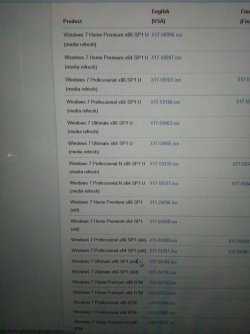
Which iso do you recommend? I have the product key for windows 7 professional 64 bit, but there are two different versions on includes an N and the other doesn't.
 

Attachments

  • uploadfromtaptalk1369677152045.jpg
    uploadfromtaptalk1369677152045.jpg
    45.6 KB · Views: 4

My Computer My Computer

At a glance

windows 8 x64intel core i7-365qm cpu @ 2.40ghz 2.40ghz8GB?
Computer type
Laptop
Computer Manufacturer/Model Number
samsung
OS
windows 8 x64
CPU
intel core i7-365qm cpu @ 2.40ghz 2.40ghz
Motherboard
?
Memory
8GB
Graphics Card(s)
?
Hard Drives
1Tb
Antivirus
?
Browser
firefox, chrome
My drive only supports 8x 12x 16x write speed so its on 8x.
 

My Computer My Computer

At a glance

windows 8 x64intel core i7-365qm cpu @ 2.40ghz 2.40ghz8GB?
Computer type
Laptop
Computer Manufacturer/Model Number
samsung
OS
windows 8 x64
CPU
intel core i7-365qm cpu @ 2.40ghz 2.40ghz
Motherboard
?
Memory
8GB
Graphics Card(s)
?
Hard Drives
1Tb
Antivirus
?
Browser
firefox, chrome
Same result froze at the loading screen.
 

My Computer My Computer

At a glance

windows 8 x64intel core i7-365qm cpu @ 2.40ghz 2.40ghz8GB?
Computer type
Laptop
Computer Manufacturer/Model Number
samsung
OS
windows 8 x64
CPU
intel core i7-365qm cpu @ 2.40ghz 2.40ghz
Motherboard
?
Memory
8GB
Graphics Card(s)
?
Hard Drives
1Tb
Antivirus
?
Browser
firefox, chrome
At some point I would save a backup image of the complete HD, my Win8 Recovery disks, and then using Diskpart Clean Command wipe the HD to Clean Install Windows 7 to a partition made during Step 7, followed by Clean Install - Windows 8 to a partition I made with its booted installer. This should configure a Dual Boot.

It's up to you if you want to install using UEFI after weighing UEFI BIOS vs. Legacy BIOS - YouTube . Wiping the HD will set it up for either type install.

It will likely save time because we have a number of these stall cases now with Win7 Dual Boot on 8 machines, and unfortunately what works the best for intractable install problems has always been clearing the boot sector with Diskpart Clean Command.
 
Ok so if I wipe the harddrive and install windows 7 and then I install windows 8 am I going to loose UEFI or anything else. Also will windows 8 recognized my product key in the bios or how will that work? Do I just download an iso of windows 8 and burn it to a dvd-r?
 

My Computer My Computer

At a glance

windows 8 x64intel core i7-365qm cpu @ 2.40ghz 2.40ghz8GB?
Computer type
Laptop
Computer Manufacturer/Model Number
samsung
OS
windows 8 x64
CPU
intel core i7-365qm cpu @ 2.40ghz 2.40ghz
Motherboard
?
Memory
8GB
Graphics Card(s)
?
Hard Drives
1Tb
Antivirus
?
Browser
firefox, chrome
Also is there a way to get a discount on windows 7 if you have windows 8? If im going to wipe the drive I should hace a full version of windows 7, my product key is only 24 months.
 

My Computer My Computer

At a glance

windows 8 x64intel core i7-365qm cpu @ 2.40ghz 2.40ghz8GB?
Computer type
Laptop
Computer Manufacturer/Model Number
samsung
OS
windows 8 x64
CPU
intel core i7-365qm cpu @ 2.40ghz 2.40ghz
Motherboard
?
Memory
8GB
Graphics Card(s)
?
Hard Drives
1Tb
Antivirus
?
Browser
firefox, chrome
Use the Win7 Product Key you have after you test drive the Dual Boot to see that's where you want it - a retail key can be installed anywhere you want.

Ask in Clean Install - Windows 8 tutorial comments if any questions about Win8 are not answered there.

You should only disable Secure boot unless you also decide you don't want to install in UEFI, in which case you'd enable LEgacy BIOS or CSM. You might want to try Win7 install in UEFI after wiping the HD to see if it works. But its up to you, so watch the video to make an informed decision which.
 
I created a image of my harddrive. So I should be able to reimage the hard drive after a delete everything correct?
 

My Computer My Computer

At a glance

windows 8 x64intel core i7-365qm cpu @ 2.40ghz 2.40ghz8GB?
Computer type
Laptop
Computer Manufacturer/Model Number
samsung
OS
windows 8 x64
CPU
intel core i7-365qm cpu @ 2.40ghz 2.40ghz
Motherboard
?
Memory
8GB
Graphics Card(s)
?
Hard Drives
1Tb
Antivirus
?
Browser
firefox, chrome
Back
Top