
Is it safe to use AMD overclock settings...?

Valsako

New member
Member
Local time
8:41 AM
Messages
48
Okay, this is probably going to sound like the most noob question, but I've never used any kind of really good graphics card before, and this is in the AMD vision engine control center application, under "Graphics overdrive".

My system specs are in my profile, so just click the thing below the post.

Would it be safe to use these settings?
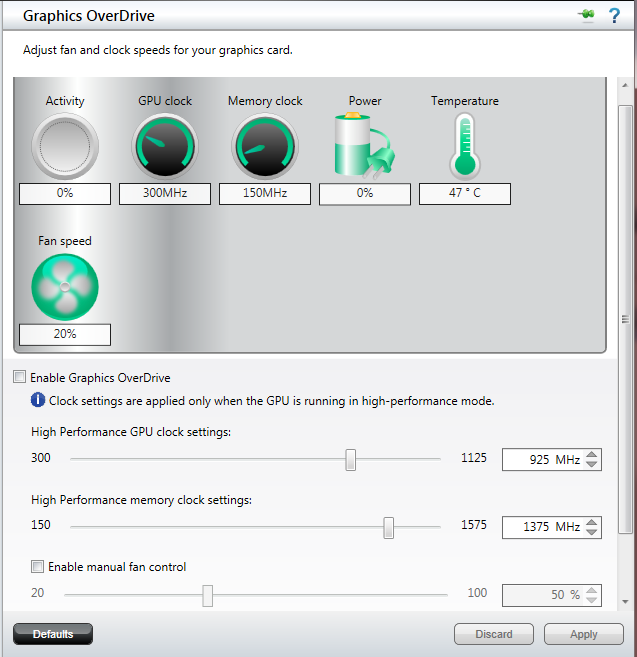
gpu10.png


I just wanted to ask first, before I touched anything, because I don't want to damage anything. xD
 

My Computer My Computer

Computer type
PC/Desktop
Computer Manufacturer/Model Number
iBuyPower
OS
Windows 7 Home Premium 64 bit
CPU
AMD FX 8350 @ 4.52 GHz
Motherboard
Gigabyte GA-970A-UD3 -- AMD 970
Memory
16 GB DDR3 Corsair Vengeance
Graphics Card(s)
AMD Radeon HD 7970 3 GB
Sound Card
3D Premium Surround Sound Onboard
Screen Resolution
1920x1080
Hard Drives
Dual 1 TB Drives - RAID-0 High Performance
PSU
850 Watt - Corsair CMPSU-850AX
Case
NZXT Source 210 Gaming Case Blue
Cooling
Liquid CPU Cooling System [AMD]
Internet Speed
300 KBps download speed.
Antivirus
Microsoft Security Essentials
Browser
Firefox 20.0.1
If everything you want to use is running great, I don't push it, since there is no need to gamble.

I have zero experience with the newer FX series either, so I am not much help, but that first line is the rule I have lived by, and you have a 7970, gasp!

My rig is perfecto for all my needs, only thing that drives me nuts is moving stuff to USB external drives, just seems slow, but I go way back to cassette drive storage, and have to laugh at that.
 

My Computer My Computer

Computer type
PC/Desktop
Computer Manufacturer/Model Number
Self Built Custom
OS
Windows 7 Ultimate Retail Box (64-bit installed) + Service Pack 1
CPU
AMD FX-8350 CPU v1.15 (or 1.0F) BIOS was required!
Motherboard
MSI 890FXA-GD70
Memory
8G CAS-7 G-Skill DDR3 @1333 (2 fours) [mobo nonOC max rec'd]
Graphics Card(s)
Radeon HD 7950 [3 gigs of GDDR5] MSI Twin Frozr model
Sound Card
Realtek High Definition Audio (onboard mobo, ALC-889 chip)
Monitor(s) Displays
2 WS LED Monitors: One LG One Viewsonic
Screen Resolution
1920 by 1080
Hard Drives
SSD for OS: Samsung 840 Pro
SSD for VM and utilities: Adata SX900
7200 RPM SATA HDs for the rest: Hitachi and Seagate
PSU
Corsair TX850 - 850W max, in service since August 2010.
Case
Thermaltake Armor A90
Cooling
Thermaltake Spin Q CPU Cooler, in service since August 2010
Keyboard
Logitech G11
Mouse
Logitech M310 Wireless
Internet Speed
100 Megabit broadband supposedly upgraded from 50 (Cable)
Antivirus
Bitdefender Internet Security 2014 suite
Browser
Pale Moon 64-bit main, also IceDragon, Opera, and Maxthon.
Other Info
CompTIA A+ certified (220-800 series) in July 2013.
Well, see, that's the thing, a few things run a little laggy, and when you're doing indie game development like me, lag isn't something you can just go for, and I think the reason it's laggy is because the settings there, I believe, are only using 1 GB of the card's 3 GB it has by default, and the AMD site says that it can be overclocked to the settings that are preset in the overdrive section, so, I don't know.

I turned it on and tested it just a little for one game for only a little while, it ran EXCELLENT, but it DID heat up a little.
 

My Computer My Computer

Computer type
PC/Desktop
Computer Manufacturer/Model Number
iBuyPower
OS
Windows 7 Home Premium 64 bit
CPU
AMD FX 8350 @ 4.52 GHz
Motherboard
Gigabyte GA-970A-UD3 -- AMD 970
Memory
16 GB DDR3 Corsair Vengeance
Graphics Card(s)
AMD Radeon HD 7970 3 GB
Sound Card
3D Premium Surround Sound Onboard
Screen Resolution
1920x1080
Hard Drives
Dual 1 TB Drives - RAID-0 High Performance
PSU
850 Watt - Corsair CMPSU-850AX
Case
NZXT Source 210 Gaming Case Blue
Cooling
Liquid CPU Cooling System [AMD]
Internet Speed
300 KBps download speed.
Antivirus
Microsoft Security Essentials
Browser
Firefox 20.0.1
7970 laggy........wow. OC'g and heat is a normal by-product of the process. I would then go in and adjust the fan up to a modest level to control this added voltage and the temps will come down some but could add a little noise depending on the fan quality!
 

My Computer My Computer

Computer type
PC/Desktop
Computer Manufacturer/Model Number
A blend of brains, brawn and dumb luck.
OS
Windows 7 Ultimate 64
CPU
i7 3770k OC'd 4.6 @ 1.17v, also FX 8120 & i5 miniITX
Motherboard
MSI P67A-GD80 b3
Memory
32 gb G.Skill Sniper DDR3 10-12-12-31 @ 2133
Graphics Card(s)
XFX Radeon 7870 2GB DDR5
Sound Card
Sound Blaster Z Series Card
Monitor(s) Displays
(2) LG LED 23" 1920 x 1080 2ms Monitors via mini d-port
Screen Resolution
1680 X 1050 p
Hard Drives
Samsung 256 gb 830 SSD sata III
(1) 1 tb WD Black
(2) 1 tb Hitachi deskmates/sata II
(2) 1 tb WD green/sata II
(2) 3 tb Seagate Barracuda
(1) 120 gb OCZ Vertex SS
(1) Drobo 5N w/5 Seagate 3tb
PSU
EVGA modular 1000G2 80% gold rating & APC 1200 RS
Case
CoolerMaster Storm Styker
Cooling
7 case fans 140mm & 120mm, NZXT Kraken X60
Keyboard
(2) Logitech Illuminated Keyboards (1) usb (1) wireless
Mouse
Logitech G700 & T-BC21 - nano nx for the laptop
Internet Speed
Basic 120mbps down
Antivirus
Trend Micro Titanium Max Security & Malwarebytes Premium
Browser
Chrome and IE 10
Other Info
5 Noctua case fans + 3 Noctua in p/p on NZXT cooler
Integrated hot swap drive bays for 2.5" Drives
(2) Lite-on dvd/cd/Blu Ray optical 22X
Integrated fan controller and led on/off
HP Officejet Pro 8630 all-n-one
Hot-swappable 3.5" hard drive bay
Netgear Nighthawk router
Asus USB 3 & sata 6 PCIe card
Vantec IDE to sata adptr./Ultra sata adptr
Lenovo L420 i5 lappy with m sata
Drobo 5N advanced NAS
Back
Top