Is it worth creating XP mode in windows 7

One important thing I forgot to mention and that is whichever virtual machine you use you'll need to go into the BIOS and enable hardware virtualization under the Power settings otherwise your virtual PC won't work.

Thank you for the information concerning the BIOS and virtual PC. However, several months ago I downloaded this software without making any changes to the BIOS. This is the first time that I have heard about it. However, all is well so I will leave it as it.

I believe MS Virtual PC and XP Mode originally worked only with Hardware Virtualization enabled but it has been updated to work without it. I use XP Mode and my CPU doesn't have any Hardware Virtualization. I guess it would work better with Hardware Virtualization.

If you wanted to run a 64bit OS in a Virtual PC then Hardware Virtualization is required. Don't bother trying this with MS Virtual PC as it will not run a 64bit OS, VMWare Workstation and VMWare Player do.
 

My Computer My Computer

At a glance

Windows 7 Ultimate x64Intel Pentium Dual Core E5200 2.5GHz (3.77GHz...Corsair 4GB DDR2 (4x1GB CM2X1024-6400C4)Palit GeForce GTS 250 (1024MB)
Computer Manufacturer/Model Number
Self built
OS
Windows 7 Ultimate x64
CPU
Intel Pentium Dual Core E5200 2.5GHz (3.77GHz OC)
Motherboard
Asus P5Q-E
Memory
Corsair 4GB DDR2 (4x1GB CM2X1024-6400C4)
Graphics Card(s)
Palit GeForce GTS 250 (1024MB)
Sound Card
On Board (ADI AD2000B 8ch HD)
Monitor(s) Displays
Samsung 32in LCD TV
Screen Resolution
1360x768
Hard Drives
2 x 1TB Samsung 103SJ (Raid0)
2 x External 500GB Samsung 502IJ (NexStar 3 HD Enclosures)
PSU
550W Antec Neo HE 550
Case
Antec P180
Cooling
Xigmatex Red Scorpion CPU Cooler. 3x120mm Fans
Keyboard
Logitech MX5000 Laser (Combo)
Mouse
Logitech MX5000 Laser (Combo)
Internet Speed
ADSL2+ (avg 10 Mbps Down, 0.80 Mbps up)
Other Info
Gigabyte GN-WP01GS 54g Wireless Lan Card
Thanks for that Jimbo.

As a matter of interest, how much better is WMWare Workstation 8 than the free VMWare Player?
]

As Jimbo stated, it just adds some feature that you may or may not need. In my enterprise environment, we use vsphere and ESXi...but for my personal playing and testing, the VMWare Player is perfectly fine for my needs.

I wish it had a snapshot ability, but I work around that easily enough. Whenever I need to do something that needs a point to get back to, I simply shut down the VM, copy the .vmdk to a backup folder and then run my tests. If I need to revert back, I shut down the VM again and restore the copy of my backup. It's a bit manual, but it saves me the nearly ~$200 that VMWare Player costs.
 

My Computer My Computer

At a glance

Windows 7 Ultimate x64Intel Q9550 2.83Ghz OC'd to 3.40Ghz8GB G.Skill PI DDR2-800, 4-4-4-12 timingsEVGA 1280MB Nvidia GeForce GTX570
Computer Manufacturer/Model Number
Self-Built in July 2009
OS
Windows 7 Ultimate x64
CPU
Intel Q9550 2.83Ghz OC'd to 3.40Ghz
Motherboard
Gigabyte GA-EP45-UD3R rev. 1.1, F12 BIOS
Memory
8GB G.Skill PI DDR2-800, 4-4-4-12 timings
Graphics Card(s)
EVGA 1280MB Nvidia GeForce GTX570
Sound Card
Realtek ALC899A 8 channel onboard audio
Monitor(s) Displays
23" Acer x233H
Screen Resolution
1920x1080
Hard Drives
Intel X25-M 80GB Gen 2 SSD
Western Digital 1TB Caviar Black, 32MB cache. WD1001FALS
PSU
Corsair 620HX modular
Case
Antec P182
Cooling
stock
Keyboard
ABS M1 Mechanical
Mouse
Logitech G9 Laser Mouse
Internet Speed
15/2 cable modem
Other Info
Windows and Linux enthusiast. Logitech G35 Headset.
Is there a way to bypass the username and password bottleneck?
Otherwise, I got to start over again from the scratch.

Launch the VM and log in. Go into Start, cmd, type
control userpasswords2

Unchceck the box that says "Users must enter a username and password to use this computer.

Reboot and you should automatically jump right to your desktop when you boot up.
 

My Computer My Computer

At a glance

Windows 7 Ultimate x64Intel Q9550 2.83Ghz OC'd to 3.40Ghz8GB G.Skill PI DDR2-800, 4-4-4-12 timingsEVGA 1280MB Nvidia GeForce GTX570
Computer Manufacturer/Model Number
Self-Built in July 2009
OS
Windows 7 Ultimate x64
CPU
Intel Q9550 2.83Ghz OC'd to 3.40Ghz
Motherboard
Gigabyte GA-EP45-UD3R rev. 1.1, F12 BIOS
Memory
8GB G.Skill PI DDR2-800, 4-4-4-12 timings
Graphics Card(s)
EVGA 1280MB Nvidia GeForce GTX570
Sound Card
Realtek ALC899A 8 channel onboard audio
Monitor(s) Displays
23" Acer x233H
Screen Resolution
1920x1080
Hard Drives
Intel X25-M 80GB Gen 2 SSD
Western Digital 1TB Caviar Black, 32MB cache. WD1001FALS
PSU
Corsair 620HX modular
Case
Antec P182
Cooling
stock
Keyboard
ABS M1 Mechanical
Mouse
Logitech G9 Laser Mouse
Internet Speed
15/2 cable modem
Other Info
Windows and Linux enthusiast. Logitech G35 Headset.
I'm another that never touched the BIOS when I installed XP Mode, I run it on the Microsoft Virtual machine. Still haven't been able to make the thing work that I wanted the XP Mode for in the first place. :rolleyes:
 

My Computer My Computer

At a glance

Windows 10 64bit/Windows 10 64bit/Windows 10 ...Intel Pentium J3710 @ 60GHz/Intel B820,1.7GHz...8.00GB DDR3 @ 1599MHz/8GB 2 x 4GB DDR3/8.00GB...Intel HD Graphics/Intel/512MB ATI AMD Radeon ...
Computer type
PC/Desktop
Computer Manufacturer/Model Number
Acer Aspire XC-704 x64 bit/ Asus K55A Notebook PC/HP Envy x360 Convertible 15-bq0xx
OS
Windows 10 64bit/Windows 10 64bit/Windows 10 64bit
CPU
Intel Pentium J3710 @ 60GHz/Intel B820,1.7GHz/AMD A9 Radeon
Motherboard
Acer Aspire XC-704 (SOCKET 0)/Asus/HP 8312 (Socket FP4)
Memory
8.00GB DDR3 @ 1599MHz/8GB 2 x 4GB DDR3/8.00GB Dual-Channel
Graphics Card(s)
Intel HD Graphics/Intel/512MB ATI AMD Radeon R5 Graphics (HP
Sound Card
Realtek High Definition Audio/Onboard/AMD High Definition Au
Monitor(s) Displays
Acer LCD K222HQL /Asus 15.6/Generic PnP Monitor (1920x1080@6
Screen Resolution
1920x1080@59Hz/1366 x 768/1920x1080@60Hz
Hard Drives
1863GBWesternn Digital WDC/Asus/119GB SanDisk SD8SN8U-128G-1006 (SSD)
931GB Hitachi HGST HTS721010A9E630 (SATA)
Keyboard
Microsoft Natural Ergonomic Keyboard 4000 (UK)/Inbuilt/Inbui
Mouse
Microsoft Optical Wheel Mouse/Same plus Touchpad/Same + Pad
Internet Speed
Infinity 2 up to 76 Mbps
Antivirus
MSE/MSE/MSE and all 3 have MalwareBytes Premium
Browser
Edge, Firefox/Edge, Firefox/Edge, Firefox, Chrome
Other Info
Seagate Expansion 500GB External Desktop Drive
Seagate Expansion Portable Drives 500GB and 1TB
Epson XP-332 Wireless Printer
195698[/ATTACH]

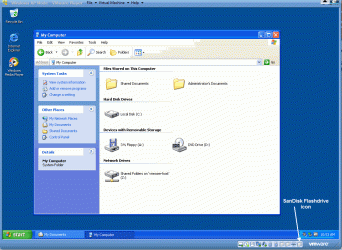
Right click device, for instance your USB stick needed to copy your encryption application to XP Mode to attach it to guest. Notice that this also releases device from host:

View attachment 195697

Kari
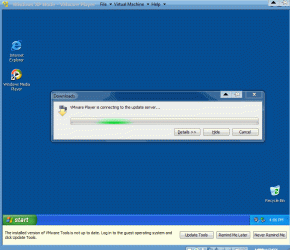
I got a new C-hard drive for my office computer. The computer runs Windows 7 pro (64 bit). XP Mode and VMWare player 3.1.5 were installed without any hitch. Restarted the computer. XP mode was succesfully imported by VMWare player.
Meanwhile, screen prompted to update VMWare Tools. Downloading of the VMWare Tools goes on forever (see one of the attachments below). I am not sure whether downloading is going or not. I am now stuck at this stage. One of the attachments is from MY Computer. Nothing seems to be changed.

I assume that without installing VMWare Tools I might be not able to run XP mode. I am wondering whether something is missing to successfully download VMWare Tools. Please advise me.
 

Attachments

  • VMPlayer 04.gif
    VMPlayer 04.gif
    23.7 KB · Views: 5
  • VMPlayer 08.gif
    VMPlayer 08.gif
    44.5 KB · Views: 2

My Computer My Computer

At a glance

Windows 7
OS
Windows 7

My Computer My Computer

At a glance

Windows 7 Ultimate SP1 64-BitIntel Core i7 870 @ 2.93GHz8Gb Dual-Channel DDR3 @ 664MHznVidia GeForce GTX 460 1024MB dedicated RAM
Computer Manufacturer/Model Number
HP Pavilion Elite 495UK
OS
Windows 7 Ultimate SP1 64-Bit
CPU
Intel Core i7 870 @ 2.93GHz
Motherboard
MSI 2A9C (CPU1)
Memory
8Gb Dual-Channel DDR3 @ 664MHz
Graphics Card(s)
nVidia GeForce GTX 460 1024MB dedicated RAM
Sound Card
Realtek HD Audio
Monitor(s) Displays
HP2310i
Screen Resolution
1920 x 1080
Hard Drives
1x1954GB Hitachi HDS22020ALA 330 (RAID), 1x1954GB Hitachi External for backup and storage
PSU
460W
Case
HP Elite
Cooling
Air cooled
Keyboard
Logitech K750 solar-powered keyboard
Mouse
Logitech Wireless M180 mouse
Internet Speed
2Mb
Other Info
Pure Avanti Flow Internet Radio with iPod Dock, 64Gb iPod, HP USB Speakers, Sony MDR-V500 Headphones, Sony Vaio F-Series Laptop
Without VMWare Tools, your XP machine will work, but the video won't be optimized and performance won't be as good as it can be.

Go into VMWare Player, File, Player Preferences, click on Connection Settings and make sure that everything is setup properly.

I've not had this hang at this point, but as I said before, there were problems with 4.0.2 getting updates...but that would throw a message. I'm currently on 3.1.3 on one of my machines and 4.0 on the other. If I get a few minutes, maybe I will try installing 3.1.5 and see if I have any issues.
 

My Computer My Computer

At a glance

Windows 7 Ultimate x64Intel Q9550 2.83Ghz OC'd to 3.40Ghz8GB G.Skill PI DDR2-800, 4-4-4-12 timingsEVGA 1280MB Nvidia GeForce GTX570
Computer Manufacturer/Model Number
Self-Built in July 2009
OS
Windows 7 Ultimate x64
CPU
Intel Q9550 2.83Ghz OC'd to 3.40Ghz
Motherboard
Gigabyte GA-EP45-UD3R rev. 1.1, F12 BIOS
Memory
8GB G.Skill PI DDR2-800, 4-4-4-12 timings
Graphics Card(s)
EVGA 1280MB Nvidia GeForce GTX570
Sound Card
Realtek ALC899A 8 channel onboard audio
Monitor(s) Displays
23" Acer x233H
Screen Resolution
1920x1080
Hard Drives
Intel X25-M 80GB Gen 2 SSD
Western Digital 1TB Caviar Black, 32MB cache. WD1001FALS
PSU
Corsair 620HX modular
Case
Antec P182
Cooling
stock
Keyboard
ABS M1 Mechanical
Mouse
Logitech G9 Laser Mouse
Internet Speed
15/2 cable modem
Other Info
Windows and Linux enthusiast. Logitech G35 Headset.
Without VMWare Tools, your XP machine will work, but the video won't be optimized and performance won't be as good as it can be.

Go into VMWare Player, File, Player Preferences, click on Connection Settings and make sure that everything is setup properly.

I've not had this hang at this point, but as I said before, there were problems with 4.0.2 getting updates...but that would throw a message. I'm currently on 3.1.3 on one of my machines and 4.0 on the other. If I get a few minutes, maybe I will try installing 3.1.5 and see if I have any issues.
Thanks for yuur suggestion. In the morning, I did not see any posting. So I tried to solve the problem myself. As you described, the problem has to do with conneciton. Default setting was Proxy. I changed into into Windows Proxy and checked its connection. Voila! It started to download VM tools and installed. Now, VM player works very well.

The screen prompted to update v. 4.01 (ror 4.02, I do not recall). it is auto-downloading it. I had problem with downong the v. 4. I rebooted the comuter and VM player restarted. Downlooading is in progreass now. I will let you know how it goes. Thanks for all your help.
 

My Computer My Computer

At a glance

Windows 7
OS
Windows 7
Installation of VMware player and VM Tools was performed without much problem. I had a problem with auto-downloading VMP 4.01. (note: I exptected to get 4.02 though). Dowloading was stalled somehow twice. I made it for the third time and installed vm tools again. VM Player 4.01 runs flawlessly. I can see and access to My Documents, hard drives, flashdrives and and DVD/CD drive. I was able to install winXP-specific software in XP mode, All are great. Thanks for all your help.
 

My Computer My Computer

At a glance

Windows 7
OS
Windows 7
That's great news.

I'm pleased you got where you want to be and thanks for the update.
 

My Computer My Computer

At a glance

Windows 7 Ultimate SP1 64-BitIntel Core i7 870 @ 2.93GHz8Gb Dual-Channel DDR3 @ 664MHznVidia GeForce GTX 460 1024MB dedicated RAM
Computer Manufacturer/Model Number
HP Pavilion Elite 495UK
OS
Windows 7 Ultimate SP1 64-Bit
CPU
Intel Core i7 870 @ 2.93GHz
Motherboard
MSI 2A9C (CPU1)
Memory
8Gb Dual-Channel DDR3 @ 664MHz
Graphics Card(s)
nVidia GeForce GTX 460 1024MB dedicated RAM
Sound Card
Realtek HD Audio
Monitor(s) Displays
HP2310i
Screen Resolution
1920 x 1080
Hard Drives
1x1954GB Hitachi HDS22020ALA 330 (RAID), 1x1954GB Hitachi External for backup and storage
PSU
460W
Case
HP Elite
Cooling
Air cooled
Keyboard
Logitech K750 solar-powered keyboard
Mouse
Logitech Wireless M180 mouse
Internet Speed
2Mb
Other Info
Pure Avanti Flow Internet Radio with iPod Dock, 64Gb iPod, HP USB Speakers, Sony MDR-V500 Headphones, Sony Vaio F-Series Laptop
When another Win 7 Pro disk arrives, I intened to setup either Virtual PC or VMw Player on my home computer.
Since my office computer is running VMw Player, i am tempted to try Virtual PC. But from other posts,my impression is that VMw Player performs better. Could someone describes pros and cons of virtual PC vs. VMw Player?
 

My Computer My Computer

At a glance

Windows 7
OS
Windows 7
Back
Top