Is Libraries Useful; a Debilitating Crutch--Or Both?

TomBrooklyn

New member
Member
Local time
9:33 AM
Messages
75
While it seems Libraries can be helpful for finding user data that may not all be neatly stored in one or several logical and easily found places; it also seems to me it would be better for a user to get their data organized and clearly know where it is, rather than let it be scattered hither and thither across various folders and drives, and rely on Libraries to find it all when desired.


Therefore
, while Libraries can obviously be useful to help find misplaced, poorly placed, or oddly placed data; might it not be better to avoid using Libraries as much as possible; and get used to using folders directly--to develop and maintain an understanding of exactly where all your data is being stored. Besides a general feeling of competency and control this would engender, this knowledge could facilitate doing comprehensive back-ups that don't inadvertently miss any data.
 

My Computer My Computer

At a glance

Win 7 ProIntel i7 2600K16 GB 1333 Crucial Hyper-X Blu I thinkIntegrated
Computer Manufacturer/Model Number
Home Built
OS
Win 7 Pro
CPU
Intel i7 2600K
Motherboard
Asus P8Z68-V LX
Memory
16 GB 1333 Crucial Hyper-X Blu I think
Graphics Card(s)
Integrated
Sound Card
Integrated
Monitor(s) Displays
Dual LCD IPS panels
Screen Resolution
1980x1200, 1980x1080
Hard Drives
3 SATA: 250, 160, 2000 GB, External USB 3TB
PSU
OCZ modular 500W
Case
Antec 300
Cooling
Case: 2 Stock fans, CPU: CoolerMaster Evo 212; PSU: fan
Keyboard
Dell Logitech wireless
Mouse
Logitech Wireless 510
Internet Speed
1.0 Mbps down, 448 Kbps up
Other Info
Case is too small.
Hi there
IMO a better facility to use these days is "Spanned Volumes" -- although remember if one volume in the "Spanned set" fails you lose the whole thing -- but provided your backup is fine then this really shouldn't be an issue.

The reason particularly why like spanned volumes is that I have several very large multi-media files - for instance I have about 4TB of music (I like loads of classical music at the best quality available --Uncompressed FLAC) and I can have all the music say in a high level directory "MUSIC" then split down into sub directories etc.

I might have 4 physical disks "Spanned" -- which gives me say my 5 - 6 TB "volume size".

So say I have volumes D,E,F,G defined as Spanned.
Windows explorer will show this as a single volume "D" with 5 - 6 TB total size.

Then you just use this volume as a single big volume. Backing up sub directories regularly will ensure you don't lose anything.

Another thing to consider is that a lot of multi-media type programs where you can organise your photos / music etc
often use some type of data base / folder system which don't allow multiple volumes. By using Spanned volumes the application just thinks your directory is on a single disk.

(I think W8 has a better system of "Pooled Storage" which is an improvement on Spanned volumes but spanning certainly works on W7).

Libraries have some problem with automatic updates / re-organisation. Spanned volumes work EXACTLY like Windows explorer does and your directories are always up to date.

To use spanned volumes - change to DYNAMIC Disks then select the disks to Span together. Can't show you an image at the moment as I'm using a laptop currently with a single internal HHD (SSD actually).

Cheers
jimbo
 

My Computer My Computer

At a glance

Linux CENTOS 7 / various Windows OS'es and se...Intel i7 Intel i58GB, 16GBOn Motherboard
Computer type
PC/Desktop
Computer Manufacturer/Model Number
Custom built, several laptops HP/ASUS
OS
Linux CENTOS 7 / various Windows OS'es and servers
CPU
Intel i7 Intel i5
Memory
8GB, 16GB
Graphics Card(s)
On Motherboard
Sound Card
Realtek HD audio
Monitor(s) Displays
Apple Cinema display, Samsung LCD
Screen Resolution
1920 X 1080
Hard Drives
4 X 1TB SATA
Mouse
Toshiba wireless laser
Internet Speed
> 20MB up
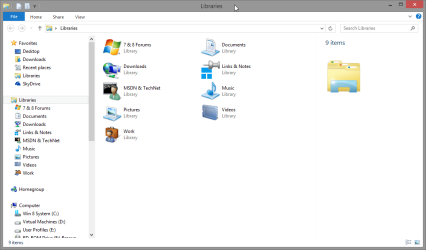
I use libraries extensively - with the default view as Folder so I see the underlying folder structure. The reason I use libraries is because my folder structure is organised in a way that results in the scattering of files across disparate drives/partitions.

They also allow me to consolidate my cloud storage - a library that contains the local synchronised file stores for several services, (Skydrive, Google Drive, Flicker, Etc.), are all visible in one place.
 

My Computers My Computers

  • At a glance

    Windows 11 Pro x64 [Latest Release and Releas...Ryzen 9 5950X, 3.8 - 5.2 MHz64GB [2 x 32GB] DDR4 3200MHz4GB NVIDIA GEFORCE GTX 1650 Ti
    Computer type
    PC/Desktop
    Computer Manufacturer/Model Number
    ChillBlast - Custom to my design
    OS
    Windows 11 Pro x64 [Latest Release and Release Preview]
    CPU
    Ryzen 9 5950X, 3.8 - 5.2 MHz
    Motherboard
    Asus Prime X570-Pro
    Memory
    64GB [2 x 32GB] DDR4 3200MHz
    Graphics Card(s)
    4GB NVIDIA GEFORCE GTX 1650 Ti
    Sound Card
    On-board SPDIF to 5.1 System + HDMI [5.1 system]
    Monitor(s) Displays
    32" UHD 32 Bit HDR Monitor + 43" UHD 4K 32Bit HDR TV
    Screen Resolution
    2 x 3840 x 2160 @60Hz
    Hard Drives
    1TB M2 SSD OS, 500GB Fast Access SSD, 2 x 8TB Data + Various Externals from 1TB to 4TB, 10TB NAS
    PSU
    NZXT C750 80 PLUS Gold 750W Modular PSU
    Case
    Workstation Case [Matt Black]
    Cooling
    NZXT Kraken X63 280mm CPU Cooler +2x Quiet Case fans
    Keyboard
    Logitech Wireless MX Keys & K400 + others
    Mouse
    Logitech Wireless MX Master 3S
    Internet Speed
    920 MB Down 50 MB Up
    Antivirus
    BitDefender Total Security Pro
    Browser
    Chrome (always run latest Non-Beta)
    Other Info
    Also run ...
    Laptop - Quad 8GB - Windows 10 Pro x64
    Nexus 7 Android tablet x2
    Samsung 10.2" tablet
    Blackview TAB 8 4G Android Tablet c/w Keyboard
    Wacom Intuos Pro Medium Pen Pad
    Wacom Intuos Pro Small Pen Pad
    Wacom Expresskeys Remote
    Loopdeck+ Graphics Controller
    Shuttle Pro v2 Control
  • At a glance

    Windows 11 Pro x64 Latest RPIntel I7 10750H 5.0GHz32GB [2x16GB] DDR4 2933 MHznVidia GTX1650Ti 4 GB GDDR6
    Computer type
    Laptop
    System Manufacturer/Model Number
    Dell XPS 17 10750H
    OS
    Windows 11 Pro x64 Latest RP
    CPU
    Intel I7 10750H 5.0GHz
    Motherboard
    Dell XPS
    Memory
    32GB [2x16GB] DDR4 2933 MHz
    Graphics Card(s)
    nVidia GTX1650Ti 4 GB GDDR6
    Sound Card
    Stock [Realtek] 4 Speaker
    Monitor(s) Displays
    17" IPS UHD+ Infinity Edge Touchscreen
    Screen Resolution
    3840 x 2400
    Hard Drives
    2TB M2 NVMe, 4TB External + various 500GB & 1TB External NVMe (also have access to spinner HDD from
    PSU
    Stock
    Case
    Stock XPS Aluminium & Carbon Fibre
    Cooling
    Stock - Active Fan Control
    Keyboard
    Backlit + Various Logitech
    Mouse
    Stock Track Pad + Logitech MX Trackball
    Internet Speed
    72 MB Down 18MB Up
    Browser
    Chrome
    Other Info
    Also run ...
    Laptop - Quad 8GB - Windows 10 Pro x64
    Nexus 7 Android tablet x2
    10.2" tablet
    Sony Z3 Android Smartphone
    Wacom Intuos Pro Medium Pen Pad
    Wacom Intuos Pro Small Pen Pad
    Wacom Expresskeys Remote
    Loopdeck+ Graphics Controller
    Shuttle Pro v2 Control Pad
    10TB NAS
Therefore, while Libraries can obviously be useful to help find misplaced, poorly placed, or oddly placed data; might it not be better to avoid using Libraries as much as possible; and get used to using folders directly--to develop and maintain an understanding of exactly where all your data is being stored. Besides a general feeling of competency and control this would engender, this knowledge could facilitate doing comprehensive back-ups that don't inadvertently miss any data.

What an odd statement!


I use libraries extensively - with the default view as Folder so I see the underlying folder structure. The reason I use libraries is because my folder structure is organised in a way that results in the scattering of files across disparate drives/partitions.

They also allow me to consolidate my cloud storage - a library that contains the local synchronised file stores for several services, (Skydrive, Google Drive, Flicker, Etc.), are all visible in one place.
+1

Using libraries does not mean being unorganized. I belong to those users who even plan the partitioning and folder structure before installing Windows on a new machine. I have separate partitions and drives for various types of data which then contain certain folder hierarchy to better suit my needs.

Using libraries I have a central one click access to all my data, each library collecting data from various partitions and drives, each having a thoroughly thought default save location. This does not mean I do not know where my data is located; in fact I know it exactly but instead of having to browse to folder A on drive X to find a document and then to folder B on drive Z to access another document I can find both in Documents library. For my purposes I need those documents to be saved on different folders on different drives but I can access them all from one library.

Libraries are for me a powerful tool to help me staying organized.

2013-05-27_104753.png

Kari
 

My Computer My Computer

At a glance

Windows 10 Pro x64 EN-GB1.6 GHz Intel Core i7-720QM Processor6 GBATI Mobility Radeon HD 5850 Graphics
Computer type
Laptop
Computer Manufacturer/Model Number
HP ENVY 17-1150eg
OS
Windows 10 Pro x64 EN-GB
CPU
1.6 GHz Intel Core i7-720QM Processor
Memory
6 GB
Graphics Card(s)
ATI Mobility Radeon HD 5850 Graphics
Sound Card
Beats sound system with integrated subwoofer
Monitor(s) Displays
17" laptop display, 22" LED and 32" Full HD TV through HDMI
Screen Resolution
1600*900 (1), 1920*1080 (2&3)
Hard Drives
Internal: 2 x 500 GB SATA Hard Disk Drive 7200 rpm
External: 2TB for backups, 3TB USB3 network drive for media
Cooling
As Envy runs a bit warm, I have it on a Cooler Master pad
Keyboard
Logitech diNovo Media Desktop Laser (bluetooth)
Mouse
Logitech Performance Mouse MX
Internet Speed
50/10 Mbps VDSL
Antivirus
Windows Defender 4.3.9431.0
Browser
Maxthon 3.5.2., IE11
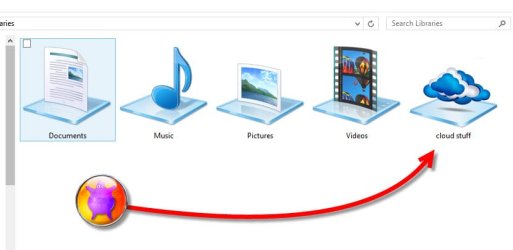
nigel, i just added my cloud stuff to libraries, prompted by your post .
then i wanted a cloud icon for libraries so i made one.
heres a copy if you want to use it

i used a base template then nicked a cloud ico image and stuck them together . looks good:)

cloudy.jpg

View attachment Library cloud Icon.zip
 

My Computer My Computer

At a glance

Microsoft Windows 7 Home Premium 64-bit 7600IIx4 amd athelon 635 processor2x2gbati radeon HD 5450
Computer Manufacturer/Model Number
Hewlett packard/p6512uk
OS
Microsoft Windows 7 Home Premium 64-bit 7600
CPU
IIx4 amd athelon 635 processor
Motherboard
FOXCONN 2AA9
Memory
2x2gb
Graphics Card(s)
ati radeon HD 5450
Sound Card
(1) Realtek High Definition Audio (2) AMD High Definition
Monitor(s) Displays
samsung lcd tv 32"
Screen Resolution
1360x 768
Hard Drives
(1) WDC WD10 01FAES-60Z2A0 SATA Disk Device (2) Maxtor OneTouch USB Device (3) ST310003 33AS USB Device (4) WD My Book 1111 USB Device
PSU
?
Cooling
air!
Keyboard
wireless hp
Mouse
wireless Hp,optical
Internet Speed
1.10mb/s
Antivirus
MSE
Browser
Firefox
Nice icon, Julian. Saved it for future use.
 

My Computer My Computer

At a glance

Windows 10 Pro x64 EN-GB1.6 GHz Intel Core i7-720QM Processor6 GBATI Mobility Radeon HD 5850 Graphics
Computer type
Laptop
Computer Manufacturer/Model Number
HP ENVY 17-1150eg
OS
Windows 10 Pro x64 EN-GB
CPU
1.6 GHz Intel Core i7-720QM Processor
Memory
6 GB
Graphics Card(s)
ATI Mobility Radeon HD 5850 Graphics
Sound Card
Beats sound system with integrated subwoofer
Monitor(s) Displays
17" laptop display, 22" LED and 32" Full HD TV through HDMI
Screen Resolution
1600*900 (1), 1920*1080 (2&3)
Hard Drives
Internal: 2 x 500 GB SATA Hard Disk Drive 7200 rpm
External: 2TB for backups, 3TB USB3 network drive for media
Cooling
As Envy runs a bit warm, I have it on a Cooler Master pad
Keyboard
Logitech diNovo Media Desktop Laser (bluetooth)
Mouse
Logitech Performance Mouse MX
Internet Speed
50/10 Mbps VDSL
Antivirus
Windows Defender 4.3.9431.0
Browser
Maxthon 3.5.2., IE11
your welcome.
its so easy to change a library icon using win8, the option is there in the icon properties.
 

My Computer My Computer

At a glance

Microsoft Windows 7 Home Premium 64-bit 7600IIx4 amd athelon 635 processor2x2gbati radeon HD 5450
Computer Manufacturer/Model Number
Hewlett packard/p6512uk
OS
Microsoft Windows 7 Home Premium 64-bit 7600
CPU
IIx4 amd athelon 635 processor
Motherboard
FOXCONN 2AA9
Memory
2x2gb
Graphics Card(s)
ati radeon HD 5450
Sound Card
(1) Realtek High Definition Audio (2) AMD High Definition
Monitor(s) Displays
samsung lcd tv 32"
Screen Resolution
1360x 768
Hard Drives
(1) WDC WD10 01FAES-60Z2A0 SATA Disk Device (2) Maxtor OneTouch USB Device (3) ST310003 33AS USB Device (4) WD My Book 1111 USB Device
PSU
?
Cooling
air!
Keyboard
wireless hp
Mouse
wireless Hp,optical
Internet Speed
1.10mb/s
Antivirus
MSE
Browser
Firefox
Ditto :D
 

My Computers My Computers

  • At a glance

    Windows 11 Pro x64 [Latest Release and Releas...Ryzen 9 5950X, 3.8 - 5.2 MHz64GB [2 x 32GB] DDR4 3200MHz4GB NVIDIA GEFORCE GTX 1650 Ti
    Computer type
    PC/Desktop
    Computer Manufacturer/Model Number
    ChillBlast - Custom to my design
    OS
    Windows 11 Pro x64 [Latest Release and Release Preview]
    CPU
    Ryzen 9 5950X, 3.8 - 5.2 MHz
    Motherboard
    Asus Prime X570-Pro
    Memory
    64GB [2 x 32GB] DDR4 3200MHz
    Graphics Card(s)
    4GB NVIDIA GEFORCE GTX 1650 Ti
    Sound Card
    On-board SPDIF to 5.1 System + HDMI [5.1 system]
    Monitor(s) Displays
    32" UHD 32 Bit HDR Monitor + 43" UHD 4K 32Bit HDR TV
    Screen Resolution
    2 x 3840 x 2160 @60Hz
    Hard Drives
    1TB M2 SSD OS, 500GB Fast Access SSD, 2 x 8TB Data + Various Externals from 1TB to 4TB, 10TB NAS
    PSU
    NZXT C750 80 PLUS Gold 750W Modular PSU
    Case
    Workstation Case [Matt Black]
    Cooling
    NZXT Kraken X63 280mm CPU Cooler +2x Quiet Case fans
    Keyboard
    Logitech Wireless MX Keys & K400 + others
    Mouse
    Logitech Wireless MX Master 3S
    Internet Speed
    920 MB Down 50 MB Up
    Antivirus
    BitDefender Total Security Pro
    Browser
    Chrome (always run latest Non-Beta)
    Other Info
    Also run ...
    Laptop - Quad 8GB - Windows 10 Pro x64
    Nexus 7 Android tablet x2
    Samsung 10.2" tablet
    Blackview TAB 8 4G Android Tablet c/w Keyboard
    Wacom Intuos Pro Medium Pen Pad
    Wacom Intuos Pro Small Pen Pad
    Wacom Expresskeys Remote
    Loopdeck+ Graphics Controller
    Shuttle Pro v2 Control
  • At a glance

    Windows 11 Pro x64 Latest RPIntel I7 10750H 5.0GHz32GB [2x16GB] DDR4 2933 MHznVidia GTX1650Ti 4 GB GDDR6
    Computer type
    Laptop
    System Manufacturer/Model Number
    Dell XPS 17 10750H
    OS
    Windows 11 Pro x64 Latest RP
    CPU
    Intel I7 10750H 5.0GHz
    Motherboard
    Dell XPS
    Memory
    32GB [2x16GB] DDR4 2933 MHz
    Graphics Card(s)
    nVidia GTX1650Ti 4 GB GDDR6
    Sound Card
    Stock [Realtek] 4 Speaker
    Monitor(s) Displays
    17" IPS UHD+ Infinity Edge Touchscreen
    Screen Resolution
    3840 x 2400
    Hard Drives
    2TB M2 NVMe, 4TB External + various 500GB & 1TB External NVMe (also have access to spinner HDD from
    PSU
    Stock
    Case
    Stock XPS Aluminium & Carbon Fibre
    Cooling
    Stock - Active Fan Control
    Keyboard
    Backlit + Various Logitech
    Mouse
    Stock Track Pad + Logitech MX Trackball
    Internet Speed
    72 MB Down 18MB Up
    Browser
    Chrome
    Other Info
    Also run ...
    Laptop - Quad 8GB - Windows 10 Pro x64
    Nexus 7 Android tablet x2
    10.2" tablet
    Sony Z3 Android Smartphone
    Wacom Intuos Pro Medium Pen Pad
    Wacom Intuos Pro Small Pen Pad
    Wacom Expresskeys Remote
    Loopdeck+ Graphics Controller
    Shuttle Pro v2 Control Pad
    10TB NAS
My ONLY experience with Libraries is as follows:

I created a library from a collection of video files on a USB external drive. When I incidentally caused the loss of the MasterFileTable on the external drive, I could only recover generic files (without filenames and such). When I managed to visit Libraries and found intact the library created, I was glad for the recovery and puzzled! I thought these were links instead of actual digital data occupying the primary hard drive space. I've stayed away from Libraries ever since.
 

My Computer My Computer

At a glance

Windows 7 Home Premium x64
OS
Windows 7 Home Premium x64
Right now, I only use Libraries in a limited way. I use the default Libraries on the Start Menu as a shortcut to get to my Documents, Music, etc. folders and only keep the main folder in each Library.

However, I will eventually have several HDDs filled with videos. Rather than span those HDDs, like Jimbo does, I plan on using the Video Library to do the same thing. The downside to spanning the drives is, as Jimbo pointed out, is, if one of the HDDs should fail, you will lose the data on all of the spanned HDDs. That danger can be adverted with a proper backup scheme but such a scheme would be too bulky and cumbersome for my needs. A Library will give the multiple drives in it a single directory, same as spanning drives will do, while allowing each drive to remain independent, simplifying backups.
 
Last edited:

My Computer My Computer

At a glance

Win 7 Ultimate 64 bitIntel i7-3930KKingston HyperX Genesis 32GB Kit (8x4GB Modul...MSI R7850 Twin Frozr 2GD5/OC Radeon HD 7850 2...
Computer type
PC/Desktop
Computer Manufacturer/Model Number
Custom Build
OS
Win 7 Ultimate 64 bit
CPU
Intel i7-3930K
Motherboard
ASUS P9X79 WS
Memory
Kingston HyperX Genesis 32GB Kit (8x4GB Modules) 1600MHz DDR
Graphics Card(s)
MSI R7850 Twin Frozr 2GD5/OC Radeon HD 7850 2GB 256-bit GDDR
Sound Card
Asus Xonar Essence STX
Monitor(s) Displays
3x Asus VG248QE 24", Vizio 32" TV
Screen Resolution
1920 x 1080, ?
Hard Drives
Samsung 128GB 840 Pro SSD (1),
Samsung 4TB 850 EVO SSDs (4)
Samsung 4TB 850 EVO SSDs (16) external backup drives used in 2.5" hot swap bays in the computer.
PSU
Corsair HX750w
Case
Antec Two Hundred v2 (modified)
Cooling
Cooler Master GeminII S524 120mm (fan replaced with a 140mm)
Keyboard
Logitech G510s
Mouse
Logitech M525 (two in use)
Internet Speed
=< 32Mbps down, 8Mbps up
Antivirus
AVAST!, MBAM, SAS, Spybot S&D (all but MBAM free) Glary Util
Browser
IE11
Other Info
LSI 9211-8i HBA card (8 SATA III ports), 2.5" & 3.5" Hot Swap Bays, HooToo HT-CR001 PCI-E to USB 3.0 Internal Hub + 6 Slot Card Reader, and LG Model CH12LS28 BD-ROM Optical Drive. Also, ScanSnap S1500 ADF duplexing scanner, Canon 9000F flat bed scanner, Corsair SP2500 2.1 speakers, Samsung CLP 415nw laser color printer, Cyberpower PP2200SW UPS
In a dual boot configuration, libraries are IMO useless. Everything is on a common D: drive.
 

My Computer My Computer

At a glance

win7 64bit Ult. using: XP Mode, in English or...8GB - included when purchased.
Computer type
Laptop
OS
win7 64bit Ult. using: XP Mode, in English or Español, SUA, Bitlocker
Memory
8GB - included when purchased.
Monitor(s) Displays
two: Laptop: 1366x768 and HP 1024x768.
Hard Drives
1: 750GB
Keyboard
Second: PS2 connection Compaq kboard, used w/adapter cable.
Mouse
USB mouse.
Antivirus
MS Security Essentials
Other Info
XP Mode Apps used: VC6 C++ and MSDN help as virtual PC apps - one for ea. monitor.
Tri-boot machine. Has Ubuntu 12.04 and Win 8.0 on as well - both used seldomly.
I stopped using libraries in 8 because mine kept corrupting.

I use them like a shortcut when I do use them. My drives are partitioned into categories anyway.
 

My Computer My Computer

At a glance

8 Pro x64i7 3770K 4.6GHz16GB G.Skill Trident X 2666mhzx2 EVGA 780 Ti Superclocked SLI
Computer type
PC/Desktop
Computer Manufacturer/Model Number
Systems by SmartEyeball
OS
8 Pro x64
CPU
i7 3770K 4.6GHz
Motherboard
ASUS P8Z77 WS
Memory
16GB G.Skill Trident X 2666mhz
Graphics Card(s)
x2 EVGA 780 Ti Superclocked SLI
Sound Card
SB X-FI Surround 5.1 PRO USB / ATH-AD900 Headphones
Monitor(s) Displays
x3 Dell U2410 / 58" Samsung
Screen Resolution
5760*1200/ 1920*1200
Hard Drives
2x Intel 520 240GB (RAID 0) * 2x WD Caviar Blacks 2TB (RAID 0) * 2TB WD Caviar Black * Sony Optirac DVD
PSU
Silverstone Strider Evolution 1200W
Case
Thermaltake Level 10 GT Snow Edition
Cooling
Noctua NH-D14
Keyboard
Topre Realforce // Ducky Shine MX Black // Filco Ninja TKL
Mouse
Thermaltake Theron (Highly Recommended) + Razer Imperator
Antivirus
MSE
Browser
IE, FF, WaterFox
Other Info
GT Extreme V2 Sim Racing Cockpit + 40" LCD and K/B Mouse stand ▼
Fanatec CSR Elite Wheel + Clubsport V1 Pedals + CSR shifter/7G-H ▼Saitek X52 Pro ▼ TrackIR 5 Pro
Buttkicker v2 Seat Rumbler with Dedicated 5.1 and Sub Woofer attached to frame ▼
=
Bloody Big Grin
Well it seems some people have found Libraries useful.

To me, it seemed like an added layer of a directory structure--that could be useful, but could also potentially lead to some confusion and disorganization.
 

My Computer My Computer

At a glance

Win 7 ProIntel i7 2600K16 GB 1333 Crucial Hyper-X Blu I thinkIntegrated
Computer Manufacturer/Model Number
Home Built
OS
Win 7 Pro
CPU
Intel i7 2600K
Motherboard
Asus P8Z68-V LX
Memory
16 GB 1333 Crucial Hyper-X Blu I think
Graphics Card(s)
Integrated
Sound Card
Integrated
Monitor(s) Displays
Dual LCD IPS panels
Screen Resolution
1980x1200, 1980x1080
Hard Drives
3 SATA: 250, 160, 2000 GB, External USB 3TB
PSU
OCZ modular 500W
Case
Antec 300
Cooling
Case: 2 Stock fans, CPU: CoolerMaster Evo 212; PSU: fan
Keyboard
Dell Logitech wireless
Mouse
Logitech Wireless 510
Internet Speed
1.0 Mbps down, 448 Kbps up
Other Info
Case is too small.
It took me about 6 months before I noticed my libraries were all screwed up. It took me 2 days of research to figure out how to fix it. I move most of my music and videos and photos out of libraries onto other hard drives.
 

My Computer My Computer

At a glance

Windows 7 Professional x648 GB
Computer type
Laptop
Computer Manufacturer/Model Number
HP
OS
Windows 7 Professional x64
Memory
8 GB
Screen Resolution
1024x768 External monitor
Hard Drives
1 TB
Keyboard
External USB
Mouse
Wireless external mouse
Internet Speed
10 Mbps/1 Mbps
Antivirus
Avast! 8
Browser
Chrome
Most useful to me is the "Recorded TV" library, in support of Windows Media Center (used as my Ceton-based whole-home DVR, for HDTV viewing/recording/playback through Linksys DMA2100 extenders around my home to support my multiple HDTV's).

WMC only supports one single "recording folder" for new recordings. There is no "folder pool" (i.e. multiple folders, possibly spread across multiple drives/partitions) for new recordings.

But WMC playback comes from the "Recorded TV" library, which by default is the same single folder used for new recordings. However MULTIPLE folders (on multiple drives/partitions) can be added to the "Recorded TV" library FOR PLAYBACK. So you can essentially have an INFINITE amount of space used for storing previously made recordings (e.g. manually moving the WTV recording files from the primary "new recording" folder to any of these additional "long term storage" folders).

All of the WTV recordings in ALL of the "Recorded TV" library appear in the "Recorded TV" list (i.e. MyDVR button on real hardware cable company or satellite DVR remotes) presented by WMC. So you can playback from anywhere in the "Recorded TV" library.

Infinitely valuable to me (and believe me, I DO know where all my data is on the 12 partitions spread across my 4 internal hard drives along with my two external USB 3.0 drives used for backups and long-term storage of WTV recordings).
 

My Computer My Computer

At a glance

Windows 7 Pro x64 (1), Win7 Pro X64 (2)i5-3350p 3.1Ghz/6MB-cache (1); E8400 3.0Ghz/6...8GB PC3-12800 DDR3 (1); 4GB PC3-10600 DDR3 (2)ATI HD7750 (1), (see TV cards); ATI R7 250 (2)
Computer type
PC/Desktop
Computer Manufacturer/Model Number
Home-built, two systems (1) and (2)
OS
Windows 7 Pro x64 (1), Win7 Pro X64 (2)
CPU
i5-3350p 3.1Ghz/6MB-cache (1); E8400 3.0Ghz/6MB-cache (2)
Motherboard
ASUS P8Z77-V Pro (1); ASUS P5Q3 (2)
Memory
8GB PC3-12800 DDR3 (1); 4GB PC3-10600 DDR3 (2)
Graphics Card(s)
ATI HD7750 (1), (see TV cards); ATI R7 250 (2)
Sound Card
Realtek ALC892 HD Audio (1); Realtek ALC1200 HD Audio (2)
Monitor(s) Displays
Eizo HD2441W LCD, Eizo S2433W (1); Eizo 24" S2433W (2)
Screen Resolution
1920x1200, 1920x1200 (1); 1920x1200 (2)
Hard Drives
(1) 1TB SATA-II (7200RPM), 2x2TB SATA-III (7200RPM), 250GB SATA-III (10000RPM) for OS; 2x2TB external USB 3.0

(2) 320GB SATA-II (7200RPM), 750GB SATA-II (7200RPM), 150GB SATA-II (10000RPM) for OS; 2TB external USB 3.0
PSU
Nesteq ECS-6001 600W (1); Nesteq ECS-5001 500W (2)
Case
Acousti-Case 360 (1) and (2)
Cooling
Noctua NH-U12P SE2 for CPU, 2x120mm case fans (1) and (2)
Keyboard
IBM PS/2 (1) and (2)
Mouse
Logitech MX Revolution wireless (1); Microsoft wired (2)
Internet Speed
100mbps down / 10mbps up
Antivirus
Microsoft Security Essentials; Malwarebyte Anti-Malware Pro
Browser
Firefox
Other Info
Ceton InfiniTV 4-tuner cablecard-enabled TV card as well as Hauppauge HVR-2250 OTA/ATSC 2-tuner TV card in (1), running under Win7 WMC
I've never used Media Center before. Just went through setup of it, but it can't find any files in the folders I gave it to search from. Maybe it needs a day?

Media Center didn't find my Hauppauge PVR either. So I'm reviewing this video about whether I should worry about that.
Hauppauge HD PVR Review with Media Center on Windows 7

I use Total Media Extreme/Theater software and record mp4's for X-Box, even though I only have a PS3. My PVR is old and should probably be replaced with a gamer model.
 

My Computer My Computer

At a glance

Windows 7 Professional x648 GB
Computer type
Laptop
Computer Manufacturer/Model Number
HP
OS
Windows 7 Professional x64
Memory
8 GB
Screen Resolution
1024x768 External monitor
Hard Drives
1 TB
Keyboard
External USB
Mouse
Wireless external mouse
Internet Speed
10 Mbps/1 Mbps
Antivirus
Avast! 8
Browser
Chrome
As was implied by my earlier system description, I do NOT use external cable company equipment (neither STB nor DVR) and do not use any any analog equipment in my WMC implementation.

WMC is in fact my DVR! It is based on the use of an internal Ceton 4-tuner M-card cablecard-enabled PCIe InfiniTV tuner card (they have new internal/network/USB versions out now that contains 6 tuner, still only requiring one M-card rented from TWC/LA at a mere $2/month). I also have a 2-tuner Hauppauge HVR-2250 internal OTA/ATSC tuner card for use with my roof antenna. HDTV image quality of local OTA/ATSC networks via off-air roof antenna is superior to that re-transmitted by TWC/LA because with OTA/ATSC there is no re-compression of the original network content as is unfortunately done by TWC (to reduce bandwidth requirements for insulting delivery to customers who presumably "can't tell the difference", but who actually probably don't know this is going on and would certainly prefer the superior original non-recompressed content if given an A/B demo).

Anyway, Windows Media Center in Win7 was DESIGNED TO WORK WITH the Ceton card (i.e. cablecard-enabled tuner, both internal and external/USB, agreed to by Microsoft's licensing and DRM agreement with Cablelabs, which allowed Ceton to develop its products and allowed Microsoft's WMC to handle decrypting of protected copy-once content via cablecard for viewing and for recording/playback) as well as with competitive external cablecard-enabled products such as the Silicon Dust HDHomeRun Prime, as well as with other retail OTA/ATSC TV tuner cards (e.g. from Hauppauge and ATI) to handle unprotected copy-freely content.

Theoretically, WMC can also work with external cable company STB/DVR tuner devices, including support for interfacing to "IR blaster" equipment so as to control the channel tuners in those external boxes for proper channel selection for scheduled recording by WMC.

I don't know what you tried to do with your initial experiment with WMC, but I'm sure it's just a configuration or setup issue. Obviously things get more complicated when you have external equipment (and multiple boxes at that) involved. In my opinion having my two TV tuner cards (4-tuner Ceton, and 2-tuner Hauppauge HVR-2250) internal to my HTPC makes it all just a piece of cake to set up WMC.

There are of course some basic preliminaries to go through, e.g. performing the DCA ("digital cable advisor") test to confirm that your system's hardware and video conform to the DRM requirements set down by Cablelabs in order to allow WMC to control the cablecard for secure decruption, etc., as well as the "head-end pairing" required to get your M-Card operational with your cable company, etc. WMC automatically detects the relevant connected hardware (both internal as well as external I would presume) and configures itself accordingly.

And you have to get the Guide configured correctly, selecting your cable company's name, provide your zip code to identify the proper channel lineup and program info (retrieved every night automatically by WMC from Zap2it which is the Microsoft contractual program Guide provider for all areas of the US, if not also for Canada).

Anyway, without knowing what you actually did and tried, and without knowing about your specific hardware equipment, I wouldn't attempt to advise you on any problem solving. And besides, that's not really the essence of this thread.

But I can tell you that WMC is WONDERFUL!!! It actually works, flawlessly (especially when it comes to not recording repeat airings of a scheduled program if I don't ask for it)! And I have essentially unlimited hard drive capacity for recordings (thanks to "Recorded TV" library), 6 tuners for simultaneous record/playback/view, 2-week program Guide for upcoming, support for up to five simultaneously operating "extenders" around the house (which are essentially "satellite clients" of my HTPC "server", i.e. independent DVR's on their own), etc.

Can't praise Microsoft enough for what they've built here. And it looks gorgeous as well!
 

My Computer My Computer

At a glance

Windows 7 Pro x64 (1), Win7 Pro X64 (2)i5-3350p 3.1Ghz/6MB-cache (1); E8400 3.0Ghz/6...8GB PC3-12800 DDR3 (1); 4GB PC3-10600 DDR3 (2)ATI HD7750 (1), (see TV cards); ATI R7 250 (2)
Computer type
PC/Desktop
Computer Manufacturer/Model Number
Home-built, two systems (1) and (2)
OS
Windows 7 Pro x64 (1), Win7 Pro X64 (2)
CPU
i5-3350p 3.1Ghz/6MB-cache (1); E8400 3.0Ghz/6MB-cache (2)
Motherboard
ASUS P8Z77-V Pro (1); ASUS P5Q3 (2)
Memory
8GB PC3-12800 DDR3 (1); 4GB PC3-10600 DDR3 (2)
Graphics Card(s)
ATI HD7750 (1), (see TV cards); ATI R7 250 (2)
Sound Card
Realtek ALC892 HD Audio (1); Realtek ALC1200 HD Audio (2)
Monitor(s) Displays
Eizo HD2441W LCD, Eizo S2433W (1); Eizo 24" S2433W (2)
Screen Resolution
1920x1200, 1920x1200 (1); 1920x1200 (2)
Hard Drives
(1) 1TB SATA-II (7200RPM), 2x2TB SATA-III (7200RPM), 250GB SATA-III (10000RPM) for OS; 2x2TB external USB 3.0

(2) 320GB SATA-II (7200RPM), 750GB SATA-II (7200RPM), 150GB SATA-II (10000RPM) for OS; 2TB external USB 3.0
PSU
Nesteq ECS-6001 600W (1); Nesteq ECS-5001 500W (2)
Case
Acousti-Case 360 (1) and (2)
Cooling
Noctua NH-U12P SE2 for CPU, 2x120mm case fans (1) and (2)
Keyboard
IBM PS/2 (1) and (2)
Mouse
Logitech MX Revolution wireless (1); Microsoft wired (2)
Internet Speed
100mbps down / 10mbps up
Antivirus
Microsoft Security Essentials; Malwarebyte Anti-Malware Pro
Browser
Firefox
Other Info
Ceton InfiniTV 4-tuner cablecard-enabled TV card as well as Hauppauge HVR-2250 OTA/ATSC 2-tuner TV card in (1), running under Win7 WMC
I've got a 4:3 VGA external monitor connected to my laptop. That probably violates some DRM for video.

There's no OTA signals in my area.
 
Last edited:

My Computer My Computer

At a glance

Windows 7 Professional x648 GB
Computer type
Laptop
Computer Manufacturer/Model Number
HP
OS
Windows 7 Professional x64
Memory
8 GB
Screen Resolution
1024x768 External monitor
Hard Drives
1 TB
Keyboard
External USB
Mouse
Wireless external mouse
Internet Speed
10 Mbps/1 Mbps
Antivirus
Avast! 8
Browser
Chrome
Hi there
IMO Libraries weren't a good implementation in any case.
They are going to disappear in the latest version of W8 (W8.1). - They will actually still exist but be hard to find so IMO no point in using them.

A much better way is to either SPAN DISKS (risk though if any disk in the spanned group fails then data on the whole lot fails) or use Storage Pools (W8.1).

If you back up data regularly then I wouldn't worry about problems with using Spanned volumes. With these a group of volumes say D,E.F.G for example is treated by Windows as a single "Logical volume". So you don't have to worry or care WHERE your data is physically located. Also good if you have a few lower capacity disks - you can "Aggregate" these into a larger disk space.

I like this a lot for multi-media - particularly Music and Video collections. These days people often have several TB of music / video - and most music organising programs get into problems if your music collection say fills up a standard disk. This method avoids that - the music collection can be as large as the entire 4 disks in my example and the program still thinks it's all stored on a single disk.

The newer storage pool system (W8.1) works much the same -- but more robustly. When the W8.1 preview appears it's worth testing this feature.

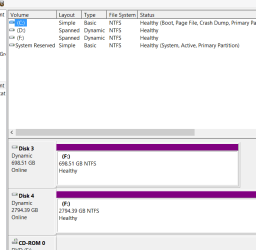
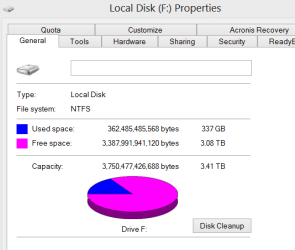
Spanned disks - sceenshot enc.

You'll see in one screenshot TWO entries for Disk F (the physical configuration)
In the other you'll see the aggregate - Disk F is now ONE volume as far as Windows is concerned.

Cheers

jimbo
 

Attachments

  • span2.png
    span2.png
    10.6 KB · Views: 4
  • span3.png
    span3.png
    9.4 KB · Views: 5

My Computer My Computer

At a glance

Linux CENTOS 7 / various Windows OS'es and se...Intel i7 Intel i58GB, 16GBOn Motherboard
Computer type
PC/Desktop
Computer Manufacturer/Model Number
Custom built, several laptops HP/ASUS
OS
Linux CENTOS 7 / various Windows OS'es and servers
CPU
Intel i7 Intel i5
Memory
8GB, 16GB
Graphics Card(s)
On Motherboard
Sound Card
Realtek HD audio
Monitor(s) Displays
Apple Cinema display, Samsung LCD
Screen Resolution
1920 X 1080
Hard Drives
4 X 1TB SATA
Mouse
Toshiba wireless laser
Internet Speed
> 20MB up
Hi there
IMO Libraries weren't a good implementation in any case.
They are going to disappear in the latest version of W8 (W8.1). - They will actually still exist but be hard to find so IMO no point in using them.

A much better way is to either SPAN DISKS (risk though if any disk in the spanned group fails then data on the whole lot fails) or use Storage Pools (W8.1).

If you back up data regularly then I wouldn't worry about problems with using Spanned volumes. With these a group of volumes say D,E.F.G for example is treated by Windows as a single "Logical volume". So you don't have to worry or care WHERE your data is physically located. Also good if you have a few lower capacity disks - you can "Aggregate" these into a larger disk space.

I like this a lot for multi-media - particularly Music and Video collections. These days people often have several TB of music / video - and most music organising programs get into problems if your music collection say fills up a standard disk. This method avoids that - the music collection can be as large as the entire 4 disks in my example and the program still thinks it's all stored on a single disk.

The newer storage pool system (W8.1) works much the same -- but more robustly. When the W8.1 preview appears it's worth testing this feature.

Spanned disks - sceenshot enc.

You'll see in one screenshot TWO entries for Disk F (the physical configuration)
In the other you'll see the aggregate - Disk F is now ONE volume as far as Windows is concerned.

Cheers

jimbo

How do you back up and restore a drive in spanned drives?
 

My Computer My Computer

At a glance

Win 7 Ultimate 64 bitIntel i7-3930KKingston HyperX Genesis 32GB Kit (8x4GB Modul...MSI R7850 Twin Frozr 2GD5/OC Radeon HD 7850 2...
Computer type
PC/Desktop
Computer Manufacturer/Model Number
Custom Build
OS
Win 7 Ultimate 64 bit
CPU
Intel i7-3930K
Motherboard
ASUS P9X79 WS
Memory
Kingston HyperX Genesis 32GB Kit (8x4GB Modules) 1600MHz DDR
Graphics Card(s)
MSI R7850 Twin Frozr 2GD5/OC Radeon HD 7850 2GB 256-bit GDDR
Sound Card
Asus Xonar Essence STX
Monitor(s) Displays
3x Asus VG248QE 24", Vizio 32" TV
Screen Resolution
1920 x 1080, ?
Hard Drives
Samsung 128GB 840 Pro SSD (1),
Samsung 4TB 850 EVO SSDs (4)
Samsung 4TB 850 EVO SSDs (16) external backup drives used in 2.5" hot swap bays in the computer.
PSU
Corsair HX750w
Case
Antec Two Hundred v2 (modified)
Cooling
Cooler Master GeminII S524 120mm (fan replaced with a 140mm)
Keyboard
Logitech G510s
Mouse
Logitech M525 (two in use)
Internet Speed
=< 32Mbps down, 8Mbps up
Antivirus
AVAST!, MBAM, SAS, Spybot S&D (all but MBAM free) Glary Util
Browser
IE11
Other Info
LSI 9211-8i HBA card (8 SATA III ports), 2.5" & 3.5" Hot Swap Bays, HooToo HT-CR001 PCI-E to USB 3.0 Internal Hub + 6 Slot Card Reader, and LG Model CH12LS28 BD-ROM Optical Drive. Also, ScanSnap S1500 ADF duplexing scanner, Canon 9000F flat bed scanner, Corsair SP2500 2.1 speakers, Samsung CLP 415nw laser color printer, Cyberpower PP2200SW UPS
Back
Top