
Is Memory Faults Causing Lagginess?

jiewmeng

New member
I find that I am experiencing lagginess on my laptop, relatively old: C2D T9300, 4GB DDR2, 1280MB GeForce 8600MGT

Is high memory faults the cause?
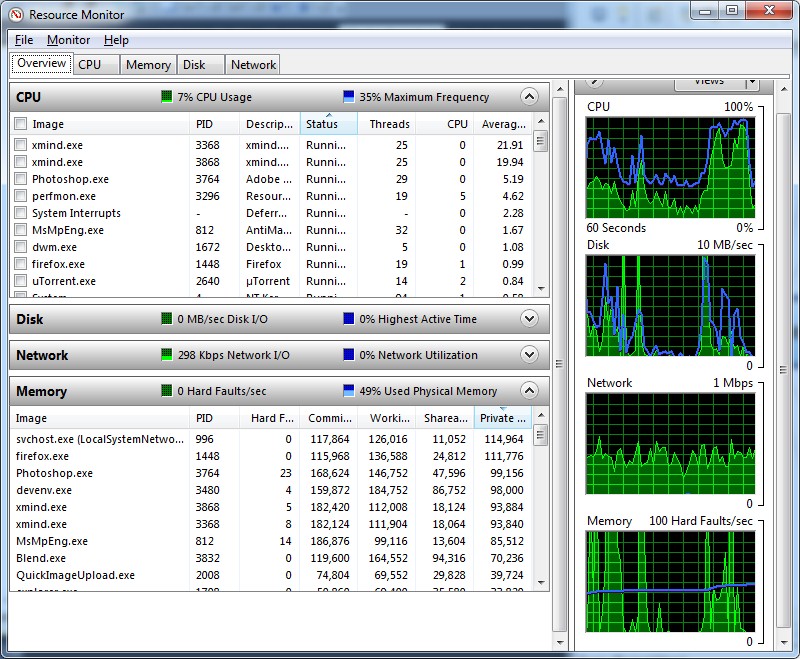
gapSQ.jpg


Sometimes, the faults are "maxed" out near 100/sec throughout that chart. What are memory faults?
 

My Computer

Computer Manufacturer/Model Number
Acer Aspire 5920G
OS
Windows 7 x64 Ultimate
CPU
Intel Core2Duo T9300 2.5GHz
Memory
4GB DDR2
Graphics Card(s)
NVIDIA 1280MB GeForce 8600MGT TurboCache
Monitor(s) Displays
15.4" WXGA Acer CrystalBrite LCD
Hard Drives
320GB
Hi jiewmeng, I had a Ram problem in my Laptop I found this out by using Windows Memory Diagnostic from Microsoft "its free", burn to a CD and run at Boot.

Microsoft Online Crash Analysis
 

My Computer

Computer Manufacturer/Model Number
Home Built
OS
Windows 7 Professional 64-bit SP1
CPU
Intel E8400
Motherboard
MSI P35 Neo
Memory
4GB Crucial Ballistix
Graphics Card(s)
ATI ASUS Radeon HD 4830
Sound Card
Realtek ALC888 on Board
Monitor(s) Displays
Asus 22-inch VH226H Widescreen
Screen Resolution
1920 x 1080
Hard Drives
Two Western Digital 500GB
PSU
Hiper HPU-4M 530W
Case
Thermaltake Tsunami Dream Black
Cooling
Air/Fans
Keyboard
Saitek Eclipse
Mouse
Razer
Internet Speed
Sky Broadband
Other Info
USB Hub/Card Reader - 2 Pen Drives, 1 Phone Dock
A hard fault is when referenced DATA is no longer in memory, but rather has been swapped out to disk (PageFile)

It is not an error.

But if you are getting a large number of hard faults, it would explain the app in question being a bit slow, as its reading from the disk more than memory.

More memory usually helps reduce Hardfaults.


The laggieness, or slowdowns may not be related to the hardfault issue however. It may simply be that the system is being taxed a bit too much.
Lots of open Programs, many writes/reads to the HD etc.


My guess is your memory is just fine itself, but testing it certainly would not hurt anything.
If you want to test the memory, to be safe:

Windows has a built in memory tester.
Hit your start Orb, and in the search box, type "memory"
The first result will be "Windows Memory Diagnostic"

A better, more accurate method is with Memtest86.
Please see this tutorial for more information:
http://www.sevenforums.com/tutorials/105647-ram-test-memtest86.html?filter[2]=Performance Maintenance
 

My Computer

Computer Manufacturer/Model Number
Custom (Self Build)
OS
Windows 7 Home Premium 64bit
CPU
Intel Core i7 2700k
Motherboard
eVGA P67 SLI
Memory
8GB Mushkin Redline Ridgebacks @1866
Graphics Card(s)
EVGA GTX570 SC
Sound Card
XiFi Titanium HD
Monitor(s) Displays
LG W2453V
Screen Resolution
1920x1080
Hard Drives
Intel 320 80GB -- Intel X25-V 40GB --WD Black 1TB x2 -- WD Blue 640GB
PSU
Seasonic x750
Case
Corsair 600T SE White
Cooling
eVGA Superclocked CPU Cooler
Keyboard
Saitek Cyborg
Antivirus
Kaspersky
Browser
IE
Other Info
LG BD/DVD
Hmm, I read before if I have 4GB RAM, I should disable virtual memory so that Windows will be forced to use RAM. Is that a good idea? I used to do that, until I got errors that I lack memory. I don't play too much games at the moment so I guess I should be fine?
 

My Computer

Computer Manufacturer/Model Number
Acer Aspire 5920G
OS
Windows 7 x64 Ultimate
CPU
Intel Core2Duo T9300 2.5GHz
Memory
4GB DDR2
Graphics Card(s)
NVIDIA 1280MB GeForce 8600MGT TurboCache
Monitor(s) Displays
15.4" WXGA Acer CrystalBrite LCD
Hard Drives
320GB
Hmm, I read before if I have 4GB RAM, I should disable virtual memory so that Windows will be forced to use RAM. Is that a good idea? I used to do that, until I got errors that I lack memory. I don't play too much games at the moment so I guess I should be fine?


Recommend that you "Let Windows choose what's best for my computer" - found under the performance options in the Advanced tab of your system properties.

Regards
 

My Computer

Computer Manufacturer/Model Number
Custom
OS
Win7 HP (x64)/Win7 Ultimate (x64)
CPU
Core i7 920
Motherboard
Intel X58
Memory
6 x 2GB Corsair XMS3
Graphics Card(s)
CF HD4890
Sound Card
Asus Xonar
Monitor(s) Displays
Dell 2408WFP
Screen Resolution
1920 x 1200
Hard Drives
2 x 150GB WDC Velociraptors (Raid 0)
1 x 1TB Seagate
1 x 1.5TB Seagate
PSU
Corsair HX1000W
Case
Antec 1200
Keyboard
Razer Lycosa/N52te
Mouse
Razer Lachesis
Hmm, I read before if I have 4GB RAM, I should disable virtual memory so that Windows will be forced to use RAM. Is that a good idea? I used to do that, until I got errors that I lack memory. I don't play too much games at the moment so I guess I should be fine?

I read about that too, but also read that it is not a good idea as some programs do expect virtual memory. I tried it anyway but I did not notice any difference (positive or negative), so I returned to automatic settings.
 

My Computer

OS
Windows 7 Pro x64
Win7 does not use the PF that often, but when a application does require it you'll run into issues.

I too would strongly advise re-enabling it, regardless how much physical RAM you have installed.
My machine has 8GB of RAM, and I still have a PF.

There are occasions when its needed.
 

My Computer

Computer Manufacturer/Model Number
Custom (Self Build)
OS
Windows 7 Home Premium 64bit
CPU
Intel Core i7 2700k
Motherboard
eVGA P67 SLI
Memory
8GB Mushkin Redline Ridgebacks @1866
Graphics Card(s)
EVGA GTX570 SC
Sound Card
XiFi Titanium HD
Monitor(s) Displays
LG W2453V
Screen Resolution
1920x1080
Hard Drives
Intel 320 80GB -- Intel X25-V 40GB --WD Black 1TB x2 -- WD Blue 640GB
PSU
Seasonic x750
Case
Corsair 600T SE White
Cooling
eVGA Superclocked CPU Cooler
Keyboard
Saitek Cyborg
Antivirus
Kaspersky
Browser
IE
Other Info
LG BD/DVD
Back
Top