Solved Is my memory speed correct?

  • Thread starter Thread starter Yanta
  • Start date Start date
Y

Yanta

Guest
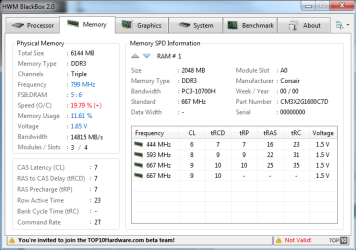
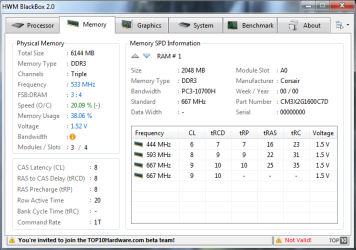
I have 3 x 2gb Corsair 1600mhz DDR3 ram sticks. I ran blackbox, and it tells me the memory is running at 533mhz? And if I read it correctly, it's underclocked by 20%??

Is this all wrong? And if so, how do I fix?

I did read this, but it didn't really explain things for me http://www.tomshardware.com/forum/55024-30-memory-please-read-posting

It says effective speed is double core speed, which would make my effective speed 1066 if the frequency listed by black box were "core". But it's supposed to be 1600mhz

Corsairs C7D ram is advertised, and sold as 7:7:7:20. Black box reports it as 8:8:8:20?


thanks
Tanya
 

Attachments
  • Memory 20100703 101831.png
    Memory 20100703 101831.png
    26 KB · Views: 99
Last edited:
I have 3 x 2gb Corsair 1600mhz DDR3 ram sticks. I ran blackbox, and it tells me the memory is running at 533mhz? And if I read it correctly, it's underclocked by 20%??

Is this all wrong? And if so, how do I fix?

I did read this, but it didn't really explain things for me MEMORY FAQ (please read before posting) - Memory - Motherboards-Memory

It says effective speed is double core speed, which would make my effective speed 1066 if the frequency listed by black box were "core". But it's supposed to be 1600mhz

Corsairs C7D ram is advertised, and sold as 7:7:7:20. Black box reports it as 8:8:8:20?


thanks
Tanya

If I recall correctly, LGA 1366 quad cores support a max of 1066 unless you overclock.

Edit: http://www.intel.com/products/processor/corei7/index.htm it says
3 Channels of DDR3 1066 MHz memory
 
Last edited:

My Computer My Computer

At a glance

Windows 7 Ultimate x64INTEL CORE I5 750 180x20 all powersaving 1.168vOCZ 4GB DDR3 PC3-10666 (7-7-7-20-2t) @1.651vASUS 9800GT GLACIATOR FANSINK
Computer Manufacturer/Model Number
Custom Built/ Built by me, CR-48
OS
Windows 7 Ultimate x64
CPU
INTEL CORE I5 750 180x20 all powersaving 1.168v
Motherboard
MSI P55-GD55
Memory
OCZ 4GB DDR3 PC3-10666 (7-7-7-20-2t) @1.651v
Graphics Card(s)
ASUS 9800GT GLACIATOR FANSINK
Sound Card
ONBOARD REALTEK ALC889
Monitor(s) Displays
VIEWSONIC VX924, VIZIO VS420LF1A
Screen Resolution
VX924: 1280x1024 75hz, VS420LF1A: 1920x1080 60hz(1080p)
Hard Drives
HITACHI Deskstar HD31000 IDK/7K 1TB 7200RPM 32MB CACHE SATA II
PSU
OCZ MODXSTREAM PRO 700 WATT SEMI-MODULAR
Case
ANTEC 900
Cooling
CoolerMaster Hyper 212+
Keyboard
Logitech K520
Mouse
LOGITECH M310
Internet Speed
CHARTER PIPELINE 15MB DOWN/ 3MB UP
Other Info
ROUTER: DLINK DIR-655, Netgear WNR3500L (SamKnows)
MODEM: MOTOROLA SB6120
HTPC: AMD Athlon II x2 255 C3, Pegatron M2N78-LA (Violet 3.02) , Galaxy NVidia Geforce 210, HP OEM 300WATT PSU, Zalman Z7 Plus, SAMSUNG 3GB PC2-5300, SEAGATE 80GB SATA, Hauppauge WinTV-HVR-1800
The memory performance also looked bad, from memory.. I posted in the "Whats your memory speed" thread started by Bloke some time ago. Back then, I clocked 20,000 memory assessment.

http://www.sevenforums.com/performa...ur-memory-assessment-speed-46.html#post461002


I just ran winsat again, and it agrees with Blackbox ... My memory speed has dropped to 14,000, yet I've not changed any hardware, and my O/S is still Win7 x64

What would cause a drop of 30% in memory performance?

In the BIOS you select a memory profile to run at 1600mhz. By default it runs at 1066. I had set mine to use the 1600mhz profile when I built the system - I rebooted and checked. Then I ran Blackbox again but I still get the same results.
 
It does indeed looks like it's running @ 1066.

When you selected the 1600mhz profile, did you leave all the other settings like voltage, timings etc on auto?

It may be worthwhile manually enetering the volts and timings for 1600mhz to see if the settings stick.
 

My Computer My Computer

At a glance

8 Pro x64i7 3770K 4.6GHz16GB G.Skill Trident X 2666mhzx2 EVGA 780 Ti Superclocked SLI
Computer type
PC/Desktop
Computer Manufacturer/Model Number
Systems by SmartEyeball
OS
8 Pro x64
CPU
i7 3770K 4.6GHz
Motherboard
ASUS P8Z77 WS
Memory
16GB G.Skill Trident X 2666mhz
Graphics Card(s)
x2 EVGA 780 Ti Superclocked SLI
Sound Card
SB X-FI Surround 5.1 PRO USB / ATH-AD900 Headphones
Monitor(s) Displays
x3 Dell U2410 / 58" Samsung
Screen Resolution
5760*1200/ 1920*1200
Hard Drives
2x Intel 520 240GB (RAID 0) * 2x WD Caviar Blacks 2TB (RAID 0) * 2TB WD Caviar Black * Sony Optirac DVD
PSU
Silverstone Strider Evolution 1200W
Case
Thermaltake Level 10 GT Snow Edition
Cooling
Noctua NH-D14
Keyboard
Topre Realforce // Ducky Shine MX Black // Filco Ninja TKL
Mouse
Thermaltake Theron (Highly Recommended) + Razer Imperator
Antivirus
MSE
Browser
IE, FF, WaterFox
Other Info
GT Extreme V2 Sim Racing Cockpit + 40" LCD and K/B Mouse stand ▼
Fanatec CSR Elite Wheel + Clubsport V1 Pedals + CSR shifter/7G-H ▼Saitek X52 Pro ▼ TrackIR 5 Pro
Buttkicker v2 Seat Rumbler with Dedicated 5.1 and Sub Woofer attached to frame ▼
=
Bloody Big Grin
It may be worthwhile manually enetering the volts and timings for 1600mhz to see if the settings stick.

I agree. At least then you'll know for sure
 

My Computer My Computer

At a glance

Windows 7 Ultimate (x64) SP1Intel 3770k 4.6GHz8GB (2x 4GB) Crucial BallistixSapphire 7950 (1060/1600)
Computer Manufacturer/Model Number
tw33k
OS
Windows 7 Ultimate (x64) SP1
CPU
Intel 3770k 4.6GHz
Motherboard
ASUS Maximus V Formula
Memory
8GB (2x 4GB) Crucial Ballistix
Graphics Card(s)
Sapphire 7950 (1060/1600)
Sound Card
On Board Realtek HD Audio
Monitor(s) Displays
27" Acer B273HU (via HDMI)
Screen Resolution
2048 x 1152
Hard Drives
Crucial M4 128GB
2TB WD Black
1TB Samsung F3 SATA
1TB WD Elite External
2TB WD USB 3.0
PSU
Corsair AX750 Gold
Case
Corsair Obsidian 800DW
Cooling
Corsair H100 (2x AP-121/2x UK-3000 push/pull)
Keyboard
Microsoft Wireless 5000
Mouse
Microsoft Wireless 5000
Internet Speed
5mb/s
Other Info
Logitech z-2300 2.1 speakers
Lamptron FC-5 v2
Ok, I'll see if I can find the corect specs for 1600mhz.

In the mean time, I checked my details again (having done nothing more than rebooting)...

winsat mem
Windows System Assessment Tool
> Running: Feature Enumeration ''
> Run Time 00:00:00.00
> Running: System memory performance assessment ''
> Run Time 00:00:05.13
> Memory Performance 20936.78 MB/s
> Total Run Time 00:00:06.43

and blackbox...

This is really bizarre :sarc:

Winsat and Blackbox dont agree on memory bandwidth :huh:
 

Attachments

  • Memory 20100703 135858.png
    Memory 20100703 135858.png
    23.8 KB · Views: 50
It does indeed looks like it's running @ 1066.

When you selected the 1600mhz profile, did you leave all the other settings like voltage, timings etc on auto?

It may be worthwhile manually enetering the volts and timings for 1600mhz to see if the settings stick.

Yes, everything was left on Auto
 
See what CPU-Z reports it running at.

Because 20+k sounds about right in winsat.
 

My Computer My Computer

At a glance

8 Pro x64i7 3770K 4.6GHz16GB G.Skill Trident X 2666mhzx2 EVGA 780 Ti Superclocked SLI
Computer type
PC/Desktop
Computer Manufacturer/Model Number
Systems by SmartEyeball
OS
8 Pro x64
CPU
i7 3770K 4.6GHz
Motherboard
ASUS P8Z77 WS
Memory
16GB G.Skill Trident X 2666mhz
Graphics Card(s)
x2 EVGA 780 Ti Superclocked SLI
Sound Card
SB X-FI Surround 5.1 PRO USB / ATH-AD900 Headphones
Monitor(s) Displays
x3 Dell U2410 / 58" Samsung
Screen Resolution
5760*1200/ 1920*1200
Hard Drives
2x Intel 520 240GB (RAID 0) * 2x WD Caviar Blacks 2TB (RAID 0) * 2TB WD Caviar Black * Sony Optirac DVD
PSU
Silverstone Strider Evolution 1200W
Case
Thermaltake Level 10 GT Snow Edition
Cooling
Noctua NH-D14
Keyboard
Topre Realforce // Ducky Shine MX Black // Filco Ninja TKL
Mouse
Thermaltake Theron (Highly Recommended) + Razer Imperator
Antivirus
MSE
Browser
IE, FF, WaterFox
Other Info
GT Extreme V2 Sim Racing Cockpit + 40" LCD and K/B Mouse stand ▼
Fanatec CSR Elite Wheel + Clubsport V1 Pedals + CSR shifter/7G-H ▼Saitek X52 Pro ▼ TrackIR 5 Pro
Buttkicker v2 Seat Rumbler with Dedicated 5.1 and Sub Woofer attached to frame ▼
=
Bloody Big Grin
CPU-Z doesn't report bandwidth that I can see, but it does report frequency as 799.4mhz, and timings as 7-7-7-20.

I've manually set everything I could set in the BIOS, except voltages which it wouldn't let me change. But they are at stock settings for the modules installed anyway.

The settings seems to have stuck for the last hour, but the PC has been idle. I'll run some programs and see if I can isolate what's causing it to drop to 1066.

I checked all the other computers and they are all exhibiting the same symptoms, which is no surprise I guess.
 
Back
Top