
Solved Is my PC constantly too hot?

Teekz

New member
Power User
Local time
8:30 AM
Messages
142
Location
Doncaster, UK.
Hello, all.

My CPU fan inside my desktop computer is ALWAYS very loud, except for about a second or so when it shows the configuration table before booting Windows. This can be very annoying, as it is really quite loud.

I think this is because my CPU gets too hot. I have CoreTemp running at all times in my taskbar, and an average CPU temperature for me when not doing too much is around 45-55 degrees Celsius. It reaches around 60 degrees Celsius when I'm doing something intense like video rendering, when the CPU runs near 100% for a while.

I think that my fan might slow down if the CPU was cooler, but I can't be sure. I can post any necessary details/information if needed.

Any help is appreciated, I'm going deaf, here. :p
Tom. :)
 

My Computer My Computer

OS
Windows 7 Ultimate (x64) Service Pack 1
CPU
AMD Athlon 64 X2 Dual Core Processor 5600+ 2.80 GHz
Motherboard
GIGABYTE GA-M720-US3
Memory
4GB, Dual Channel, DDR2
Graphics Card(s)
NVIDIA GeForce 8600 GT
Sound Card
Creative SB X-Fi
Monitor(s) Displays
Dual Screen - Dell SE198WFP (19"), & GRUNDIG GU37BLKSE (37")
Screen Resolution
1440x900, 1600x1200
Hard Drives
Hitachi HDS722020ALA330 (2TB Internal), WD 15EADS (1.5TB External)
Keyboard
Microsoft Wireless Laser Keyboard 7000
Mouse
Microsoft Wireless Laser Mouse 7000
Teekz,
When was the last time you got inside to have a look around and clean. The cooler and fans must be cleaned at least twice a year and more with hi dust or pets !
 

My Computer My Computer

Computer type
PC/Desktop
Computer Manufacturer/Model Number
A blend of brains, brawn and dumb luck.
OS
Windows 7 Ultimate 64
CPU
i7 3770k OC'd 4.6 @ 1.17v, also FX 8120 & i5 miniITX
Motherboard
MSI P67A-GD80 b3
Memory
32 gb G.Skill Sniper DDR3 10-12-12-31 @ 2133
Graphics Card(s)
XFX Radeon 7870 2GB DDR5
Sound Card
Sound Blaster Z Series Card
Monitor(s) Displays
(2) LG LED 23" 1920 x 1080 2ms Monitors via mini d-port
Screen Resolution
1680 X 1050 p
Hard Drives
Samsung 256 gb 830 SSD sata III
(1) 1 tb WD Black
(2) 1 tb Hitachi deskmates/sata II
(2) 1 tb WD green/sata II
(2) 3 tb Seagate Barracuda
(1) 120 gb OCZ Vertex SS
(1) Drobo 5N w/5 Seagate 3tb
PSU
EVGA modular 1000G2 80% gold rating & APC 1200 RS
Case
CoolerMaster Storm Styker
Cooling
7 case fans 140mm & 120mm, NZXT Kraken X60
Keyboard
(2) Logitech Illuminated Keyboards (1) usb (1) wireless
Mouse
Logitech G700 & T-BC21 - nano nx for the laptop
Internet Speed
Basic 120mbps down
Antivirus
Trend Micro Titanium Max Security & Malwarebytes Premium
Browser
Chrome and IE 10
Other Info
5 Noctua case fans + 3 Noctua in p/p on NZXT cooler
Integrated hot swap drive bays for 2.5" Drives
(2) Lite-on dvd/cd/Blu Ray optical 22X
Integrated fan controller and led on/off
HP Officejet Pro 8630 all-n-one
Hot-swappable 3.5" hard drive bay
Netgear Nighthawk router
Asus USB 3 & sata 6 PCIe card
Vantec IDE to sata adptr./Ultra sata adptr
Lenovo L420 i5 lappy with m sata
Drobo 5N advanced NAS
Not too long ago. I'd say a month or so ago?
 

My Computer My Computer

OS
Windows 7 Ultimate (x64) Service Pack 1
CPU
AMD Athlon 64 X2 Dual Core Processor 5600+ 2.80 GHz
Motherboard
GIGABYTE GA-M720-US3
Memory
4GB, Dual Channel, DDR2
Graphics Card(s)
NVIDIA GeForce 8600 GT
Sound Card
Creative SB X-Fi
Monitor(s) Displays
Dual Screen - Dell SE198WFP (19"), & GRUNDIG GU37BLKSE (37")
Screen Resolution
1440x900, 1600x1200
Hard Drives
Hitachi HDS722020ALA330 (2TB Internal), WD 15EADS (1.5TB External)
Keyboard
Microsoft Wireless Laser Keyboard 7000
Mouse
Microsoft Wireless Laser Mouse 7000

My Computer My Computer

Computer type
PC/Desktop
Computer Manufacturer/Model Number
Dell XPS 420
OS
Windows 10, Home Clean Install
CPU
Intel Core2 processsor Q8200(2.33Ghz 1333FSB) Quad Core Tech
Motherboard
Dell
Memory
6 gb
Graphics Card(s)
ATI Radeon 256MB HD3650
Sound Card
Intergrated 7.1 Channel Audio
Monitor(s) Displays
Dell SP2009W 20"
Hard Drives
640 GB Serial ATA Hard drive
Cooling
Fan
Keyboard
Dell USB Keyboard
Mouse
Dell Premium Optical USB
Internet Speed
DSL 2.85
You are within normal ranges with those temps. You can check your bios from the setup screen when you boot and see if there is a setting for 'Active' fan control... or try speedfan from almico.com to control the fans...
 

My Computer My Computer

Computer type
Laptop
Computer Manufacturer/Model Number
HP 17-ak0xx, dv7 3173nr
OS
Win7 Home Premium x64 W10Pro&Home
CPU
A12 9720p 4+8 TurionII M520
Motherboard
HP 3839
Memory
6GB 8GB
Graphics Card(s)
R7
Monitor(s) Displays
24" sa550
Screen Resolution
1600x900 1920x1080
Mouse
Logitechx2
Internet Speed
120Mb/s down 12up
You are within normal ranges with those temps. You can check your bios from the setup screen when you boot and see if there is a setting for 'Active' fan control... or try speedfan from almico.com to control the fans...

Speedfan didn't seem to have any effect, although there's a chance I might have misconfigured it.

There is an option in my bios, but the only options. Disabled makes the fan run at full speed all the time, and the other option regulates the speed automatically. It it currently set to automatic, but the fan speed never seems to change.
 

My Computer My Computer

OS
Windows 7 Ultimate (x64) Service Pack 1
CPU
AMD Athlon 64 X2 Dual Core Processor 5600+ 2.80 GHz
Motherboard
GIGABYTE GA-M720-US3
Memory
4GB, Dual Channel, DDR2
Graphics Card(s)
NVIDIA GeForce 8600 GT
Sound Card
Creative SB X-Fi
Monitor(s) Displays
Dual Screen - Dell SE198WFP (19"), & GRUNDIG GU37BLKSE (37")
Screen Resolution
1440x900, 1600x1200
Hard Drives
Hitachi HDS722020ALA330 (2TB Internal), WD 15EADS (1.5TB External)
Keyboard
Microsoft Wireless Laser Keyboard 7000
Mouse
Microsoft Wireless Laser Mouse 7000
You could be ready to pull the stock cooler off and re-apply thermal paste. This makes a good case for a cooling upgrade. If you like your system and plan on keeping or upgrading same then a new cooler and quality case fans will keep temps at there lowest as well as noise.
 
Last edited:

My Computer My Computer

Computer type
PC/Desktop
Computer Manufacturer/Model Number
A blend of brains, brawn and dumb luck.
OS
Windows 7 Ultimate 64
CPU
i7 3770k OC'd 4.6 @ 1.17v, also FX 8120 & i5 miniITX
Motherboard
MSI P67A-GD80 b3
Memory
32 gb G.Skill Sniper DDR3 10-12-12-31 @ 2133
Graphics Card(s)
XFX Radeon 7870 2GB DDR5
Sound Card
Sound Blaster Z Series Card
Monitor(s) Displays
(2) LG LED 23" 1920 x 1080 2ms Monitors via mini d-port
Screen Resolution
1680 X 1050 p
Hard Drives
Samsung 256 gb 830 SSD sata III
(1) 1 tb WD Black
(2) 1 tb Hitachi deskmates/sata II
(2) 1 tb WD green/sata II
(2) 3 tb Seagate Barracuda
(1) 120 gb OCZ Vertex SS
(1) Drobo 5N w/5 Seagate 3tb
PSU
EVGA modular 1000G2 80% gold rating & APC 1200 RS
Case
CoolerMaster Storm Styker
Cooling
7 case fans 140mm & 120mm, NZXT Kraken X60
Keyboard
(2) Logitech Illuminated Keyboards (1) usb (1) wireless
Mouse
Logitech G700 & T-BC21 - nano nx for the laptop
Internet Speed
Basic 120mbps down
Antivirus
Trend Micro Titanium Max Security & Malwarebytes Premium
Browser
Chrome and IE 10
Other Info
5 Noctua case fans + 3 Noctua in p/p on NZXT cooler
Integrated hot swap drive bays for 2.5" Drives
(2) Lite-on dvd/cd/Blu Ray optical 22X
Integrated fan controller and led on/off
HP Officejet Pro 8630 all-n-one
Hot-swappable 3.5" hard drive bay
Netgear Nighthawk router
Asus USB 3 & sata 6 PCIe card
Vantec IDE to sata adptr./Ultra sata adptr
Lenovo L420 i5 lappy with m sata
Drobo 5N advanced NAS
in that case I would toss in an after market heat sink with a bigger fan (bigger is usually slower).
Just make sure you order some good thermal compound as well. Remove the old "gunk" from the cpu with a Q-tip and some rubbing alcohol (Isopropanol) .From the new compound you put a dab in the center of the Cpu (size of a small pea not more. That should do the trick.

If the new heat sink comes with applied compound, and you want to use that, make sure you remove the little piece of clear plastic tape that they slap on to prevent a mess in the box ;)


-DG
 

My Computer My Computer

Computer Manufacturer/Model Number
HP m8000n
OS
Windows 7 Ultimate x86
CPU
DualCore AMD Athlon 64 X2, 2600 MHz 5200+
Motherboard
Asus M2N68-LA (Narra)
Memory
Samsung 2GB DDR2
Graphics Card(s)
Onboard NVIDIA GeForce 6150SE nForce 430
Sound Card
Onboard nVIDIA nForce 6100-430 (MCP61P)
Monitor(s) Displays
Westinghouse 19" LED
Screen Resolution
1280x1024
Hard Drives
SATA II Seagate Barracuda 500GB
USB II WD Elements 500GB
USB II WD My Book 1TB
USB II WD My Book 2TB
PSU
Stock (HP)
Case
Stock (HP)
Cooling
Stock
Keyboard
Logitech Classic KB 200
Mouse
Standard HP opticle USB mouse
I have stock cooling on my AMD Quad and it idles at ~30C; under load it never gets above 50C.

Yes- I think 60C is too hot for a constant idle temperature on that CPU.

How about some snapshots of your SpeedFan settings?

Oh- and if you're using SpeedFan, then I would disable the Auto-fan settings in BIOS as they might be in conflict.
 

My Computer My Computer

Computer Manufacturer/Model Number
OEM - Me
OS
Windows 7 Home Premium x64
CPU
AMD Phenom II X6 1600T
Motherboard
GigaByte GZ-990FXA-UD3
Memory
16GB PC3-10700 (1342MHz)
Graphics Card(s)
ATI Radeon 5770 HD (x2) CrossFire
Sound Card
On-board RealTek chipset
Monitor(s) Displays
3x Hanns-G 1920x1080 Monitors
Screen Resolution
3x Hanns-G 1920x1080 Monitors
Hard Drives
Intel 25-V SSD 40GB: 218 MB/s AT: 0.1ms
Intel X-25M SSD 80GB: 230MB/s AT: 0.1ms
Seagate 750GB: 133 MB/s AT: 13ms (perpendicular storage)
Buffalo HD-PCTU3 1TB External drive
PSU
OCZ Stealth X Stream 750W
Case
Cheap (unknown)
Cooling
Stock
Keyboard
HP USB
Mouse
LogiTech USB
Internet Speed
1.5 Mbps - Slow - At the tail-end of a rural network
Other Info
Printer: Epson Stylus C-84
Scanner: HP 3500C Flatbed
DVD-RW: Plextor
DVD-ROM: Unknown
WEI: 7.4
How about some snapshots of your SpeedFan settings?

Oh- and if you're using SpeedFan, then I would disable the Auto-fan settings in BIOS as they might be in conflict.

I uninstalled SpeedFan when it didn't work. Just reinstalled, but if you can recommend any settings to me, it would be appreciated. :)

I disabled the automatic fan speed, and set it so it runs at 100% all the time, but there is another option called "Cool&Quiet", which I wasn't sure whether or not to disable. Any idea what it is/does? :confused:
 

My Computer My Computer

OS
Windows 7 Ultimate (x64) Service Pack 1
CPU
AMD Athlon 64 X2 Dual Core Processor 5600+ 2.80 GHz
Motherboard
GIGABYTE GA-M720-US3
Memory
4GB, Dual Channel, DDR2
Graphics Card(s)
NVIDIA GeForce 8600 GT
Sound Card
Creative SB X-Fi
Monitor(s) Displays
Dual Screen - Dell SE198WFP (19"), & GRUNDIG GU37BLKSE (37")
Screen Resolution
1440x900, 1600x1200
Hard Drives
Hitachi HDS722020ALA330 (2TB Internal), WD 15EADS (1.5TB External)
Keyboard
Microsoft Wireless Laser Keyboard 7000
Mouse
Microsoft Wireless Laser Mouse 7000
Quiet "n" Cool is like a CPU throttle. The throttle then allows the computer to use less power when it's loafing or at idle and then jump to life at full or partial throttle when demand hits instantaneously.
 

My Computer My Computer

Computer type
PC/Desktop
Computer Manufacturer/Model Number
A blend of brains, brawn and dumb luck.
OS
Windows 7 Ultimate 64
CPU
i7 3770k OC'd 4.6 @ 1.17v, also FX 8120 & i5 miniITX
Motherboard
MSI P67A-GD80 b3
Memory
32 gb G.Skill Sniper DDR3 10-12-12-31 @ 2133
Graphics Card(s)
XFX Radeon 7870 2GB DDR5
Sound Card
Sound Blaster Z Series Card
Monitor(s) Displays
(2) LG LED 23" 1920 x 1080 2ms Monitors via mini d-port
Screen Resolution
1680 X 1050 p
Hard Drives
Samsung 256 gb 830 SSD sata III
(1) 1 tb WD Black
(2) 1 tb Hitachi deskmates/sata II
(2) 1 tb WD green/sata II
(2) 3 tb Seagate Barracuda
(1) 120 gb OCZ Vertex SS
(1) Drobo 5N w/5 Seagate 3tb
PSU
EVGA modular 1000G2 80% gold rating & APC 1200 RS
Case
CoolerMaster Storm Styker
Cooling
7 case fans 140mm & 120mm, NZXT Kraken X60
Keyboard
(2) Logitech Illuminated Keyboards (1) usb (1) wireless
Mouse
Logitech G700 & T-BC21 - nano nx for the laptop
Internet Speed
Basic 120mbps down
Antivirus
Trend Micro Titanium Max Security & Malwarebytes Premium
Browser
Chrome and IE 10
Other Info
5 Noctua case fans + 3 Noctua in p/p on NZXT cooler
Integrated hot swap drive bays for 2.5" Drives
(2) Lite-on dvd/cd/Blu Ray optical 22X
Integrated fan controller and led on/off
HP Officejet Pro 8630 all-n-one
Hot-swappable 3.5" hard drive bay
Netgear Nighthawk router
Asus USB 3 & sata 6 PCIe card
Vantec IDE to sata adptr./Ultra sata adptr
Lenovo L420 i5 lappy with m sata
Drobo 5N advanced NAS
Quiet "n" Cool is like a CPU throttle. The throttle then allows the computer to use less power when it's loafing or at idle and then jump to life at full or partial throttle when demand hits instantaneously.

So, this wouldn't affect my fan speeds directly? Sounds like it'd be best left on "Auto", rather than "Disabled".
 

My Computer My Computer

OS
Windows 7 Ultimate (x64) Service Pack 1
CPU
AMD Athlon 64 X2 Dual Core Processor 5600+ 2.80 GHz
Motherboard
GIGABYTE GA-M720-US3
Memory
4GB, Dual Channel, DDR2
Graphics Card(s)
NVIDIA GeForce 8600 GT
Sound Card
Creative SB X-Fi
Monitor(s) Displays
Dual Screen - Dell SE198WFP (19"), & GRUNDIG GU37BLKSE (37")
Screen Resolution
1440x900, 1600x1200
Hard Drives
Hitachi HDS722020ALA330 (2TB Internal), WD 15EADS (1.5TB External)
Keyboard
Microsoft Wireless Laser Keyboard 7000
Mouse
Microsoft Wireless Laser Mouse 7000
Same here, rap33042 (right now it's 24-26º C) when I get to 60ºC under full stress (encoding a movie etc.) I know it's time for spring cleaning again.
If he has 60C idle then I assume the heat sink is not mounted correctly or some wires block the fan/airflow.
Which would also explain the loud fan.

What I have never seen with a quad core : Teekz claims he has only ~ 5-10º difference between idle and 100% load
No matter which Quadcore I checked..the temperature difference between idle and 100% was always around 25-30ºC

@Teekz: I would suggest you check the temperature in BIOS just to see how they compare to whatever CoreTemp shows you. (Boot into Bios and let the rig running for a while those BIOS Temps are generally more accurate than 3rd party readings...of course you only get the idle temps there)
Cool 'n' Quiet affects your fan speed to some degree: since the CPU throttles down whenever it's not in use, temp goes down and the automatic reduces the fan speed
so yes...leave it on automatic and use Cool 'n' Quiet


-DG
 

My Computer My Computer

Computer Manufacturer/Model Number
HP m8000n
OS
Windows 7 Ultimate x86
CPU
DualCore AMD Athlon 64 X2, 2600 MHz 5200+
Motherboard
Asus M2N68-LA (Narra)
Memory
Samsung 2GB DDR2
Graphics Card(s)
Onboard NVIDIA GeForce 6150SE nForce 430
Sound Card
Onboard nVIDIA nForce 6100-430 (MCP61P)
Monitor(s) Displays
Westinghouse 19" LED
Screen Resolution
1280x1024
Hard Drives
SATA II Seagate Barracuda 500GB
USB II WD Elements 500GB
USB II WD My Book 1TB
USB II WD My Book 2TB
PSU
Stock (HP)
Case
Stock (HP)
Cooling
Stock
Keyboard
Logitech Classic KB 200
Mouse
Standard HP opticle USB mouse
@Teekz: I would suggest you check the temperature in BIOS just to see how they compare to whatever CoreTemp shows you. (Boot into Bios and let the rig running for a while those BIOS Temps are generally more accurate than 3rd party readings...of course you only get the idle temps there)-DG

I just let it sit for a good 20 mins or so in the BIOS, and these 3 values didn't change at all during the last 10-15 mins of that 20.

Current system temperature: 40C
Current CPU temperature: 50C
Current CPU fan speed: 4753RPM.

So, CoreTemp's readings aren't too far from the truth...
 

My Computer My Computer

OS
Windows 7 Ultimate (x64) Service Pack 1
CPU
AMD Athlon 64 X2 Dual Core Processor 5600+ 2.80 GHz
Motherboard
GIGABYTE GA-M720-US3
Memory
4GB, Dual Channel, DDR2
Graphics Card(s)
NVIDIA GeForce 8600 GT
Sound Card
Creative SB X-Fi
Monitor(s) Displays
Dual Screen - Dell SE198WFP (19"), & GRUNDIG GU37BLKSE (37")
Screen Resolution
1440x900, 1600x1200
Hard Drives
Hitachi HDS722020ALA330 (2TB Internal), WD 15EADS (1.5TB External)
Keyboard
Microsoft Wireless Laser Keyboard 7000
Mouse
Microsoft Wireless Laser Mouse 7000
Hello, all.

My CPU fan inside my desktop computer is ALWAYS very loud, except for about a second or so when it shows the configuration table before booting Windows. This can be very annoying, as it is really quite loud.

I think this is because my CPU gets too hot. I have CoreTemp running at all times in my taskbar, and an average CPU temperature for me when not doing too much is around 45-55 degrees Celsius. It reaches around 60 degrees Celsius when I'm doing something intense like video rendering, when the CPU runs near 100% for a while.

I think that my fan might slow down if the CPU was cooler, but I can't be sure. I can post any necessary details/information if needed.

Any help is appreciated, I'm going deaf, here. :p
Tom. :)

Since my Athlon X2 6000+ is out of warranty, i decided to lap the cpu and the heatsink (CM Hyper 212), besides shaving the concave out of them, i shaved 5 degrees Celsius idle and 10 degrees Celsius at full load.
 

My Computer My Computer

Computer type
PC/Desktop
OS
Microsoft Windows 10 Professional / Windows 7 Professional
CPU
Intel i5-3570
Motherboard
Lenovo Mahobay
Memory
16GB DDR3
Graphics Card(s)
AMD Radeon HD 7850 2GB
Sound Card
(1) Realtek HD Audio (2) AMD HD Audio
Monitor(s) Displays
LG LS192WS
Screen Resolution
1440 x 900 @ 32bit color
Hard Drives
(1) SUV300S37A/120G (2) ST3500413AS SATA Disk Device AHCI mode enabled.
PSU
Corsair HX620
Case
Thermaltake V4 Black Edition
Cooling
Cooler Master Hyper 212 + Artic Silver 5 on CPU/GPU
Keyboard
Dell SK-8115
Mouse
Razer Copperhead with MAPED mat (awesome!)
Internet Speed
100 Mbps up/down
Browser
Chrome
Fan RPM at 4753?! Must sound like a vacuum cleaner! :confused:
Is your computer levitating?

Case temp at 40C is high- should idle around 30C
CPU Temp at 50C is definitely high.
Granted, the temps are within spec, but I know if it was my computer, I'd be working to lower them ASAP.

The cooler, the better.
Just my feelings on this...
 

My Computer My Computer

Computer Manufacturer/Model Number
OEM - Me
OS
Windows 7 Home Premium x64
CPU
AMD Phenom II X6 1600T
Motherboard
GigaByte GZ-990FXA-UD3
Memory
16GB PC3-10700 (1342MHz)
Graphics Card(s)
ATI Radeon 5770 HD (x2) CrossFire
Sound Card
On-board RealTek chipset
Monitor(s) Displays
3x Hanns-G 1920x1080 Monitors
Screen Resolution
3x Hanns-G 1920x1080 Monitors
Hard Drives
Intel 25-V SSD 40GB: 218 MB/s AT: 0.1ms
Intel X-25M SSD 80GB: 230MB/s AT: 0.1ms
Seagate 750GB: 133 MB/s AT: 13ms (perpendicular storage)
Buffalo HD-PCTU3 1TB External drive
PSU
OCZ Stealth X Stream 750W
Case
Cheap (unknown)
Cooling
Stock
Keyboard
HP USB
Mouse
LogiTech USB
Internet Speed
1.5 Mbps - Slow - At the tail-end of a rural network
Other Info
Printer: Epson Stylus C-84
Scanner: HP 3500C Flatbed
DVD-RW: Plextor
DVD-ROM: Unknown
WEI: 7.4
OK Teekz...at least you know the temps shown are accurate.
You didn't switch on Cool 'n' Quiet I assume since your temps are still that high.
Ah well...then it's new thermal compound etc. I guess
 

My Computer My Computer

Computer Manufacturer/Model Number
HP m8000n
OS
Windows 7 Ultimate x86
CPU
DualCore AMD Athlon 64 X2, 2600 MHz 5200+
Motherboard
Asus M2N68-LA (Narra)
Memory
Samsung 2GB DDR2
Graphics Card(s)
Onboard NVIDIA GeForce 6150SE nForce 430
Sound Card
Onboard nVIDIA nForce 6100-430 (MCP61P)
Monitor(s) Displays
Westinghouse 19" LED
Screen Resolution
1280x1024
Hard Drives
SATA II Seagate Barracuda 500GB
USB II WD Elements 500GB
USB II WD My Book 1TB
USB II WD My Book 2TB
PSU
Stock (HP)
Case
Stock (HP)
Cooling
Stock
Keyboard
Logitech Classic KB 200
Mouse
Standard HP opticle USB mouse
Fan RPM at 4753?! Must sound like a vacuum cleaner! :confused:
Is your computer levitating?

Case temp at 40C is high- should idle around 30C
CPU Temp at 50C is definitely high.
Granted, the temps are within spec, but I know if it was my computer, I'd be working to lower them ASAP.

It does! (Sound like a vacuum cleaner, not levitate. :p) that's why I'm here!

OK Teekz...at least you know the temps shown are accurate.
You didn't switch on Cool 'n' Quiet I assume since your temps are still that high.
Ah well...then it's new thermal compound etc. I guess

Hmm.. Is there no other way? D:

Also, any help on properly configuring SpeedFan? :confused:
 

My Computer My Computer

OS
Windows 7 Ultimate (x64) Service Pack 1
CPU
AMD Athlon 64 X2 Dual Core Processor 5600+ 2.80 GHz
Motherboard
GIGABYTE GA-M720-US3
Memory
4GB, Dual Channel, DDR2
Graphics Card(s)
NVIDIA GeForce 8600 GT
Sound Card
Creative SB X-Fi
Monitor(s) Displays
Dual Screen - Dell SE198WFP (19"), & GRUNDIG GU37BLKSE (37")
Screen Resolution
1440x900, 1600x1200
Hard Drives
Hitachi HDS722020ALA330 (2TB Internal), WD 15EADS (1.5TB External)
Keyboard
Microsoft Wireless Laser Keyboard 7000
Mouse
Microsoft Wireless Laser Mouse 7000
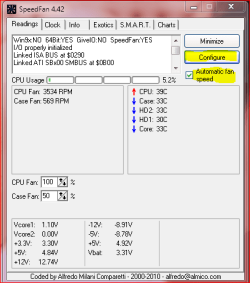
Speedfan Main window:


  • Make sure the Automatic fan speed box is checked
  • Click configure Button

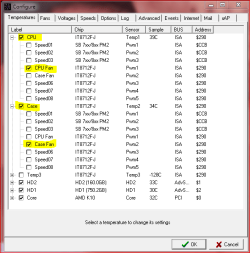
Configuration window (Temperature):


  • If CPU, CASE, Temp3, etc is checked, it will show up on the Main window
  • If you select CPU Fan, for instance, then you will be able to set high/low temperatures
  • You can change the Titles by selecting a 'name', and hitting the F2 key
  • The fans need to be associated with the correct component; that is, you don't want the Case fan speed being adjusted by the temperature of the CPU

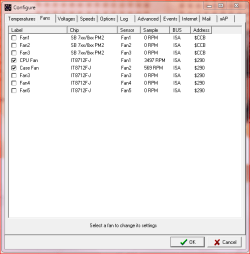
Configuration window (Fans):


  • Here you can rename the fans by selecting them and hitting F2
  • You can also select them and choose to log them

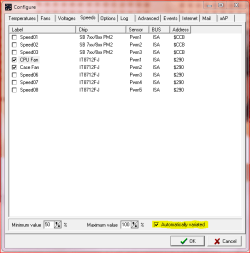
Configuration window (Speeds):


  • Here you can set minimum/maximum fan speeds
  • Be sure to have the Automatically variated box checked if you want SpeedFan to monitor it
Hope this helps!
 

Attachments

  • SF-001.PNG
    SF-001.PNG
    11.2 KB · Views: 8
  • SF-002.PNG
    SF-002.PNG
    12.9 KB · Views: 11
  • SF-003.PNG
    SF-003.PNG
    13 KB · Views: 9
  • SF-004.PNG
    SF-004.PNG
    14.2 KB · Views: 7

My Computer My Computer

Computer Manufacturer/Model Number
OEM - Me
OS
Windows 7 Home Premium x64
CPU
AMD Phenom II X6 1600T
Motherboard
GigaByte GZ-990FXA-UD3
Memory
16GB PC3-10700 (1342MHz)
Graphics Card(s)
ATI Radeon 5770 HD (x2) CrossFire
Sound Card
On-board RealTek chipset
Monitor(s) Displays
3x Hanns-G 1920x1080 Monitors
Screen Resolution
3x Hanns-G 1920x1080 Monitors
Hard Drives
Intel 25-V SSD 40GB: 218 MB/s AT: 0.1ms
Intel X-25M SSD 80GB: 230MB/s AT: 0.1ms
Seagate 750GB: 133 MB/s AT: 13ms (perpendicular storage)
Buffalo HD-PCTU3 1TB External drive
PSU
OCZ Stealth X Stream 750W
Case
Cheap (unknown)
Cooling
Stock
Keyboard
HP USB
Mouse
LogiTech USB
Internet Speed
1.5 Mbps - Slow - At the tail-end of a rural network
Other Info
Printer: Epson Stylus C-84
Scanner: HP 3500C Flatbed
DVD-RW: Plextor
DVD-ROM: Unknown
WEI: 7.4
WOW! I was apparently wrong about when this computer was actually last cleaned! :eek:

The heatsink is absolutely laden with dust! Obviously the cause of my problem! :eek:
 

My Computer My Computer

OS
Windows 7 Ultimate (x64) Service Pack 1
CPU
AMD Athlon 64 X2 Dual Core Processor 5600+ 2.80 GHz
Motherboard
GIGABYTE GA-M720-US3
Memory
4GB, Dual Channel, DDR2
Graphics Card(s)
NVIDIA GeForce 8600 GT
Sound Card
Creative SB X-Fi
Monitor(s) Displays
Dual Screen - Dell SE198WFP (19"), & GRUNDIG GU37BLKSE (37")
Screen Resolution
1440x900, 1600x1200
Hard Drives
Hitachi HDS722020ALA330 (2TB Internal), WD 15EADS (1.5TB External)
Keyboard
Microsoft Wireless Laser Keyboard 7000
Mouse
Microsoft Wireless Laser Mouse 7000
Back
Top