Is Security Essentials & Windows Firewall Compatible. I Cant Network

2therock

New member
Member
VIP
Local time
9:17 PM
Messages
97
Location
N. GA
Is Security Essentials & Windows Firewall Compatible. I Cant Network

Is Security Essentials & Windows Firewall Compatible. I Cant Network or file and printer share with the Firewall enabled and Essentials.

I have a Trendnet router with shared key and pretty much defaulted.

Is a Fire wall needed. If I disable the Windows firewall everything works.
 

My Computer My Computer

At a glance

Win 10 Pro 64xIntel-Core-i7-3770K16 GB DDR3
Computer type
PC/Desktop
Computer Manufacturer/Model Number
Home Build By Yours Truly
OS
Win 10 Pro 64x
CPU
Intel-Core-i7-3770K
Motherboard
GIGABYTE GA-Z77-UD5H
Memory
16 GB DDR3
Mouse
Logitech VX Revolution
Hello,

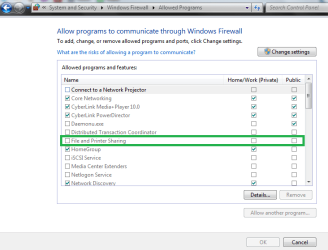
Please follow this Tutorial so that you may allow files and printer sharing from the Windows Firewall.
 

My Computer My Computer

At a glance

Win7 & Win8 64bitIntel i5
Computer Manufacturer/Model Number
Lenovo Desktop/Samsung Laptop
OS
Win7 & Win8 64bit
CPU
Intel i5
Internet Speed
Charter-20 Mbps
Antivirus
Avast
Browser
FF, IE9 and Chrome
Thanks but when I get to #2. In the Program or port list, make sure the File and Printer Sharing check box is selected, and then click OK.

I have no such options.

  1. Click Allow a program through Windows Firewall.
    18abb370-ac1e-4b6b-b663-e028a75bf05b_41.png
    If you are prompted for an administrator password or confirmation, type the password or provide confirmation.
  2. In the Program or port list, make sure the File and Printer Sharing check box is selected, and then click OK.
 

My Computer My Computer

At a glance

Win 10 Pro 64xIntel-Core-i7-3770K16 GB DDR3
Computer type
PC/Desktop
Computer Manufacturer/Model Number
Home Build By Yours Truly
OS
Win 10 Pro 64x
CPU
Intel-Core-i7-3770K
Motherboard
GIGABYTE GA-Z77-UD5H
Memory
16 GB DDR3
Mouse
Logitech VX Revolution
Your router also has a firewall. Maybe you can live with that.
 

My Computer My Computer

At a glance

Vista, Windows7, Mint Mate, Zorin, Windows 8from 1.6GHz Duo to i7
Computer Manufacturer/Model Number
HP, Dell, Gateway, Toshiba - 4 laptops and 2 desktops
OS
Vista, Windows7, Mint Mate, Zorin, Windows 8
CPU
from 1.6GHz Duo to i7
Monitor(s) Displays
2x HP w2207
Hard Drives
5x HDD, 7x SSD, 12x Externals
Keyboard
with trackball - no mices
Mouse
Trackball mice
Internet Speed
DSL 6000
Thanks but when I get to #2. In the Program or port list, make sure the File and Printer Sharing check box is selected, and then click OK.

I have no such options.

  1. Click Allow a program through Windows Firewall.
    18abb370-ac1e-4b6b-b663-e028a75bf05b_41.png
    If you are prompted for an administrator password or confirmation, type the password or provide confirmation.
  2. In the Program or port list, make sure the File and Printer Sharing check box is selected, and then click OK.
Here's mine:
Control Panel\System and Security\Windows Firewall\Allowed Programs
 

Attachments

  • Firewall allow programs.PNG
    Firewall allow programs.PNG
    18.1 KB · Views: 9

My Computer My Computer

At a glance

Win7 & Win8 64bitIntel i5
Computer Manufacturer/Model Number
Lenovo Desktop/Samsung Laptop
OS
Win7 & Win8 64bit
CPU
Intel i5
Internet Speed
Charter-20 Mbps
Antivirus
Avast
Browser
FF, IE9 and Chrome
I think I'm going to have to. I did have a Sirefif virus recently get through.

It removed turned off my Pre Release MS Essentials and removed it from the start up list.
The symptoms were Flash crashes in Firefox and flickering its icon in the tool bar.

I always check my startup list to see if anything was planted and then could not see the MSE.

Ran the scan and found it. How did it get by?

Thanks Guys.
 

My Computer My Computer

At a glance

Win 10 Pro 64xIntel-Core-i7-3770K16 GB DDR3
Computer type
PC/Desktop
Computer Manufacturer/Model Number
Home Build By Yours Truly
OS
Win 10 Pro 64x
CPU
Intel-Core-i7-3770K
Motherboard
GIGABYTE GA-Z77-UD5H
Memory
16 GB DDR3
Mouse
Logitech VX Revolution
Thanks but when I get to #2. In the Program or port list, make sure the File and Printer Sharing check box is selected, and then click OK.

I have no such options.

  1. Click Allow a program through Windows Firewall.
    18abb370-ac1e-4b6b-b663-e028a75bf05b_41.png
    If you are prompted for an administrator password or confirmation, type the password or provide confirmation.
  2. In the Program or port list, make sure the File and Printer Sharing check box is selected, and then click OK.
Here's mine:
Control Panel\System and Security\Windows Firewall\Allowed Programs


I cannot get that list to populate anything at all.

I think I'm going to have to. I did have a Sirefif virus recently get through.

It removed turned off my Pre Release MS Essentials and removed it from the start up list.
The symptoms were Flash crashes in Firefox and flickering its icon in the tool bar.

I always check my startup list to see if anything was planted and then could not see the MSE.

Ran the scan and found it. How did it get by?

Thanks Guys.
 

My Computer My Computer

At a glance

Win 10 Pro 64xIntel-Core-i7-3770K16 GB DDR3
Computer type
PC/Desktop
Computer Manufacturer/Model Number
Home Build By Yours Truly
OS
Win 10 Pro 64x
CPU
Intel-Core-i7-3770K
Motherboard
GIGABYTE GA-Z77-UD5H
Memory
16 GB DDR3
Mouse
Logitech VX Revolution

My Computer My Computer

At a glance

Win7 & Win8 64bitIntel i5
Computer Manufacturer/Model Number
Lenovo Desktop/Samsung Laptop
OS
Win7 & Win8 64bit
CPU
Intel i5
Internet Speed
Charter-20 Mbps
Antivirus
Avast
Browser
FF, IE9 and Chrome
Microsoft Security Essentials does the same thing when you choose a Full Scan. Thats how I found and weeded it out. I then researched the virus and went to all the registry locations looking for signs of it and there were none.

I do lots of Webb browsing in China at the RC Helicopter vendor sites and believe that's where I'm getting nailed.

Thanks
 

My Computer My Computer

At a glance

Win 10 Pro 64xIntel-Core-i7-3770K16 GB DDR3
Computer type
PC/Desktop
Computer Manufacturer/Model Number
Home Build By Yours Truly
OS
Win 10 Pro 64x
CPU
Intel-Core-i7-3770K
Motherboard
GIGABYTE GA-Z77-UD5H
Memory
16 GB DDR3
Mouse
Logitech VX Revolution
What I have suggested will do a deeper scan than MSE, it's up to you. MSE is just a basic protection.
 

My Computer My Computer

At a glance

Win7 & Win8 64bitIntel i5
Computer Manufacturer/Model Number
Lenovo Desktop/Samsung Laptop
OS
Win7 & Win8 64bit
CPU
Intel i5
Internet Speed
Charter-20 Mbps
Antivirus
Avast
Browser
FF, IE9 and Chrome
Thanks. I did. I'm clean and running OK. If you are viewing U-Tube vids with Firefox and keep getting Flash plugin errors and sometimes the vids will not open and the toolbar icon flashes or flickers. start looking for trouble. Also FF has reported JAVA to have security issues in their latest and will not allow it to run. Have to go to IE to do my banking via JAVA security.
 

My Computer My Computer

At a glance

Win 10 Pro 64xIntel-Core-i7-3770K16 GB DDR3
Computer type
PC/Desktop
Computer Manufacturer/Model Number
Home Build By Yours Truly
OS
Win 10 Pro 64x
CPU
Intel-Core-i7-3770K
Motherboard
GIGABYTE GA-Z77-UD5H
Memory
16 GB DDR3
Mouse
Logitech VX Revolution
Back
Top