Is slipstreaming worth it, really to reinstall Windows 7?

pintree3

Mich
Member
VIP
Local time
12:02 PM
Messages
394
Location
Canada
Up to now my one cherished adviser/consultant here has been Gregrocker-whose advice over and over again has been a godsend. And so the last time I updated my Win 7 I used his tutorial.
Having said this, the installation process is overwhelmingly long once you take into account all the updates that must be done later.
And so I thought of slip-streaming from the old days of Windows XP. And in doing research I realized that either I have forgotten what it was like in the XP days or for Win 7 the process seems useless (unless I read the wrong articles).
Some of them only add SP1 to the process (doesn't the downloadable ISO already include SP1?) which to me seems not worth the effort. Others require you to download this software and that software and then do process A then B then C, which got me thinking: Really? Isn't slip-streaming supposed to make the whole thing faster and easier?
My idea of slip-streaming entails most updates since my original CD, including updated drivers (and hell, if I could add the Office Suite [and Adobe suite :sarc:'] to the process so much the better. Any views on this?
One way or another it is time for me to reinstall W7.
 

My Computer My Computer

At a glance

Windows 7 Home Premium 64Intel Core i5 760 @ 2800MHz12288MBAMD Radeon HD 7800 Series
Computer type
PC/Desktop
Computer Manufacturer/Model Number
OEM Designed by me :-)
OS
Windows 7 Home Premium 64
CPU
Intel Core i5 760 @ 2800MHz
Motherboard
Asus P7P55D-E LX
Memory
12288MB
Graphics Card(s)
AMD Radeon HD 7800 Series
Sound Card
ASUS Xonar DG
Monitor(s) Displays
ViewSonic VX2453 Series, HDMI 1080p Full HD
Screen Resolution
1920X1080
Hard Drives
Samsung SSD 840 EVO 250GB& two others
PSU
Tagan BZ Series, TG800-BZ 800W
Keyboard
Logitech MK250
Mouse
Logitech M310
Internet Speed
toppest, mostest :-) <-- bad, but fun English
Browser
Firefox, Crrome, IE
Hopefully you already have a previously downloaded ISO because they are now much harder to come by.

This isn't slipstreaming but is helpful by adding all the updates into the ISO,

http://www.sevenforums.com/installation-setup/282232-test-update-7-installation-media.html

I wouldn't worry about the drivers, those are better left separate if you ask me.

If you want to start adding programs then you probably want something like sysprep which we also have experts on.
 

My Computer My Computer

At a glance

Win 10 Pro x64Intel I5-2500K @3.3GHz16GB G.Skill Ripjaws X (4x4GB)EVGA GeForce 750 Ti SC 2GB
Computer type
PC/Desktop
Computer Manufacturer/Model Number
Self Built
OS
Win 10 Pro x64
CPU
Intel I5-2500K @3.3GHz
Motherboard
Asrock P67 Extreme4
Memory
16GB G.Skill Ripjaws X (4x4GB)
Graphics Card(s)
EVGA GeForce 750 Ti SC 2GB
Sound Card
ASUS Xonar DG 5.1 Channels 24-bit 96KHz PCI Interface Sound
Monitor(s) Displays
auria eq2367
Screen Resolution
1920 x 1080
Hard Drives
250GB Samsung 850 EVO SSD
1TB WD Blue
1TB Hitachi
PSU
SeaSonic X 650W 80 Plus Gold
Case
Corsair Obsidian 750D
Cooling
Corsair H60, Three 140mm case fans
Keyboard
Logitech Wireless Keyboard K520
Mouse
Logitech Wireless Mouse M310
Internet Speed
Wave Broadband ~ 100 dn 5 up
Antivirus
Windows Defender, Malwarebytes Premium
Browser
Edge, IE11, Chrome
Other Info
Laptop specs: HP g7-1365dx /
CPU: AMD A6-3420M APU with Radeon(tm) HD Graphics /
RAM: Crucial 8Gb (2x4Gb) /
SSD: Crucial M4-CT128M4SSD2 ATA Device/ FW 000F /
GFX: AMD Radeon HD 6520G /
OS: Windows 10 Pro x64
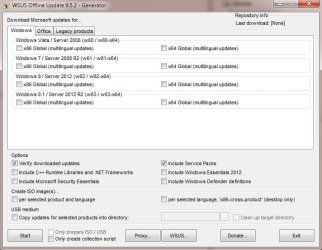
Check out the WSUS Offline Update freeware tool. It makes the update process after a reinstall MUCH easier, less painful, reduces clock time and the number of user interactions. Note: I find even when done I may still need to run one or two manual updates but IMO overall process is greatly improved
  1. Download and extract the folder
  2. Click to run UpdateGenerator. Check off your version of Windows/platform and and other options. If you use MS Office also notice the Office tab.
  3. Click Start. It can take time (maybe a half hour? i forget) to download all updates. (but it's fully automatic)
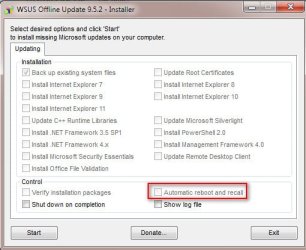
  4. When done click to open the Client folder. Run the UpdateInstaller. Be sure to click the box for Automatic Reboot. along with other install options you want
Generator and Installer window snapshots below
 

Attachments

  • Generator.jpg
    Generator.jpg
    56.5 KB · Views: 16
  • Installer.jpg
    Installer.jpg
    35 KB · Views: 98

My Computer My Computer

At a glance

Desk 1: Win 7 Pro x32; Desk 2: Windows 10 x64
Computer type
PC/Desktop
Computer Manufacturer/Model Number
Dell Optiplex 360 and Optiplex 755
OS
Desk 1: Win 7 Pro x32; Desk 2: Windows 10 x64
Hard Drives
500GB Crucial SSD in both Desktops
Other Info
Buffalo 6TB NAS, Raid 1
Sorry for the double post but will be easier to read.

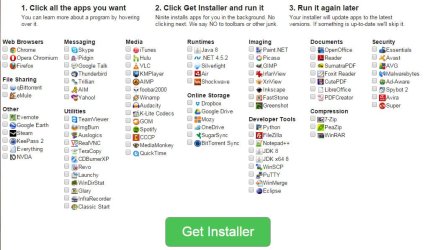
Tip #2. To further improve re-install time and process.... After updates, check out ninite.com. Install many of your freeware tools with a single installer! Ninite also automatically avoids all those piggy-back downloads that you have to carefully avoid when you run these freeware installers manually one by one on your own!
 

Attachments

  • Ninite.jpg
    Ninite.jpg
    86.7 KB · Views: 4

My Computer My Computer

At a glance

Desk 1: Win 7 Pro x32; Desk 2: Windows 10 x64
Computer type
PC/Desktop
Computer Manufacturer/Model Number
Dell Optiplex 360 and Optiplex 755
OS
Desk 1: Win 7 Pro x32; Desk 2: Windows 10 x64
Hard Drives
500GB Crucial SSD in both Desktops
Other Info
Buffalo 6TB NAS, Raid 1
You still have to take the time to gather the installers, the updates etc. Then take time to add them to the iso, then the install time just takes longer anyway. I see no point in doing it that way. Windows takes 15 minutes to install, another hour and a half for all the updates ( and that`s being generous ) and another 10/15 minutes to add your programs. Not long at all in my opinion. It`s not something to be rushed anyway.

Compare that to the the time that some of us have been tinkering with our machines, saving the money for and adding new parts, and the customizations etc. etc. etc. :)
 

My Computer My Computer

At a glance

Windows 10 Pro x64Intel Core i7 6700KGSkill TridentZ RGB 16GB 3600 16-16-16-36EVGA GTX 980 Ti SC x2
Computer type
PC/Desktop
Computer Manufacturer/Model Number
Skylake Special #666
OS
Windows 10 Pro x64
CPU
Intel Core i7 6700K
Motherboard
Asus Sabertooth Z170 Mark 1
Memory
GSkill TridentZ RGB 16GB 3600 16-16-16-36
Graphics Card(s)
EVGA GTX 980 Ti SC x2
Sound Card
Realtek High Definition
Monitor(s) Displays
AOC G2460PG
Screen Resolution
1920 x 1080 144Hz
Hard Drives
Samsung 860 Pro 256GB, Seagate Barracuda 4TB x2
PSU
EVGA 1000 P2, EVGA White Custom Braided Cables
Case
Corsair Vengeance C70 Gunmetal Black
Cooling
Corsair H100i v2, Corsair ML120 x2, Thermal Grizzly Kryonaut
Keyboard
Logitech G910 Orion Spectrum
Mouse
Logitech G700s
Internet Speed
Verizon Fios Quantum Gateway 75/75
Antivirus
Windows Defender, Malwarebytes Free 3.8.3
Browser
Chrome
Other Info
Corsair SP120 x4, LG Blu-ray Drive, Durabrand HT-395 100 Watt Dolby Digital Amp, Corsair H2100 Wireless 7.1 Headset
Hello pintree3,

Yes, it is worth it to slipstream updates to your installation image (would cut install+update time by 3 folds).

First if you did not already, you should get yourself a fresh Windows 7 image with SP1 and media refresh update:
microsoft.com/en-us/software-recovery

Do note you can only use purchased Windows 7 product-keys to download (darn you M$), if you do not like this, go blame Micro$oft and anyone who do not allow other reputable downloads :(.

For maintaining both online and offline Windows images, we use a software called DISM.
technet.microsoft.com/en-us/library/hh825236.aspx
For a excellent guide for Windows integration by the awesome user 'murphy78':
forums.mydigitallife.info/threads/47875-Windows-Integration-Guide-murphy78

To get your updates, you can use a software used 'WHDownloader':
forums.mydigitallife.info/threads/44645-WHDownloader-v0-0-1-4

First unpack the ISO to a folder, then delete 'sources\ei.cfg' to allow choosing of all versions.
Then create a folder somewhere ('C:\mount') and mount the index of choice in the image 'sources/install.wim' to it.
Code:
DISM /mount-wim /wimfile:c:\win7\sources\install.wim /index:1 /mountdir:c:\mount

Now you can add the update packages to the image:
Code:
DISM /image:c:\mount /add-package /packagepath:c:\updates\

Now you can save the index back to the image:
Code:
dism /unmount-wim /mountdir:c:\mount /commit
Or if you made a mistake and want to remove the image to start over (never try to delete the image manually):
Code:
dism /unmount-wim /mountdir:c:\mount /discard

After you edited all indexes, you may noticed the image increase in size, so you may want to compress it using imagex:
Code:
imagex /compress maximum /export c:\win7\sources\install.wim * c:\win7\sources\install.wim.new
Don't forget to rename 'install.wim.new' to 'install.wim' :).

Afterwards use the 'oscdimg' to create a ISO that is bootable on UEFI and/or BIOS.
Code:
For 32 bit
oscdimg.exe -h -m -o -u2 -bx:\win7\boot\etfsboot.com -lWindows7install c:\win7 c:\Windows7.iso
For 64 bit:
oscdimg.exe -h -m -o -u2 -udfver102 -bootdata:2#p0,e,bC:\win7\boot\etfsboot.com#pEF,e,bc:\win7\efi\microsoft\boot\efisys.bin -lWindows7install c:\win7 c:\Windows7.iso


If the above is to hard, you can download a updatepack called 'Simplix Pack' which can also integrate update into the Windows 7 image:
forums.mydigitallife.info/threads/45005-Simplix-Pack-to-update-Live-Win7-System-Integrate-hotfixes-into-Win7-distribution

First unpack your ISO to a folder, then delete 'sources\ei.cfg' to allow choosing of all versions.
Then open a CMD prompt and use the following command
Code:
UpdatePack7R2.exe /ie11 /WimFile=C:\install.wim /Index=*
Replace 'C:\install.wim' with the location of install.wim.

Then you can use a program called Wintoolkit to mount image indexes and create a ISO for you:
wincert.net/forum/files/file/5-win-toolkit/

Good luck ^^.
 
Last edited:

My Computer My Computer

At a glance

Primary OS: Archlinux with Kde-Plasma5 x86-64...i5-4570 3.2GHz8GiBNvidia GeForce GTX 660 (Msi TwinFrozr III)
Computer type
PC/Desktop
Computer Manufacturer/Model Number
Custom build
OS
Primary OS: Archlinux with Kde-Plasma5 x86-64. Secondary OS: Windows 8.1 x64. UEFI Setup.
CPU
i5-4570 3.2GHz
Motherboard
Asus H87-PLUS
Memory
8GiB
Graphics Card(s)
Nvidia GeForce GTX 660 (Msi TwinFrozr III)
Screen Resolution
1920 * 1080
Hard Drives
Samsung SSD 840 PRO 128Gib (Linux) [Is technically not a HDD]
WD Red 1TB (Data+Windows)
PSU
Corsair Gaming GS600 (600W)
Case
Zalman Z9 Plus
Internet Speed
46Mbps (5,75MBps) Down. 5Mbps (0,625MBps) Up.
Antivirus
Avast, but never really needed any AV though...
Browser
Firefox only ^^.
@Midori

Great info. And thanks for tips on some new tools. I use DISM as well. I thought i might help clarify how to determine "index of choice" when you say
Then create a folder somewhere ('C:\mount') and mount the index of choice in the image 'sources/install.wim' to it.
The "index of choice" corresponds to the index for the version of Windows in the .wim file one wants to update.

To see the versions stored in a .wim file and each version's corresponding index number, use the command syntax below. As an example, I display the results of my Windows 7 install disk.
Code:
Dism   /Get-WimInfo /WimFile:c:\win7\sources\install.wim
results below showing index # for each windows version in the .wim
Code:
Details for image : C:\win7\sources\install.wim

Index : 1
Name : Windows 7 HOMEBASIC
Description : Windows 7 HOMEBASIC
Size : 11,710,161,360 bytes

Index : 2
Name : Windows 7 HOMEPREMIUM
Description : Windows 7 HOMEPREMIUM
Size : 12,222,587,449 bytes

Index : 3
Name : Windows 7 PROFESSIONAL
Description : Windows 7 PROFESSIONAL
Size : 12,122,886,417 bytes

Index : 4
Name : Windows 7 ULTIMATE
Description : Windows 7 ULTIMATE
Size : 12,285,492,779 bytes

The operation completed successfully.

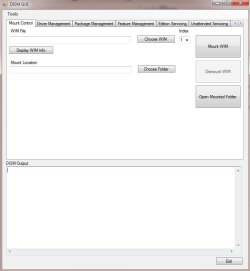
p.s. Personally, I keep forgetting DISM syntax. Also check out DISM GUI for a UI interface alternative to remembering DISM command prompt syntax. DISM GUI must be run as admin to work. For this example,
  • Use Mount Control tab to mount/unmount the .wim file. When Unmounting, the GUI will ask if you want to commit the changes
  • Use Package Management tab to add all the updates to the mounted wim
 

Attachments

  • GUI.jpg
    GUI.jpg
    28.4 KB · Views: 1

My Computer My Computer

At a glance

Desk 1: Win 7 Pro x32; Desk 2: Windows 10 x64
Computer type
PC/Desktop
Computer Manufacturer/Model Number
Dell Optiplex 360 and Optiplex 755
OS
Desk 1: Win 7 Pro x32; Desk 2: Windows 10 x64
Hard Drives
500GB Crucial SSD in both Desktops
Other Info
Buffalo 6TB NAS, Raid 1
Great info. And thanks for tips on some new tools. I use DISM as well. I thought i might help clarify how to determine "index of choice" when you say
Good point, though i did not post that because of the link to the guide of 'Microsoft' and 'Murphy78', i am to lazy to explain :p.

p.s. Personally, I keep forgetting DISM syntax. Also check out DISM GUI for a UI interface alternative to remembering DISM command prompt syntax. DISM GUI must be run as admin to work. For this example,
  • Use Mount Control tab to mount/unmount the .wim file. When Unmounting, the GUI will ask if you want to commit the changes
  • Use Package Management tab to add all the updates to the mounted wim
Nice, but in GUI vs GUI it pails in compare of features to Wintoolkit:
wincert.net/forum/files/file/5-win-toolkit/
It uses Dism and Imagex for all image operations and allows for many nice presets, a All-In-One Integrator, Wim splitter and combiner, Iso and Usb preperator, Registry editor, etc...

Have a good day ^^.
 

My Computer My Computer

At a glance

Primary OS: Archlinux with Kde-Plasma5 x86-64...i5-4570 3.2GHz8GiBNvidia GeForce GTX 660 (Msi TwinFrozr III)
Computer type
PC/Desktop
Computer Manufacturer/Model Number
Custom build
OS
Primary OS: Archlinux with Kde-Plasma5 x86-64. Secondary OS: Windows 8.1 x64. UEFI Setup.
CPU
i5-4570 3.2GHz
Motherboard
Asus H87-PLUS
Memory
8GiB
Graphics Card(s)
Nvidia GeForce GTX 660 (Msi TwinFrozr III)
Screen Resolution
1920 * 1080
Hard Drives
Samsung SSD 840 PRO 128Gib (Linux) [Is technically not a HDD]
WD Red 1TB (Data+Windows)
PSU
Corsair Gaming GS600 (600W)
Case
Zalman Z9 Plus
Internet Speed
46Mbps (5,75MBps) Down. 5Mbps (0,625MBps) Up.
Antivirus
Avast, but never really needed any AV though...
Browser
Firefox only ^^.
Nice, but in GUI vs GUI it pails in compare of features to Wintoolkit:
wincert.net/forum/files/file/5-win-toolkit/
It uses Dism and Imagex for all image operations and allows for many nice presets, a All-In-One Integrator, Wim splitter and combiner, Iso and Usb preperator, Registry editor, etc...

Fair enough. Wintoolkit is one of the new tools you mentioned I haven't yet used. But will definitely now check out!

Thanks again for all the new info and references. Also all the new tools tips I learned and I'll have to try :thumbsup:
 

My Computer My Computer

At a glance

Desk 1: Win 7 Pro x32; Desk 2: Windows 10 x64
Computer type
PC/Desktop
Computer Manufacturer/Model Number
Dell Optiplex 360 and Optiplex 755
OS
Desk 1: Win 7 Pro x32; Desk 2: Windows 10 x64
Hard Drives
500GB Crucial SSD in both Desktops
Other Info
Buffalo 6TB NAS, Raid 1
I have 4 win7 pc's

One of them I keep a backup install on a 60gb hard drive, which is a full install.
Couple times to that PC, I have had to restore windows.
So I use clonezilla to copy the backup install to the new hard drive.
It only takes a few minutes to do the hard drive copy using clonezilla.
The i remove the 60 gb source drive and boot up the new hard drive.
Then I can expand the new hard drive's 60gb partition to fill the new drive.

So basically take 2 drives, install to one drive to be kept as backup.
Then clonezilla the backup drive to the drive you plan to run.
Of course that only works for a single PC, but it saves me lots of time.

I have had unusual issues with that PC, including me doing unusual things to it, so I decided to keep a working backup to quickly restore it.
 

My Computer My Computer

At a glance

Windows 7 Ultimate x64
OS
Windows 7 Ultimate x64
Nice, but in GUI vs GUI it pails in compare of features to Wintoolkit:
wincert.net/forum/files/file/5-win-toolkit/
It uses Dism and Imagex for all image operations and allows for many nice presets, a All-In-One Integrator, Wim splitter and combiner, Iso and Usb preperator, Registry editor, etc...

I just had a (quick) look at WinToolKit. I'm impressed. It's quite feature rich. Thanks again for the tip(s)! :)
 
Last edited:

My Computer My Computer

At a glance

Desk 1: Win 7 Pro x32; Desk 2: Windows 10 x64
Computer type
PC/Desktop
Computer Manufacturer/Model Number
Dell Optiplex 360 and Optiplex 755
OS
Desk 1: Win 7 Pro x32; Desk 2: Windows 10 x64
Hard Drives
500GB Crucial SSD in both Desktops
Other Info
Buffalo 6TB NAS, Raid 1
Thank everyone :-) The original 'w.heidoc.net' link for the ISO no longer has the ISOs however it does refer you to the new Microsoft one (also mentioned above) http://www.microsoft.com/en-us/software-recovery.
I did so and I ran into a problem; having an OEM version of Win 7 makes Microsoft assume that this was pre-installed: Their message after keying in my product key was:
Unsupported product.
The product key you entered appears to be for software that was pre-installed on a device. Please contact the device manufacturer for software recovery options."
This wasn't pre-installed so to speak, it was purchased as an OEM, my PC is not Dell, Compaq or what-have-you. My PC is mother board A added with VGA card B, etc at one of those small stores that sell and do such things.
So what now? since I do not have a 'device manufacturer' to contact (In actuality I had thought I bought a 'normal' Windows 7 CD and only realized much later that what I had purchased was an OEM--nothing on the BOX or the DVD itself says OEM except for the careful addition of the words on the CD that say, "For product support contact the manufacturer of your PC''
 

My Computer My Computer

At a glance

Windows 7 Home Premium 64Intel Core i5 760 @ 2800MHz12288MBAMD Radeon HD 7800 Series
Computer type
PC/Desktop
Computer Manufacturer/Model Number
OEM Designed by me :-)
OS
Windows 7 Home Premium 64
CPU
Intel Core i5 760 @ 2800MHz
Motherboard
Asus P7P55D-E LX
Memory
12288MB
Graphics Card(s)
AMD Radeon HD 7800 Series
Sound Card
ASUS Xonar DG
Monitor(s) Displays
ViewSonic VX2453 Series, HDMI 1080p Full HD
Screen Resolution
1920X1080
Hard Drives
Samsung SSD 840 EVO 250GB& two others
PSU
Tagan BZ Series, TG800-BZ 800W
Keyboard
Logitech MK250
Mouse
Logitech M310
Internet Speed
toppest, mostest :-) <-- bad, but fun English
Browser
Firefox, Crrome, IE
Contacted Microsoft since I wrote my previous message re: my OEM version, and it seems there is nothing I can do unless I want to upgrade to windows 8.1 (and this wold include a free upgrade to Win 10 when it comes out)
 

My Computer My Computer

At a glance

Windows 7 Home Premium 64Intel Core i5 760 @ 2800MHz12288MBAMD Radeon HD 7800 Series
Computer type
PC/Desktop
Computer Manufacturer/Model Number
OEM Designed by me :-)
OS
Windows 7 Home Premium 64
CPU
Intel Core i5 760 @ 2800MHz
Motherboard
Asus P7P55D-E LX
Memory
12288MB
Graphics Card(s)
AMD Radeon HD 7800 Series
Sound Card
ASUS Xonar DG
Monitor(s) Displays
ViewSonic VX2453 Series, HDMI 1080p Full HD
Screen Resolution
1920X1080
Hard Drives
Samsung SSD 840 EVO 250GB& two others
PSU
Tagan BZ Series, TG800-BZ 800W
Keyboard
Logitech MK250
Mouse
Logitech M310
Internet Speed
toppest, mostest :-) <-- bad, but fun English
Browser
Firefox, Crrome, IE
You still have to take the time to gather the installers, the updates etc. Then take time to add them to the iso, then the install time just takes longer anyway. I see no point in doing it that way. Windows takes 15 minutes to install, another hour and a half for all the updates ( and that`s being generous ) and another 10/15 minutes to add your programs. Not long at all in my opinion. It`s not something to be rushed anyway. :)
Wow, you're great for being positive and seeing it as such. It always takes me a whole day to do such a thing, because reinstalling the OS also means, as you mentioned, updating the OS but then also means taking care of the drivers, and then reinstalling all other software (Office, suite, Adobe suite, etc.) and their updates etc. etc. so to me the process is not one of just a couple of hours but a whole day indeed--or else I would be doing so every 2 months. My XP slipstream was basically self run and did take little time overall (except for the 1st time setup and stuff, but after that....)
 

My Computer My Computer

At a glance

Windows 7 Home Premium 64Intel Core i5 760 @ 2800MHz12288MBAMD Radeon HD 7800 Series
Computer type
PC/Desktop
Computer Manufacturer/Model Number
OEM Designed by me :-)
OS
Windows 7 Home Premium 64
CPU
Intel Core i5 760 @ 2800MHz
Motherboard
Asus P7P55D-E LX
Memory
12288MB
Graphics Card(s)
AMD Radeon HD 7800 Series
Sound Card
ASUS Xonar DG
Monitor(s) Displays
ViewSonic VX2453 Series, HDMI 1080p Full HD
Screen Resolution
1920X1080
Hard Drives
Samsung SSD 840 EVO 250GB& two others
PSU
Tagan BZ Series, TG800-BZ 800W
Keyboard
Logitech MK250
Mouse
Logitech M310
Internet Speed
toppest, mostest :-) <-- bad, but fun English
Browser
Firefox, Crrome, IE
Forgot if you already checked.. but did you go to Disk Management and look at the partitions on your hard drive? Is there a recovery partition? (Usually about 8GB with no drive letter assignment so you don't see it unless you look for it)
 

My Computer My Computer

At a glance

Desk 1: Win 7 Pro x32; Desk 2: Windows 10 x64
Computer type
PC/Desktop
Computer Manufacturer/Model Number
Dell Optiplex 360 and Optiplex 755
OS
Desk 1: Win 7 Pro x32; Desk 2: Windows 10 x64
Hard Drives
500GB Crucial SSD in both Desktops
Other Info
Buffalo 6TB NAS, Raid 1
Forgot if you already checked.. but did you go to Disk Management and look at the partitions on your hard drive? Is there a recovery partition? (Usually about 8GB with no drive letter assignment so you don't see it unless you look for it)
No such thing exists (Why would there be, if I may ask? it wasn't purchased from Acer, Dell, Compaq etc.) All there is extra on the C: drive is a data file of 100MB
 

My Computer My Computer

At a glance

Windows 7 Home Premium 64Intel Core i5 760 @ 2800MHz12288MBAMD Radeon HD 7800 Series
Computer type
PC/Desktop
Computer Manufacturer/Model Number
OEM Designed by me :-)
OS
Windows 7 Home Premium 64
CPU
Intel Core i5 760 @ 2800MHz
Motherboard
Asus P7P55D-E LX
Memory
12288MB
Graphics Card(s)
AMD Radeon HD 7800 Series
Sound Card
ASUS Xonar DG
Monitor(s) Displays
ViewSonic VX2453 Series, HDMI 1080p Full HD
Screen Resolution
1920X1080
Hard Drives
Samsung SSD 840 EVO 250GB& two others
PSU
Tagan BZ Series, TG800-BZ 800W
Keyboard
Logitech MK250
Mouse
Logitech M310
Internet Speed
toppest, mostest :-) <-- bad, but fun English
Browser
Firefox, Crrome, IE
Overwhelmed and confused at this point. We know I do not have nor can get an ISO (with or without SP1) of Win 7 because my DVD of Win 7 is an OEM version. All links on how to do an ISO from my DVD seem to be outdated--all I really found is how to make an image of my DVD to my USB (and bootable) which I assume is not the same thing. SO I am not quite sure what to do now. Perhaps I should go back to gregrocker afterall, as I have done in the past.
update: oops 1 of the software listed above did have something for making an ISO
 

My Computer My Computer

At a glance

Windows 7 Home Premium 64Intel Core i5 760 @ 2800MHz12288MBAMD Radeon HD 7800 Series
Computer type
PC/Desktop
Computer Manufacturer/Model Number
OEM Designed by me :-)
OS
Windows 7 Home Premium 64
CPU
Intel Core i5 760 @ 2800MHz
Motherboard
Asus P7P55D-E LX
Memory
12288MB
Graphics Card(s)
AMD Radeon HD 7800 Series
Sound Card
ASUS Xonar DG
Monitor(s) Displays
ViewSonic VX2453 Series, HDMI 1080p Full HD
Screen Resolution
1920X1080
Hard Drives
Samsung SSD 840 EVO 250GB& two others
PSU
Tagan BZ Series, TG800-BZ 800W
Keyboard
Logitech MK250
Mouse
Logitech M310
Internet Speed
toppest, mostest :-) <-- bad, but fun English
Browser
Firefox, Crrome, IE
I think here I will answer my own question: Is slip-streaming worth it? NO.
And here's why:
I will 1st give the conclusion and then I'll answer how I got there.
In order to do so, one must do a lot of things. And to do these things one needs to learn how to do them use them. And at the end of all this you realize that by the time you have done all of this so much time has been spent that you would have saved yourself a lot of this time if you had just simply done it the normal way.
Much of the info given here and elsewhere is not necessarily easy to understand or follow. Much of it is also no longer possible since no ISO can now be gotten from Microsoft if you are like me and have an OEM version or a manufacturer's version. All software seems to need a wim and try as I may, I never was able to get one or create one. 'DISM Gui' and 'WinToolKit' require a wim file so they became useless to me. Prior to all this I ended up doing other things, all useless since integration of updates seems to need a wim file which I do not have and could not get.

So in theory this is what I would have liked (the impossible, the dreamer me)
-1- Have original DVD of windows or its ISO
-2- Get software XYZ
-2b- with software XYZ there is one button and only one button which will do the following (attain all of your needed updates integrate them to a new ISO and then create this new ISO on your bootable USB drive.
While it's doing this you can go have a coffee somewhere or do something else on your computer since no other work is required.
After your coffee reboot your computer to the USB and let it do it's work (you do add your serial number--preferably no longer necessary since you had the original DVD and it knows this-- add your keyboard language, date and computer name and then go have another coffee, since all else will be done for you.
Seems like a dream now but, if memory serves me right that was what slip-streaming with XP used to be (more or less).
 

My Computer My Computer

At a glance

Windows 7 Home Premium 64Intel Core i5 760 @ 2800MHz12288MBAMD Radeon HD 7800 Series
Computer type
PC/Desktop
Computer Manufacturer/Model Number
OEM Designed by me :-)
OS
Windows 7 Home Premium 64
CPU
Intel Core i5 760 @ 2800MHz
Motherboard
Asus P7P55D-E LX
Memory
12288MB
Graphics Card(s)
AMD Radeon HD 7800 Series
Sound Card
ASUS Xonar DG
Monitor(s) Displays
ViewSonic VX2453 Series, HDMI 1080p Full HD
Screen Resolution
1920X1080
Hard Drives
Samsung SSD 840 EVO 250GB& two others
PSU
Tagan BZ Series, TG800-BZ 800W
Keyboard
Logitech MK250
Mouse
Logitech M310
Internet Speed
toppest, mostest :-) <-- bad, but fun English
Browser
Firefox, Crrome, IE
Hello pintree3,

I am not sure i can post links, but i can point you to 'MyDigitalLife Forums', they have mirrors to valid uptodate 'Windows 7 SP1 U' ISO's in the windows 7 section.
Look for something with 'SmartVersion patch's conversions'.

A 'install.wim' file is a image containing the actual windows 7 install's [basic-home-pro-ult] that will be unpacked on your HDD when you install windows.
The install.wim file is contained in the folder 'Sources' inside the Windows ISO.

Like i said earlier, if it's to hard to all to get updates and use DISM, try using 'Simplix-Pack'.
It is a montly pack of tested updates which can also integrate those in the install.wim you specify.
Simplix Pack to update Live Win7 System/ Integrate hotfixes into Win7 distribution

The command one usually uses to integrate IE11 and updates and in all windows 7 install's in the install.wim:
Code:
UpdatePack7R2.exe /ie11 /WimFile=C:\install.wim /Index=*
This command assumes you copied 'install.wim' to C:\ , if not, change 'C:\install.wim' to your path.


Once your 'install.wim' is done, copy it back to your 'sources' folder in the unpacked Windows ISO folder.
Now you can make a ISO of the unpacked folder or install to a USB[Is faster] using something like 'Wintoolkit':
Win Toolkit - WinCert.net Forums

Or a ISO directly using 'oscdimg':
Code:
For 32 bit
oscdimg.exe -h -m -o -u2 -bx:\win7\boot\etfsboot.com -lWindows7install c:\win7 c:\Windows7.iso
For 64 bit:
oscdimg.exe -h -m -o -u2 -udfver102 -bootdata:2#p0,e,bC:\win7\boot\etfsboot.com#pEF,e,bc:\win7\efi\microsoft\boot\efisys.bin -lWindows7install c:\win7 c:\Windows7.iso
Replace 'win7' with the path to the Windows ISO folder.

A clean install and 200 Updates on a medium internet connection with multiple reboots can take atleast 4-5 hours.
A remastered ISO cuts that by half of two/third.
If you only use the ISO once, a remaster will be pointless, but if like me you need to do a lot of installs, this will be pretty annoying over time.

Else if you really do not want to make your own remaster even with my simple guide, you can also just do a normal install. If you need offline updates you can use a tool called 'WSUS Offline Update':
WSUS Offline Update - Update Microsoft Windows and Office without an Internet connection

Good luck ^^.
 
Last edited:

My Computer My Computer

At a glance

Primary OS: Archlinux with Kde-Plasma5 x86-64...i5-4570 3.2GHz8GiBNvidia GeForce GTX 660 (Msi TwinFrozr III)
Computer type
PC/Desktop
Computer Manufacturer/Model Number
Custom build
OS
Primary OS: Archlinux with Kde-Plasma5 x86-64. Secondary OS: Windows 8.1 x64. UEFI Setup.
CPU
i5-4570 3.2GHz
Motherboard
Asus H87-PLUS
Memory
8GiB
Graphics Card(s)
Nvidia GeForce GTX 660 (Msi TwinFrozr III)
Screen Resolution
1920 * 1080
Hard Drives
Samsung SSD 840 PRO 128Gib (Linux) [Is technically not a HDD]
WD Red 1TB (Data+Windows)
PSU
Corsair Gaming GS600 (600W)
Case
Zalman Z9 Plus
Internet Speed
46Mbps (5,75MBps) Down. 5Mbps (0,625MBps) Up.
Antivirus
Avast, but never really needed any AV though...
Browser
Firefox only ^^.
I am not sure i can post links, but i can point you to 'MyDigitalLife Forums', they have mirrors to valid uptodate 'Windows 7 SP1 U' ISO's in the windows 7 section.

Just out of curiosity, have you confirmed that they still have those? I'm pretty sure Microsoft took all those down.
 

My Computer My Computer

At a glance

Win 10 Pro x64Intel I5-2500K @3.3GHz16GB G.Skill Ripjaws X (4x4GB)EVGA GeForce 750 Ti SC 2GB
Computer type
PC/Desktop
Computer Manufacturer/Model Number
Self Built
OS
Win 10 Pro x64
CPU
Intel I5-2500K @3.3GHz
Motherboard
Asrock P67 Extreme4
Memory
16GB G.Skill Ripjaws X (4x4GB)
Graphics Card(s)
EVGA GeForce 750 Ti SC 2GB
Sound Card
ASUS Xonar DG 5.1 Channels 24-bit 96KHz PCI Interface Sound
Monitor(s) Displays
auria eq2367
Screen Resolution
1920 x 1080
Hard Drives
250GB Samsung 850 EVO SSD
1TB WD Blue
1TB Hitachi
PSU
SeaSonic X 650W 80 Plus Gold
Case
Corsair Obsidian 750D
Cooling
Corsair H60, Three 140mm case fans
Keyboard
Logitech Wireless Keyboard K520
Mouse
Logitech Wireless Mouse M310
Internet Speed
Wave Broadband ~ 100 dn 5 up
Antivirus
Windows Defender, Malwarebytes Premium
Browser
Edge, IE11, Chrome
Other Info
Laptop specs: HP g7-1365dx /
CPU: AMD A6-3420M APU with Radeon(tm) HD Graphics /
RAM: Crucial 8Gb (2x4Gb) /
SSD: Crucial M4-CT128M4SSD2 ATA Device/ FW 000F /
GFX: AMD Radeon HD 6520G /
OS: Windows 10 Pro x64
Back
Top