Is there a gadget for core-temperature

bawldiggle

GrayGhost2 ret.
Is there a gadget for core-temperature. ?

I am currently using "Core Temp 1.0 RC5" but it shows multiple cores as multiple icons in sys-tray.
And the alternative (a window on desktop) is too large ... and when I close the CoreTemp 1.0 window it closes CoreTemp all together.
Not very useful :mad:

Thank you :)
 

My Computer

Computer type
PC/Desktop
Computer Manufacturer/Model Number
Toshiba, Lenovo (laptops) + 4 rigs
OS
XP Pro (x86) | 7 HP (x86) & (x64) | 7 Pro (x64)

My Computer

Computer type
PC/Desktop
Computer Manufacturer/Model Number
Self Built
OS
Windows 8.1 Pro x64
CPU
Intel Core i5-2500K @ 3.30GHz - S1155
Motherboard
Asus P8P67 LE Rev3, Intel P67, S115
Memory
8GB Corsair DDR3 XMS3, PC3-12800
Graphics Card(s)
NVIDIA GeForce GTX 650
Sound Card
On-Board
Monitor(s) Displays
3 x 24" {Extended Display}
Screen Resolution
1920 x 1080
Hard Drives
300GB Seagate Barracuda 7200
PSU
550W Coolermaster GX550
Case
Silverstone Precision PS04B
Cooling
Stock
Keyboard
Logitech K120
Mouse
World of Warcraft Cataclysm MMO Gaming Mouse
Internet Speed
80 MB
Antivirus
MSE / Windows Defender
Browser
Chrome
I use Speecy by Piriform...
Speccy - Update

Under CPU it will report your temps.
Nice little program to check several different items on your computer and it's FREE!
THW
 

My Computer

Computer Manufacturer/Model Number
HP M9077c
OS
Windows 7 Home Premium 64bit
CPU
Intel(R)Core(TM)2 quad [email protected] 2.39GHz
Motherboard
ASUSeK
Memory
6GB DDR2 6400
Graphics Card(s)
GeForce 8500/512MB
Sound Card
Realtek High Def Audio
Monitor(s) Displays
HP w2408 LCD 24" widescreen
Screen Resolution
1920x1200
Cooling
6 pack of Bud
Keyboard
MS wireless Inteli
Mouse
MS wireless Inteli
Is there a gadget for core-temperature. ?

I am currently using "Core Temp 1.0 RC5" but it shows multiple cores as multiple icons in sys-tray.
And the alternative (a window on desktop) is too large ... and when I close the CoreTemp 1.0 window it closes CoreTemp all together.
Not very useful :mad:

Thank you :)
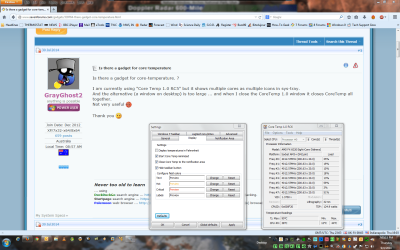
1. Launch CoreTemp and display the window on your desktop. Click Options -> Settings -> System Tray tab. Choose the radio button marked "Highest Temperature". Click "Apply", then "OK".
2. Don't "close" CoreTemp. Minimize it instead. Then Customize your System Tray icons so that CoreTemp is set to "Show Icon and Notifications". Then your temp will show in your systray. If you do want to close CoreTemp, right-click the temp in the systray and then choose "Exit".
 

My Computer

Computer type
PC/Desktop
Computer Manufacturer/Model Number
Self-Built
OS
Win10 Pro 64-bit
CPU
AMD Ryzen 7 3800X
Motherboard
Gigabyte X570 UD
Memory
32 GB Kingston DDR4-2666
Graphics Card(s)
MSI nVidia GT 710 (2GB)
Sound Card
Creative Audigy FX 5.1
Monitor(s) Displays
ViewSonic VG2439Smh 24"
Screen Resolution
1920x1080
Hard Drives
3xWD1TB; 1xSeagate 1TB... all spinning rust
PSU
EVGA 100-W1-0500-KR (500w)
Case
SilverStone PS10 (modified)
Cooling
CPU:AMD Wraith Prism. Case:3x Noctua 120mm
Keyboard
Compaq Professional PS/2
Mouse
Microsoft Basic Optical Mouse 2.0
Internet Speed
Fiber 1Gbit/sec down/up
Antivirus
Avast Free
Browser
FF, Chrome
Other Info
2x LG GH24NSC0 DVD burners, Mackie CR3 monitor speakers
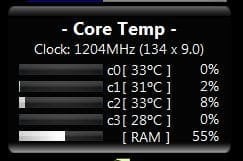
Get the Core Temp gadget

Core Temp - Add Ons

You can configure it any way you like (mine)

ct.jpg

The multiple core temp in tray just set to Only show notifications

A Guy
 

My Computer

Computer type
PC/Desktop
OS
Windows 10 Home x64
CPU
INTEL Core i5-750 Quad-Core 3.37GHz
Motherboard
ASUS P7P55D
Memory
HyperX Fury Black Series 8GB (2 x 4GB) 1866Mhz
Graphics Card(s)
EVGA GeForce GTX 750 Superclocked 1GB 128-Bit GDDR5
Monitor(s) Displays
LG 32MA68HY 32" IPS
Screen Resolution
1920 x 1080
Hard Drives
Samsung 840 Evo 120GB, SEAGATE 500GB Barracuda® 7200.12, SATA 3 Gb/s, 7200 RPM, 16MB cache
PSU
ANTEC TruePower New TP-550, 80 PLUS, 550W
Case
ANTEC Three Hundred Illusion
Cooling
COOLER MASTER Hyper 212 Plus, 4 x 120mm 1 x 140mm Noctua's
Internet Speed
85 + Mbps
Antivirus
Avast
Browser
Vivaldi
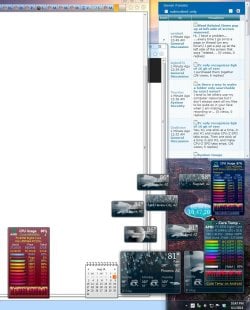
Thanks for the Core Temp Gadgets. They look Great ;)
 

Attachments

  • Core_Temp Gadgets.JPG
    Core_Temp Gadgets.JPG
    187.9 KB · Views: 3

My Computer

Computer type
PC/Desktop
Computer Manufacturer/Model Number
Built them myself, Science Experiments !
OS
Win7 Enterprise, Win7 x86 (Ult 7600), Win7 x64 Ult 7600, TechNet RTM on AMD x64 (2.8Ghz)
CPU
AMD fx8350 4ghz, AMD-32 2400mhz, AMD-64 3200mhz, AMDx64 2.8G
Motherboard
SIS 755, ECS-K8M890M-M (Ult 7600), GigaByte & others
Memory
2gb, 4gb on the Ult 7600, 4gb on Technet RTM, 32gb on FX8350
Graphics Card(s)
Draw my own Graphics, several nVidia cards
Sound Card
on motherboard
Monitor(s) Displays
19" flat scr, 28" I-Inc widescr,22" Emprex Widescr, 23" Acer
Screen Resolution
1280 x 1024, 1440 x 900, 1920 x 1080
Hard Drives
6 pata Ide HD's & 2 Sata HD's
added 80gb external on Ult 7600 computer,
numerous extra 1tb, 2TB, 3Tb SATA HD's
A collection of ext HD Docks w/ HDs
PSU
430w, 550w, 600w, 700, 800, etc
Case
All Generic Full Towers
Cooling
Open Air & a few fans, some w/ colored LEDs
Keyboard
Compaq & Dell recycled from GoodWill
Mouse
Made in China Optical Wired Mouse
Internet Speed
Fast Cable InterNet
Antivirus
AVG Free on 24 different Desktops, NO Problems!
Browser
IE 8 is preferred, but use FireFox sometimes
Other Info
Linksys Routers, switches, & Hubs
Too Many USB Flash Drives to count, Biggest is 64GB !
Eight computers in my home network.
Sixteen computers at my business network.
Linked via TeamViewer !
Lots of old used spare computer parts everywhere!
Looking good Doc ;) You're welcome :)

A Guy
 

My Computer

Computer type
PC/Desktop
OS
Windows 10 Home x64
CPU
INTEL Core i5-750 Quad-Core 3.37GHz
Motherboard
ASUS P7P55D
Memory
HyperX Fury Black Series 8GB (2 x 4GB) 1866Mhz
Graphics Card(s)
EVGA GeForce GTX 750 Superclocked 1GB 128-Bit GDDR5
Monitor(s) Displays
LG 32MA68HY 32" IPS
Screen Resolution
1920 x 1080
Hard Drives
Samsung 840 Evo 120GB, SEAGATE 500GB Barracuda® 7200.12, SATA 3 Gb/s, 7200 RPM, 16MB cache
PSU
ANTEC TruePower New TP-550, 80 PLUS, 550W
Case
ANTEC Three Hundred Illusion
Cooling
COOLER MASTER Hyper 212 Plus, 4 x 120mm 1 x 140mm Noctua's
Internet Speed
85 + Mbps
Antivirus
Avast
Browser
Vivaldi
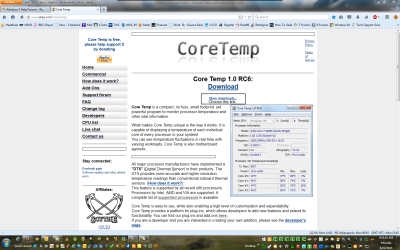
Try Core Temp RC 6. Use the MORE DOWNLOADS link on the website.
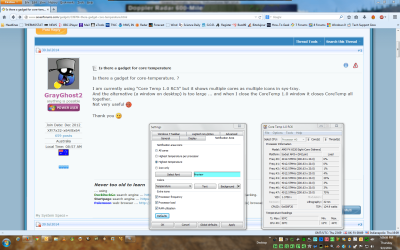
Check the box "Minimize to notification area".
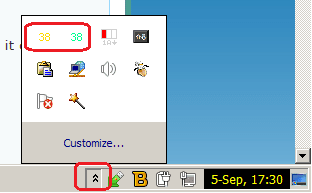
I use the program on all my machines. The little icons just under GMT are my current temps, cpu usage, ram usage and clock speed.
 

Attachments

  • 2014-09-04 19_03_14-Greenshot.png
    2014-09-04 19_03_14-Greenshot.png
    538.4 KB · Views: 3

My Computer

Computer type
PC/Desktop
Computer Manufacturer/Model Number
Bluethunder II
OS
Windows 7 x64 Ultimate and numerous virtual machines
CPU
AMD FX-8350 Vishera 32nm Technology @ 4.2 GHz default
Motherboard
ASUSTeK COMPUTER INC. SABERTOOTH 990FX R2.0 (Socket 942)
Memory
G Skill 32.0GB Dual-Channel DDR3 @ 1204MHz (11-13-13-31)
Graphics Card(s)
EVGA GeForce GTX 960 4GB Super SC ACX 2.0+ with Back Plate
Sound Card
Creative X-Fi Titanium HD Audiophile PCIe
Monitor(s) Displays
LG L227WTG x 3
Screen Resolution
1680 x 1050 16:10
Hard Drives
238GB Samsung850 PRO SATA Disk Device (SSD)
1863GB Seagate ST2000DM 001-1CH164 (SATA)
1397GB Seagate ST1500DL 003-9VT16L(SATA)
466GB Western Digital WDC WD50 03AZEX-00K1GA0 (SATA) x 2
932GB Seagate ST310005 28AS SATA Disk Device (SATA)
PSU
Enermax Revolution87+ 1000 Watts Gold Certified Power Supply
Case
Rocketfish Full Tower
Cooling
Cooler Master Hyper 212 EVO Push Pull 120mm Fans
Keyboard
Logitech K740
Mouse
Logitech G100S Laser LED + Logitech Gamepad F310
Internet Speed
500 mbs down and 30mbs up
Antivirus
Malwarebytes Pro & Avast and MSE on certain Virtual Machines
Browser
Firefox (Main) Chrome, Internet Explorer (Back Up)
Other Info
Logitech X 230 2.1 Stereo System and 5.1 Yamaha RX V2090
B&W DM6 Monitor Speakers + Center and Surround Speakers
Using Mouse Without Borders (Google it)
Set the notification area as I have and you get just the highest temperature.
 

Attachments

  • 2014-09-04 19_09_08-Greenshot.png
    2014-09-04 19_09_08-Greenshot.png
    494.5 KB · Views: 3

My Computer

Computer type
PC/Desktop
Computer Manufacturer/Model Number
Bluethunder II
OS
Windows 7 x64 Ultimate and numerous virtual machines
CPU
AMD FX-8350 Vishera 32nm Technology @ 4.2 GHz default
Motherboard
ASUSTeK COMPUTER INC. SABERTOOTH 990FX R2.0 (Socket 942)
Memory
G Skill 32.0GB Dual-Channel DDR3 @ 1204MHz (11-13-13-31)
Graphics Card(s)
EVGA GeForce GTX 960 4GB Super SC ACX 2.0+ with Back Plate
Sound Card
Creative X-Fi Titanium HD Audiophile PCIe
Monitor(s) Displays
LG L227WTG x 3
Screen Resolution
1680 x 1050 16:10
Hard Drives
238GB Samsung850 PRO SATA Disk Device (SSD)
1863GB Seagate ST2000DM 001-1CH164 (SATA)
1397GB Seagate ST1500DL 003-9VT16L(SATA)
466GB Western Digital WDC WD50 03AZEX-00K1GA0 (SATA) x 2
932GB Seagate ST310005 28AS SATA Disk Device (SATA)
PSU
Enermax Revolution87+ 1000 Watts Gold Certified Power Supply
Case
Rocketfish Full Tower
Cooling
Cooler Master Hyper 212 EVO Push Pull 120mm Fans
Keyboard
Logitech K740
Mouse
Logitech G100S Laser LED + Logitech Gamepad F310
Internet Speed
500 mbs down and 30mbs up
Antivirus
Malwarebytes Pro & Avast and MSE on certain Virtual Machines
Browser
Firefox (Main) Chrome, Internet Explorer (Back Up)
Other Info
Logitech X 230 2.1 Stereo System and 5.1 Yamaha RX V2090
B&W DM6 Monitor Speakers + Center and Surround Speakers
Using Mouse Without Borders (Google it)
@ A Guy :)

How did you get your very slick black "configuration"
- did you use an addon ... the link to Core Temp - Addons lists 7 addons.
I think there are a number of products called "Core Temp"

Mine is ...
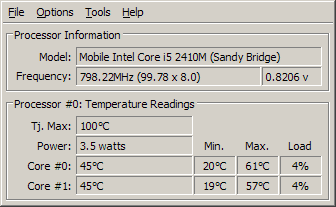
Core Temp 1.0RC5-32-bit ... (by Aurthur Liberman)
... which looks like this
CoreTemp.png details mini version.png

... the second window is 85cm wide about a one-fifth of my laptop screen width
It is also a number of clicks to close it
 

My Computer

Computer type
PC/Desktop
Computer Manufacturer/Model Number
Toshiba, Lenovo (laptops) + 4 rigs
OS
XP Pro (x86) | 7 HP (x86) & (x64) | 7 Pro (x64)
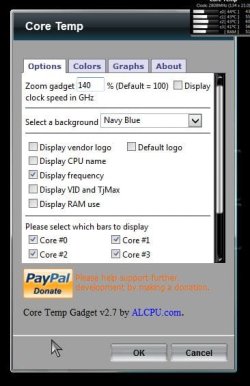
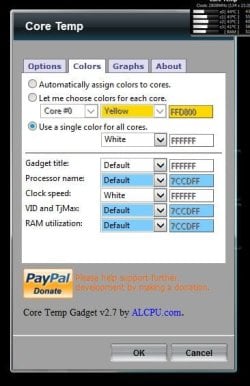
Core Temp Gadget 2.7

It has the ability to show everything, as little as you like, change background colors, fonts, etc.

ct1.jpg

colors.jpg

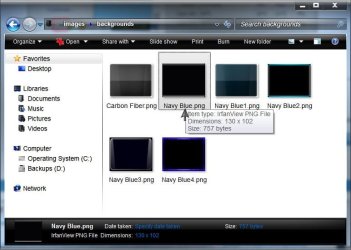
I actually changed one of the blue background images (Navy Blue.png) to a black one renamed the same as the original to get a black background

Navy Blue.jpg

C:\Users\Bill\AppData\Local\Microsoft\Windows Sidebar\Gadgets\CoreTempGadget2.7.gadget\images\backgrounds

Just type shell:gadgets in the start menu search box to get to the gadgets folder

A Guy
 

My Computer

Computer type
PC/Desktop
OS
Windows 10 Home x64
CPU
INTEL Core i5-750 Quad-Core 3.37GHz
Motherboard
ASUS P7P55D
Memory
HyperX Fury Black Series 8GB (2 x 4GB) 1866Mhz
Graphics Card(s)
EVGA GeForce GTX 750 Superclocked 1GB 128-Bit GDDR5
Monitor(s) Displays
LG 32MA68HY 32" IPS
Screen Resolution
1920 x 1080
Hard Drives
Samsung 840 Evo 120GB, SEAGATE 500GB Barracuda® 7200.12, SATA 3 Gb/s, 7200 RPM, 16MB cache
PSU
ANTEC TruePower New TP-550, 80 PLUS, 550W
Case
ANTEC Three Hundred Illusion
Cooling
COOLER MASTER Hyper 212 Plus, 4 x 120mm 1 x 140mm Noctua's
Internet Speed
85 + Mbps
Antivirus
Avast
Browser
Vivaldi
A Guy ... you are a legend :grouphug:

Thank you
 

My Computer

Computer type
PC/Desktop
Computer Manufacturer/Model Number
Toshiba, Lenovo (laptops) + 4 rigs
OS
XP Pro (x86) | 7 HP (x86) & (x64) | 7 Pro (x64)
I keep telling people... :D

Glad I could help ;)

A Guy
 

My Computer

Computer type
PC/Desktop
OS
Windows 10 Home x64
CPU
INTEL Core i5-750 Quad-Core 3.37GHz
Motherboard
ASUS P7P55D
Memory
HyperX Fury Black Series 8GB (2 x 4GB) 1866Mhz
Graphics Card(s)
EVGA GeForce GTX 750 Superclocked 1GB 128-Bit GDDR5
Monitor(s) Displays
LG 32MA68HY 32" IPS
Screen Resolution
1920 x 1080
Hard Drives
Samsung 840 Evo 120GB, SEAGATE 500GB Barracuda® 7200.12, SATA 3 Gb/s, 7200 RPM, 16MB cache
PSU
ANTEC TruePower New TP-550, 80 PLUS, 550W
Case
ANTEC Three Hundred Illusion
Cooling
COOLER MASTER Hyper 212 Plus, 4 x 120mm 1 x 140mm Noctua's
Internet Speed
85 + Mbps
Antivirus
Avast
Browser
Vivaldi
Core Temp install must be done carefuly to avoid PUPs. I wound up not installing it although i am familiar with these PUP installs. There were just too many steps and it triggered my annoyance sensors.
I don't know about the programs it tried to trick me into installing,but any prog that requires that much care is not for beginners, and in my opinion ought to be flagged with a warning any time it is mentioned.
This is a help forum, after all ;)
 

My Computer

Computer type
PC/Desktop
Computer Manufacturer/Model Number
Gateway DX-4710-05
OS
Windows Microsoft Windows 7 Professional 64-bit 7601 Multiprocessor Free Service Pack 17 Pro 64
CPU
Intel(R) Core(TM)2 Quad CPU Q6600 @ 2.40GHz
Motherboard
Gateway G33M05G1 Bios Phoenix - AwardBIOS v6.00PG 8/7/2008
Memory
6.00 GB
Graphics Card(s)
Sapphire HD7870 with one glitched fan
Sound Card
MS High Definition Audio Device
Monitor(s) Displays
Samsung Syncmaster T260 HD
Screen Resolution
1920 x 1200 x 32
PSU
Thermaltake Sp-650P
Case
Gateway
Cooling
Stock
Keyboard
Saitek Eclipse 2
Mouse
SteelSeries Xai with dead LCD
Antivirus
MSE, MBAM
Browser
Google Chrome
Other Info
Libraries Disabled - Startups, Context Menus, etc. customized thanks to Sevenforums!
Core Temp install must be done carefuly to avoid PUPs. I wound up not installing it although i am familiar with these PUP installs. There were just too many steps and it triggered my annoyance sensors.
I don't know about the programs it tried to trick me into installing,but any prog that requires that much care is not for beginners, and in my opinion ought to be flagged with a warning any time it is mentioned.
This is a help forum, after all ;)
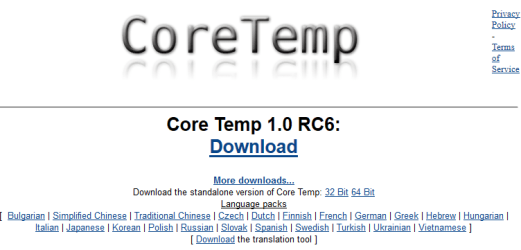
Nope you do not have to go through all that nonsense. See screen shot:
 

Attachments

  • 2015-06-22 09_45_16-Greenshot.png
    2015-06-22 09_45_16-Greenshot.png
    456.6 KB · Views: 3
  • 2015-06-22 10_10_12-Core Temp.png
    2015-06-22 10_10_12-Core Temp.png
    44.6 KB · Views: 1

My Computer

Computer type
PC/Desktop
Computer Manufacturer/Model Number
Bluethunder II
OS
Windows 7 x64 Ultimate and numerous virtual machines
CPU
AMD FX-8350 Vishera 32nm Technology @ 4.2 GHz default
Motherboard
ASUSTeK COMPUTER INC. SABERTOOTH 990FX R2.0 (Socket 942)
Memory
G Skill 32.0GB Dual-Channel DDR3 @ 1204MHz (11-13-13-31)
Graphics Card(s)
EVGA GeForce GTX 960 4GB Super SC ACX 2.0+ with Back Plate
Sound Card
Creative X-Fi Titanium HD Audiophile PCIe
Monitor(s) Displays
LG L227WTG x 3
Screen Resolution
1680 x 1050 16:10
Hard Drives
238GB Samsung850 PRO SATA Disk Device (SSD)
1863GB Seagate ST2000DM 001-1CH164 (SATA)
1397GB Seagate ST1500DL 003-9VT16L(SATA)
466GB Western Digital WDC WD50 03AZEX-00K1GA0 (SATA) x 2
932GB Seagate ST310005 28AS SATA Disk Device (SATA)
PSU
Enermax Revolution87+ 1000 Watts Gold Certified Power Supply
Case
Rocketfish Full Tower
Cooling
Cooler Master Hyper 212 EVO Push Pull 120mm Fans
Keyboard
Logitech K740
Mouse
Logitech G100S Laser LED + Logitech Gamepad F310
Internet Speed
500 mbs down and 30mbs up
Antivirus
Malwarebytes Pro & Avast and MSE on certain Virtual Machines
Browser
Firefox (Main) Chrome, Internet Explorer (Back Up)
Other Info
Logitech X 230 2.1 Stereo System and 5.1 Yamaha RX V2090
B&W DM6 Monitor Speakers + Center and Surround Speakers
Using Mouse Without Borders (Google it)
Ahh - i see now.
I did not understand which link to choose by looking at your screenshot, as "more downloads...choose this link " looks more like a path to PUPs than the simple "Download" directly under the name of the program.
I scrolled back up and saw your post :
"Try Core Temp RC 6. Use the MORE DOWNLOADS link on the website."

I did notice the screenshot from the "gadgets" post by JDobbsy1987 which looks like it has a link to the .zip file for Core Temp RC 6, but had already been to the website and gone through the process of aborting the install.

So, either way it is a deceptive page, even if the program installer is clean.

Edit: I do realize this is listed in the customization forum, so i am not criticizing anyone for suggesting this program. If one is customizing, there are always risks.
 
Last edited:

My Computer

Computer type
PC/Desktop
Computer Manufacturer/Model Number
Gateway DX-4710-05
OS
Windows Microsoft Windows 7 Professional 64-bit 7601 Multiprocessor Free Service Pack 17 Pro 64
CPU
Intel(R) Core(TM)2 Quad CPU Q6600 @ 2.40GHz
Motherboard
Gateway G33M05G1 Bios Phoenix - AwardBIOS v6.00PG 8/7/2008
Memory
6.00 GB
Graphics Card(s)
Sapphire HD7870 with one glitched fan
Sound Card
MS High Definition Audio Device
Monitor(s) Displays
Samsung Syncmaster T260 HD
Screen Resolution
1920 x 1200 x 32
PSU
Thermaltake Sp-650P
Case
Gateway
Cooling
Stock
Keyboard
Saitek Eclipse 2
Mouse
SteelSeries Xai with dead LCD
Antivirus
MSE, MBAM
Browser
Google Chrome
Other Info
Libraries Disabled - Startups, Context Menus, etc. customized thanks to Sevenforums!
Back
Top