
Is there a way to monitor all device's internet connection ?

It doesn't show much alone. Run 3 separate cmd windows, run one ping in each:
Ping -t yourownIP (run in cmd: ipconfig to find out)
Ping -t 192.168.1.254
Ping -t 8.8.8.8

quick question about ipconfig

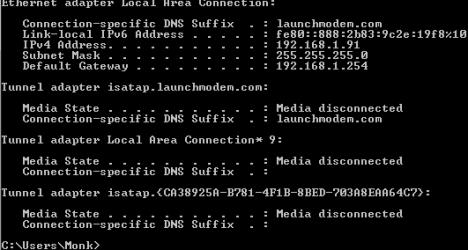
this IPv4 Address is my own IP ?
and this 192.168.1.254 is the router aka Default Gateway ?

Are those 2 correct ?


what the heck is this launchmodem.com ? (website said not found)


As with most things of this nature, I suggest that you take a look at the tools available from Microsoft itself, or more directly the Sysinternals suite by Mark Russinovich

In this case have a look at what is possible with PsTools

Thank you for your help and don't stop there yet ... :) ... I am checking it out ...

only one thing that I know how is the procexp and procmon and the rest seems new to me ... I guess that I need time to study and figure those out :/
 

Attachments
  • IPConfig.PNG
    IPConfig.PNG
    3.4 KB · Views: 19

My Computer My Computer

At a glance

Win 7 Pro 32-bit
Computer type
PC/Desktop
OS
Win 7 Pro 32-bit
See your screenshot:
Your IP Address: 192.168.1.91
Router (Gateway): 192.168.1.254
So 3 cmd windows each pinging one of the addresses (3rd is 8.8.8.8) with -t switch (so it ping continuously)

Launchmodem.com comes from your modem/router.
 

My Computer My Computer

At a glance

Windows 7 Ultimate x64 SP1AMD Phenom 2 1090T2x8GB Kingston HyperX Fury Black 1600Mhz Unga...MSI GTX 970 Gaming 4G
Computer type
PC/Desktop
Computer Manufacturer/Model Number
Custom Build
OS
Windows 7 Ultimate x64 SP1
CPU
AMD Phenom 2 1090T
Motherboard
Gigabyte GA-890FXA-UD5
Memory
2x8GB Kingston HyperX Fury Black 1600Mhz Unganged
Graphics Card(s)
MSI GTX 970 Gaming 4G
Sound Card
Realtek On-Board HD 7.1 Audio / Logitech G35
Monitor(s) Displays
3xAcer GD245HQ
Screen Resolution
1920x1080
Hard Drives
Samsung 850 Pro 512GB SSD - OS /
WD Caviar Black SATA 3 - 1 TBx2 - Dynamic RAID 0 /
WD Caviar Green SATA 2 - 640GBx2 - Dynamic RAID 0 /
WD Caviar Green SATA 2 - 640GB - Internal Backup /
Seagate Barracude SATA 3 - 3TB - External Backup/ Sync
PSU
HighPower 1000W
Case
Cooler Master HAF 932
Cooling
Noctua NH-D14
Keyboard
Logitech G19
Mouse
Logitech G500
Internet Speed
100/4 Mbit Cable (100GB quota)
Antivirus
ZoneAlarm Extreme Security / MBAM Pro / MBAE Free / SAS Free
Browser
IE 11 - Firefox - Chrome
Other Info
Logitech F710/ G27/ G940/ Z5500 // TrackIR 5 // Nvidia 3D Surround Vision
As with most things of this nature, I suggest that you take a look at the tools available from Microsoft itself, or more directly the Sysinternals suite by Mark Russinovich

In this case have a look at what is possible with PsTools

Thank you for the PsTools. Could come in very handy.
 

My Computer My Computer

At a glance

Windows 10 Pro. 64/ version 1709 Windows 7 Pr...Intel i7-6800K @ 4.3Corsair Platinum 16 gig @2400EVGA GTX 1070 OC
Computer type
PC/Desktop
Computer Manufacturer/Model Number
Home made Desktop
OS
Windows 10 Pro. 64/ version 1709 Windows 7 Pro/64
CPU
Intel i7-6800K @ 4.3
Motherboard
ASUS X-99 Deluxe II
Memory
Corsair Platinum 16 gig @2400
Graphics Card(s)
EVGA GTX 1070 OC
Monitor(s) Displays
Asus 27" LED LCD/VE278Q
Screen Resolution
1920-1080 or 1280-720 HDMI
Hard Drives
INTEL SSD 730-240 Gb Sata 3.0/
PSU
EVGA Platium 1200W
Case
Phanteks Luxe Tempered Glass 8 fans/ one radiator
Cooling
XSPC/ Water Cooled CPU
Keyboard
Das 4 Professional
Mouse
Logitech M705/MX Anywhere 2-S
Internet Speed
100 mbits
Antivirus
Microsoft Security Essentials/ Malwarebytes Premium 3.0/ SAS
Browser
I.E. 11 default/Firefox/ ISP Time Warner Cable/Spectrum
Other Info
LG BluRay Burner/
Sound system-KLipsch-THX/
Icy Dock ssd Hot Swap bays.

My Computer My Computer

At a glance

Win 7 Pro 32-bit
Computer type
PC/Desktop
OS
Win 7 Pro 32-bit
I don't know how to use it. Still looking for some instruction that doesn't need programmer skills.
I also get a bunch of agree or disagree boxes and super fast flashes of cmd prompt run as admin.
 

My Computer My Computer

At a glance

Windows 10 Pro. 64/ version 1709 Windows 7 Pr...Intel i7-6800K @ 4.3Corsair Platinum 16 gig @2400EVGA GTX 1070 OC
Computer type
PC/Desktop
Computer Manufacturer/Model Number
Home made Desktop
OS
Windows 10 Pro. 64/ version 1709 Windows 7 Pro/64
CPU
Intel i7-6800K @ 4.3
Motherboard
ASUS X-99 Deluxe II
Memory
Corsair Platinum 16 gig @2400
Graphics Card(s)
EVGA GTX 1070 OC
Monitor(s) Displays
Asus 27" LED LCD/VE278Q
Screen Resolution
1920-1080 or 1280-720 HDMI
Hard Drives
INTEL SSD 730-240 Gb Sata 3.0/
PSU
EVGA Platium 1200W
Case
Phanteks Luxe Tempered Glass 8 fans/ one radiator
Cooling
XSPC/ Water Cooled CPU
Keyboard
Das 4 Professional
Mouse
Logitech M705/MX Anywhere 2-S
Internet Speed
100 mbits
Antivirus
Microsoft Security Essentials/ Malwarebytes Premium 3.0/ SAS
Browser
I.E. 11 default/Firefox/ ISP Time Warner Cable/Spectrum
Other Info
LG BluRay Burner/
Sound system-KLipsch-THX/
Icy Dock ssd Hot Swap bays.
I don't know how to use it. Still looking for some instruction that doesn't need programmer skills.
I also get a bunch of agree or disagree boxes and super fast flashes of cmd prompt run as admin.

Thank you and that is what I get ... it is a shame ... bummer.


I went search and find this is funny

SysInternals Pro: What Are the SysInternals Tools and How Do You Use Them?


We got classes to attend to ... LOL !!! ... Don't be late ... LOL !!!


... oh wow ... yes i do remember this

Remember that time Sony tried to embed rootkits into their music CDs? Yeah, it was a SysInternals utility that first detected the problem, and it was the SysInternals guys that made the announcement. In 2006, Microsoft finally bought the company behind SysInternals, and they continue to provide the utilities for free on their web site.


now I got it to work and thanks to how-to-geek :) ... hope that helps to get started.

I will be back later ... still reading ... at bottom page 1 ... it is AWESOME.
 

My Computer My Computer

At a glance

Win 7 Pro 32-bit
Computer type
PC/Desktop
OS
Win 7 Pro 32-bit
Hey guys - First class is here ... https://technet.microsoft.com/en-us/sysinternals/jj729731

The whole Sysinternals Suite goes back to the early days of windows when system administrators still preferred to use a DOS box to interrogate systems, (sounds like at least last Thursday :p ). A lot of the tools in the suite are still DOS based, as this allows the user to use them in DOS Batch Files and or Powershell Scripts. They can be used from a Command Prompt, but if completed they can sometimes close the box without giving chance to read the output.

A little DOS revision may be needed such as the PIPE commands

Looking at a Simple ping ...

Ping 127.0.0.1 /t >> PingLog.txt This will create a file called PingLog.txt and write the results of the Ping to that file - It will continue until CTRL-C is pressed to stop it - the Single > will send the output to an existing text file.

Homework :p :D https://en.wikipedia.org/wiki/List_of_DOS_commands
 

My Computers My Computers

  • At a glance

    Windows 11 Pro x64 [Latest Release and Releas...Ryzen 9 5950X, 3.8 - 5.2 MHz64GB [2 x 32GB] DDR4 3200MHz4GB NVIDIA GEFORCE GTX 1650 Ti
    Computer type
    PC/Desktop
    Computer Manufacturer/Model Number
    ChillBlast - Custom to my design
    OS
    Windows 11 Pro x64 [Latest Release and Release Preview]
    CPU
    Ryzen 9 5950X, 3.8 - 5.2 MHz
    Motherboard
    Asus Prime X570-Pro
    Memory
    64GB [2 x 32GB] DDR4 3200MHz
    Graphics Card(s)
    4GB NVIDIA GEFORCE GTX 1650 Ti
    Sound Card
    On-board SPDIF to 5.1 System + HDMI [5.1 system]
    Monitor(s) Displays
    32" UHD 32 Bit HDR Monitor + 43" UHD 4K 32Bit HDR TV
    Screen Resolution
    2 x 3840 x 2160 @60Hz
    Hard Drives
    1TB M2 SSD OS, 500GB Fast Access SSD, 2 x 8TB Data + Various Externals from 1TB to 4TB, 10TB NAS
    PSU
    NZXT C750 80 PLUS Gold 750W Modular PSU
    Case
    Workstation Case [Matt Black]
    Cooling
    NZXT Kraken X63 280mm CPU Cooler +2x Quiet Case fans
    Keyboard
    Logitech Wireless MX Keys & K400 + others
    Mouse
    Logitech Wireless MX Master 3S
    Internet Speed
    920 MB Down 50 MB Up
    Antivirus
    BitDefender Total Security Pro
    Browser
    Chrome (always run latest Non-Beta)
    Other Info
    Also run ...
    Laptop - Quad 8GB - Windows 10 Pro x64
    Nexus 7 Android tablet x2
    Samsung 10.2" tablet
    Blackview TAB 8 4G Android Tablet c/w Keyboard
    Wacom Intuos Pro Medium Pen Pad
    Wacom Intuos Pro Small Pen Pad
    Wacom Expresskeys Remote
    Loopdeck+ Graphics Controller
    Shuttle Pro v2 Control
  • At a glance

    Windows 11 Pro x64 Latest RPIntel I7 10750H 5.0GHz32GB [2x16GB] DDR4 2933 MHznVidia GTX1650Ti 4 GB GDDR6
    Computer type
    Laptop
    System Manufacturer/Model Number
    Dell XPS 17 10750H
    OS
    Windows 11 Pro x64 Latest RP
    CPU
    Intel I7 10750H 5.0GHz
    Motherboard
    Dell XPS
    Memory
    32GB [2x16GB] DDR4 2933 MHz
    Graphics Card(s)
    nVidia GTX1650Ti 4 GB GDDR6
    Sound Card
    Stock [Realtek] 4 Speaker
    Monitor(s) Displays
    17" IPS UHD+ Infinity Edge Touchscreen
    Screen Resolution
    3840 x 2400
    Hard Drives
    2TB M2 NVMe, 4TB External + various 500GB & 1TB External NVMe (also have access to spinner HDD from
    PSU
    Stock
    Case
    Stock XPS Aluminium & Carbon Fibre
    Cooling
    Stock - Active Fan Control
    Keyboard
    Backlit + Various Logitech
    Mouse
    Stock Track Pad + Logitech MX Trackball
    Internet Speed
    72 MB Down 18MB Up
    Browser
    Chrome
    Other Info
    Also run ...
    Laptop - Quad 8GB - Windows 10 Pro x64
    Nexus 7 Android tablet x2
    10.2" tablet
    Sony Z3 Android Smartphone
    Wacom Intuos Pro Medium Pen Pad
    Wacom Intuos Pro Small Pen Pad
    Wacom Expresskeys Remote
    Loopdeck+ Graphics Controller
    Shuttle Pro v2 Control Pad
    10TB NAS
Barman: To be honest, I am wondering about its (Sysinternals Suite) relevance to this thread :)

The ping command we already use. PSTools version is psping. Do you have a specific psping command that will ease our job? Because I fail to see a feature that we can use in this case.

Edit: Didn't know the difference of > and >>, thanks for mentioning that one
 

My Computer My Computer

At a glance

Windows 7 Ultimate x64 SP1AMD Phenom 2 1090T2x8GB Kingston HyperX Fury Black 1600Mhz Unga...MSI GTX 970 Gaming 4G
Computer type
PC/Desktop
Computer Manufacturer/Model Number
Custom Build
OS
Windows 7 Ultimate x64 SP1
CPU
AMD Phenom 2 1090T
Motherboard
Gigabyte GA-890FXA-UD5
Memory
2x8GB Kingston HyperX Fury Black 1600Mhz Unganged
Graphics Card(s)
MSI GTX 970 Gaming 4G
Sound Card
Realtek On-Board HD 7.1 Audio / Logitech G35
Monitor(s) Displays
3xAcer GD245HQ
Screen Resolution
1920x1080
Hard Drives
Samsung 850 Pro 512GB SSD - OS /
WD Caviar Black SATA 3 - 1 TBx2 - Dynamic RAID 0 /
WD Caviar Green SATA 2 - 640GBx2 - Dynamic RAID 0 /
WD Caviar Green SATA 2 - 640GB - Internal Backup /
Seagate Barracude SATA 3 - 3TB - External Backup/ Sync
PSU
HighPower 1000W
Case
Cooler Master HAF 932
Cooling
Noctua NH-D14
Keyboard
Logitech G19
Mouse
Logitech G500
Internet Speed
100/4 Mbit Cable (100GB quota)
Antivirus
ZoneAlarm Extreme Security / MBAM Pro / MBAE Free / SAS Free
Browser
IE 11 - Firefox - Chrome
Other Info
Logitech F710/ G27/ G940/ Z5500 // TrackIR 5 // Nvidia 3D Surround Vision
PSping allows you to record the full set of data to a text file which is always useful in a dispute with an ISP - It also allows you to record latency, and bandwidth information, which can be a useful backup

The basic example I quoted in my previous post, (Ping 127.0.0.1 /t >> PingLog.txt ), if the IP address is set to something external to the local network, 8.8.8.8 for example, will produce a network ping log without using the PSPing ;)
 

My Computers My Computers

  • At a glance

    Windows 11 Pro x64 [Latest Release and Releas...Ryzen 9 5950X, 3.8 - 5.2 MHz64GB [2 x 32GB] DDR4 3200MHz4GB NVIDIA GEFORCE GTX 1650 Ti
    Computer type
    PC/Desktop
    Computer Manufacturer/Model Number
    ChillBlast - Custom to my design
    OS
    Windows 11 Pro x64 [Latest Release and Release Preview]
    CPU
    Ryzen 9 5950X, 3.8 - 5.2 MHz
    Motherboard
    Asus Prime X570-Pro
    Memory
    64GB [2 x 32GB] DDR4 3200MHz
    Graphics Card(s)
    4GB NVIDIA GEFORCE GTX 1650 Ti
    Sound Card
    On-board SPDIF to 5.1 System + HDMI [5.1 system]
    Monitor(s) Displays
    32" UHD 32 Bit HDR Monitor + 43" UHD 4K 32Bit HDR TV
    Screen Resolution
    2 x 3840 x 2160 @60Hz
    Hard Drives
    1TB M2 SSD OS, 500GB Fast Access SSD, 2 x 8TB Data + Various Externals from 1TB to 4TB, 10TB NAS
    PSU
    NZXT C750 80 PLUS Gold 750W Modular PSU
    Case
    Workstation Case [Matt Black]
    Cooling
    NZXT Kraken X63 280mm CPU Cooler +2x Quiet Case fans
    Keyboard
    Logitech Wireless MX Keys & K400 + others
    Mouse
    Logitech Wireless MX Master 3S
    Internet Speed
    920 MB Down 50 MB Up
    Antivirus
    BitDefender Total Security Pro
    Browser
    Chrome (always run latest Non-Beta)
    Other Info
    Also run ...
    Laptop - Quad 8GB - Windows 10 Pro x64
    Nexus 7 Android tablet x2
    Samsung 10.2" tablet
    Blackview TAB 8 4G Android Tablet c/w Keyboard
    Wacom Intuos Pro Medium Pen Pad
    Wacom Intuos Pro Small Pen Pad
    Wacom Expresskeys Remote
    Loopdeck+ Graphics Controller
    Shuttle Pro v2 Control
  • At a glance

    Windows 11 Pro x64 Latest RPIntel I7 10750H 5.0GHz32GB [2x16GB] DDR4 2933 MHznVidia GTX1650Ti 4 GB GDDR6
    Computer type
    Laptop
    System Manufacturer/Model Number
    Dell XPS 17 10750H
    OS
    Windows 11 Pro x64 Latest RP
    CPU
    Intel I7 10750H 5.0GHz
    Motherboard
    Dell XPS
    Memory
    32GB [2x16GB] DDR4 2933 MHz
    Graphics Card(s)
    nVidia GTX1650Ti 4 GB GDDR6
    Sound Card
    Stock [Realtek] 4 Speaker
    Monitor(s) Displays
    17" IPS UHD+ Infinity Edge Touchscreen
    Screen Resolution
    3840 x 2400
    Hard Drives
    2TB M2 NVMe, 4TB External + various 500GB & 1TB External NVMe (also have access to spinner HDD from
    PSU
    Stock
    Case
    Stock XPS Aluminium & Carbon Fibre
    Cooling
    Stock - Active Fan Control
    Keyboard
    Backlit + Various Logitech
    Mouse
    Stock Track Pad + Logitech MX Trackball
    Internet Speed
    72 MB Down 18MB Up
    Browser
    Chrome
    Other Info
    Also run ...
    Laptop - Quad 8GB - Windows 10 Pro x64
    Nexus 7 Android tablet x2
    10.2" tablet
    Sony Z3 Android Smartphone
    Wacom Intuos Pro Medium Pen Pad
    Wacom Intuos Pro Small Pen Pad
    Wacom Expresskeys Remote
    Loopdeck+ Graphics Controller
    Shuttle Pro v2 Control Pad
    10TB NAS
Edit: to be clear - this is just to make amends for my post# 12.
It is cool that the OP has an interest in command line stuff.

A summary of certain posts:

post #2 - simple constant ping
post #3 - include router in another simple constant ping
post #4 thru #9 - some Q&A
post #10 - the OP asks a question - in bold letters no less.
(nothing wrong with bold letters)
post #11 - answers post #10 with a portable app that works
(crashed for me upon exit - but works)

post #12 - I did not mean to discourage the use of 3rd party apps

post #14 - more details about how to do post #3
post #15 - OP did post #14 and finds an app
post #17 - OP finds another app

I'll skip to the present:
The app is post #17 does what was asked for in posts #3 and #10. You tell it a target IP (or select one of the presets). It seems to do one tracert and then constantly pings/plots each IP from that trace. It is pretty cool. However, it might confuse the AT&T support staff. Running two or three copies of the portable app in post #11 might be better. I'll let the OP decide.


The OP's request in post #10 can be met via DOS if you include date/time environmental variables.
 

My Computer My Computer

At a glance

W7 Pro SP1 64biti78GBIntel HD Graphics
Computer type
Laptop
Computer Manufacturer/Model Number
Employer provided Dell Latitude
OS
W7 Pro SP1 64bit
CPU
i7
Memory
8GB
Graphics Card(s)
Intel HD Graphics
Hard Drives
crappy SSD
Antivirus
Employer mandated Symantec Endpoint Protection
Browser
Pale Moon 64bit, IE11 64bit & Chrome 64bit
Well-Said, UsernameIssues ... well-said

Dos, Ping Monitor and Ping Plotter ... I just need alittle more time to mess/test around those 3 ... until I get a strong grip of it ... then recording it ... and will speak to AT&T about DSL is being unstable/fluctuating or/and Miniclip about robbing my pool coins in game in higher (high risk) tiers and getting disconnecting on purpose ... all that with (hopefully) no loose ends (very solid information) whether "it is NOT my computer/router" or "hard evidence about who is disconnecting/reconnecting the internet line" etc etc


... it just takes time and gathering it up to get ready to battle with them (or my computer) in a peaceful way.

The supreme art of war is to subdue the enemy without fighting.
-Sun Tzu


I just hate being cheated.
 

My Computer My Computer

At a glance

Win 7 Pro 32-bit
Computer type
PC/Desktop
OS
Win 7 Pro 32-bit
you know how pandora or netflix buffering to avoid pausing ...

well, this might not be possible ... can we buffering the "internet connection" to avoid disconnecting ?

:huh:

One minute later of thinking about that ... I laughed ... that is a very smart idea, but not possible, correct ?
 

My Computer My Computer

At a glance

Win 7 Pro 32-bit
Computer type
PC/Desktop
OS
Win 7 Pro 32-bit
Well, it has to be one hell of a machine to buffer Internet connection as it has to anticipate what you will do next. Netflix can buffer because it knows what you have requested and what comes next.
 

My Computer My Computer

At a glance

Windows 7 Ultimate x64 SP1AMD Phenom 2 1090T2x8GB Kingston HyperX Fury Black 1600Mhz Unga...MSI GTX 970 Gaming 4G
Computer type
PC/Desktop
Computer Manufacturer/Model Number
Custom Build
OS
Windows 7 Ultimate x64 SP1
CPU
AMD Phenom 2 1090T
Motherboard
Gigabyte GA-890FXA-UD5
Memory
2x8GB Kingston HyperX Fury Black 1600Mhz Unganged
Graphics Card(s)
MSI GTX 970 Gaming 4G
Sound Card
Realtek On-Board HD 7.1 Audio / Logitech G35
Monitor(s) Displays
3xAcer GD245HQ
Screen Resolution
1920x1080
Hard Drives
Samsung 850 Pro 512GB SSD - OS /
WD Caviar Black SATA 3 - 1 TBx2 - Dynamic RAID 0 /
WD Caviar Green SATA 2 - 640GBx2 - Dynamic RAID 0 /
WD Caviar Green SATA 2 - 640GB - Internal Backup /
Seagate Barracude SATA 3 - 3TB - External Backup/ Sync
PSU
HighPower 1000W
Case
Cooler Master HAF 932
Cooling
Noctua NH-D14
Keyboard
Logitech G19
Mouse
Logitech G500
Internet Speed
100/4 Mbit Cable (100GB quota)
Antivirus
ZoneAlarm Extreme Security / MBAM Pro / MBAE Free / SAS Free
Browser
IE 11 - Firefox - Chrome
Other Info
Logitech F710/ G27/ G940/ Z5500 // TrackIR 5 // Nvidia 3D Surround Vision
Nope - can't buffer like that.

Pick whatever tool you want, gather some data about the outages and contact customer support.

Let us know how it goes.
 

My Computer My Computer

At a glance

W7 Pro SP1 64biti78GBIntel HD Graphics
Computer type
Laptop
Computer Manufacturer/Model Number
Employer provided Dell Latitude
OS
W7 Pro SP1 64bit
CPU
i7
Memory
8GB
Graphics Card(s)
Intel HD Graphics
Hard Drives
crappy SSD
Antivirus
Employer mandated Symantec Endpoint Protection
Browser
Pale Moon 64bit, IE11 64bit & Chrome 64bit
Back
Top