Solved Is there a way to set the Gannt chart to open automatically On launch

hollyoaks777

New member
Member
VIP
Local time
4:58 PM
Messages
340
My calender does not open automatically on lanch i have tried a repair and did not fix the problem. Is there a way to set the Gannt chart and timeline to open automatically On launch of the programm
Thank you in advance
 

My Computer My Computer

At a glance

windows 7
OS
windows 7
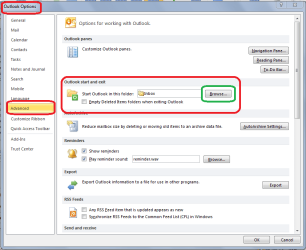
Touch the File tab (top left), then Options.

Select Advanced from the list on the left, then Outlook Start and Exit > Start Outlook in this folder > touch the browse button and select Calendar from the list.

Re-start Outlook - it should now open with you selected calendar view. :)
.
.
 

Attachments

  • calendar start.PNG
    calendar start.PNG
    25.7 KB · Views: 2

My Computer My Computer

At a glance

Windows 7 Home Premium 64bitIntel(R) Core(TM) i3-2120 CPU @ 3.30GHz3.00 GB(1) Intel(R) HD Graphics (2) VNC Mirror Driver
Computer type
PC/Desktop
Computer Manufacturer/Model Number
Packard Bell
OS
Windows 7 Home Premium 64bit
CPU
Intel(R) Core(TM) i3-2120 CPU @ 3.30GHz
Motherboard
Packard Bell IPISB-AG
Memory
3.00 GB
Graphics Card(s)
(1) Intel(R) HD Graphics (2) VNC Mirror Driver
Sound Card
Realtek High Definition Audio
Monitor(s) Displays
AIO LCD
Screen Resolution
1920 x 1080
Hard Drives
WDC WD10EADX-22TDHB0 ATA Device
Fixed hard disk media
4 partitions
931.51 GB
Keyboard
Wireless
Mouse
Wireless
Antivirus
Microsoft Security Essentials
Browser
IE; Firefox
Other Info
Also:
Samsung N220 Plus Netbook - Windows 7 Home
HP laptop
iPad 5
Touch the File tab (top left), then Options.

Select Advanced from the list on the left, then Outlook Start and Exit > Start Outlook in this folder > touch the browse button and select Calendar from the list.

Re-start Outlook - it should now open with you selected calendar view. :)
.
.
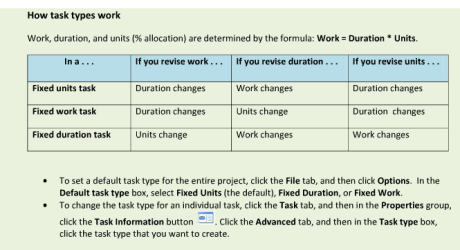
Very sorry mate it's about Microsoft project 2010. I have fixed it now but i can't get duration to go up in days at all now
 

My Computer My Computer

At a glance

windows 7
OS
windows 7

Attachments

  • Project schedules.PNG
    Project schedules.PNG
    16 KB · Views: 2

My Computer My Computer

At a glance

Windows 7 Home Premium 64bitIntel(R) Core(TM) i3-2120 CPU @ 3.30GHz3.00 GB(1) Intel(R) HD Graphics (2) VNC Mirror Driver
Computer type
PC/Desktop
Computer Manufacturer/Model Number
Packard Bell
OS
Windows 7 Home Premium 64bit
CPU
Intel(R) Core(TM) i3-2120 CPU @ 3.30GHz
Motherboard
Packard Bell IPISB-AG
Memory
3.00 GB
Graphics Card(s)
(1) Intel(R) HD Graphics (2) VNC Mirror Driver
Sound Card
Realtek High Definition Audio
Monitor(s) Displays
AIO LCD
Screen Resolution
1920 x 1080
Hard Drives
WDC WD10EADX-22TDHB0 ATA Device
Fixed hard disk media
4 partitions
931.51 GB
Keyboard
Wireless
Mouse
Wireless
Antivirus
Microsoft Security Essentials
Browser
IE; Firefox
Other Info
Also:
Samsung N220 Plus Netbook - Windows 7 Home
HP laptop
iPad 5
There is a Quick Reference Guide in the link below - page 5 (illustration below) seems to explain how to set the duration:
Quick Reference Guide for Microsoft Project 2010

Also, excellent information here:
Getting Started With Microsoft Project 2010 - How-To Geek

.
.
got that now how do i keep the column widths without having to save project, it always asks me to save project when i have adjusted them. I have tried view save view but it still asks me to save project. Thank you in advance
 

My Computer My Computer

At a glance

windows 7
OS
windows 7
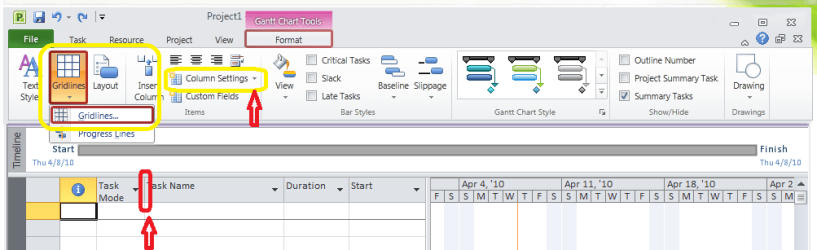
I don't actually have Project, but my best guess would be to either hover your cursor at the top of a column divider until you see arrows pointing to the right and left, then right-click and drag the column to the desired width, or try the column settings or grid-lines.

Maybe I'll download a trial copy. ;)
.
.
 

Attachments

  • Project Columns.PNG
    Project Columns.PNG
    22.1 KB · Views: 4

My Computer My Computer

At a glance

Windows 7 Home Premium 64bitIntel(R) Core(TM) i3-2120 CPU @ 3.30GHz3.00 GB(1) Intel(R) HD Graphics (2) VNC Mirror Driver
Computer type
PC/Desktop
Computer Manufacturer/Model Number
Packard Bell
OS
Windows 7 Home Premium 64bit
CPU
Intel(R) Core(TM) i3-2120 CPU @ 3.30GHz
Motherboard
Packard Bell IPISB-AG
Memory
3.00 GB
Graphics Card(s)
(1) Intel(R) HD Graphics (2) VNC Mirror Driver
Sound Card
Realtek High Definition Audio
Monitor(s) Displays
AIO LCD
Screen Resolution
1920 x 1080
Hard Drives
WDC WD10EADX-22TDHB0 ATA Device
Fixed hard disk media
4 partitions
931.51 GB
Keyboard
Wireless
Mouse
Wireless
Antivirus
Microsoft Security Essentials
Browser
IE; Firefox
Other Info
Also:
Samsung N220 Plus Netbook - Windows 7 Home
HP laptop
iPad 5
sorted thanks to all who posted. Thank you very much
 

My Computer My Computer

At a glance

windows 7
OS
windows 7
Back
Top