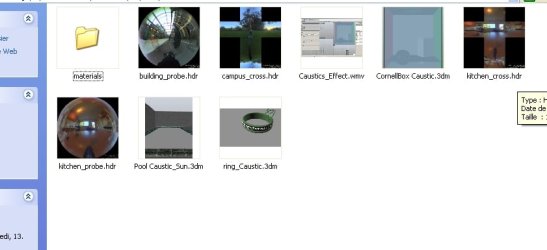
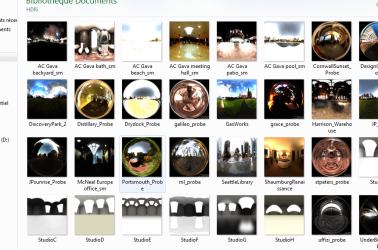
Is there a way to view HDR's as thumbnails in Windows Explorer

perfectude

New member
Local time
12:42 PM
Messages
7
Hi
Is there a way to view HDR's as thumbnails in Windows Explorer, seems you need to download the latest Directx SDK
I have Direct x11:
Operating System: Windows 7 Édition Intégrale 64-bit
Processor: Intel(R) Core(TM) i7 CPU 880 @ 3.07GHz (8 CPUs), ~3.1GHz
Memory: 12288MB RAM
Available OS Memory: 12248MB RAM
DirectX Version: DirectX 11
Graphic: Geforce GTX 460

Any suggestions?

Thank you very much for your time
 

Attachments

  • Capture.PNG
    Capture.PNG
    10.7 KB · Views: 43

My Computer My Computer

At a glance

Windows 7 Ultimate x64i7 3.06ghzNvudia
Computer Manufacturer/Model Number
dell xps
OS
Windows 7 Ultimate x64
CPU
i7 3.06ghz
Graphics Card(s)
Nvudia
I don't see how DirectX is involved in displaying HDR images. Where are you getting that notion?

What are the extensions on the files you are trying to thumbnail?
 

My Computer My Computer

At a glance

XP / Win7 x64 ProIntel Quad-Core Q9450 @ 3.2GHz2x2GB GSkill DDR2NVIDIA GeForce 8600 GTS (EVGA)
OS
XP / Win7 x64 Pro
CPU
Intel Quad-Core Q9450 @ 3.2GHz
Motherboard
Asus P5-E
Memory
2x2GB GSkill DDR2
Graphics Card(s)
NVIDIA GeForce 8600 GTS (EVGA)
Monitor(s) Displays
Dell 2408WFP
Screen Resolution
1920x1200
hi

extension: .hdr or .hdri

found this:
"Just update your DirectX to the latest versions and the dll will register just use REGSVR32 TXVIEW.DLL (no need to enter the full path).

I copied my txview.dll in the \Windows\System32 folder, then opened a command prompt, changed directory to C:\Windows\System32 and typed regsvr32 txview.dll


Works like a charm!! HDRI & TGA thumbnail preview in the Windows Explorer!! Yaaay!"

what do you think that was a post on a CGI forum not a windows 7 forum...:rolleyes:


My Computer My Computer

At a glance

Windows 7 Ultimate x64i7 3.06ghzNvudia
Computer Manufacturer/Model Number
dell xps
OS
Windows 7 Ultimate x64
CPU
i7 3.06ghz
Graphics Card(s)
Nvudia
What program is used to create and edit these files?
 

My Computer My Computer

At a glance

XP / Win7 x64 ProIntel Quad-Core Q9450 @ 3.2GHz2x2GB GSkill DDR2NVIDIA GeForce 8600 GTS (EVGA)
OS
XP / Win7 x64 Pro
CPU
Intel Quad-Core Q9450 @ 3.2GHz
Motherboard
Asus P5-E
Memory
2x2GB GSkill DDR2
Graphics Card(s)
NVIDIA GeForce 8600 GTS (EVGA)
Monitor(s) Displays
Dell 2408WFP
Screen Resolution
1920x1200
it is used for rendering and stands for
High Dynamique Resolution Image HDRI

it is an image
Thanks for your help
 

My Computer My Computer

At a glance

Windows 7 Ultimate x64i7 3.06ghzNvudia
Computer Manufacturer/Model Number
dell xps
OS
Windows 7 Ultimate x64
CPU
i7 3.06ghz
Graphics Card(s)
Nvudia
I know what HDR is, but what program was used to create or edit these files? You're talking about 3D rendering applications to view them, which I've never had to use for HDR pictures I've produced.

Or did you just download them?

It appears that there are no freely available win 7 x64 codecs for hdr or hdri files, which is obviously the problem. So, you'd need a program installed that can edit or create these files with the codecs in tow, which is why I asked the above question.
 

My Computer My Computer

At a glance

XP / Win7 x64 ProIntel Quad-Core Q9450 @ 3.2GHz2x2GB GSkill DDR2NVIDIA GeForce 8600 GTS (EVGA)
OS
XP / Win7 x64 Pro
CPU
Intel Quad-Core Q9450 @ 3.2GHz
Motherboard
Asus P5-E
Memory
2x2GB GSkill DDR2
Graphics Card(s)
NVIDIA GeForce 8600 GTS (EVGA)
Monitor(s) Displays
Dell 2408WFP
Screen Resolution
1920x1200
I just want to see them in the windows explorer files... I use them for rendering and it hard to remember what they look like if I dont see them in thumbs
They can be produced with a free prog called HDR Shop
 

My Computer My Computer

At a glance

Windows 7 Ultimate x64i7 3.06ghzNvudia
Computer Manufacturer/Model Number
dell xps
OS
Windows 7 Ultimate x64
CPU
i7 3.06ghz
Graphics Card(s)
Nvudia
Ok, so you use them for rendering with a certain program that you still haven't stated... If that particular program doesn't include the codecs necessary to display them as thumbnails on Win 7 x64, then your only hope is to find an x64 dll/codec/utility like you already have done (txviewer) and try installing it in compatibility mode to see if it works. Try downloading that for Vista (or XP) x64 and install in compatibility mode. I doubt it will work, but it's worth a shot.

http://www.sevenforums.com/tutorials/316-compatibility-mode.html

Codecs for different raw files on Win 7 x64 are hard to come by. For instance, there aren't any RAW codecs for x64 that allow RAW image thumbnailing in explorer, either. If nothing works, your only option may be to find a program that can convert them to jpegs so they can be thumbnailed in explorer.
 

My Computer My Computer

At a glance

XP / Win7 x64 ProIntel Quad-Core Q9450 @ 3.2GHz2x2GB GSkill DDR2NVIDIA GeForce 8600 GTS (EVGA)
OS
XP / Win7 x64 Pro
CPU
Intel Quad-Core Q9450 @ 3.2GHz
Motherboard
Asus P5-E
Memory
2x2GB GSkill DDR2
Graphics Card(s)
NVIDIA GeForce 8600 GTS (EVGA)
Monitor(s) Displays
Dell 2408WFP
Screen Resolution
1920x1200
Thanks
I see them fine in my 3d programs, I want to see them in explorer..

I dont know why it would be relevant to state the 3d render program to view image thumbs in explorer, any way here they are:

Maya 2011 Ultimate with Mental Ray and Vray
Rhinoceros 3d with Vray

Thanks for your help anyway installing and regestering dll is not my thing

Used to work just fine in xp pro..

Best
 

Attachments

  • 12325.jpg
    12325.jpg
    28.5 KB · Views: 116
Last edited:

My Computer My Computer

At a glance

Windows 7 Ultimate x64i7 3.06ghzNvudia
Computer Manufacturer/Model Number
dell xps
OS
Windows 7 Ultimate x64
CPU
i7 3.06ghz
Graphics Card(s)
Nvudia
I dont know why it would be relevant to state the 3d render program to view image thumbs in explorer, any way here they are:

Maya 2011 Ultimate with Mental Ray and Vray
Rhinoceros 3d with Vray

FliGi7 said:
If that particular program doesn't include the codecs necessary to display them as thumbnails on Win 7 x64, then your only hope is to find an x64 dll/codec/utility like you already have done (txviewer) and try installing it in compatibility mode to see if it works.

That's why it is relevant. Sometimes the programs used to create and edit these types of files will install their own codecs or dlls, which will allow them to be thumbnailed in explorer.

Like I said, unfortunately there is a lack of image codec support for Win 7 x64, of which these files fall into. So, it appears at this point that you'll either have to convert them to jpegs, try installing txviewer in compatibility mode like I said earlier, or just view them through your specific 3d editing programs.
 

My Computer My Computer

At a glance

XP / Win7 x64 ProIntel Quad-Core Q9450 @ 3.2GHz2x2GB GSkill DDR2NVIDIA GeForce 8600 GTS (EVGA)
OS
XP / Win7 x64 Pro
CPU
Intel Quad-Core Q9450 @ 3.2GHz
Motherboard
Asus P5-E
Memory
2x2GB GSkill DDR2
Graphics Card(s)
NVIDIA GeForce 8600 GTS (EVGA)
Monitor(s) Displays
Dell 2408WFP
Screen Resolution
1920x1200

Attachments

  • 52.PNG
    52.PNG
    131.9 KB · Views: 65

My Computer My Computer

At a glance

Windows 7 Ultimate x64i7 3.06ghzNvudia
Computer Manufacturer/Model Number
dell xps
OS
Windows 7 Ultimate x64
CPU
i7 3.06ghz
Graphics Card(s)
Nvudia
Excellent. Glad I could at least keep the thoughts going until you found something.
 

My Computer My Computer

At a glance

XP / Win7 x64 ProIntel Quad-Core Q9450 @ 3.2GHz2x2GB GSkill DDR2NVIDIA GeForce 8600 GTS (EVGA)
OS
XP / Win7 x64 Pro
CPU
Intel Quad-Core Q9450 @ 3.2GHz
Motherboard
Asus P5-E
Memory
2x2GB GSkill DDR2
Graphics Card(s)
NVIDIA GeForce 8600 GTS (EVGA)
Monitor(s) Displays
Dell 2408WFP
Screen Resolution
1920x1200
Back
Top