
Is there an actual fix to the 80070002 update error?

My Computer My Computer

At a glance

W7 home premium 32bit/W7HP 64bit/w10 tp insid...E5300 dual core3gbNvidia Geforce 7100 Nforce 630i
Computer type
PC/Desktop
Computer Manufacturer/Model Number
medionl/Aspire 6930G/acer x55a
OS
W7 home premium 32bit/W7HP 64bit/w10 tp insider ring
CPU
E5300 dual core
Motherboard
medion MS7366
Memory
3gb
Graphics Card(s)
Nvidia Geforce 7100 Nforce 630i
Monitor(s) Displays
avixc
Internet Speed
n (isp resticted to 72)
Antivirus
mse/pands
Browser
palemoon
Other Info
Belkin Fd7050 n USB using Railink RT2870 drivers, more upto date
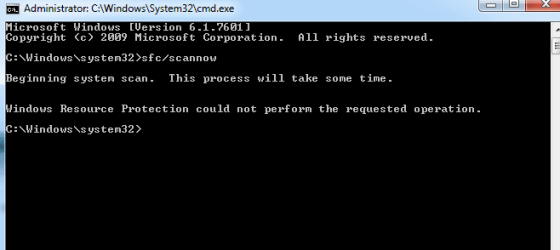
Which is the actual SURT report. sfc did not work again.
 

Attachments

  • sfc 03-11-16.PNG
    sfc 03-11-16.PNG
    6 KB · Views: 14

My Computer My Computer

At a glance

Windows 7 64 bitIntel G32588 mb
Computer type
PC/Desktop
Computer Manufacturer/Model Number
Custom
OS
Windows 7 64 bit
CPU
Intel G3258
Motherboard
Gigabyte
Memory
8 mb
Hard Drives
Seagate
Antivirus
Avast
Browser
Firefox
SURT is the Blue link in my last post

Roy
 

My Computer My Computer

At a glance

W7 home premium 32bit/W7HP 64bit/w10 tp insid...E5300 dual core3gbNvidia Geforce 7100 Nforce 630i
Computer type
PC/Desktop
Computer Manufacturer/Model Number
medionl/Aspire 6930G/acer x55a
OS
W7 home premium 32bit/W7HP 64bit/w10 tp insider ring
CPU
E5300 dual core
Motherboard
medion MS7366
Memory
3gb
Graphics Card(s)
Nvidia Geforce 7100 Nforce 630i
Monitor(s) Displays
avixc
Internet Speed
n (isp resticted to 72)
Antivirus
mse/pands
Browser
palemoon
Other Info
Belkin Fd7050 n USB using Railink RT2870 drivers, more upto date
Yes I ran that but for some reason the CBS.zip file isn't uploading
 

My Computer My Computer

At a glance

Windows 7 64 bitIntel G32588 mb
Computer type
PC/Desktop
Computer Manufacturer/Model Number
Custom
OS
Windows 7 64 bit
CPU
Intel G3258
Motherboard
Gigabyte
Memory
8 mb
Hard Drives
Seagate
Antivirus
Avast
Browser
Firefox

My Computer My Computer

At a glance

W7 home premium 32bit/W7HP 64bit/w10 tp insid...E5300 dual core3gbNvidia Geforce 7100 Nforce 630i
Computer type
PC/Desktop
Computer Manufacturer/Model Number
medionl/Aspire 6930G/acer x55a
OS
W7 home premium 32bit/W7HP 64bit/w10 tp insider ring
CPU
E5300 dual core
Motherboard
medion MS7366
Memory
3gb
Graphics Card(s)
Nvidia Geforce 7100 Nforce 630i
Monitor(s) Displays
avixc
Internet Speed
n (isp resticted to 72)
Antivirus
mse/pands
Browser
palemoon
Other Info
Belkin Fd7050 n USB using Railink RT2870 drivers, more upto date
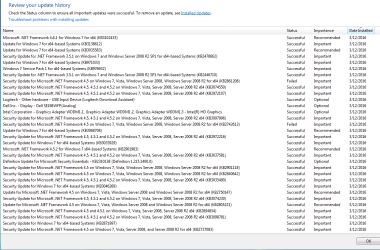
I did a search for KB245826 and it came up empty. But looking at my CBS file there are also a ton of errors. I am going to check my other drive that I just did a clean install on and can't do updates on that either and see what the CBS says.
 

My Computer My Computer

At a glance

Windows 7 64 bitIntel G32588 mb
Computer type
PC/Desktop
Computer Manufacturer/Model Number
Custom
OS
Windows 7 64 bit
CPU
Intel G3258
Motherboard
Gigabyte
Memory
8 mb
Hard Drives
Seagate
Antivirus
Avast
Browser
Firefox
Here is the CBS text file
 

My Computer My Computer

At a glance

Windows 7 64 bitIntel G32588 mb
Computer type
PC/Desktop
Computer Manufacturer/Model Number
Custom
OS
Windows 7 64 bit
CPU
Intel G3258
Motherboard
Gigabyte
Memory
8 mb
Hard Drives
Seagate
Antivirus
Avast
Browser
Firefox
Sounds like a corrupt copy or a bad boot config in that case.
When you install W7 NO external devices should be connected.

Roy
 

My Computer My Computer

At a glance

W7 home premium 32bit/W7HP 64bit/w10 tp insid...E5300 dual core3gbNvidia Geforce 7100 Nforce 630i
Computer type
PC/Desktop
Computer Manufacturer/Model Number
medionl/Aspire 6930G/acer x55a
OS
W7 home premium 32bit/W7HP 64bit/w10 tp insider ring
CPU
E5300 dual core
Motherboard
medion MS7366
Memory
3gb
Graphics Card(s)
Nvidia Geforce 7100 Nforce 630i
Monitor(s) Displays
avixc
Internet Speed
n (isp resticted to 72)
Antivirus
mse/pands
Browser
palemoon
Other Info
Belkin Fd7050 n USB using Railink RT2870 drivers, more upto date
My DVD shouldn't be corrupt, updates used to work. On my clean install I did have my printer connected, and my wireless mouse. On my current setup I did change the CPU but the update errors occurred much later after I did that. I am going to do another clean install on my other drive, take out everything and no printer and see what happens, though the only internal card I have installed is a Creative audio card. This is nuts!
 

My Computer My Computer

At a glance

Windows 7 64 bitIntel G32588 mb
Computer type
PC/Desktop
Computer Manufacturer/Model Number
Custom
OS
Windows 7 64 bit
CPU
Intel G3258
Motherboard
Gigabyte
Memory
8 mb
Hard Drives
Seagate
Antivirus
Avast
Browser
Firefox
Here is the CBS file and sfc scan of my clean install as well as my update log. I'm able to do updates after the sfc scan but some didn't install and some I had to try a few times. I'm assuming some aren't applicable and will try and download from the MS website after seeing what they're for.
 

Attachments

  • Snip 1 sfc before updates.PNG
    Snip 1 sfc before updates.PNG
    7.6 KB · Views: 7
  • Capture Updates 1 of 2 on 03-16.PNG
    Capture Updates 1 of 2 on 03-16.PNG
    30.9 KB · Views: 0
  • Capture Updates 2 of 2 on 03-12-16.PNG
    Capture Updates 2 of 2 on 03-12-16.PNG
    31.3 KB · Views: 0

My Computer My Computer

At a glance

Windows 7 64 bitIntel G32588 mb
Computer type
PC/Desktop
Computer Manufacturer/Model Number
Custom
OS
Windows 7 64 bit
CPU
Intel G3258
Motherboard
Gigabyte
Memory
8 mb
Hard Drives
Seagate
Antivirus
Avast
Browser
Firefox
Hi Brian,
Did ALL of these installs come from an image!

Its showing that certain entries are Sandboxed, which possibly means that an AV was running when the copy was made.
CBS Opened cabinet package, package directory:
C:\Windows\TEMP\IE1D355.tmp\KB2834140\, sandbox location:

Its also showing as being a small business server edition
2016-03-11 20:12:26, Info CBS Appl: Package: Microsoft-Windows-IIS-WebServer
-AddOn-Package~31bf3856ad364e35~amd64~~6.1.7601.17514,
Update: IIS-FTPServer, Applicable: NeedsParent, Disposition: Staged

2016-03-11 20:12:26, Info CBS Failed to find localized custom property bag
[HRESULT = 0x80070490 - ERROR_NOT_FOUND
(WUClient-SelfUpdate-Aux-MiniLP)

It cant get the right permissions.

Roy
 

My Computer My Computer

At a glance

W7 home premium 32bit/W7HP 64bit/w10 tp insid...E5300 dual core3gbNvidia Geforce 7100 Nforce 630i
Computer type
PC/Desktop
Computer Manufacturer/Model Number
medionl/Aspire 6930G/acer x55a
OS
W7 home premium 32bit/W7HP 64bit/w10 tp insider ring
CPU
E5300 dual core
Motherboard
medion MS7366
Memory
3gb
Graphics Card(s)
Nvidia Geforce 7100 Nforce 630i
Monitor(s) Displays
avixc
Internet Speed
n (isp resticted to 72)
Antivirus
mse/pands
Browser
palemoon
Other Info
Belkin Fd7050 n USB using Railink RT2870 drivers, more upto date
Hi Roy, not sure what you mean by image? These installs were done through Windows Update. I may have had Firefox open when I was doing updates, had my TV guide open and should have had it closed. The only antivirus I have on this setup is MSE and it actually had an update that installed as well.

Why this would show as anything other than Win 7 Home Premium I have no idea.

It seems to be working okay at this point but took running sfc to be able to get updates.
 

My Computer My Computer

At a glance

Windows 7 64 bitIntel G32588 mb
Computer type
PC/Desktop
Computer Manufacturer/Model Number
Custom
OS
Windows 7 64 bit
CPU
Intel G3258
Motherboard
Gigabyte
Memory
8 mb
Hard Drives
Seagate
Antivirus
Avast
Browser
Firefox
Windows Update error w/"clean install"

When you clean installed W7 SP-1 you were not given the latest version of Windows Updater. This alone WILL cause a failure/error. Microsoft has a solution, but it is buried in the FIXIT and or info on their website.
On the Microsoft site navigate to find Windows 6.1-KB3102810-x64.msu (3.2MB).
This is the solution I used as it is a complete replacement for the version that was not properly updated. MS says that the Updater should update itself but this sometimes does not happen. The You can determine which files you have by looking in System32 for wuaueng.dll and wuauclt. These files should have dates of 9/25/15, after installing the replacement.

Warning: Microsoft continues to sneak Windows 10 offers. During a fresh/clean install of W7 Pro, I went thru over 200 updates and found the ones listed elsewhere here on the Forum. It is very tedious to do this but well worth it as one will find things that do not apply to most users everyday needs.
 

My Computer My Computer

At a glance

Windows 7 Enterprise 64bit Desktops; Windows ...AMD Athlon 2 X3; I5-6200 6th gen (Dell)8 Gig Desktop, 8Gig Laptop, 16Gig LaptopRadeon R5450 1Gig
Computer type
PC/Desktop
Computer Manufacturer/Model Number
Custom Desktop (2 alike) Dell inspiron 13" W10 Laptop Dell Inspiron 17 5759
OS
Windows 7 Enterprise 64bit Desktops; Windows 7 Professional 64Bit 17"Laptop
CPU
AMD Athlon 2 X3; I5-6200 6th gen (Dell)
Motherboard
Gigabyte GA 78LMT-USB3 (2 Desktops)
Memory
8 Gig Desktop, 8Gig Laptop, 16Gig Laptop
Graphics Card(s)
Radeon R5450 1Gig
Sound Card
Creative SB X-Fi Titanium Extreme Audio Desktop 1
Monitor(s) Displays
Dell 2419
Screen Resolution
1920x1080
Hard Drives
Crucial M500 500GB SSD Desktop 1 and Laptops
Samsung 850EVO 250GB - Desktop 2
PSU
Thermaltake 600watt
Case
Rosewill
Cooling
Scythe Typhoon 120mm
Keyboard
Kensington
Mouse
Logitech M310
Internet Speed
50/50
Antivirus
Avast
Browser
Firefox 68
Thanks for the info JC. I installed KB3102810 though the files you mentioned to look for were from 02/12/16, at least that's when they were modified. Why this wouldn't be an immediate fix from MS is ridiculous.

I am going to try and find Win 10 files to delete because as much as I dislike Win 7 compared to XP which was rock solid, I don't want to go anywhere near 10.
 

My Computer My Computer

At a glance

Windows 7 64 bitIntel G32588 mb
Computer type
PC/Desktop
Computer Manufacturer/Model Number
Custom
OS
Windows 7 64 bit
CPU
Intel G3258
Motherboard
Gigabyte
Memory
8 mb
Hard Drives
Seagate
Antivirus
Avast
Browser
Firefox
Tried to do updates last night and it hung up all night on KB3006625, was still trying to run this morning. I stopped the update and even that hung up. If my PC is saying I am a small business server I'm assuming it's going to have me update things I don't need. How can I change what my PC is? I simply have Home Premium and it's a standalone PC.
 

Attachments

  • Update hangup 3-15-16.PNG
    Update hangup 3-15-16.PNG
    27.4 KB · Views: 0

My Computer My Computer

At a glance

Windows 7 64 bitIntel G32588 mb
Computer type
PC/Desktop
Computer Manufacturer/Model Number
Custom
OS
Windows 7 64 bit
CPU
Intel G3258
Motherboard
Gigabyte
Memory
8 mb
Hard Drives
Seagate
Antivirus
Avast
Browser
Firefox
Back
Top