K kalpna New member Local time 11:14 PM Messages 4 Jun 15, 2012 #1 I want to install a program which remind me in a timely manner. Say that program will remind me what thing I should have to do at a specific time. My Computer My Computer At a glance 32 bit windows 7 home basicOS32 bit windows 7 home basic
I want to install a program which remind me in a timely manner. Say that program will remind me what thing I should have to do at a specific time.
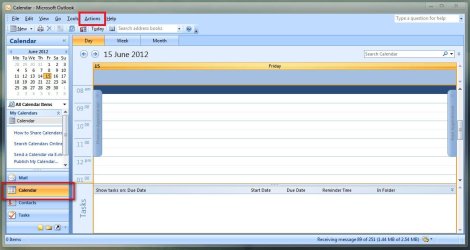
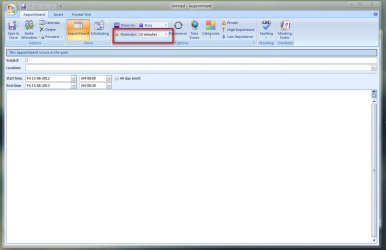
Arc New member SF Team Local time 9:44 AM Messages 35,002 Jun 15, 2012 #2 Welcome Aboard If you have outlook, you can do it easily. Click Calender > Actions > New Appointments. Then Set Your reminder at will . Some other programs are also there like EssentialPIM - Probably the Best Personal Information Manager . (There is a free version, too ). Hope it helps My Computer My Computer At a glance Microsoft Windows 10 Pro Insider Preview 64-bitIntel(R) Core(TM) i3-4130 CPU @ 3.40GHzCorsair Vengence 4GB x2 (8.00GB Dual-Channel ...2047MB GeForce GTS 450 (ZOTAC International)Computer typePC/DesktopComputer Manufacturer/Model NumberSelf AssembledOSMicrosoft Windows 10 Pro Insider Preview 64-bitCPUIntel(R) Core(TM) i3-4130 CPU @ 3.40GHzMotherboardGigabyte Technology Co., Ltd. B85M-D3HMemoryCorsair Vengence 4GB x2 (8.00GB Dual-Channel DDR3 @ 798MHz)Graphics Card(s)2047MB GeForce GTS 450 (ZOTAC International)Sound CardOnboard (Realtek High Definition Audio)Monitor(s) DisplaysLG Flatron E2040TScreen Resolution1600x900Hard DrivesWestern Digital 1 TB Seagate 500 GBPSUCorsair VS550CaseCooler Master K380CoolingCooler Master Seidon 120V PlusKeyboardLogitech MK260rMouseLogitech MK260rInternet SpeedPMPL BroadbandAntivirusWindows Defender + MBAMBrowserFirefoxOther InfoDell Studio 15" Laptop
Welcome Aboard If you have outlook, you can do it easily. Click Calender > Actions > New Appointments. Then Set Your reminder at will . Some other programs are also there like EssentialPIM - Probably the Best Personal Information Manager . (There is a free version, too ). Hope it helps
D Duzzy New member Guru VIP Local time 2:14 PM Messages 640 Jun 15, 2012 #3 Task Scheduler can display a message if that has enough customisation for you and it should already be running on your system. My Computer My Computer At a glance Windows 7 Ultimate x64Intel Pentium Dual Core E5200 2.5GHz (3.77GHz...Corsair 4GB DDR2 (4x1GB CM2X1024-6400C4)Palit GeForce GTS 250 (1024MB)Computer Manufacturer/Model NumberSelf builtOSWindows 7 Ultimate x64CPUIntel Pentium Dual Core E5200 2.5GHz (3.77GHz OC)MotherboardAsus P5Q-EMemoryCorsair 4GB DDR2 (4x1GB CM2X1024-6400C4)Graphics Card(s)Palit GeForce GTS 250 (1024MB)Sound CardOn Board (ADI AD2000B 8ch HD)Monitor(s) DisplaysSamsung 32in LCD TVScreen Resolution1360x768Hard Drives2 x 1TB Samsung 103SJ (Raid0) 2 x External 500GB Samsung 502IJ (NexStar 3 HD Enclosures)PSU550W Antec Neo HE 550CaseAntec P180CoolingXigmatex Red Scorpion CPU Cooler. 3x120mm FansKeyboardLogitech MX5000 Laser (Combo)MouseLogitech MX5000 Laser (Combo)Internet SpeedADSL2+ (avg 10 Mbps Down, 0.80 Mbps up)Other InfoGigabyte GN-WP01GS 54g Wireless Lan Card
Task Scheduler can display a message if that has enough customisation for you and it should already be running on your system.
K kalpna New member Thread Starter Local time 11:14 PM Messages 4 Jun 24, 2012 #4 Arc said: Welcome Aboard If you have outlook, you can do it easily. Click Calender > Actions > New Appointments. View attachment 216599 Then Set Your reminder at will . View attachment 216600 Some other programs are also there like EssentialPIM - Probably the Best Personal Information Manager . (There is a free version, too ). Hope it helps Click to expand... Ok got it. It will help me a lot in schedule some works in proper way. My Computer My Computer At a glance 32 bit windows 7 home basicOS32 bit windows 7 home basic
Arc said: Welcome Aboard If you have outlook, you can do it easily. Click Calender > Actions > New Appointments. View attachment 216599 Then Set Your reminder at will . View attachment 216600 Some other programs are also there like EssentialPIM - Probably the Best Personal Information Manager . (There is a free version, too ). Hope it helps Click to expand... Ok got it. It will help me a lot in schedule some works in proper way.
Arc New member SF Team Local time 9:44 AM Messages 35,002 Jun 24, 2012 #5 kalpna said: Ok got it. It will help me a lot in schedule some works in proper way. Click to expand... Glad to help My Computer My Computer At a glance Microsoft Windows 10 Pro Insider Preview 64-bitIntel(R) Core(TM) i3-4130 CPU @ 3.40GHzCorsair Vengence 4GB x2 (8.00GB Dual-Channel ...2047MB GeForce GTS 450 (ZOTAC International)Computer typePC/DesktopComputer Manufacturer/Model NumberSelf AssembledOSMicrosoft Windows 10 Pro Insider Preview 64-bitCPUIntel(R) Core(TM) i3-4130 CPU @ 3.40GHzMotherboardGigabyte Technology Co., Ltd. B85M-D3HMemoryCorsair Vengence 4GB x2 (8.00GB Dual-Channel DDR3 @ 798MHz)Graphics Card(s)2047MB GeForce GTS 450 (ZOTAC International)Sound CardOnboard (Realtek High Definition Audio)Monitor(s) DisplaysLG Flatron E2040TScreen Resolution1600x900Hard DrivesWestern Digital 1 TB Seagate 500 GBPSUCorsair VS550CaseCooler Master K380CoolingCooler Master Seidon 120V PlusKeyboardLogitech MK260rMouseLogitech MK260rInternet SpeedPMPL BroadbandAntivirusWindows Defender + MBAMBrowserFirefoxOther InfoDell Studio 15" Laptop
kalpna said: Ok got it. It will help me a lot in schedule some works in proper way. Click to expand... Glad to help