Is this a sign of hardware failure?

Infinite

Closed as requested
Local time
5:46 AM
Messages
958
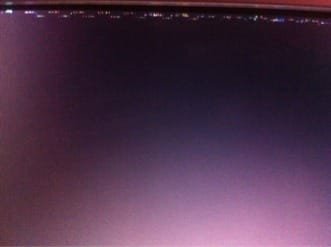
Sometimes when I boot into Windows, I am sometimes greeted with white lines across the screen (usually when attempting to chkdsk, etc). This remains and Windows does not boot, I have to either reboot or use a restore point if necessary.

Usually when I bootup, there are 6 or so white dashes but these are fine and Windows continues to boot.

Any suggestions?

Screenshots of 'corrupted' boot dashes
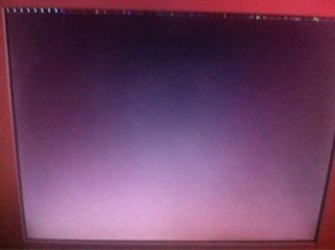
ImageUploadedBySeven Forums1372499755.963084.jpgImageUploadedBySeven Forums1372499770.304618.jpgImageUploadedBySeven Forums1372499780.931523.jpg
 

My Computer My Computer

At a glance

Windows 7 Ultimate SP1 - 64 BitIntel Core i5 2500k2x4GB DDR3 1333HzAti Radeon 6770
Computer type
PC/Desktop
Computer Manufacturer/Model Number
Novatech iRush Pro
OS
Windows 7 Ultimate SP1 - 64 Bit
CPU
Intel Core i5 2500k
Motherboard
Foxconn H67M-S/H67M-V/H67
Memory
2x4GB DDR3 1333Hz
Graphics Card(s)
Ati Radeon 6770
Sound Card
None
Monitor(s) Displays
Samsung S22B150
Screen Resolution
1920x1080
Hard Drives
2x500GB
PSU
500W
Cooling
Fan
Keyboard
HP KU0316
Mouse
Wireless Logitech M185
Internet Speed
20MB/s
Antivirus
Avast Free
Browser
Google Chrome
Other Info
Logitech M185 Mouse
KU-M316 Keyboard
From what you've said it could be the video card or it'd driver. You could start by clean re-installing the graphics driver.

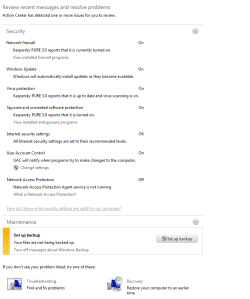
Do this: go to the START menu and type "problem" in the search box. Then click on "view solutions to problems". What do you find there?
 

My Computer My Computer

At a glance

Windows 7 64 Bit Home Premium SP1i7-3820GSkill F3-14900CL9Q - 16GBEVGA GeForce GTX660 - Driver 352.86
Computer type
PC/Desktop
Computer Manufacturer/Model Number
Home Built - Jan 2013
OS
Windows 7 64 Bit Home Premium SP1
CPU
i7-3820
Motherboard
Asus P9X79-PRO - Bios 4608
Memory
GSkill F3-14900CL9Q - 16GB
Graphics Card(s)
EVGA GeForce GTX660 - Driver 352.86
Sound Card
On board Realtek ALC898
Monitor(s) Displays
Acer S271HL
Screen Resolution
1920 x 1080
Hard Drives
#1- Samsung 840 Pro Series
#2- Western Digital WD1002FAEX Sata3 Black
#3- Western Digital WD1002FAEX Sata3 Black
PSU
Corsair CMPSU-850TX-V2 - 850 watt (by Seasonic)
Case
Corsair Obsidian 550D
Cooling
Standard 3 120mm case fans, Cooler Master Hyper 212 EVO
Keyboard
MS KC-0405
Mouse
Intellimouse 5-button
Internet Speed
56 Mbits/Sec (on a good day)
Antivirus
Avast & Malwarebytes
Browser
Firefox
Other Info
Asus DVD - DRW-24B1ST 24X
Do you have an adapter attached between a VGA cord and your graphics card port? It may be your adapter's compatibility if it's a 3rd party. That would be best-case-scenario as adapters are significantly cheaper than other computer hardware!
 

My Computer My Computer

At a glance

Windows 7 Home Premium x64Intel Core i7-3770S Quad @ 3.1 GHz (Turbo-Boo...16GB (DDR3) @1,600MHz Corsair Vengeance 2EVGA GeForce GTX 960 SuperSC ACX 2.0+ 2GB
Computer type
PC/Desktop
Computer Manufacturer/Model Number
Custom Build
OS
Windows 7 Home Premium x64
CPU
Intel Core i7-3770S Quad @ 3.1 GHz (Turbo-Boost to 3.9GHz)
Motherboard
ASUS ROG Maximus V Formula ATX
Memory
16GB (DDR3) @1,600MHz Corsair Vengeance 2
Graphics Card(s)
EVGA GeForce GTX 960 SuperSC ACX 2.0+ 2GB
Monitor(s) Displays
Acer 23" S230HL
Screen Resolution
1920 x 1080
Hard Drives
Seagate 1TB @7,200rpm
PSU
850W Power Supply (Thermaltake - SP850M)
Case
NZXT SWITCH 810 Gun-Metal CA-SW810-G1
Cooling
Cooler Master Hyper 212 EVO (RR-212E-20PK)
Keyboard
Logitech G510
Mouse
Logitech G602
Internet Speed
5Mbps Download / 756kbps Upload
Antivirus
Microsoft Security Essentials
From what you've said it could be the video card or it'd driver. You could start by clean re-installing the graphics driver.
I looked for a driver and could not find one, I recently installed CCC but the issue happened before that.

Do this: go to the START menu and type "problem" in the search box. Then click on "view solutions to problems". What do you find there?
example.png

Do you have an adapter attached between a VGA cord and your graphics card port? It may be your adapter's compatibility if it's a 3rd party. That would be best-case-scenario as adapters are significantly cheaper than other computer hardware!

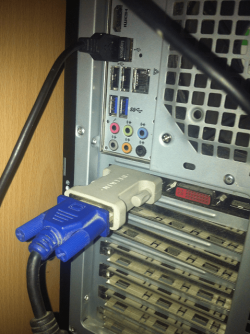
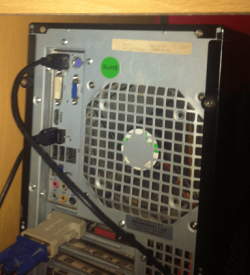
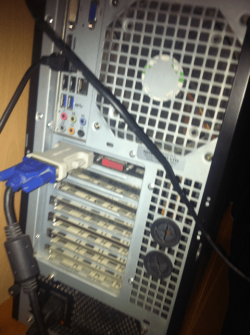
There's a DVI to VGA adapter as my monitor does not support it, I took some pictures as examples:
Untitled.pngUntitled2.pngUntitled3.png
 

My Computer My Computer

At a glance

Windows 7 Ultimate SP1 - 64 BitIntel Core i5 2500k2x4GB DDR3 1333HzAti Radeon 6770
Computer type
PC/Desktop
Computer Manufacturer/Model Number
Novatech iRush Pro
OS
Windows 7 Ultimate SP1 - 64 Bit
CPU
Intel Core i5 2500k
Motherboard
Foxconn H67M-S/H67M-V/H67
Memory
2x4GB DDR3 1333Hz
Graphics Card(s)
Ati Radeon 6770
Sound Card
None
Monitor(s) Displays
Samsung S22B150
Screen Resolution
1920x1080
Hard Drives
2x500GB
PSU
500W
Cooling
Fan
Keyboard
HP KU0316
Mouse
Wireless Logitech M185
Internet Speed
20MB/s
Antivirus
Avast Free
Browser
Google Chrome
Other Info
Logitech M185 Mouse
KU-M316 Keyboard
My Computer My Computer

At a glance

Windows 7 Ultimate X64 SP1Intel i5-2550K, Differing ~4.4-4.8GHz No buil...16GB G.Skill Sniper 1866MHz @ 2133MHz 2x8GBASUS GTX650TIB-DC2OC-2GD5, (650TI Boost)
Computer type
PC/Desktop
Computer Manufacturer/Model Number
Home Built Desktop By DataTech
OS
Windows 7 Ultimate X64 SP1
CPU
Intel i5-2550K, Differing ~4.4-4.8GHz No built in GPU
Motherboard
ASUS P8Z68-V PRO/GEN3
Memory
16GB G.Skill Sniper 1866MHz @ 2133MHz 2x8GB
Graphics Card(s)
ASUS GTX650TIB-DC2OC-2GD5, (650TI Boost)
Sound Card
Onboard Realtek 5-1
Monitor(s) Displays
Samsung P2570HD
Screen Resolution
1920x1080
Hard Drives
Samsung 840 Pro 256GB SSD for OS, 500GB Seagate Constellation (Enterprise drive) for Data
PSU
Corsair HX650W
Case
Inwin Dragon Rider
Cooling
Hyper 212 EVO w/two Noctua fans, push-pull, @1300 RPM
Keyboard
E-Z Eyes, bright yellow keys with large characters
Mouse
steelseries SENSEI Laser Pro Gaming
Internet Speed
48-51Mbs Mbs down, 11 Mbs up Xfinity Cable
Antivirus
Norton Internet Security 2013
Browser
IE 10, Opera, Pale Moon if needed
Other Info
4 case fans, LG BluRay-RE, ASUS DVD-RW, Mr. Fusion power supply, 1.21 gigawatts.
Some hardware tests to run.


Hard drive(s)test(s):
Pick one for your HDD brand or use Seatools.
7 Free Hard Drive Testing Software Tools

RAM (memory) test:
This will require memtest on a bootable CD or USB stick.
RAM - Test with Memtest86+

memtest86: left it on overnight, for 10 passes and it found no errors.

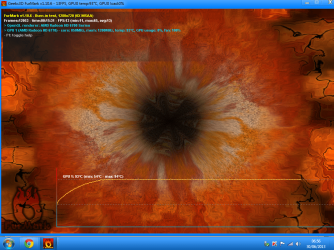
Burn test:
Untitled.png

Maxed at 93

3 seconds before I took the screenshot the screen went blank for 5 seconds, and then came back on, my response was to take a screenshot and stop the test.

Do you think anything could be wrong?

Seatools HD test
Was a bit confused on what test to run and what to configure, is there any recommended settings or tutorial?

S.M.A.R.T Check - Both Drives Passed
Short Drive Self Check - Both Drives Passed
Short Generic - Both Drives Passed
 
Last edited:

My Computer My Computer

At a glance

Windows 7 Ultimate SP1 - 64 BitIntel Core i5 2500k2x4GB DDR3 1333HzAti Radeon 6770
Computer type
PC/Desktop
Computer Manufacturer/Model Number
Novatech iRush Pro
OS
Windows 7 Ultimate SP1 - 64 Bit
CPU
Intel Core i5 2500k
Motherboard
Foxconn H67M-S/H67M-V/H67
Memory
2x4GB DDR3 1333Hz
Graphics Card(s)
Ati Radeon 6770
Sound Card
None
Monitor(s) Displays
Samsung S22B150
Screen Resolution
1920x1080
Hard Drives
2x500GB
PSU
500W
Cooling
Fan
Keyboard
HP KU0316
Mouse
Wireless Logitech M185
Internet Speed
20MB/s
Antivirus
Avast Free
Browser
Google Chrome
Other Info
Logitech M185 Mouse
KU-M316 Keyboard
It looks to me just a driver initialization thing.
I would suggest update or downdate the driver see if there is any effect. I have seen this quite often on various builds\systems and don't consider it a worry.

At that stage of the boot it would be the BIOS inbuilt driver, have a look if there is an update, but I wouldn't panic personally.
 

My Computer My Computer

At a glance

Windows 7 home premium x64AMD FX-4100 AM3+ 3.6GHz 12MB Black EditionCrsair vengeance 12Gb DDR3 1600MHz CL9Asus GTX 560 1GB
Computer Manufacturer/Model Number
DIY
OS
Windows 7 home premium x64
CPU
AMD FX-4100 AM3+ 3.6GHz 12MB Black Edition
Motherboard
Asus M5A97 Pro
Memory
Crsair vengeance 12Gb DDR3 1600MHz CL9
Graphics Card(s)
Asus GTX 560 1GB
Sound Card
Realtek onboard
Monitor(s) Displays
Hanns G 1680x1050 native
Hard Drives
OCZ 128Gb Petrol ssd
2x500 Gb Samsung
PSU
OCZ StealthXstream II 500W
Internet Speed
8Mb or better
It looks to me just a driver initialization thing.
I would suggest update or downdate the driver see if there is any effect. I have seen this quite often on various builds\systems and don't consider it a worry.

At that stage of the boot it would be the BIOS inbuilt driver, have a look if there is an update, but I wouldn't panic personally.

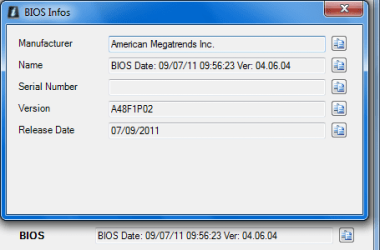
My BIOS:
Untitled.png

I don't want to use the wrong one as it may brick my system :S.
 

My Computer My Computer

At a glance

Windows 7 Ultimate SP1 - 64 BitIntel Core i5 2500k2x4GB DDR3 1333HzAti Radeon 6770
Computer type
PC/Desktop
Computer Manufacturer/Model Number
Novatech iRush Pro
OS
Windows 7 Ultimate SP1 - 64 Bit
CPU
Intel Core i5 2500k
Motherboard
Foxconn H67M-S/H67M-V/H67
Memory
2x4GB DDR3 1333Hz
Graphics Card(s)
Ati Radeon 6770
Sound Card
None
Monitor(s) Displays
Samsung S22B150
Screen Resolution
1920x1080
Hard Drives
2x500GB
PSU
500W
Cooling
Fan
Keyboard
HP KU0316
Mouse
Wireless Logitech M185
Internet Speed
20MB/s
Antivirus
Avast Free
Browser
Google Chrome
Other Info
Logitech M185 Mouse
KU-M316 Keyboard
I would advise you against doing a BIOS update. Any artifact like this that is seen both in POST and in the Windows desktop is more likely to be a monitor problem than a BIOS problem. I can see that your BIOS is not current, but that's to be expected as manufacturers don't do BIOS upgrades for very long until a new machine comes out. I mistakenly did a BIOS update on a Gigabyte motherboard a while back, and even though it finished properly, had I not gone to the trouble to back off the old BIOS in a restorable way, I would have lost the use of my PC. My general perspective is that, unless you know for sure that a BIOS update will fix your problem, AND you have a way both to save off the current BIOS and restore it, then do NOT do a BIOS update.
 

My Computer My Computer

At a glance

Win7 Pro 32-bit, Win8 Pro 32-bitAMD Phenom II X6 1090T4GB ddr3 1300AMD HD 4290 onboard
Computer type
PC/Desktop
Computer Manufacturer/Model Number
Custom
OS
Win7 Pro 32-bit, Win8 Pro 32-bit
CPU
AMD Phenom II X6 1090T
Motherboard
Gigabyte
Memory
4GB ddr3 1300
Graphics Card(s)
AMD HD 4290 onboard
Sound Card
Builtin Realtek HD Audio
Monitor(s) Displays
Samsung 24" widescreen, LG 23" widescreen
Screen Resolution
1920x1200/1920x1080
Hard Drives
Kingston 256GB SSD
Keyboard
Logitech Illuminated Keyboard
Mouse
Logitech M705 wireless mouse
Antivirus
Norton Av 2013
Browser
IE v10
Back
Top