Solved Is this a virus?

Yatchiie

New member
Member
Local time
8:22 PM
Messages
46
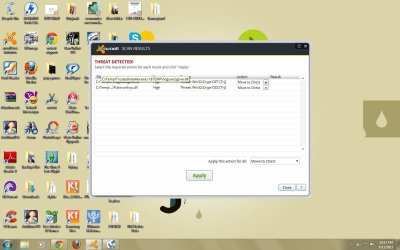
I'm a little bit confused if this is a virus. I googled the trusted installer, and it says that it is a program which enables my OS to get updates from Microsoft. But why is there a virus? Should I delete it?
 

Attachments

  • sss1.jpg
    sss1.jpg
    109.1 KB · Views: 79

My Computer

OS
Windows 7 Ultimate 32-bit
Why do you need to need to use a third-party program to gain updates from Microsoft? I thought that was the entire point of Windows Update?

What is the program or installer you are using?
 

My Computer

Computer type
Laptop
Id remove Daemon Tools Lite . That program causes issues known for BSODs .
 

My Computer

Computer Manufacturer/Model Number
Custom Built
OS
Windows 7 Ultimate 32-Bit & Windows 7 Ultimate 64-Bit
CPU
Intel Core i7 CPU 950 @ 3.07GHz
Motherboard
ASUS P6T DELUXE V2
Memory
OCZ 6GB (3 x 2GB) 240-Pin DDR3 SDRAM DDR3 1600 OCZ3X1600R2
Graphics Card(s)
ATI Radeon HD 5700 Series
Sound Card
OnBoard
Hard Drives
WD6400AACS-00M3B0 (640GB SATA )
PSU
CORSAIR 850w
Case
NZXT LEXA
Cooling
Intel Stock Heatsink Fan
Keyboard
Microsoft Wireless Laser Keyboard 7000
Mouse
Microsoft Wireless Laser Mouse 7000
Yatchiie,

On avast!, use: Move to chest
Click: Apply

Now, please download RogueKiller:
Tlcharger RogueKiller (Site Officiel)

When you get to the website, go to where it says:
(Download link) Lien de téléchargement:
rendu2.png

Select the version for your system: 64-bit
Click the dark-blue button with x64 to download.
Save to the Desktop.

Close all windows and browsers.

Right-click and select: Run as Administrator

At the program console, wait for the prescan to finish. (Under Status, it says: Prescan finished.)

Press: SCAN


When done, a report opens on the Desktop: RKreport.txt
Please provide the RKreport.txt (Mode: Scan) in your reply.


Also download TDSSKiller.zip:
http://www.bleepingcomputer.com/download/tdsskiller/
Right-click the program and select: Extract to tdsskiller\

A TDSSKiller folder is found on your Desktop.
Open the folder, and double-click the TDSSKiller application.

When TDSSKiller opens, click on: Change Parameters
Under Additional Options, place a check in the box next to: Detect TDLFS File System
Click: OK

Press: Start Scan

If a suspicious object is detected, the default action is Skip, leave it as is, and click on: Continue
If malicious objects are found, they show in the Scan results.
Ensure Cure (the default) is selected, then click: Continue > Reboot now, to finish the cleaning process.
(Note: If Cure is not available, select Skip, >>Do not select: Delete<<)

When done, the tool outputs its log to the disk with the Windows Operating System, normally C:\

Logs have a name like:
C:\TDSSKiller.X.X.X_11.04.2013_15.31.43_log.txt

Please post the TDSSKiller log in your reply.
 
Last edited:

My Computer

Computer type
PC/Desktop
Computer Manufacturer/Model Number
An ol' eMachines
OS
Windows 7 Home Premium
Internet Speed
Fine for me...I'm retired!
Yachtiie,

you have got to be a teenager with a desk top like that! Is your bedroom in a similar state lol?:D

Andy
 

My Computer

Computer type
PC/Desktop
Computer Manufacturer/Model Number
Titan 8900i Plasma MK II built by Overclockersuk
OS
Windows 7 Home Premium 64bit
CPU
Intel Core i5 3570K @ 3.40GHz
Motherboard
Gigabyte Z77-D3H (Intel Core i5-3570K CPU @ 3.40ghz
Memory
16.0 GB Dual-Channel DDR3 @ 762MHz (11-11-11-28)
Graphics Card(s)
NVIDIA GeForce GTX 670
Sound Card
ASUS Xonar DG
Monitor(s) Displays
Acer P246H
Screen Resolution
1920x1080@60Hz
Hard Drives
112GB INTEL SSDSC2CT120A3 ATA Device (SSD)
932GB Seagate ST1000DM003-1CH162 ATA Device (SATA)
1TB Seagate external HDD.
PSU
Corsair GS 600w PSU
Case
Antec 302 Three Hundred Two Ultimate Gaming Case
Cooling
Alpenfohn K2 Mount Doom CPU Cooler
Keyboard
Microsoft Sidewinder X4
Mouse
Anker 8000dpi gaming mouse
Internet Speed
12mb
Antivirus
Bitdefender Internet Security 2014
Browser
Chrome and IE11
Other Info
Malwarebytes, ADWCleaner, CCleaner, SUPERAntispyware Pro, Revo Uninstaller Pro

Adobe Photoshop CS6/Lightroom 5.3/NIK Software/Keyword Perfect
Why do you need to need to use a third-party program to gain updates from Microsoft? I thought that was the entire point of Windows Update?

What is the program or installer you are using?

No, I didn't install any third party program. I found the Trusted Installer in my C:/Temp I don't know where it came from. Moreover, I got this information from the web Service TrustedInstaller.EXE permanently active taking up to 50% - Microsoft Community that is why I'm hesitating to remove the virus, thinking that I won't get any updates if I delete the Trusted Installer


Yatchiie,

On avast!, use: Move to chest
Click: Apply

Now, please download RogueKiller:
Tlcharger RogueKiller (Site Officiel)

When you get to the website, go to where it says:
(Download link) Lien de téléchargement:
rendu2.png

Select the version for your system: 64-bit
Click the dark-blue button with x64 to download.
Save to the Desktop.

Close all windows and browsers.

Right-click and select: Run as Administrator

At the program console, wait for the prescan to finish. (Under Status, it says: Prescan finished.)

Press: SCAN


When done, a report opens on the Desktop: RKreport.txt
Please provide the RKreport.txt (Mode: Scan) in your reply.


Also download TDSSKiller.zip:
http://www.bleepingcomputer.com/download/tdsskiller/
Right-click the program and select: Extract to tdsskiller\

A TDSSKiller folder is found on your Desktop.
Open the folder, and double-click the TDSSKiller application.

When TDSSKiller opens, click on: Change Parameters
Under Additional Options, place a check in the box next to: Detect TDLFS File System
Click: OK

Press: Start Scan

If a suspicious object is detected, the default action is Skip, leave it as is, and click on: Continue
If malicious objects are found, they show in the Scan results.
Ensure Cure (the default) is selected, then click: Continue > Reboot now, to finish the cleaning process.
(Note: If Cure is not available, select Skip, >>Do not select: Delete<<)

When done, the tool outputs its log to the disk with the Windows Operating System, normally C:\

Logs have a name like:
C:\TDSSKiller.X.X.X_11.04.2013_15.31.43_log.txt

Please post the TDSSKiller log in your reply.


I just finished doing all the instructions you posted and attached the log files. BTW, thank you for posting a vivid instruction :)
 

Attachments

My Computer

OS
Windows 7 Ultimate 32-bit
Please run RogueKiller once again:

Close all windows and browsers
Right-click RogueKiller and select 'Run as Administrator'

Wait until the Prescan finishes

Press: Scan

When done, on the right, click: Delete

Wait until the Status box shows: Deleting Finished

Click on Report and provide the content of the new Rkreport (Mode: Remove) in your reply.


Now, please run avast! once again, and tell us what it shows.
 

My Computer

Computer type
PC/Desktop
Computer Manufacturer/Model Number
An ol' eMachines
OS
Windows 7 Home Premium
Internet Speed
Fine for me...I'm retired!
Please run RogueKiller once again:

Close all windows and browsers
Right-click RogueKiller and select 'Run as Administrator'

Wait until the Prescan finishes

Press: Scan

When done, on the right, click: Delete

Wait until the Status box shows: Deleting Finished

Click on Report and provide the content of the new Rkreport (Mode: Remove) in your reply.


Now, please run avast! once again, and tell us what it shows.


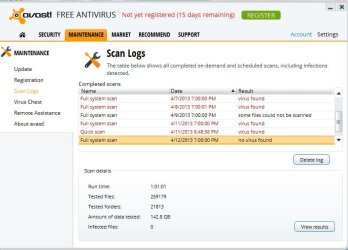
Here's the result. Yay, no more virus :)
 

Attachments

My Computer

OS
Windows 7 Ultimate 32-bit


Please download Temp File Cleaner (TFC):
http://oldtimer.geekstogo.com/TFC.exe

Save to your Desktop.
  • Save any work in progress!! TFC closes open applications and removes unsaved work!! Close all windows.
  • Double-click TFC.exe to run the program.
  • If prompted, click "Yes" to reboot.
Also download Security Check

http://screen317.spywareinfoforum.org/SecurityCheck.exe
Save to the Desktop.

Double-click SecurityCheck.exe and follow the onscreen instructions (on the black screen)

When done, a Notepad document opens automatically: checkup.txt

Please post the contents of checkup.txt in your reply.
 

My Computer

Computer type
PC/Desktop
Computer Manufacturer/Model Number
An ol' eMachines
OS
Windows 7 Home Premium
Internet Speed
Fine for me...I'm retired!


Please download Temp File Cleaner (TFC):
http://oldtimer.geekstogo.com/TFC.exe

Save to your Desktop.
  • Save any work in progress!! TFC closes open applications and removes unsaved work!! Close all windows.
  • Double-click TFC.exe to run the program.
  • If prompted, click "Yes" to reboot.
Also download Security Check

http://screen317.spywareinfoforum.org/SecurityCheck.exe
Save to the Desktop.

Double-click SecurityCheck.exe and follow the onscreen instructions (on the black screen)

When done, a Notepad document opens automatically: checkup.txt

Please post the contents of checkup.txt in your reply.


Here :)
 

Attachments

My Computer

OS
Windows 7 Ultimate 32-bit
Yatchiie

Update

:ar: Firefox Browser
Description:|Version:|Download:
Firefox|20.0|
Download


:ar: Java
Description:|Version:|Download:
Java|Update 17|
Download


:ar: Adobe Reader
Description:|Version:|Download:
Adobe Reader|11.0.02|
Download


My Computer

Computer Manufacturer/Model Number
Custom Built
OS
Windows 7 Ultimate 32-Bit & Windows 7 Ultimate 64-Bit
CPU
Intel Core i7 CPU 950 @ 3.07GHz
Motherboard
ASUS P6T DELUXE V2
Memory
OCZ 6GB (3 x 2GB) 240-Pin DDR3 SDRAM DDR3 1600 OCZ3X1600R2
Graphics Card(s)
ATI Radeon HD 5700 Series
Sound Card
OnBoard
Hard Drives
WD6400AACS-00M3B0 (640GB SATA )
PSU
CORSAIR 850w
Case
NZXT LEXA
Cooling
Intel Stock Heatsink Fan
Keyboard
Microsoft Wireless Laser Keyboard 7000
Mouse
Microsoft Wireless Laser Mouse 7000
Totally uninstall FireFox before updating. Be aware of FF extensions and add-ons :mad:
Don't install Google ANY Google extensions!!

These instructions may help you in the future.
 

My Computer

Computer type
PC/Desktop
Computer Manufacturer/Model Number
Bruce ... somewhere in his 40's
OS
Windows 7 Ultimate 32bit SP1
CPU
Intel(R) Core(TM)2 Quad CPU @ 2.40GHz, 2400 MHz
Motherboard
INTEL/D975XBX2
Memory
4 GB
Graphics Card(s)
ATI Radeon HD 2600 Pro
Monitor(s) Displays
Samsung SyncMaster 914v
Screen Resolution
1280 x 1024
Hard Drives
2/500GB each ... ST3500630AS ATA Device.
One is not connected
PSU
Rocketfish 700 W
Case
G.Skill Gigabyte Chassis
Keyboard
Standard PS/2 Keyboard
Mouse
Microsoft PS/2 Mouse
Internet Speed
DSL
Antivirus
Avira Internet Security
Browser
IE 11
Other Info
ATI HDMI Audio
Yatchiie

Update

:ar: Firefox Browser
Description:|Version:|Download:
Firefox|20.0|
Download


:ar: Java
Description:|Version:|Download:
Java|Update 17|
Download


:ar: Adobe Reader
Description:|Version:|Download:
Adobe Reader|11.0.02|
Download


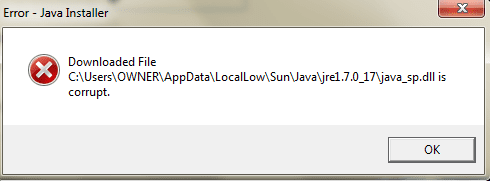
It's been a year since I've successfully updated Java. I always get this error after its succeeding updates. Btw, thank you so much for helping me out :)
 

Attachments

  • error.png
    error.png
    7.1 KB · Views: 3

My Computer

OS
Windows 7 Ultimate 32-bit
Last edited:

My Computer

Computer type
PC/Desktop
Computer Manufacturer/Model Number
An ol' eMachines
OS
Windows 7 Home Premium
Internet Speed
Fine for me...I'm retired!
Yatchiie

Were you able to install Java Update 17 ?
 

My Computer

Computer Manufacturer/Model Number
Custom Built
OS
Windows 7 Ultimate 32-Bit & Windows 7 Ultimate 64-Bit
CPU
Intel Core i7 CPU 950 @ 3.07GHz
Motherboard
ASUS P6T DELUXE V2
Memory
OCZ 6GB (3 x 2GB) 240-Pin DDR3 SDRAM DDR3 1600 OCZ3X1600R2
Graphics Card(s)
ATI Radeon HD 5700 Series
Sound Card
OnBoard
Hard Drives
WD6400AACS-00M3B0 (640GB SATA )
PSU
CORSAIR 850w
Case
NZXT LEXA
Cooling
Intel Stock Heatsink Fan
Keyboard
Microsoft Wireless Laser Keyboard 7000
Mouse
Microsoft Wireless Laser Mouse 7000
Good question x BlueRobot.

One needs to determine whether it is really necessary to run Java in web browsers, etc...

Java has a strong reputation for having vulnerabilities.
 

My Computer

Computer type
PC/Desktop
Computer Manufacturer/Model Number
An ol' eMachines
OS
Windows 7 Home Premium
Internet Speed
Fine for me...I'm retired!
Thanks, and many programs and webpages don't even require Java anymore either.
 

My Computer

Computer type
Laptop
Yatchiie,

Glad you got everything sorted out.

Good luck!!


Oooops,

Thought you meant something else.

Try the following:
Download errors: java_sp.dll is corrupt, 1305, 2755, 1606 - Print-friendly Page
Download errors: java_sp.dll is corrupt, 1305, 2755, 1606


Thanks :)

Yatchiie

Were you able to install Java Update 17 ?
No, I wasn't able to install it. Java's successful update on my machine happened a year ago, after that, I cannot update it anymore; I always get the same error.
 

My Computer

OS
Windows 7 Ultimate 32-bit
Let's see if this works...

Please go to this page: Java SE Downloads
Tick: Accept Licence Agreement
Now, download the last entry: Windows x64 41.49 MB jre-7u17-windows-x64.tar.gz
Save to the Desktop

Uninstall any version of Java from Programs and Features in Control Panel.
Restart your computer

Temporarily disable avast!:
Right- click on the avast! icon on the system tray.
Select: avast! shields control
The options allow you to disable avast for 10 minutes, 1 hour, until the computer is restarted or permanently.
Select: 10 minutes

Install Java from the file on your Desktop.
Restart the computer.

Enable avast!

Did you get the same error?
 

My Computer

Computer type
PC/Desktop
Computer Manufacturer/Model Number
An ol' eMachines
OS
Windows 7 Home Premium
Internet Speed
Fine for me...I'm retired!
Back
Top