
Is this an installation problem or something else?

AeroX23

New member
Local time
6:08 PM
Messages
32
Location
The ol' Mississippi
Okay, first before I say anything else..

Please forgive me if this is in the wrong section. This is my very first visit here, and I need some help fast.


Alright, now when I installed 7, everything went fine and whatnot, but now..
Everything looks huge. :O
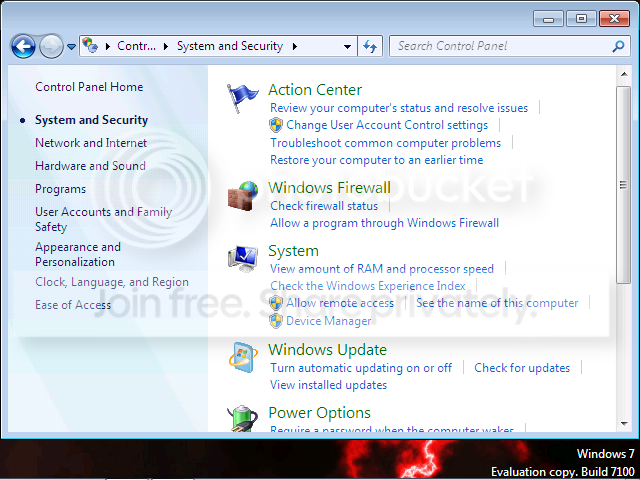
wat.png


The picture above is an example of what I'm seeing.

In before ''Oh, change the resolution and all shall be fine!'' and in before ''Just upgrade the graphics drivers and you'll be good, bro.''

I really need help, windowsevenforums.com was no help and you guys are my last hope.
 

My Computer

Computer Manufacturer/Model Number
Dell Dimension 2400
OS
Windows 7 x32 build 7100
CPU
Intel Celeron CPU 2.40GHz
Memory
1 Gig Big
Graphics Card(s)
Standard VGA Graphics Adapter
Sound Card
Intel(r)82801/DBM AC '97 Audio Controller
Monitor(s) Displays
Widescreen lol?!
Screen Resolution
1600x900
Hard Drives
74.5GB NTFS LOL!
Case
Dell
Cooling
None
Keyboard
Dell
Mouse
Dell
Internet Speed
100.0Mbps
Other Info
I want a new effing graphics card, damn it.
I am not sure what is huge in the screen shot can you explain better please?

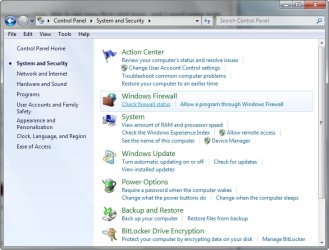
This is what my screen looks like and it is the same as what you have shown.

2009-07-22_174226.jpg
 

My Computer

Computer Manufacturer/Model Number
Home Brew
OS
Windows 7 Ultimate Vista Ultimate x64
CPU
Core 2 Duo E8500 3.16Ghz @ 3.8Ghz
Motherboard
eVGA 750i FTW
Memory
2x2Gigs Patriot PC2-6400 LL
Graphics Card(s)
Inno3D GeForce GTX260 216 SP
Monitor(s) Displays
ASUS VW222U 22" 2ms Response time
Screen Resolution
1680x1050
Hard Drives
SATA 150GB
SATA II 250GB
USB IDE 750GB Ext.
PSU
HYTEC 600W & Thermaltake 650W Toughpower Power Exp
Case
Thermaltake Armor LCS (Liquid Cooling System)
Cooling
Liquid Cooling System
Keyboard
Logitech G15 Gaming Keyboard
Mouse
Logitech G9 Gaming Mouse
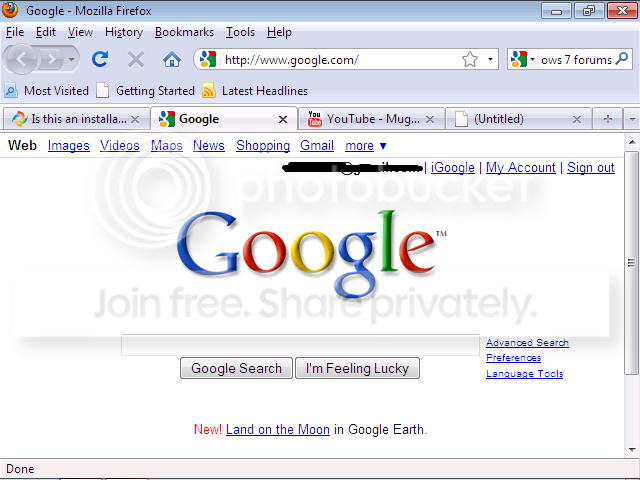
Okay I'll take a screenshot of my Firefox currently.

Edit: Here it is.

shutup.png


By the way, for some reason the screen resolution is stuck on 640x840. I can't change it at all.
 

My Computer

Computer Manufacturer/Model Number
Dell Dimension 2400
OS
Windows 7 x32 build 7100
CPU
Intel Celeron CPU 2.40GHz
Memory
1 Gig Big
Graphics Card(s)
Standard VGA Graphics Adapter
Sound Card
Intel(r)82801/DBM AC '97 Audio Controller
Monitor(s) Displays
Widescreen lol?!
Screen Resolution
1600x900
Hard Drives
74.5GB NTFS LOL!
Case
Dell
Cooling
None
Keyboard
Dell
Mouse
Dell
Internet Speed
100.0Mbps
Other Info
I want a new effing graphics card, damn it.
I see, well to help you further we will need your system specs, what Windows 7 build your using and if was an upgrade or fresh install. Any possible information you can give us to help find the cause will be appreciated, remember we are not mind readers and can not access your computer so we need you to tell us anything that may help.

There is a link to fill out your system specs on the lower left side of your post.

2009-07-22_175826.jpg
 

My Computer

Computer Manufacturer/Model Number
Home Brew
OS
Windows 7 Ultimate Vista Ultimate x64
CPU
Core 2 Duo E8500 3.16Ghz @ 3.8Ghz
Motherboard
eVGA 750i FTW
Memory
2x2Gigs Patriot PC2-6400 LL
Graphics Card(s)
Inno3D GeForce GTX260 216 SP
Monitor(s) Displays
ASUS VW222U 22" 2ms Response time
Screen Resolution
1680x1050
Hard Drives
SATA 150GB
SATA II 250GB
USB IDE 750GB Ext.
PSU
HYTEC 600W & Thermaltake 650W Toughpower Power Exp
Case
Thermaltake Armor LCS (Liquid Cooling System)
Cooling
Liquid Cooling System
Keyboard
Logitech G15 Gaming Keyboard
Mouse
Logitech G9 Gaming Mouse
Alright will do.

Edit: Ok, it's done.
 

My Computer

Computer Manufacturer/Model Number
Dell Dimension 2400
OS
Windows 7 x32 build 7100
CPU
Intel Celeron CPU 2.40GHz
Memory
1 Gig Big
Graphics Card(s)
Standard VGA Graphics Adapter
Sound Card
Intel(r)82801/DBM AC '97 Audio Controller
Monitor(s) Displays
Widescreen lol?!
Screen Resolution
1600x900
Hard Drives
74.5GB NTFS LOL!
Case
Dell
Cooling
None
Keyboard
Dell
Mouse
Dell
Internet Speed
100.0Mbps
Other Info
I want a new effing graphics card, damn it.
Sorry to jump in Mr GRiM :p


The issue is with the GFX card not being recognised, do you happen to know the exact make/model of the card (not just what Device Manager is stating)? There are 2 ways around this...Also, make/model of your Dell machine too...
  1. Open Device Manager, right-click the 'Standard VGA graphics adapter' & choose 'Update driver software'. This will search Windows Update for any drivers that match the hardware codes.
  2. Download the latest driver from the manufacturer, but in this case, if you don't know that detail then several manufaturers websites have 'Auto Detect' functionality.

OS
 

My Computer

Computer Manufacturer/Model Number
Compaq Desktop
OS
Windows 7 Ultimate x64
CPU
AMD Sempron Dual Core
Memory
3GB
Graphics Card(s)
NVIDIA GeForce 6150SE nForce 430
Screen Resolution
1024x768
Hard Drives
150GB Sata
Also, if you have a driver software for your onboard video card, install the driver so that it can detect the optimum resolution for the monitor to give you a perfect screen. You'll find the driver on the Dell dimension resource Cd which came alongwith your computer.

Could you also let us know the model of your Dell computer? You will find the model # at the front panel of your pc.
 

My Computer

Computer Manufacturer/Model Number
Samsung NP530U4B-S02IN
OS
Windows® 8 Pro (64-bit)
CPU
Intel® Core™ i5 Processor 2467M (1.60GHz, 3MB L3 Cache)
Motherboard
Samsung Electronics
Memory
6GB DDR3 System Memory at 1,333MHz (on BD 4GB + 2GB x 1)
Graphics Card(s)
AMD Radeon™ HD7550M 1GB DDR3 (Ext. Graphic)
Sound Card
Realtek High Definition Audio
Monitor(s) Displays
35.56cm (14.0) SuperBright 300nit HD LED Display
Screen Resolution
1366x768
Hard Drives
1TB S-ATA II Hard Drive (5400RPM) with ExpressCache 16GB SSD
Internet Speed
sucks
Antivirus
Microsoft Security Essentials
Browser
Google Chrome (Sync enabled)
Sorry to jump in Mr GRiM :p


The issue is with the GFX card not being recognised, do you happen to know the exact make/model of the card (not just what Device Manager is stating)? There are 2 ways around this...Also, make/model of your Dell machine too...
  1. Open Device Manager, right-click the 'Standard VGA graphics adapter' & choose 'Update driver software'. This will search Windows Update for any drivers that match the hardware codes.
  2. Download the latest driver from the manufacturer, but in this case, if you don't know that detail then several manufaturers websites have 'Auto Detect' functionality.

OS


Humm.. It says it has the latest software installed.. but I can't change my resolution or anything :S
 

My Computer

Computer Manufacturer/Model Number
Dell Dimension 2400
OS
Windows 7 x32 build 7100
CPU
Intel Celeron CPU 2.40GHz
Memory
1 Gig Big
Graphics Card(s)
Standard VGA Graphics Adapter
Sound Card
Intel(r)82801/DBM AC '97 Audio Controller
Monitor(s) Displays
Widescreen lol?!
Screen Resolution
1600x900
Hard Drives
74.5GB NTFS LOL!
Case
Dell
Cooling
None
Keyboard
Dell
Mouse
Dell
Internet Speed
100.0Mbps
Other Info
I want a new effing graphics card, damn it.
Do you know the exact make/model of your GFX card?

Also, does Windows Update (from the start menu) herald any driver updates?
 

My Computer

Computer Manufacturer/Model Number
Compaq Desktop
OS
Windows 7 Ultimate x64
CPU
AMD Sempron Dual Core
Memory
3GB
Graphics Card(s)
NVIDIA GeForce 6150SE nForce 430
Screen Resolution
1024x768
Hard Drives
150GB Sata
Nope, no driver updates here.
If you have an MSN, we could do remote assistance, as I can't find it :P
 

My Computer

Computer Manufacturer/Model Number
Dell Dimension 2400
OS
Windows 7 x32 build 7100
CPU
Intel Celeron CPU 2.40GHz
Memory
1 Gig Big
Graphics Card(s)
Standard VGA Graphics Adapter
Sound Card
Intel(r)82801/DBM AC '97 Audio Controller
Monitor(s) Displays
Widescreen lol?!
Screen Resolution
1600x900
Hard Drives
74.5GB NTFS LOL!
Case
Dell
Cooling
None
Keyboard
Dell
Mouse
Dell
Internet Speed
100.0Mbps
Other Info
I want a new effing graphics card, damn it.
Nope, no driver updates here.
If you have an MSN, we could do remote assistance, as I can't find it :P

I'll install it now ;)
 

My Computer

Computer Manufacturer/Model Number
Compaq Desktop
OS
Windows 7 Ultimate x64
CPU
AMD Sempron Dual Core
Memory
3GB
Graphics Card(s)
NVIDIA GeForce 6150SE nForce 430
Screen Resolution
1024x768
Hard Drives
150GB Sata
Alright cool ;)
 

My Computer

Computer Manufacturer/Model Number
Dell Dimension 2400
OS
Windows 7 x32 build 7100
CPU
Intel Celeron CPU 2.40GHz
Memory
1 Gig Big
Graphics Card(s)
Standard VGA Graphics Adapter
Sound Card
Intel(r)82801/DBM AC '97 Audio Controller
Monitor(s) Displays
Widescreen lol?!
Screen Resolution
1600x900
Hard Drives
74.5GB NTFS LOL!
Case
Dell
Cooling
None
Keyboard
Dell
Mouse
Dell
Internet Speed
100.0Mbps
Other Info
I want a new effing graphics card, damn it.
What's your system model number?
 

My Computer

Computer Manufacturer/Model Number
Samsung NP530U4B-S02IN
OS
Windows® 8 Pro (64-bit)
CPU
Intel® Core™ i5 Processor 2467M (1.60GHz, 3MB L3 Cache)
Motherboard
Samsung Electronics
Memory
6GB DDR3 System Memory at 1,333MHz (on BD 4GB + 2GB x 1)
Graphics Card(s)
AMD Radeon™ HD7550M 1GB DDR3 (Ext. Graphic)
Sound Card
Realtek High Definition Audio
Monitor(s) Displays
35.56cm (14.0) SuperBright 300nit HD LED Display
Screen Resolution
1366x768
Hard Drives
1TB S-ATA II Hard Drive (5400RPM) with ExpressCache 16GB SSD
Internet Speed
sucks
Antivirus
Microsoft Security Essentials
Browser
Google Chrome (Sync enabled)
Ok well um, it's either one of these two:

X10-60264
or
00043-636-972-145
 

My Computer

Computer Manufacturer/Model Number
Dell Dimension 2400
OS
Windows 7 x32 build 7100
CPU
Intel Celeron CPU 2.40GHz
Memory
1 Gig Big
Graphics Card(s)
Standard VGA Graphics Adapter
Sound Card
Intel(r)82801/DBM AC '97 Audio Controller
Monitor(s) Displays
Widescreen lol?!
Screen Resolution
1600x900
Hard Drives
74.5GB NTFS LOL!
Case
Dell
Cooling
None
Keyboard
Dell
Mouse
Dell
Internet Speed
100.0Mbps
Other Info
I want a new effing graphics card, damn it.
I'll install it now ;)

Install failed, i had to cancel :(

My download speed is currently too low to successfully Remote connect

Trying other avenues.....
 

My Computer

Computer Manufacturer/Model Number
Compaq Desktop
OS
Windows 7 Ultimate x64
CPU
AMD Sempron Dual Core
Memory
3GB
Graphics Card(s)
NVIDIA GeForce 6150SE nForce 430
Screen Resolution
1024x768
Hard Drives
150GB Sata
Ok well um, it's either one of these two:

X10-60264
or
00043-636-972-145
No that's not the model #. It must be something Like Dell Dimension 4600 or Dell Dimension E510. The reason i m asking you about the model # is you can go to this website and punch in the model # of your computer or the service tag(its a 7 digit alpha-numeric # at the back side of your computer, generally on a white bar-code sticker) and then download the appropriate video driver for your system.
 

My Computer

Computer Manufacturer/Model Number
Samsung NP530U4B-S02IN
OS
Windows® 8 Pro (64-bit)
CPU
Intel® Core™ i5 Processor 2467M (1.60GHz, 3MB L3 Cache)
Motherboard
Samsung Electronics
Memory
6GB DDR3 System Memory at 1,333MHz (on BD 4GB + 2GB x 1)
Graphics Card(s)
AMD Radeon™ HD7550M 1GB DDR3 (Ext. Graphic)
Sound Card
Realtek High Definition Audio
Monitor(s) Displays
35.56cm (14.0) SuperBright 300nit HD LED Display
Screen Resolution
1366x768
Hard Drives
1TB S-ATA II Hard Drive (5400RPM) with ExpressCache 16GB SSD
Internet Speed
sucks
Antivirus
Microsoft Security Essentials
Browser
Google Chrome (Sync enabled)
Install failed, i had to cancel :(

My download speed is currently too low to successfully Remote connect

Trying other avenues.....

Darn :(

Well there is that Invite remote assistance from another computer thing on Win7 :P
 

My Computer

Computer Manufacturer/Model Number
Dell Dimension 2400
OS
Windows 7 x32 build 7100
CPU
Intel Celeron CPU 2.40GHz
Memory
1 Gig Big
Graphics Card(s)
Standard VGA Graphics Adapter
Sound Card
Intel(r)82801/DBM AC '97 Audio Controller
Monitor(s) Displays
Widescreen lol?!
Screen Resolution
1600x900
Hard Drives
74.5GB NTFS LOL!
Case
Dell
Cooling
None
Keyboard
Dell
Mouse
Dell
Internet Speed
100.0Mbps
Other Info
I want a new effing graphics card, damn it.
No that's not the model #. It must be something Like Dell Dimension 4600 or Dell Dimension E510. The reason i m asking you about the model # is you can go to this website and punch in the model # of your computer or the service tag(its a 7 digit alpha-numeric # at the back side of your computer, generally on a white bar-code sticker) and then download the appropriate video driver for your system.

Ah cool, I got it, thanks man ;)
 

My Computer

Computer Manufacturer/Model Number
Dell Dimension 2400
OS
Windows 7 x32 build 7100
CPU
Intel Celeron CPU 2.40GHz
Memory
1 Gig Big
Graphics Card(s)
Standard VGA Graphics Adapter
Sound Card
Intel(r)82801/DBM AC '97 Audio Controller
Monitor(s) Displays
Widescreen lol?!
Screen Resolution
1600x900
Hard Drives
74.5GB NTFS LOL!
Case
Dell
Cooling
None
Keyboard
Dell
Mouse
Dell
Internet Speed
100.0Mbps
Other Info
I want a new effing graphics card, damn it.
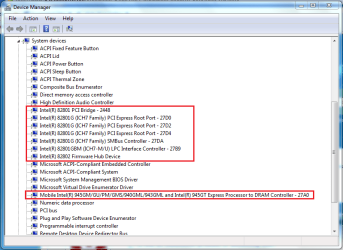
If you open Device Manager & expand the 'System Devices' section, what does it show?

Capture.PNG

This could give us an indication to your 'chipset' and may helps us resolve this :)
 

My Computer

Computer Manufacturer/Model Number
Compaq Desktop
OS
Windows 7 Ultimate x64
CPU
AMD Sempron Dual Core
Memory
3GB
Graphics Card(s)
NVIDIA GeForce 6150SE nForce 430
Screen Resolution
1024x768
Hard Drives
150GB Sata
Let us know if the video driver from the Dell website works.
 

My Computer

Computer Manufacturer/Model Number
Samsung NP530U4B-S02IN
OS
Windows® 8 Pro (64-bit)
CPU
Intel® Core™ i5 Processor 2467M (1.60GHz, 3MB L3 Cache)
Motherboard
Samsung Electronics
Memory
6GB DDR3 System Memory at 1,333MHz (on BD 4GB + 2GB x 1)
Graphics Card(s)
AMD Radeon™ HD7550M 1GB DDR3 (Ext. Graphic)
Sound Card
Realtek High Definition Audio
Monitor(s) Displays
35.56cm (14.0) SuperBright 300nit HD LED Display
Screen Resolution
1366x768
Hard Drives
1TB S-ATA II Hard Drive (5400RPM) with ExpressCache 16GB SSD
Internet Speed
sucks
Antivirus
Microsoft Security Essentials
Browser
Google Chrome (Sync enabled)
Back
Top