
ISO disc image burning always displaying Error Code: 0x80004005

Vertex

New member
Guru
Local time
10:23 PM
Messages
477
Location
Philippines
Everytime try to burn an ISO file to a blank CD, I always set it to verify before finishing the disc image burning process and I always get the warning that the disc image didn't burn successfully and it has Error Code: 0x80004005.


I've tried burning disc image on a number of blank CD's but to my dismay, they all get wasted upon getting this error. This doesn't usually come before, unless the discs I used were of poor quality. I've tried different discs with different brands, different ISOs and just now a re-writable CD to no avail. I've been using the built in ISO disc image burner on Windows 7 and I also tried ImgBurn but they both report some sort of error on the disc verification process before the completion of the disc burning. I don't know how this is supposed to be. I was gonna burn some Linux ISOs but they just won't burn well.
 

Attachments
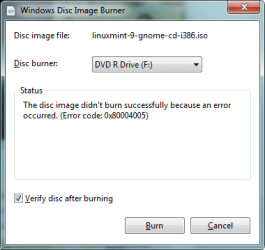
  • Burning Error.png
    Burning Error.png
    10.3 KB · Views: 20

My Computer My Computer

Computer Manufacturer/Model Number
Custom Built
OS
Windows 7 Ultimate 32 Bit, Windows Developer Preview, Linux Mint 9 Gnome 32 Bit
CPU
Intel Pentium Dual CPU E2180@2GHz
Motherboard
Elitegroup 671T-M3
Graphics Card(s)
NVIDIA GeForce 7200 GS
Monitor(s) Displays
AOC TFT1560 15" LCD Monitor
Screen Resolution
1024x768
Keyboard
Logitech USB Keyboard
There are 3 points of failure: The burning program, the disks, the burner.

You test to see if you get the same error using a different burning program (check).
You test to see if you get the same error using different media (check).
You test by using a different optical drive.

Optical drives are cheap (both meanings) and the heads can be knocked out of alignment too easily. Once that happens there is little to no chance of repairing it. It is just easier to get a new drive.

EDIT: be sure to try cleaning the drive. Use compressed air or vacuum to try and get any dust or hair out of the compartment (carefully). NEVER try to clean the lenses by touching them.
 

My Computer My Computer

Computer type
PC/Desktop
Computer Manufacturer/Model Number
Home Built - Jan 2013
OS
Windows 7 64 Bit Home Premium SP1
CPU
i7-3820
Motherboard
Asus P9X79-PRO - Bios 4608
Memory
GSkill F3-14900CL9Q - 16GB
Graphics Card(s)
EVGA GeForce GTX660 - Driver 352.86
Sound Card
On board Realtek ALC898
Monitor(s) Displays
Acer S271HL
Screen Resolution
1920 x 1080
Hard Drives
#1- Samsung 840 Pro Series
#2- Western Digital WD1002FAEX Sata3 Black
#3- Western Digital WD1002FAEX Sata3 Black
PSU
Corsair CMPSU-850TX-V2 - 850 watt (by Seasonic)
Case
Corsair Obsidian 550D
Cooling
Standard 3 120mm case fans, Cooler Master Hyper 212 EVO
Keyboard
MS KC-0405
Mouse
Intellimouse 5-button
Internet Speed
56 Mbits/Sec (on a good day)
Antivirus
Avast & Malwarebytes
Browser
Firefox
Other Info
Asus DVD - DRW-24B1ST 24X
Well, I tried using IMGBurn and I still get an issue upon verification. I just uninstalled my DVD drive's driver and reinstalled it. I then tried to burn a Linux ISO and I still get that error. It could be a hardware issue though. I've had this drive for 4 and a half years.
 

My Computer My Computer

Computer Manufacturer/Model Number
Custom Built
OS
Windows 7 Ultimate 32 Bit, Windows Developer Preview, Linux Mint 9 Gnome 32 Bit
CPU
Intel Pentium Dual CPU E2180@2GHz
Motherboard
Elitegroup 671T-M3
Graphics Card(s)
NVIDIA GeForce 7200 GS
Monitor(s) Displays
AOC TFT1560 15" LCD Monitor
Screen Resolution
1024x768
Keyboard
Logitech USB Keyboard
Try cleaning it. If that doesn't work it's probably time for a new one.

Alternately, you could borrow one from another machine to test before buying a new one.
 

My Computer My Computer

Computer type
PC/Desktop
Computer Manufacturer/Model Number
Home Built - Jan 2013
OS
Windows 7 64 Bit Home Premium SP1
CPU
i7-3820
Motherboard
Asus P9X79-PRO - Bios 4608
Memory
GSkill F3-14900CL9Q - 16GB
Graphics Card(s)
EVGA GeForce GTX660 - Driver 352.86
Sound Card
On board Realtek ALC898
Monitor(s) Displays
Acer S271HL
Screen Resolution
1920 x 1080
Hard Drives
#1- Samsung 840 Pro Series
#2- Western Digital WD1002FAEX Sata3 Black
#3- Western Digital WD1002FAEX Sata3 Black
PSU
Corsair CMPSU-850TX-V2 - 850 watt (by Seasonic)
Case
Corsair Obsidian 550D
Cooling
Standard 3 120mm case fans, Cooler Master Hyper 212 EVO
Keyboard
MS KC-0405
Mouse
Intellimouse 5-button
Internet Speed
56 Mbits/Sec (on a good day)
Antivirus
Avast & Malwarebytes
Browser
Firefox
Other Info
Asus DVD - DRW-24B1ST 24X
Back
Top