ISO file help

R Fernandez

New member
Member
Local time
3:14 AM
Messages
25
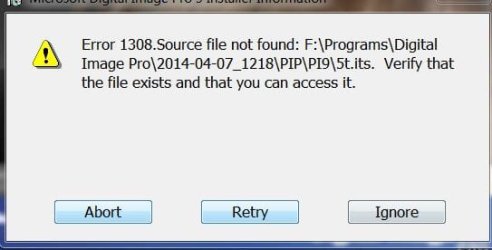
(Program with to cd's) when installing from original cd's two installation options are given "Typical" which only installs the program or "Full" which installs the program and second cd. When choosing "Full" installation will ask for disk 2--Program installs. I want to install from external drive. Used Roxio to create two iso files. Used WinRAR to extract both files. Opened first file and clicked on Setup. Both options are given "Typical" and "Full". Selecting "Typical" will install the program ok (program works but no info from disk 2). If I select "Full" an error message will pop up. Is there a way to get around this problem? Once the error message appears I have to abort.
 

Attachments
  • Capture.JPG
    Capture.JPG
    24.4 KB · Views: 40

My Computer

OS
Windows 7
Here's something from MS you could try.

The Virtual CD-ROM Control Panel utility enables users of Windows XP, Vista, and 7 to mount ISO disk image files as virtual CD-ROM drives. This can be highly useful for reading disk images to install software or recover backup files. Notes: This tool is not supported by Microsoft; use at your own risk. Windows 8 users do NOT need this tool. Windows 8 natively supports ISO files. In Windows 8, you can simply open an ISO file and Windows automatically assigns it a drive letter and reads it as a virtual drive.
Source: Download Virtual CD-ROM Control Panel from Official Microsoft Download Center
 

My Computer

Computer type
PC/Desktop
Computer Manufacturer/Model Number
home built
OS
Multi-Boot W7_Pro_x64 W8.1_Pro_x64 W10_Pro_x64 +Linux_VMs +Chromium_VM
CPU
AMD Athlon II x4 620
Motherboard
Gigabyte GA-MA785G-UD3H
Memory
6GB GSkill DDR2 800
Graphics Card(s)
AMD 4670 GPU + AMD 4200 IGP
Sound Card
on board Realtek ALC889A
Monitor(s) Displays
RCA 40" LCD TV, Insignia 32" LCD TV, HP 15" LCD monitor
Screen Resolution
1680 x 1050
Hard Drives
OCZ Vertex 3 120GB,
Samsung F3 1TB (3),
Several others - WD, Seagate, Hitachi, ...
PSU
Corsair 500 W
Case
Rosewill mid tower
Cooling
CM 90mm rifle
Keyboard
Gyration wireless, Logitech wireless, Dell USB wired
Mouse
Gyration wireless, Logitech wireless, V7 USB wired
Internet Speed
Spectrum - 100Mbps D / 10Mbps U
Antivirus
Avast, MBAM3, EMET, WinPatrol
Browser
Pale Moon, Firefox, IE
Other Info
2 multi-boot PC's
Mainly HTPC/Office/Gen purpose (no gaming).
Trendnet USB KVM.
LG DVD burner/Blue Ray Player.
Tray system for removable SATA backup drives.

Not currently OCd, under-volted.
I use Hybrid sleep, rarely re-boot or shutdown.

Hauppauge HD-PVR, Avermedia PCIe TV Tuner, Hauppauge PCI TV Tuner.
I had some time and played with the MS Utility.
It didn't work well for me.
Everything installed, ran, I mounted an ISO image.
No errors ...
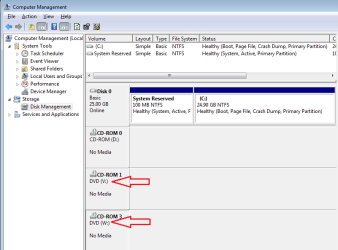
Problem is I don't see the mounted drive in Explorer or Disk Management :confused:

I tried this other utility from SlySoft.
For me it's much easier to use.
I mounted 2 ISOs and see both of them in Explorer and Disk Management :)

SlySoft Virtual CloneDrive
 

My Computer

Computer type
PC/Desktop
Computer Manufacturer/Model Number
home built
OS
Multi-Boot W7_Pro_x64 W8.1_Pro_x64 W10_Pro_x64 +Linux_VMs +Chromium_VM
CPU
AMD Athlon II x4 620
Motherboard
Gigabyte GA-MA785G-UD3H
Memory
6GB GSkill DDR2 800
Graphics Card(s)
AMD 4670 GPU + AMD 4200 IGP
Sound Card
on board Realtek ALC889A
Monitor(s) Displays
RCA 40" LCD TV, Insignia 32" LCD TV, HP 15" LCD monitor
Screen Resolution
1680 x 1050
Hard Drives
OCZ Vertex 3 120GB,
Samsung F3 1TB (3),
Several others - WD, Seagate, Hitachi, ...
PSU
Corsair 500 W
Case
Rosewill mid tower
Cooling
CM 90mm rifle
Keyboard
Gyration wireless, Logitech wireless, Dell USB wired
Mouse
Gyration wireless, Logitech wireless, V7 USB wired
Internet Speed
Spectrum - 100Mbps D / 10Mbps U
Antivirus
Avast, MBAM3, EMET, WinPatrol
Browser
Pale Moon, Firefox, IE
Other Info
2 multi-boot PC's
Mainly HTPC/Office/Gen purpose (no gaming).
Trendnet USB KVM.
LG DVD burner/Blue Ray Player.
Tray system for removable SATA backup drives.

Not currently OCd, under-volted.
I use Hybrid sleep, rarely re-boot or shutdown.

Hauppauge HD-PVR, Avermedia PCIe TV Tuner, Hauppauge PCI TV Tuner.
+1 for Virtual CloneDrive

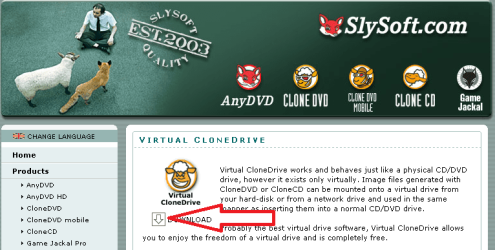
Using the link provided above - you should see this:

vcd1.png

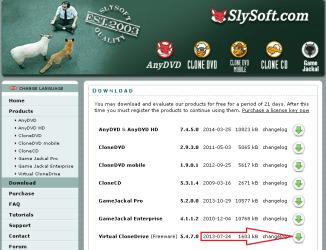
Followed by this:

vcd2.png


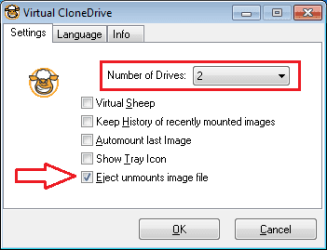
After installation completes, double click on the shortcut that the install process places on the desktop and consider selecting these options:

vcd3.png


Once the options are set, you can delete the desktop shortcut - you will rarely need to use it. You can get to the settings via the Start menu:

vcd4.png


edit: I should add...
...double click on an ISO file from within Windows (file) Explorer to mount/use/view that ISO
...right click on the drive letter from within Windows (file) Explorer to eject that ISO

...and like David said, you can live without the VCCDaemon running all of the time.

vcd5.png


edit2: You don't have to do this - but I assign drive letters V (virtual) and W to the two virtual drives so that the drive letters stay the same in case other drives are added over time. That way, if I install something via a mounted ISO, the installation comes from drive V. I use drive W mostly when comparing the files withing two ISOs.

vcd6.png
 
Last edited:

My Computer

Computer type
Laptop
Computer Manufacturer/Model Number
Employer provided Dell Latitude
OS
W7 Pro SP1 64bit
CPU
i7
Memory
8GB
Graphics Card(s)
Intel HD Graphics
Hard Drives
crappy SSD
Antivirus
Employer mandated Symantec Endpoint Protection
Browser
Pale Moon 64bit, IE11 64bit & Chrome 64bit
Nice help UsernameIssues +1.
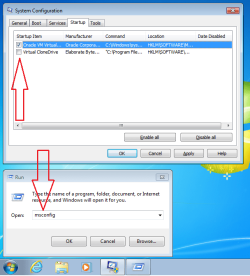
Also, installing it does add a msconfig / startup entry for it.
I removed it from startup.
 

My Computer

Computer type
PC/Desktop
Computer Manufacturer/Model Number
home built
OS
Multi-Boot W7_Pro_x64 W8.1_Pro_x64 W10_Pro_x64 +Linux_VMs +Chromium_VM
CPU
AMD Athlon II x4 620
Motherboard
Gigabyte GA-MA785G-UD3H
Memory
6GB GSkill DDR2 800
Graphics Card(s)
AMD 4670 GPU + AMD 4200 IGP
Sound Card
on board Realtek ALC889A
Monitor(s) Displays
RCA 40" LCD TV, Insignia 32" LCD TV, HP 15" LCD monitor
Screen Resolution
1680 x 1050
Hard Drives
OCZ Vertex 3 120GB,
Samsung F3 1TB (3),
Several others - WD, Seagate, Hitachi, ...
PSU
Corsair 500 W
Case
Rosewill mid tower
Cooling
CM 90mm rifle
Keyboard
Gyration wireless, Logitech wireless, Dell USB wired
Mouse
Gyration wireless, Logitech wireless, V7 USB wired
Internet Speed
Spectrum - 100Mbps D / 10Mbps U
Antivirus
Avast, MBAM3, EMET, WinPatrol
Browser
Pale Moon, Firefox, IE
Other Info
2 multi-boot PC's
Mainly HTPC/Office/Gen purpose (no gaming).
Trendnet USB KVM.
LG DVD burner/Blue Ray Player.
Tray system for removable SATA backup drives.

Not currently OCd, under-volted.
I use Hybrid sleep, rarely re-boot or shutdown.

Hauppauge HD-PVR, Avermedia PCIe TV Tuner, Hauppauge PCI TV Tuner.
Nice help UsernameIssues +1.
Also, installing it does add a msconfig / startup entry for it.
I removed it from startup.
You are correct about not needing that app always running.
I've added a tiny bit to my post to reflect removing it.
Thanks for the reminder. I had not removed it from this laptop.
 

My Computer

Computer type
Laptop
Computer Manufacturer/Model Number
Employer provided Dell Latitude
OS
W7 Pro SP1 64bit
CPU
i7
Memory
8GB
Graphics Card(s)
Intel HD Graphics
Hard Drives
crappy SSD
Antivirus
Employer mandated Symantec Endpoint Protection
Browser
Pale Moon 64bit, IE11 64bit & Chrome 64bit
Back
Top