Issue with Daemon Tools Lite

PwnFrnzy

Hardware & Perfomance
Pro User
Local time
9:19 PM
Messages
500
Location
California, US
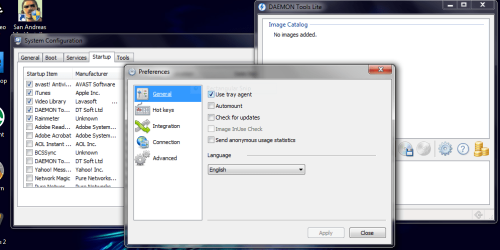
I have Daemon Tools Lite on my computer, but the issue is that every time it is used, it checks itself in on the start-up list. I would open MSconfig and it would be checked in again. Is there any way to stop this program from making itself a start-up program every time I use it?
 

My Computer

Computer type
PC/Desktop
Computer Manufacturer/Model Number
Frankenstein PC
OS
Windows 7 Home Premium 64-bit SP1
CPU
Intel core i7 920 @ 2.67Ghz; Bloomfield 45nm Technology
Motherboard
Intel Corporation DX58SO (J1PR)
Memory
16GB Dual-Channel DDR3 @ 540MHz (7-7-7-19)
Graphics Card(s)
4095MB NVIDIA GeForce GTX 960 (EVGA)
Sound Card
N/A Integrated Audio
Monitor(s) Displays
Acer S231HLbid LED Monitor 23"
Screen Resolution
1920x1080 1080p 60Hz
Hard Drives
BOOT: 59GB ADATA SP900 (SSD)
STORAGE 1: 977GB Hitachi HDS721010CLA (SATA) @7200RPM;
STORAGE 2: 465GB Western Digital WDC WD5000AAKS-65YGA0 (SATA) @ 7200RPM;
PSU
EVGA SuperNOVA 750 G1 80+ Gold (120-G1-0750-XR)
Case
Cooler Master Elite Gaming Case Black 430
Cooling
Cooler Master Hyper 212 Heatsink. Front and rear 120mm fan
Keyboard
Rosewill RIKB-11003
Mouse
James Donkey 112S
Internet Speed
200/40
Antivirus
Avast! Antivirus Free
Browser
Cyberfox x64 / FireFox / PaleMoon x64; kept up-to-date
Other Info
Windows Installed on March 21, 2014
simply open daemon tools preferences and in general tab - uncheck "Open Mount'n'Drive Manager on start"
that's it :D


add to my rep if i helped :D
 

My Computer

OS
MS Windows 7 Ultimate 32-bit
CPU
Intel Core i3 530 @ 2.93GHz 39 °C Clarkdale 32nm Technology
Motherboard
Gigabyte Technology Co., Ltd. H55M-S2H (Socket 1156)
Memory
2.0GB Single-Channel DDR3 @ 666MHz (9-9-9-24)
Graphics Card(s)
SyncMaster @ 1600x900 ATI Radeon HD 4550 (Gigabyte) 47 °C
Sound Card
Realtek High Definition Audio
Screen Resolution
1600x900
Hard Drives
488GB Seagate ST3500418AS ATA Device (Unknown Interface)
Internet Speed
512 kbps (when i download speed = 50kbps)
Other Info
HL-DT-ST DVDRAM GH24NS50 ATA Device (DVD DRIVE)
There is a slight problem with your answer. . .
 

Attachments

  • Capture.PNG
    Capture.PNG
    41.9 KB · Views: 189

My Computer

Computer type
PC/Desktop
Computer Manufacturer/Model Number
Frankenstein PC
OS
Windows 7 Home Premium 64-bit SP1
CPU
Intel core i7 920 @ 2.67Ghz; Bloomfield 45nm Technology
Motherboard
Intel Corporation DX58SO (J1PR)
Memory
16GB Dual-Channel DDR3 @ 540MHz (7-7-7-19)
Graphics Card(s)
4095MB NVIDIA GeForce GTX 960 (EVGA)
Sound Card
N/A Integrated Audio
Monitor(s) Displays
Acer S231HLbid LED Monitor 23"
Screen Resolution
1920x1080 1080p 60Hz
Hard Drives
BOOT: 59GB ADATA SP900 (SSD)
STORAGE 1: 977GB Hitachi HDS721010CLA (SATA) @7200RPM;
STORAGE 2: 465GB Western Digital WDC WD5000AAKS-65YGA0 (SATA) @ 7200RPM;
PSU
EVGA SuperNOVA 750 G1 80+ Gold (120-G1-0750-XR)
Case
Cooler Master Elite Gaming Case Black 430
Cooling
Cooler Master Hyper 212 Heatsink. Front and rear 120mm fan
Keyboard
Rosewill RIKB-11003
Mouse
James Donkey 112S
Internet Speed
200/40
Antivirus
Avast! Antivirus Free
Browser
Cyberfox x64 / FireFox / PaleMoon x64; kept up-to-date
Other Info
Windows Installed on March 21, 2014
lol sorry was talking about the old version
uncheck "use tray agent" and it's solved
:D :D
 

My Computer

OS
MS Windows 7 Ultimate 32-bit
CPU
Intel Core i3 530 @ 2.93GHz 39 °C Clarkdale 32nm Technology
Motherboard
Gigabyte Technology Co., Ltd. H55M-S2H (Socket 1156)
Memory
2.0GB Single-Channel DDR3 @ 666MHz (9-9-9-24)
Graphics Card(s)
SyncMaster @ 1600x900 ATI Radeon HD 4550 (Gigabyte) 47 °C
Sound Card
Realtek High Definition Audio
Screen Resolution
1600x900
Hard Drives
488GB Seagate ST3500418AS ATA Device (Unknown Interface)
Internet Speed
512 kbps (when i download speed = 50kbps)
Other Info
HL-DT-ST DVDRAM GH24NS50 ATA Device (DVD DRIVE)
Back
Top