G gjoellee New member Local time 8:49 PM Messages 22 Jan 25, 2010 #1 Nothing shown in the explorer sidebar when I want to save something in Office 2007. Any way to perhaps solve this? My Computer My Computer At a glance Windows 7 & LinuxOSWindows 7 & Linux
Nothing shown in the explorer sidebar when I want to save something in Office 2007. Any way to perhaps solve this?
Venths New member Pro User Local time 9:49 PM Messages 385 Location Coimbatore/India Doha/Qatar Jan 25, 2010 #2 Hi, * Go to Control Panel > Folder Options. * Restore Defaults in all the 3 tabs "General, View, Search". This should resolve the issue ! My Computer My Computer At a glance Windows 7 Ultimate x64 SP1Intel Core i34 GB DDR3Computer Manufacturer/Model NumberDell Inspiron N5010OSWindows 7 Ultimate x64 SP1CPUIntel Core i3Memory4 GB DDR3Screen Resolution1366 X 768Hard DrivesSeagate 500 GBInternet Speed4 MBPS
Hi, * Go to Control Panel > Folder Options. * Restore Defaults in all the 3 tabs "General, View, Search". This should resolve the issue !
G gjoellee New member Thread Starter Local time 8:49 PM Messages 22 Jan 27, 2010 #3 Nope it did not Kinds of the same issue occurs with other application, like when I install XAMPP I just got an empty window when I browsed to find an installation folder, a ampy window appeared. My Computer My Computer At a glance Windows 7 & LinuxOSWindows 7 & Linux
Nope it did not Kinds of the same issue occurs with other application, like when I install XAMPP I just got an empty window when I browsed to find an installation folder, a ampy window appeared.
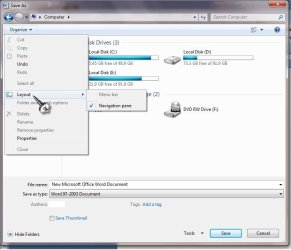
Venths New member Pro User Local time 9:49 PM Messages 385 Location Coimbatore/India Doha/Qatar Jan 27, 2010 #4 Ok now, In the same dialog box window. Unmark the option "Navigation Pane". Then again mark it (enable) the Navigation Pane option from the Organize option. Check figure for assistance: My Computer My Computer At a glance Windows 7 Ultimate x64 SP1Intel Core i34 GB DDR3Computer Manufacturer/Model NumberDell Inspiron N5010OSWindows 7 Ultimate x64 SP1CPUIntel Core i3Memory4 GB DDR3Screen Resolution1366 X 768Hard DrivesSeagate 500 GBInternet Speed4 MBPS
Ok now, In the same dialog box window. Unmark the option "Navigation Pane". Then again mark it (enable) the Navigation Pane option from the Organize option. Check figure for assistance:
G gjoellee New member Thread Starter Local time 8:49 PM Messages 22 Jan 31, 2010 #5 I kind of need the navigation pane...I use it A LOT! NOTE: The problem only occurs while saving a document, with office or a few other programs. My Computer My Computer At a glance Windows 7 & LinuxOSWindows 7 & Linux
I kind of need the navigation pane...I use it A LOT! NOTE: The problem only occurs while saving a document, with office or a few other programs.
C ccatlett1984 Technophile Guru Local time 2:49 PM Messages 795 Location michigan (metro detroit area) Jan 31, 2010 #6 gjoellee said: I kind of need the navigation pane...I use it A LOT! NOTE: The problem only occurs while saving a document, with office or a few other programs. Click to expand... Re-read the above post, we need you to disable the option, then to enable it again. My Computer My Computer At a glance windows 7 RTM x64Phenom II 965 Quad Core 3.4GhzMushkin Blackline 8GB (4x2gb)XFX Radeon 5970 Black EditionComputer Manufacturer/Model NumberBlack_Box (homebuilt)OSwindows 7 RTM x64CPUPhenom II 965 Quad Core 3.4GhzMotherboardAsus M4A79T DeluxeMemoryMushkin Blackline 8GB (4x2gb)Graphics Card(s)XFX Radeon 5970 Black EditionSound CardonboardMonitor(s) DisplaysDell 2408WPF-main Dell E248WFP-secondaryScreen Resolution1920x1200-main 1920x1200-secondaryHard DrivesOCZ Vertex Limited Edition 100GB (OS) x1 WD Black Edition 500GB drive (Storage)PSUXFX 850w Black Edition (Modular)CaseMountian Mods H2goCoolingCoolITSystems ECO A.L.C.KeyboardLogitech MX 5500 wireless keyboardMouseRazor CopperheadInternet Speed16Mb down/2Mb up Wowway Cable Internet
gjoellee said: I kind of need the navigation pane...I use it A LOT! NOTE: The problem only occurs while saving a document, with office or a few other programs. Click to expand... Re-read the above post, we need you to disable the option, then to enable it again.