Issue with keyboard input

edithegodfather

New member
Member
Local time
1:00 PM
Messages
61
Hey guys, sorry for my noob question; i've looked a bit over in language/regions and ease of acces and i couldn't find what i was lookin' for so i thought i'd ask somewhere for help.
Whenever i type ' or " only once nothing happens, the symbol appears only after i pressed anything else after it, so if i were to say "nothin'happens" they appear in one word because the symbol ' appears only after i typed anything after it and the space bar doesn't count.
Any ideea what's the problem?

Thnx
 

My Computer My Computer

OS
windows 7
Hey guys, sorry for my noob question; i've looked a bit over in language/regions and ease of acces and i couldn't find what i was lookin' for so i thought i'd ask somewhere for help.
Whenever i type ' or " only once nothing happens, the symbol appears only after i pressed anything else after it, so if i were to say "nothin'happens" they appear in one word because the symbol ' appears only after i typed anything after it and the space bar doesn't count.
Any ideea what's the problem?

Thnx

My first guess is that it may be the keyboard. Can you try another?
 

My Computer My Computer

Computer type
PC/Desktop
Computer Manufacturer/Model Number
Dell XPS 420
OS
Windows 10, Home Clean Install
CPU
Intel Core2 processsor Q8200(2.33Ghz 1333FSB) Quad Core Tech
Motherboard
Dell
Memory
6 gb
Graphics Card(s)
ATI Radeon 256MB HD3650
Sound Card
Intergrated 7.1 Channel Audio
Monitor(s) Displays
Dell SP2009W 20"
Hard Drives
640 GB Serial ATA Hard drive
Cooling
Fan
Keyboard
Dell USB Keyboard
Mouse
Dell Premium Optical USB
Internet Speed
DSL 2.85
[After trying another keyboard]
Eaah, the keyboard's fine, i think i accidentally pressed some sort of keyboard shortcut and now i'm stuck with this. I also see that if i hit a vocale after ' it does a diacritical
á é í ó ú ç
except C xD .
But i gotta say the keyboard input language is US english international which makes it a bit inconvenient xD .
 

My Computer My Computer

OS
windows 7
[After trying another keyboard]
Eaah, the keyboard's fine, i think i accidentally pressed some sort of keyboard shortcut and now i'm stuck with this. I also see that if i hit a vocale after ' it does a diacritical
á é í ó ú ç
except C xD .
But i gotta say the keyboard input language is US english international which makes it a bit inconvenient xD .

If you did that,a system restore would probably put things back the way they were.
 

My Computer My Computer

Computer type
PC/Desktop
Computer Manufacturer/Model Number
Dell XPS 420
OS
Windows 10, Home Clean Install
CPU
Intel Core2 processsor Q8200(2.33Ghz 1333FSB) Quad Core Tech
Motherboard
Dell
Memory
6 gb
Graphics Card(s)
ATI Radeon 256MB HD3650
Sound Card
Intergrated 7.1 Channel Audio
Monitor(s) Displays
Dell SP2009W 20"
Hard Drives
640 GB Serial ATA Hard drive
Cooling
Fan
Keyboard
Dell USB Keyboard
Mouse
Dell Premium Optical USB
Internet Speed
DSL 2.85
What you describe is how US International keyboard layout works. According to your posts, there's no issue, no fault.

Look at the image below. It shows the US International keyboard layout. Characters marked red are different accent marks and apostrophs (Apostrophe - Wikipedia, the free encyclopedia) needed in some languages with some words. They do not appear before another character is typed.

US_international.PNG

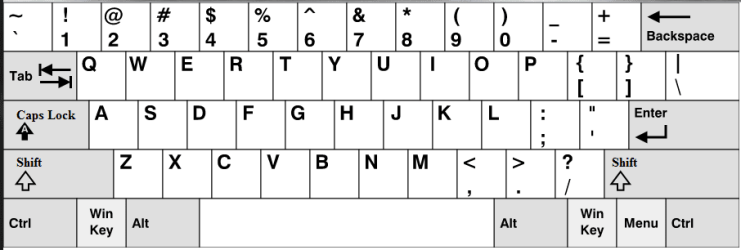
Here is a normal US English keyboard layout:

US.PNG

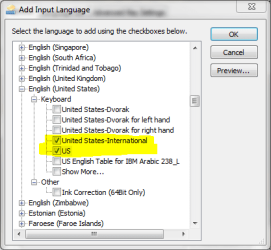
It works as I understood from your original post you would like it to work. If you want to use this normal US English keyboard layout, go to Region and Language settings, choose Keyboards and Languages tab and click Change keyboards. Click Add and choose the normal US keyboard layout:

Input_language2..PNG

Click OK. Now make the US keyboard layout default and, if you want, remove the US International layout.

Input_language3.PNG

Kari
 
Last edited:

My Computer My Computer

Computer type
Laptop
Computer Manufacturer/Model Number
HP ENVY 17-1150eg
OS
Windows 10 Pro x64 EN-GB
CPU
1.6 GHz Intel Core i7-720QM Processor
Memory
6 GB
Graphics Card(s)
ATI Mobility Radeon HD 5850 Graphics
Sound Card
Beats sound system with integrated subwoofer
Monitor(s) Displays
17" laptop display, 22" LED and 32" Full HD TV through HDMI
Screen Resolution
1600*900 (1), 1920*1080 (2&3)
Hard Drives
Internal: 2 x 500 GB SATA Hard Disk Drive 7200 rpm
External: 2TB for backups, 3TB USB3 network drive for media
Cooling
As Envy runs a bit warm, I have it on a Cooler Master pad
Keyboard
Logitech diNovo Media Desktop Laser (bluetooth)
Mouse
Logitech Performance Mouse MX
Internet Speed
50/10 Mbps VDSL
Antivirus
Windows Defender 4.3.9431.0
Browser
Maxthon 3.5.2., IE11
That's perfect. Man, you're a genius :D .
Thnx a lot.
 

My Computer My Computer

OS
windows 7
Nice to be able to assist you.

Merry Christmas!

Kari
 

My Computer My Computer

Computer type
Laptop
Computer Manufacturer/Model Number
HP ENVY 17-1150eg
OS
Windows 10 Pro x64 EN-GB
CPU
1.6 GHz Intel Core i7-720QM Processor
Memory
6 GB
Graphics Card(s)
ATI Mobility Radeon HD 5850 Graphics
Sound Card
Beats sound system with integrated subwoofer
Monitor(s) Displays
17" laptop display, 22" LED and 32" Full HD TV through HDMI
Screen Resolution
1600*900 (1), 1920*1080 (2&3)
Hard Drives
Internal: 2 x 500 GB SATA Hard Disk Drive 7200 rpm
External: 2TB for backups, 3TB USB3 network drive for media
Cooling
As Envy runs a bit warm, I have it on a Cooler Master pad
Keyboard
Logitech diNovo Media Desktop Laser (bluetooth)
Mouse
Logitech Performance Mouse MX
Internet Speed
50/10 Mbps VDSL
Antivirus
Windows Defender 4.3.9431.0
Browser
Maxthon 3.5.2., IE11
Back
Top