
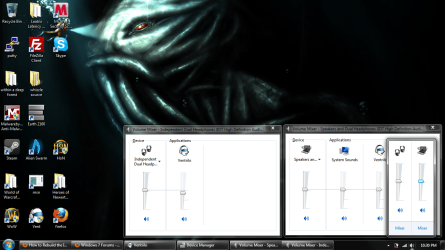
I installed Skype messenger today and in the process of setting it up I seemed to 'mess up' my sound. My sound controls are being displayed as two different controls, my speakers and independent headset (see screen shot provided).Before installing Skype everything was normal in the sense that all sound went through my speakers until I put in my headset then everything went through the headset. Since installing it I seem to have to change the settings on whatever I am using so that they go through the appropriate channel. I presume there is something I can do to fix this back to the way it was. I also presume that in installing Skype I somehow changed the default settings. Any help would be amazing because as it stands now my music is playing through my speakers and vent, skype, games are through my headset (because I set them to). Apologies for the wall of text, I couldn't find another way to explain the issue.
Attachments
My Computer
- Computer Manufacturer/Model Number
- HP
- OS
- Windows 7 Home Premium X64
- CPU
- Intel Core 2 Duo T6600 2.20GHz
- Memory
- 4GB
- Graphics Card(s)
- NVIDIA GeForce 9600M GT
- Sound Card
- IDT High Definition Audio CODEC


