Never heard of unGoogled chromium, thank you, I really dislike chrome for the privacy issues so this is great just personally to know about.
Just stay abreast of the updates at the UnGoogled Chromium download page. Probably like once a month to two months is all unless a real PITA website insists you need the most absolute updated version of Chrome.
I will absolutely do the firefox update trick because i was just trying to figure out yesterday how to disable that for her haha so thank you.
Again, stay abreast of updates which can be downloaded at Firefox's FTP (File Transfer Protocol) webpage which can be found here:
Directory Listing: /pub/firefox/releases/
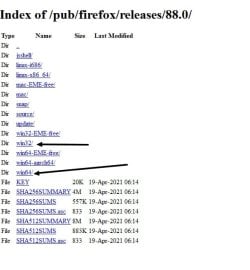
You'd scroll all the way down to the latest which won't have a b in the version number. The b means beta. So looking there you'll see as of this post version 88 is the latest. Now clicking version 88 will take you to a directory of all kinds of crap. The two directories you'll want to focus on are the 32 and 64 bit directories. Depending on what Firefox version is installed (32 bit or 64 bit), you'll want that version. To make sure you know what version you already have, go into Firefox and above go to Help | About Firefox. Now once in the 32 bit or 64 bit directory you'll have all the different language versions. For the U.S. it'll be the en-US version. For the UK it'll be the en-GB version. Now once in that language directory you'll have options for the type of download you want. I'd pick the .exe type as that would be
safest (in terms of code-wise updating mechanisms) to run as opposed to an .msi version. The installer version is just a downloader stub which fetches the download on the computer rather than you downloading directly from the FTP directory. See attached screenshot.
Also a good tip on just having vanilla chrome and telling her do taxes and stuff there.
I mention it for two primary reasons:
1) UnGoogled Chromium won't have uBlock Origin installed to potently mess something up. And you certainly don't want that when doing something very important like taxes and what not. Some websites just don't play nice with uBlock on and its filters without you knowing how to tame that beast.
2) UnGoogled Chromium will be plain vanilla and should be with no added extensions and a Google account to help keep the privacy invasion to a limit. So being plain vanilla there is very little that can mess up the website, and most websites prefer Chrome, Firefox, Edge, etc.
I really dislike chrome for the privacy issues so this is great just personally to know about.
Just keep in mind Firefox has their own abundance of telemetry and Windows 10 is the BIGGEST in that department. I know because I ran Windows 10 in a virtual machine and watched the network traffic. Never, EVER saw that in a virgin install of Windows 7 or XP.
Since this post, we've actually got another computer she had, upgraded to Windows 10...
One day an update will probably hose it over again. So for ease of use in a small home/office environment just use Linux and perhaps check out the Twister OS UI. There's also Windows 10 AME (not an official Microsoft product), but you have to know what you're doing and it may not be for everybody. Just throwing that out there.
We ended up just resetting the PC as a result (but I was able to backup the data first in Ubuntu, which, on an unrelated topic, revealed to me that everyone should be encrypting their hard drives. I had no idea how easy it was to access data).
Exactly. It's why I use FDE (Full Disk Encryption) on all of my computers. But I wouldn't use proprietary encryption. I personally use Truecrypt since I've been using that for years and years. When it was audited by a team of people who knew what they were doing I followed the audit and watched their DEFCON presentation on YouTube. I liked the results so I still use the now defunct Truecrypt which is a whoooole other story as to why it's now no longer being coded. There are certain flaws, but that can be mitigated. There is a fork called Veracrypt. Whether you use Trucrypt or Veracrypt you'll want to read the WHOLE manual. Every bit of it. For those less tech savvy then just use Bitlocker. The only issue with FDE is cloning the now encrypted drive. For that I found Clonezilla to work with FDE. Clonezilla may not be easy to understand either.
I'm going to check it out for myself as well, I've been looking in to password vaults forever but could never settle on one. I tried Keepass some years ago but think I wasn't able to get a handle on it. But I think I am going to try and give it another shot. I will compare it to Bitwarden and see what I think.
Bitwarden will be by far the easiest to use and understand and you don't have to backup its database yourself. If you don't trust Bitwarden's server you can create your own. But that's beyond the scope of this post.
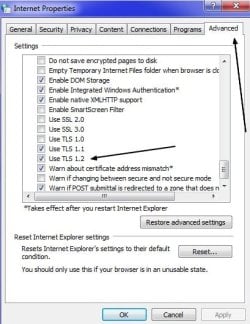
BTW - I looked and TLS 1.2 was already enabled in internet properties. Just curious why this was suggested?
Two reasons:
1) You indicated you were using Internet Explorer. Since a lot of website's already have the capability to use TLS (Transport Layer Security) version 1.2, you'll want to take advantage of that more secure version of encryption. Now there is also version 1.3 which some websites use. I don't know if there is a Window update for that or if IE 11 has it. I'd have to look it up.
2) If you ever happen to install a piece of software who's licensing mechanism or other features require TLS 1.2, you
may need that turned on in the Internet Options.
I'm still totally baffled that resetting internet explorer options worked...
This is not just the IE settings, this is Internet
Options as its name implies. Go into the Control Panel and look. So what this is are options that encompass the whole of the OS for some Internet options in relation to IE or programs that use those options as well as core OS features. IE is like built into the OS in some ways that's why even if you get the inclination to uninstall IE, you shouldn't.
P.S. To anyone who happens to come across this thread, I'll share something interesting and useful I only just discovered - Windows 10 has a built in remote desktop/assistance app called 'Quick Assist'.
Just be advised that something like that built into the OS probably has hacker potential. Just like RDP (Remote Desktop Protocol). It's why I never allow RDP and remote assistance to be left on. It's one of the first things I do when I install Windows is turn that off along with NetBIOS. I don't use Samba and Windows Networking. I use a local FTP server in the house. One day I'll use something called WebDAV. Since I use FTP I can use an FTP App in the phone and transfer data back and fourth via that method with all computers. And I can transfer data between computers via FTP.
~48 CVEs since Windows 10 came out
Quick Assist is based on RDP.
What I did for remote access to my parent's computer was use TeamViewer. It is HIPAA compliant the last I looked. You'd install the server software on the computer you want to remote control and then on your end use the client. There is also a TeamViewer App so I could access the computer with my phone as well. In addition to that, TeamViewer has a server App which I installed to my mom's phone to remote into her phone if I needed to do something. This can be hit and miss sometimes depending on the phone and how great its current Internet connection is.
Now something I have to say here. TeamViewer makes LOTS of connections, so being the privacy/focused person I am I mostly ended that remote desktop software and instead went with TightVNC. Now this is fine if you deploy it the way I did, but it's very nerdy. In order to use TightVNC you'd have to open a port in the router. Well, there was no way I was doing that for security reasons. So the router is flashed with a third-party firmware called Asus Merlin and in that firmware there is a VPN capability. So without having to open a dedicated VNC port I just connect to the VPN built in the router and establish a connection. Once I do that I now have local
intranet capability where I can fire up TightVNC and access the local computer as if I were right there since my connection is emanating from the router its self.
Now technically the VPN in the router would have a port already open, but try as I might I have not seen that port open at all. Neither Shodan, Censys, GRC's Shield's Up or an Nmap scan showed the port as being open. I did some research and discovered it may have something to do with a so-called magic string. So I sent the magic string via Nmap and still no joy at seeing the port as being open. Wanting to know what was going on, I asked the horse's mouth at the OpenVPN website forum. My inquiry was responded to with just got a one sentence response saying something to the effect OpenVPN was "smart." Asking to elaborate I got another cryptic response. So who knows... Maybe I had the wrong magic string. So long as the port doesn't show up at Shodan et al I think it's pretty safe. One day I will deploy the Pfsense firewall.
Anyway, if you use TeamViewer you absolutely
MUST use a strong password (emphasis back to Bitwarden) and 2FA (Two Factor authentication). I use Authy for 2FA, and I already made a long post about this
here. The reason being is that TeamViewer accounts have been hijacked. Also note that the TeamViewer server software on the remote computer will need to be updated from time to time and you should get a pop up on that. You should be able to do that via a remote season.
P.P.S - I feel like you should pin your post or something for future reference, it could be like a guide for folks who are trying to set up computers for their less-tech savy parents. There's just a lot of great ideas here that I think not everyone would think about
I may write a post on this subject on my own website.
Thank you for all the info you gave. this was supremely helpful to me. if you ever have any additional suggestions from your own situation that you'd like to share (how you setup your parents computer), I'm all ears.
No problem.
The biggest thing I could probably add is the need for a full disk clone regimen. I have, to an extent wrote about that
here.
The other thing is that you want to get in the habit of scanning ALL downloads at
Virus Total. Couple of reasons why you'd want to do that is A) anti-virus software (which now-a-days is nothing but fluff) is by in large definition based which means it has the characteristic of not detecting polymorphic malware like ransomware that doesn't already have a definition to detect it. The principle is the same as the flu vaccine which I believe is only 30% effective from what I remember. The flu vaccine has several different "definitions" from the most common flu strains around the word for that time. I think the lower latitude countries who were in fall and Winter. Anyway, Virus Total uses a whole pile of anti-virus engines so if the download happens to be malicious, Virus Total
may be able to tell you along with some nerdy Info. if posted. B) Virus Total gets malware samples (probably unclassified) from the U.S. Cyber Command. So if that picture or piece of software you downloaded has a malicious payload from a state sponsored actor it
may get detected. Now the general consensus is four hits and you toss. Since Virus Total uses so many anti-virus engines, false positives are bound to show up. So it's really kinda of a double edge sword unless you can see the source code, look at it, and compile back to source. It also depends on what you have there. If it's a game hack then bells are gonna go off. If it's some computer power user program that mimics malicious behavior, then bells will also go off. You just have to make up your own mind with some understanding when it comes to that stuff.
Well, I wrote about enough now. Time for a smoke and a coffee. LOL!