Help with "you have been logged on with a temporary profile windows 7"
Hello friends,
I have windows 7 Pro Office laptop, work from home using Cisco VPN client to connect to the Corporate network. I'm local admin of my laptop. Everything works fine except for the user profile. Every time I login (tried rebooting & re-login several times) I get the message "you have been logged on with a temporary profile" and I don't see anything on my desktop/profile/settings/history etc.
What I tried so far
1) sfc /scannow - showed & fixed couple of errors
2) chkdsk - No errors
3) Tried to fix this way - How to Fix Temporary Profile in Windows 7 (Step by Step Guide)
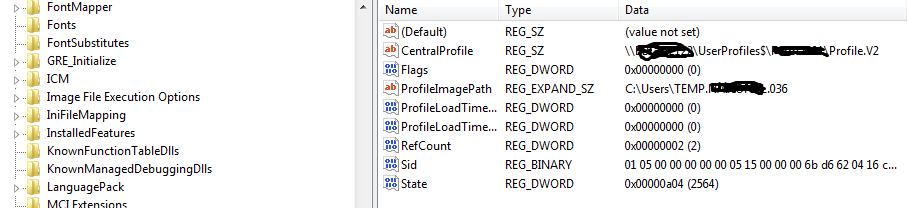
But my laptop doesn't have the .bak profile at all. When I login, i get some temporary folder as home directory. Please see below screenshot

4) I do have another office laptop which doesn't have any problem hence tried Profile copying from good one to bad laptop using "Windows Easy Transfer", transferred successfully but same error.
Could anyone please advise on how can I fix this issue without involving my Windows admin from my office?
Many thanks!!
Hello friends,
I have windows 7 Pro Office laptop, work from home using Cisco VPN client to connect to the Corporate network. I'm local admin of my laptop. Everything works fine except for the user profile. Every time I login (tried rebooting & re-login several times) I get the message "you have been logged on with a temporary profile" and I don't see anything on my desktop/profile/settings/history etc.
What I tried so far
1) sfc /scannow - showed & fixed couple of errors
2) chkdsk - No errors
3) Tried to fix this way - How to Fix Temporary Profile in Windows 7 (Step by Step Guide)
But my laptop doesn't have the .bak profile at all. When I login, i get some temporary folder as home directory. Please see below screenshot
4) I do have another office laptop which doesn't have any problem hence tried Profile copying from good one to bad laptop using "Windows Easy Transfer", transferred successfully but same error.
Could anyone please advise on how can I fix this issue without involving my Windows admin from my office?
Many thanks!!
My Computer
At a glance
Windows 7 Pro 64-bitCore i58GBATI
- Computer Manufacturer/Model Number
- HP EliteBook 8470p
- OS
- Windows 7 Pro 64-bit
- CPU
- Core i5
- Memory
- 8GB
- Graphics Card(s)
- ATI
- Hard Drives
- Toshiba SATA 500GB 7200rpm