
You are using an out of date browser. It may not display this or other websites correctly.
You should upgrade or use an alternative browser.
You should upgrade or use an alternative browser.
Issues logging into Windows.
- Thread starter GilV37
- Start date

Jacee
Consumer Security
So which is set as your 'default' browser? IE or FF?
Read this tutorial http://www.sevenforums.com/tutorials/2630-default-programs-set-programs-default-associations.html
Read this tutorial http://www.sevenforums.com/tutorials/2630-default-programs-set-programs-default-associations.html
My Computer
- Computer type
- PC/Desktop
- Computer Manufacturer/Model Number
- Bruce ... somewhere in his 40's
- OS
- Windows 7 Ultimate 32bit SP1
- CPU
- Intel(R) Core(TM)2 Quad CPU @ 2.40GHz, 2400 MHz
- Motherboard
- INTEL/D975XBX2
- Memory
- 4 GB
- Graphics Card(s)
- ATI Radeon HD 2600 Pro
- Monitor(s) Displays
- Samsung SyncMaster 914v
- Screen Resolution
- 1280 x 1024
- Hard Drives
- 2/500GB each ... ST3500630AS ATA Device.
One is not connected
- PSU
- Rocketfish 700 W
- Case
- G.Skill Gigabyte Chassis
- Keyboard
- Standard PS/2 Keyboard
- Mouse
- Microsoft PS/2 Mouse
- Internet Speed
- DSL
- Antivirus
- Avira Internet Security
- Browser
- IE 11
- Other Info
- ATI HDMI Audio

VistaKing
New member
GilV37
If I am not mistaken the IE icon on the Taskbar is 32-bit . If right click on the IE icon on the taskbar then right click on Internet Explorer choose Properties the location points to C:\Program Files (x86)\Internet Explorer
If click on the rb: then click on All Programs and locate Internet Explorer right click on then choose Properties the location is C:\Program Files\Internet Explorer <---- That's 64-bit .
That's how it is on my Windows 7 Ultimate 64-bit
If I am not mistaken the IE icon on the Taskbar is 32-bit . If right click on the IE icon on the taskbar then right click on Internet Explorer choose Properties the location points to C:\Program Files (x86)\Internet Explorer
If click on the
rb: then click on All Programs and locate Internet Explorer right click on then choose Properties the location is C:\Program Files\Internet Explorer <---- That's 64-bit . That's how it is on my Windows 7 Ultimate 64-bit
My Computer
- Computer Manufacturer/Model Number
- Custom Built
- OS
- Windows 7 Ultimate 32-Bit & Windows 7 Ultimate 64-Bit
- CPU
- Intel Core i7 CPU 950 @ 3.07GHz
- Motherboard
- ASUS P6T DELUXE V2
- Memory
- OCZ 6GB (3 x 2GB) 240-Pin DDR3 SDRAM DDR3 1600 OCZ3X1600R2
- Graphics Card(s)
- ATI Radeon HD 5700 Series
- Sound Card
- OnBoard
- Hard Drives
- WD6400AACS-00M3B0 (640GB SATA )
- PSU
- CORSAIR 850w
- Case
- NZXT LEXA
- Cooling
- Intel Stock Heatsink Fan
- Keyboard
- Microsoft Wireless Laser Keyboard 7000
- Mouse
- Microsoft Wireless Laser Mouse 7000

cottonball
Retired ol' hound...
Can you try using the Junkware Removal Tool Download once again?
Save to the Desktop.
Make sure you temporarily disable your AntiVirus, Firewall, and any other AntiSpyware applications.
These programs may interfere with the running of JRT.
Right-click JRT.exe and select: Run as Administrator
The tool opens and starts scanning the system. Please be patient as this can take a while...
When done, a report, JRT.txt is saved on the Desktop.
Please post the contents of JRT.txt in your reply.
Save to the Desktop.
Make sure you temporarily disable your AntiVirus, Firewall, and any other AntiSpyware applications.
These programs may interfere with the running of JRT.
Right-click JRT.exe and select: Run as Administrator
The tool opens and starts scanning the system. Please be patient as this can take a while...
When done, a report, JRT.txt is saved on the Desktop.
Please post the contents of JRT.txt in your reply.
My Computer
- Computer type
- PC/Desktop
- Computer Manufacturer/Model Number
- An ol' eMachines
- OS
- Windows 7 Home Premium
- Internet Speed
- Fine for me...I'm retired!
cottonball
Retired ol' hound...
GilV37,
Please hold off on Post #144, maybe we will run JRT later.
For now, need to dig deeper...
Please download MiniRegTool64.zip:
http://download.bleepingcomputer.com/farbar/MiniRegTool64.zip
Unzip the downloaded file.
Save to the Desktop

Please post (do not attach) the Result.txt in your reply.
Please hold off on Post #144, maybe we will run JRT later.
For now, need to dig deeper...
Please download MiniRegTool64.zip:
http://download.bleepingcomputer.com/farbar/MiniRegTool64.zip
Unzip the downloaded file.
Save to the Desktop
- Open the tool's folder and double-click: MiniRegTool
- Copy/paste the following text inside the code box into the large blank box in the tool:
Code:HKEY_LOCAL_MACHINE\SYSTEM\CurrentControlSet\services\SharedAccess HKEY_LOCAL_MACHINE\SOFTWARE\Microsoft\Security Center HKEY_LOCAL_MACHINE\SOFTWARE\Microsoft\.NETFramework\v2.0.50727\NGENService\State HKEY_LOCAL_MACHINE\SOFTWARE\Microsoft\Windows\CurrentVersion\Explorer\ShellServiceObjects\{F56F6FDD-AA9D-4618-A949-C1B91AF43B1A} - Check: Query Keys
- Press: Go
Please post (do not attach) the Result.txt in your reply.
My Computer
- Computer type
- PC/Desktop
- Computer Manufacturer/Model Number
- An ol' eMachines
- OS
- Windows 7 Home Premium
- Internet Speed
- Fine for me...I'm retired!
cottonball
Retired ol' hound...
Also, please start: Downloading MiniToolBox
Save to the Desktop
Double-click the downloaded file to run it.
Image courtesy of BleepingComputer:

When the above console opens, please check the following boxes:
Please post (do not attach) the result Result.txt in your reply.
(A copy of Result.txt is also saved in the same directory the tool is run (Desktop).)
Save to the Desktop
Double-click the downloaded file to run it.
Image courtesy of BleepingComputer:
When the above console opens, please check the following boxes:
- Flush DNS
- Report IE Proxy Settings
- Reset IE Proxy Settings
- Report FF Proxy Settings
- Reset FF Proxy Settings <<--(Please close Firefox while using this option)
- List content of Hosts
- List IP configuration
- List Winsock Entries
- List last 10 Event Viewer log
Please post (do not attach) the result Result.txt in your reply.
(A copy of Result.txt is also saved in the same directory the tool is run (Desktop).)
My Computer
- Computer type
- PC/Desktop
- Computer Manufacturer/Model Number
- An ol' eMachines
- OS
- Windows 7 Home Premium
- Internet Speed
- Fine for me...I'm retired!
My Computer
- Computer type
- PC/Desktop
- Computer Manufacturer/Model Number
- HP
- OS
- Windows 7 Home
VistaKing
New member
Try to download a file from Internet Explorer 64-bit .
My Computer
- Computer Manufacturer/Model Number
- Custom Built
- OS
- Windows 7 Ultimate 32-Bit & Windows 7 Ultimate 64-Bit
- CPU
- Intel Core i7 CPU 950 @ 3.07GHz
- Motherboard
- ASUS P6T DELUXE V2
- Memory
- OCZ 6GB (3 x 2GB) 240-Pin DDR3 SDRAM DDR3 1600 OCZ3X1600R2
- Graphics Card(s)
- ATI Radeon HD 5700 Series
- Sound Card
- OnBoard
- Hard Drives
- WD6400AACS-00M3B0 (640GB SATA )
- PSU
- CORSAIR 850w
- Case
- NZXT LEXA
- Cooling
- Intel Stock Heatsink Fan
- Keyboard
- Microsoft Wireless Laser Keyboard 7000
- Mouse
- Microsoft Wireless Laser Mouse 7000
VistaKing
New member
I see your default Gateway is 10.0.0.1 . Did you change that yourself ?
Usually that default gateway IP address is used in business network on Cisco routers .
Home routers usually have 192.168.x.x IP addresses for their Default Gateway
Usually that default gateway IP address is used in business network on Cisco routers .
Home routers usually have 192.168.x.x IP addresses for their Default Gateway
My Computer
- Computer Manufacturer/Model Number
- Custom Built
- OS
- Windows 7 Ultimate 32-Bit & Windows 7 Ultimate 64-Bit
- CPU
- Intel Core i7 CPU 950 @ 3.07GHz
- Motherboard
- ASUS P6T DELUXE V2
- Memory
- OCZ 6GB (3 x 2GB) 240-Pin DDR3 SDRAM DDR3 1600 OCZ3X1600R2
- Graphics Card(s)
- ATI Radeon HD 5700 Series
- Sound Card
- OnBoard
- Hard Drives
- WD6400AACS-00M3B0 (640GB SATA )
- PSU
- CORSAIR 850w
- Case
- NZXT LEXA
- Cooling
- Intel Stock Heatsink Fan
- Keyboard
- Microsoft Wireless Laser Keyboard 7000
- Mouse
- Microsoft Wireless Laser Mouse 7000
VistaKing
New member
What's the model of your router ?
My Computer
- Computer Manufacturer/Model Number
- Custom Built
- OS
- Windows 7 Ultimate 32-Bit & Windows 7 Ultimate 64-Bit
- CPU
- Intel Core i7 CPU 950 @ 3.07GHz
- Motherboard
- ASUS P6T DELUXE V2
- Memory
- OCZ 6GB (3 x 2GB) 240-Pin DDR3 SDRAM DDR3 1600 OCZ3X1600R2
- Graphics Card(s)
- ATI Radeon HD 5700 Series
- Sound Card
- OnBoard
- Hard Drives
- WD6400AACS-00M3B0 (640GB SATA )
- PSU
- CORSAIR 850w
- Case
- NZXT LEXA
- Cooling
- Intel Stock Heatsink Fan
- Keyboard
- Microsoft Wireless Laser Keyboard 7000
- Mouse
- Microsoft Wireless Laser Mouse 7000
VistaKing
New member
Ok your IP address is correct on that router .
My Computer
- Computer Manufacturer/Model Number
- Custom Built
- OS
- Windows 7 Ultimate 32-Bit & Windows 7 Ultimate 64-Bit
- CPU
- Intel Core i7 CPU 950 @ 3.07GHz
- Motherboard
- ASUS P6T DELUXE V2
- Memory
- OCZ 6GB (3 x 2GB) 240-Pin DDR3 SDRAM DDR3 1600 OCZ3X1600R2
- Graphics Card(s)
- ATI Radeon HD 5700 Series
- Sound Card
- OnBoard
- Hard Drives
- WD6400AACS-00M3B0 (640GB SATA )
- PSU
- CORSAIR 850w
- Case
- NZXT LEXA
- Cooling
- Intel Stock Heatsink Fan
- Keyboard
- Microsoft Wireless Laser Keyboard 7000
- Mouse
- Microsoft Wireless Laser Mouse 7000
VistaKing
New member
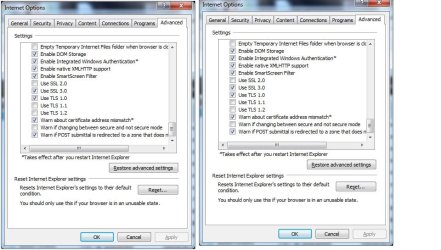
Can you give me a screen shot of the Internet options Advanced tab scroll down to the Security section and upload that image
My Computer
- Computer Manufacturer/Model Number
- Custom Built
- OS
- Windows 7 Ultimate 32-Bit & Windows 7 Ultimate 64-Bit
- CPU
- Intel Core i7 CPU 950 @ 3.07GHz
- Motherboard
- ASUS P6T DELUXE V2
- Memory
- OCZ 6GB (3 x 2GB) 240-Pin DDR3 SDRAM DDR3 1600 OCZ3X1600R2
- Graphics Card(s)
- ATI Radeon HD 5700 Series
- Sound Card
- OnBoard
- Hard Drives
- WD6400AACS-00M3B0 (640GB SATA )
- PSU
- CORSAIR 850w
- Case
- NZXT LEXA
- Cooling
- Intel Stock Heatsink Fan
- Keyboard
- Microsoft Wireless Laser Keyboard 7000
- Mouse
- Microsoft Wireless Laser Mouse 7000
VistaKing
New member
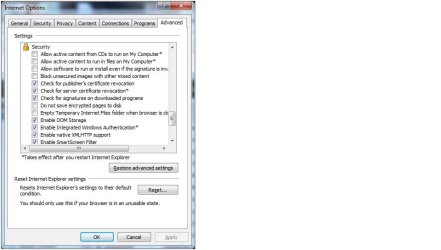
Can you move up a little ? Till like the middle of the Security section
My Computer
- Computer Manufacturer/Model Number
- Custom Built
- OS
- Windows 7 Ultimate 32-Bit & Windows 7 Ultimate 64-Bit
- CPU
- Intel Core i7 CPU 950 @ 3.07GHz
- Motherboard
- ASUS P6T DELUXE V2
- Memory
- OCZ 6GB (3 x 2GB) 240-Pin DDR3 SDRAM DDR3 1600 OCZ3X1600R2
- Graphics Card(s)
- ATI Radeon HD 5700 Series
- Sound Card
- OnBoard
- Hard Drives
- WD6400AACS-00M3B0 (640GB SATA )
- PSU
- CORSAIR 850w
- Case
- NZXT LEXA
- Cooling
- Intel Stock Heatsink Fan
- Keyboard
- Microsoft Wireless Laser Keyboard 7000
- Mouse
- Microsoft Wireless Laser Mouse 7000
VistaKing
New member
GilV37
Inside the Internet Options click on the Advanced tab scroll to the Security section and uncheck the mark next to Check for signatures on downloaded programs click Apply and then the OK button . Open up Internet Explorer and see if you could Download .
If you already have IE opened after you clicked on the Apply and OK buttons close and reopen IE .
Inside the Internet Options click on the Advanced tab scroll to the Security section and uncheck the mark next to Check for signatures on downloaded programs click Apply and then the OK button . Open up Internet Explorer and see if you could Download .
If you already have IE opened after you clicked on the Apply and OK buttons close and reopen IE .
My Computer
- Computer Manufacturer/Model Number
- Custom Built
- OS
- Windows 7 Ultimate 32-Bit & Windows 7 Ultimate 64-Bit
- CPU
- Intel Core i7 CPU 950 @ 3.07GHz
- Motherboard
- ASUS P6T DELUXE V2
- Memory
- OCZ 6GB (3 x 2GB) 240-Pin DDR3 SDRAM DDR3 1600 OCZ3X1600R2
- Graphics Card(s)
- ATI Radeon HD 5700 Series
- Sound Card
- OnBoard
- Hard Drives
- WD6400AACS-00M3B0 (640GB SATA )
- PSU
- CORSAIR 850w
- Case
- NZXT LEXA
- Cooling
- Intel Stock Heatsink Fan
- Keyboard
- Microsoft Wireless Laser Keyboard 7000
- Mouse
- Microsoft Wireless Laser Mouse 7000